
What's New
Bug fixes and performance improvements.
App Description
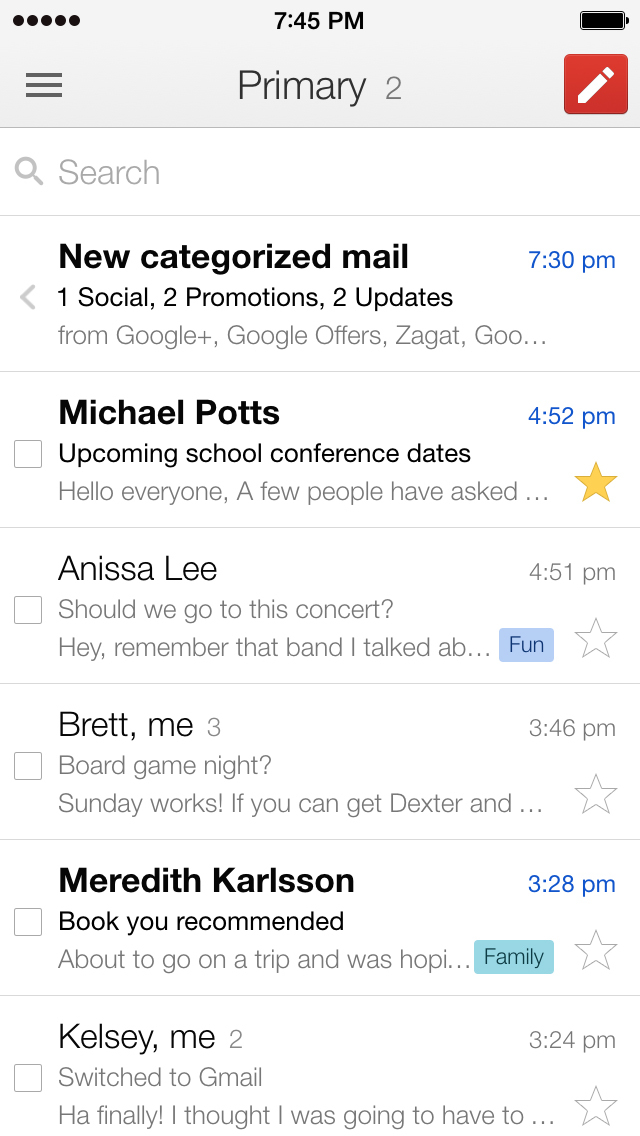
The official Gmail app brings the best of Gmail to your iPhone or iPad with robust security, real-time notifications, multiple account support, and search that works across all your mail.
With the Gmail app, you can:
• Make Gmail your default email app on iOS
• Automatically block more than 99.9 percent of spam, phishing, malware, and dangerous links from ever reaching your inbox
• Undo send, to prevent embarrassing mistakes
• Turn on Google Chat to connect, create and collaborate with others
• Get more done as a group in Spaces - a dedicated place for organizing people, topics, and projects
• Enjoy high quality video calling with Google Meet
• Respond to emails quickly with Smart Reply suggestions
• Switch between multiple accounts
• Get notified of new mail fast, with notification center, badge, and lock screen options
• Search your mail faster with instant results, predictions as you type, and spelling suggestions
• Organize your mail by labeling, starring, deleting, and reporting spam
• Swipe to archive/delete, to quickly clear out your inbox
• Read your mail with threaded conversations
• Auto-complete contact names as you type from your Google contacts or your phone
• Respond to Google Calendar invites right from the app
Gmail is part of Google Workspace, allowing you and your team to easily connect, create, and collaborate. You can:
• Connect with coworkers via Google Meet or Google Chat, send an invite in Calendar, add an action to your task list, and more without leaving Gmail
• Use suggested actions — like Smart Reply, Smart Compose, grammar suggestions, and nudges — to help you stay on top of work and take care of simple tasks, so you can be more efficient with your time
• Stay safe. Our machine learning models block more than 99.9% of spam, phishing, and malware from reaching our users
iPhone Screenshots
(click to enlarge)




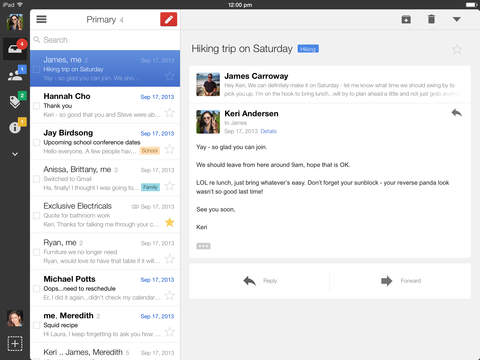
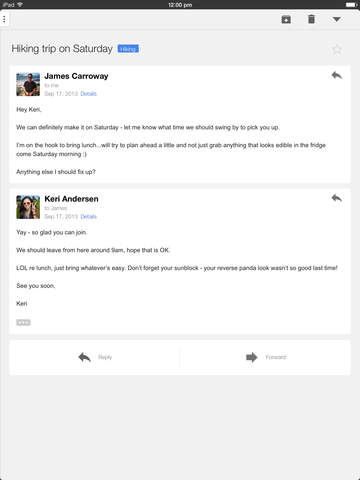
iPad Screenshots
(click to enlarge)


App Changes
- December 14, 2011 New version 1.1
- February 16, 2012 New version 1.1.1
- June 25, 2012 New version 1.2.7812
- July 31, 2012 New version 1.3
- September 06, 2012 New version 1.3.1
- September 28, 2012 New version 1.3.1415
- December 04, 2012 New version 2.0
- February 05, 2013 New version 2.0.1
- March 27, 2013 New version 2.1
- May 06, 2013 New version 2.2.7182
- June 04, 2013 New version 2.3.14159
- August 28, 2013 New version 2.4
- September 18, 2013 New version 2.4.1
- October 02, 2013 New version 2.4.2
- October 18, 2013 New version 2.4.3
- November 14, 2013 New version 2.7182
- December 05, 2013 New version 2.71828
- March 05, 2014 New version 3.0
- March 25, 2014 New version 3.0.1
- April 15, 2014 New version 3.0.2
- July 24, 2014 New version 3.14159
- September 19, 2014 New version 3.141592
- October 06, 2014 New version 3.1415926
- March 05, 2015 New version 4.0
- September 03, 2015 New version 4.1
- November 12, 2015 New version 4.2
- December 11, 2015 New version 4.3
- January 21, 2016 New version 4.4.0
- November 07, 2016 New version 5.0.3
- November 11, 2016 New version 5.0.4
- November 17, 2016 New version 5.0.5
- November 30, 2016 New version 5.0.6
- December 08, 2016 New version 5.0.7
- December 14, 2016 New version 5.0.8
- December 19, 2016 New version 5.0.9
- January 25, 2017 New version 5.0.10
- February 22, 2017 New version 5.0.12
- March 03, 2017 New version 5.0.13
- March 28, 2017 New version 5.0.170312
- April 19, 2017 New version 5.0.170326
- May 02, 2017 New version 5.0.170409
- May 11, 2017 New version 5.0.170423
- May 24, 2017 New version 5.0.170507
- June 12, 2017 New version 5.0.170521
- June 22, 2017 New version 5.0.170604
- July 06, 2017 New version 5.0.170618
- July 26, 2017 New version 5.0.170703
- August 10, 2017 New version 5.0.170716
- August 18, 2017 New version 5.0.170730
- August 30, 2017 New version 5.0.170813
- September 12, 2017 New version 5.0.170827
- September 26, 2017 New version 5.0.170910
- October 30, 2017 New version 5.0.170925
- November 08, 2017 New version 5.0.171020
- November 21, 2017 New version 5.0.171104
- December 05, 2017 New version 5.0.171119
- December 19, 2017 New version 5.0.171120
- January 16, 2018 New version 5.0.171217
- January 30, 2018 New version 5.0.180107
- February 15, 2018 New version 5.0.180121
- February 21, 2018 New version 5.0.180122
- March 13, 2018 New version 5.0.180211
- March 15, 2018 New version 5.0.180225
- March 22, 2018 New version 5.0.180311
- April 10, 2018 New version 5.0.180325
- April 20, 2018 New version 5.0.180408
- May 07, 2018 New version 5.0.180422
- May 29, 2018 New version 5.0.180506
- June 07, 2018 New version 5.0.180520
- June 19, 2018 New version 5.0.180603
- July 05, 2018 New version 5.0.180617
- July 18, 2018 New version 5.0.180701
- July 30, 2018 New version 5.0.180715
- August 14, 2018 New version 5.0.180729
- August 28, 2018 New version 5.0.180813
- September 11, 2018 New version 5.0.180826
- September 20, 2018 New version 5.0.180909
- October 05, 2018 New version 5.0.180921
- October 24, 2018 New version 5.0.181007
- November 12, 2018 New version 5.0.181021
- November 20, 2018 New version 5.0.181103
- December 07, 2018 New version 5.0.181119
- January 04, 2019 New version 5.0.181202
- January 14, 2019 New version 5.0.181230
- February 04, 2019 New version 5.0.190113
- February 20, 2019 New version 5.0.190127
- March 05, 2019 New version 5.0.190211
- March 13, 2019 New version 6.0.190224
- March 26, 2019 New version 6.0.190309
- April 12, 2019 New version 6.0.190324
- April 26, 2019 New version 6.0.190407
- May 09, 2019 New version 6.0.190421
- May 22, 2019 New version 6.0.190505
- July 03, 2019 New version 6.0.190602
- August 02, 2019 New version 6.0.190630
- August 14, 2019 New version 6.0.190721
- September 03, 2019 New version 6.0.190811
- September 19, 2019 New version 6.0.190821
- September 24, 2019 New version 6.0.190822
- November 07, 2019 New version 6.0.191006
- November 19, 2019 New version 6.0.191023
- December 10, 2019 New version 6.0.191117
- January 13, 2020 New version 6.0.191215
- January 29, 2020 New version 6.0.200112
- February 19, 2020 New version 6.0.200126
- March 03, 2020 New version 6.0.200209
- March 11, 2020 New version 6.0.200223
- March 19, 2020 New version 6.0.200224
- March 26, 2020 New version 6.0.200308
- April 07, 2020 New version 6.0.200323
- April 20, 2020 New version 6.0.200324
- May 01, 2020 New version 6.0.200412
- June 05, 2020 New version 6.0.200519
- June 15, 2020 New version 6.0.200531
- July 06, 2020 New version 6.0.200614
- July 17, 2020 New version 6.0.200628
- August 04, 2020 New version 6.0.200712
- August 25, 2020 New version 6.0.200809
- August 31, 2020 New version 6.0.200810
- September 16, 2020 New version 6.0.200824
- September 21, 2020 New version 6.0.200825
- September 22, 2020 New version 6.0.200826
- September 28, 2020 New version 6.0.200906
- October 05, 2020 New version 6.0.200920
- October 20, 2020 New version 6.0.201004
- November 03, 2020 New version 6.0.201018
- November 18, 2020 New version 6.0.201101
- December 02, 2020 New version 6.0.201115
- March 01, 2021 New version 6.0.210124
- March 03, 2021 New version 6.0.210207
- March 22, 2021 New version 6.0.210221
- March 30, 2021 New version 6.0.210222
- April 27, 2021 New version 6.0.210321
- May 02, 2021 New version 6.0.210322
- May 13, 2021 New version 6.0.210404
- May 27, 2021 New version 6.0.210502
- June 07, 2021 New version 6.0.210516
- June 17, 2021 New version 6.0.210530
- July 07, 2021 New version 6.0.210613
- July 15, 2021 New version 6.0.210627
- July 28, 2021 New version 6.0.210709
- August 11, 2021 New version 6.0.210725
- August 27, 2021 New version 6.0.210808
- September 01, 2021 New version 6.0.210809
- September 08, 2021 New version 6.0.210822
- September 20, 2021 New version 6.0.210905
- October 06, 2021 New version 6.0.210919
- October 18, 2021 New version 6.0.211003
- November 01, 2021 New version 6.0.211017
- November 04, 2021 New version 6.0.211018
- November 15, 2021 New version 6.0.211031
- November 19, 2021 New version 6.0.211101
- December 02, 2021 New version 6.0.211114
- December 14, 2021 New version 6.0.211128
- January 10, 2022 New version 6.0.211226
- January 26, 2022 New version 6.0.220109
- February 09, 2022 New version 6.0.220123
- February 18, 2022 New version 6.0.220124
- March 02, 2022 New version 6.0.220206
- March 10, 2022 New version 6.0.220220
- March 28, 2022 New version 6.0.220306
- April 05, 2022 New version 6.0.220320
- April 21, 2022 New version 6.0.220403
- May 03, 2022 New version 6.0.220417
- May 17, 2022 New version 6.0.220501
- May 31, 2022 New version 6.0.220515
- June 04, 2022 New version 6.0.220516
- June 15, 2022 New version 6.0.220529
- June 23, 2022 New version 6.0.220530
- June 30, 2022 New version 6.0.220612
- July 13, 2022 New version 6.0.220626
- July 26, 2022 New version 6.0.220710
- July 30, 2022 New version 6.0.220730
- August 08, 2022 New version 6.0.220801
- August 23, 2022 New version 6.0.220807
- September 08, 2022 New version 6.0.220821
- September 20, 2022 New version 6.0.220904
- October 03, 2022 New version 6.0.220918
- October 17, 2022 New version 6.0.221002
- November 01, 2022 New version 6.0.221016
- November 15, 2022 New version 6.0.221030
- December 01, 2022 New version 6.0.221113
- December 13, 2022 New version 6.0.221127
- January 12, 2023 New version 6.0.221225
- January 24, 2023 New version 6.0.230108
- January 25, 2023 New version 6.0.230109
- February 07, 2023 New version 6.0.230122
- February 21, 2023 New version 6.0.230205
- March 07, 2023 New version 6.0.230219
- March 21, 2023 New version 6.0.230305
- April 03, 2023 New version 6.0.230319
- April 13, 2023 New version 6.0.230402
- April 28, 2023 New version 6.0.230416
- May 03, 2023 New version 6.0.230417
- May 22, 2023 New version 6.0.230430
- May 30, 2023 New version 6.0.230514
- June 06, 2023 New version 6.0.230515
- June 13, 2023 New version 6.0.230528
- June 26, 2023 New version 6.0.230611
- July 10, 2023 New version 6.0.230625
- July 25, 2023 New version 6.0.230709
- August 07, 2023 New version 6.0.230723
- August 21, 2023 New version 6.0.230806
- September 05, 2023 New version 6.0.230820
- September 11, 2023 New version 6.0.230821
- September 21, 2023 New version 6.0.230903
- October 02, 2023 New version 6.0.230917
- October 24, 2023 New version 6.0.231001
- November 03, 2023 New version 6.0.231022
- November 07, 2023 New version 6.0.231023
- November 10, 2023 New version 6.0.231029
- November 16, 2023 New version 6.0.231105
- November 30, 2023 New version 6.0.231112
- December 07, 2023 New version 6.0.231126
- December 13, 2023 New version 6.0.231127
- January 04, 2024 New version 6.0.231224
- January 12, 2024 New version 6.0.231232
- January 26, 2024 New version 6.0.240114
- February 01, 2024 New version 6.0.240121
- February 09, 2024 New version 6.0.240128
- February 15, 2024 New version 6.0.240204
- February 24, 2024 New version 6.0.240211
- February 29, 2024 New version 6.0.240212
- March 12, 2024 New version 6.0.240225
- March 20, 2024 New version 6.0.240310
- March 29, 2024 New version 6.0.240317
- April 04, 2024 New version 6.0.240324
- April 10, 2024 New version 6.0.240325
- April 17, 2024 New version 6.0.240407
- April 24, 2024 New version 6.0.240414
Other Apps From Google LLC