Posts Tagged Hardware

Dead phones are a problem that just won’t go away. Mobile technology is advancing faster than battery technology can keep up, and our phones are dying faster than ever. Sure, external batteries exist, but what happens when those die, especially for those who are away from power sources for extended periods of time? There are solar chargers, but that relies, quite obviously, on there being sunlight. In my best infomercial voice, I exclaim, “There’s got to be a better way!” Meet the Powertrekk, the charging solution that’s unlike any that have come before it.

This is because the Powertrekk comes with a fuel cell that can be used to power USB devices. Fuel cells work by converting by a fuel’s chemical energy, from a source such as hydrogen, into electricity through reactions with elements like oxygen. So, for those who paid attention in chemistry, what’s a common liquid source of oxygen that could be added to a hydrogen fuel cell in order to be converted into electricity? Water! Yes, by simply adding water to the Powertrekk’s fuel cell puck, it can be used to charge a device over USB. The Powertrekk also comes with a 1500 mAh internal battery that can be charged over USB, or through the internal fuel cell. The fuel cell itself has a storage capacity of 4 watt-hours, which means that at its maximum output of 5 volts, it has a total 8000 mAh capacity, using Amperage X Voltage = Wattage. In layman’s terms, that’s about enough to charge the iPhone completely about 4 times, assuming maximum battery efficiency. Also, the 5 volt output means that the iPad cannot be charged with the Powertrekk.

Now, the Powertrekk is not an inexpensive solution; the charger is expected to sell for US$229 when it is released, and 3 extra fuel cell pucks will cost $12. Still, this could be a useful accessory for those who spend a lot of time away from electrical sources, find solar chargers inefficient, and/or want an environmentally-conscious way to charge their USB devices. The Powertrekk will go on sale in the spring, available from both the Powertrekk website and worldwide through a variety of distributors.

Singaporean-based Zensorium is introducing a new device designed to let people track their health and wellness on their iOS device, with a new device called the Tinké.

The Tinké plugs directly into an iOS device, and users touch its sensor directly with their finger. By touching this, the device claims that it can measure heart rate, respiratory rate, and the oxygen level in a person’s blood, making it essentially a pulse oximeter for an iOS device. It measures these then rates the person on its “Vita Index”, which is based on the quality of the measured information. Tinké also can track this information over time, so people can see how their health is changing, and preferably for the better! People can share this information with friends and family, with the ability to comment on Vita Indices, to share tips and encouragement. As well, users can share their Vita Scores anonymously, with the ability to compare their scores with other people in their age group.

The Tinké will come in four colors: black, red, white and an aqua blue. Zensorium is currently taking reservations, with a target price of $99, although there is no planned release date for the hardware. As well, there is no indication if this will officially support the iPad. Will the information be cloud-based, or device-based, so users could potentially use the Tinké dongle on their other iOS devices, like iPod touch or iPad, and will the network be available through the web? Plus, will it work? Will all the measurements, especially oxygen measurement, really be accurate based on just using a dongle? Other pulse oximeters are intrusion free, but use a closed design; will the open ended design of Tinké negatively affect measurement? These are important questions to be answered as Tinké reaches its release date in the indefinite future.

Technology continues to amaze and surprise us with steady and fantastic moves to make life easier and more exciting. One crucial problem gets in the way of all of that, however – technology’s kryptonite, if you will. That dastardly villain? Water.

As any poor soul who’s dropped their iPhone into the bath or kitchen sink has discovered, iPhones do many things but swim is not one of them. It’s a grim death and an expensive one at that. Luckily, there are some very clever people out there that are determined to make water damage a thing of the past. That idea? Liquipel.

Liquipel is a process that applies a waterproof coating to the device, thus protecting it from any damage. The coating is microscopically thin ensuring that it’s not visible to the human eye and virtually undectable on the whole. It’s applied to every surface outside and inside of the device to provide optimal protection against liquids.

To say it’s potentially game changing is no exagaration. Such technology could be used very effectively for all manners of items. A YouTube video explains all as to how it works but it’s the video we’ve included below this that truly demonstrates the technology. Pouring water onto an iPhone is something that will fill any owner with dread, yet it continues to work without any difficulty.

It’s worth noting that Liquipel does recommend that such protection shouldn’t encourage users to use their iOS devices purposefully underwater, such as for photography, but it’s still very impressive.

Liquipel requires sending off the iPhone but it only takes a few days for the procedure to be completed. Standard pricing is set at $59 while a priority service is $69. For those worried about scratching, a scratch resistant film can be applied at the same time for a grand total of $79.

For the accident prone, this may well be an utter bargain.

Gaming on a touch screen is pretty effective. As our gaming review archives show, countless titles demonstrate what works so well for iOS devices. However, options are good and many gamers used to physical game controllers prefer to use input devices such as the iCade.

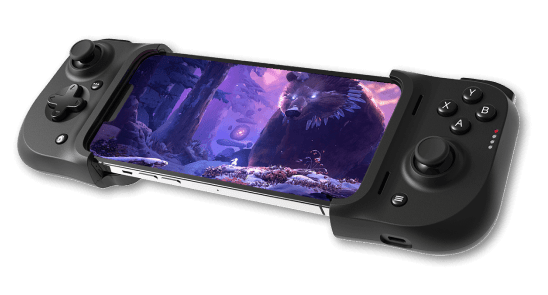
The iCade serves the arcade gaming market perfectly with its chunky, retro appearance but that doesn’t mean there isn’t room for a more traditional gaming controller. This is where Fructel’s Gametel enters the picture and is set to provide plenty of great functionality to gamers.

Previously only compatible with Android smartphones and tablets, the Gametel clearly has the pedigree to be a great addition to the iOS peripheral market.

The device is smaller than other iOS focused controllers while still offering a 4 way joystick with 4 face buttons as well as 2 shoulder buttons on the back. Comfortable to use with a snug clamp to keep the iOS device steady while Bluetooth does its connectivity magic, the Gametel is looking great hardware wise. A nine hour battery life just goes to back up that idea.

That’s no use without good software support, however. Fortunately, it’s looking good for the console style controller with all iCade suite titles already supported as well as other iOS games such as No Gravity, Silverfish, Super Crossfire HD and Terra Noctis also covered. Regular 148apps readers will note that all these titles are great examples of quality iOS games making it an ideal starting point for such a device. It’s looking pretty attractive to gamers in need of a more console style control system.

No solid release date has yet been given for the GameTel in the US. While it’s available in selected European countries, at the moment it doesn’t support iOS while the relevant app works its way through the approval process. We’ll be sure to keep up to date on any release date for the device.

Soulo Karaoke and Soulo Mic Review

Developer: Seven45 Studios
App Price: Free
Hardware Price: Wired Mic: $69.99, Wireless Mic: $99.99
Version Reviewed: 2.4
Device Reviewed On: iPad 1, Wired Mic

Graphics / Sound Rating: ★★★★☆
User Interface Rating: ★★★★½
Hardware Integration Rating: ★★★★☆
Replay Value Rating: ★★★★½

Overall Rating: ★★★★½

Soulo Karaoke is a sing along app with a library of popular and public domain songs to rock out to. It can be used with the iPhone 3GS and up, and both iPad devices. It’s possible to record using the built in microphone on these devices, but the company (and our testing) deosn’t recommend it. Instead, they also sell the Soulo Mic, a $70 – $100 microphone accessory made to be used with the app.

The microphone plugs into the headphone port and has a little headphone jack to connect headphones or an external speaker. The app also allows video to be output to an external screen, like a TV, but not currently through AirPlay; the wireless version of the Soulo mic has a video adapter that can be used. According to the support website, “audio out through HDMI is not currently supported while in recording mode, but the audio will work through an HDMI connection to play back your finished recordings.”

The microphone hardware is solid, if a bit light in the hand, and is fairly sensitive picking up vocal sounds. The only issue I had with the microphone is the fact that, because it uses the headphone port, the audio out MUST be via headphone or external speaker. No using the iPad or iPhone speakers. In addition, everytime I used the app, it reminded me to use the Soulo mic, as all mics would not work as well as that one. This is when I was using the Soulo Mic.

Using the app is straight forward. Users simply tap the large “Start Singing” button on the Home screen, choose a song (it can be previewed as well), and start singing along. The volume of the backing music and the original vocals can be set, as can the level of Pitch Enhancement, Tone, Reverb and Echo. Soulo records all the performances, allowing users to share the recording via YouTube, Facebook, Twitter, and Email. If a performance isn’t good enough to share, it can be deleted or saved to work on later without sharing. Users can also sing along to any song in their device’s iTunes library, though resulting performances cannot be recorded or shared.

Soulo comes with a fairly robust library of pop, rock, country, hip hop, and dance tunes, with a ton able to be purchased in the in-app Music Store for $0.99 each.

Bottom line, Soulo Karaoke is a great Karaoke app. My daughter and I had a ton of fun singing along to the songs we downloaded, and being able to share the tracks is a nice bonus feature. It would be great if AirPlay was an option for larger parties, but even without it, I’d use this instead of a big fancy Karaoke machine most days.


Want a one stop solution for transforming an iOS device into an all-in-one fitness training partner? Then why not consider Wahoo Fitness’s Wahoo Run/Gym Pack?

For $119.99, it offers everything an exercise fan could want. Using ANT+ technology, the pack combines GPS, heart rate, music playing and phone facilities all into one package. Connect an iOS device up to heart rate monitors, foot pods and other fitness sensors all through this piece of kit.

As CEO of Wahoo Fitness, Chip Hawkins, puts it: “You no longer have to purchase a designated fitness watch. You’re already carrying your iPhone or iPod Touch with you for music and safety; might as well have it track your workout too.”

The Wahoo Run/Gym Pack includes a Wahoo Soft Heart Rate Strap and Wahoo Key which links the iOS device to the most popular heart rate monitors and other ANT+ sensors. It’s all compatible with over 100 of the most popular fitness apps like RunKeeper, MapMyRun+ and more, with the kit coming bundled with Wahoo Fitness’ own app.

The Wahoo Run/Gym Pack is available now for $129.99 at Best Buy stores across the country as well as on the Wahoo website.

Aren’t iPad docks predictable? Always looking roughly the same and not very exciting to show off to friends and family? So how about this one for a change? It’s called the Bentley Mulsanne. Oh yeah, and it’s a car.

Yup, one of the world’s most luxurious cars, the Bentley Mulsanne, has a new interior that includes two iPads in the back. Built in the UK, the interior in all costs an extra £85,000 on top of the basic price of £205,000 for the car alone. That makes the whole thing around $457,000.

It’ll be worth it to someone, though, with the iPad area including full internet access and the possibility to stream TV shows or movies to a large drop down LED screen. Each iPad also comes fully equipped with a bluetooth keyboard dock and the devices fold away into the back of the seat when not in use. It’s very cool stuff indeed with even a Mac Mini thrown in and an iPod Touch controlling the audio system for the car.

If you’ve got a spare half a million lying down the back of the sofa, this could be the ideal media solution with a neat car thrown in. Oh and mind if I come along for the ride? Thank you in advance!

[Source: Daily Mail]

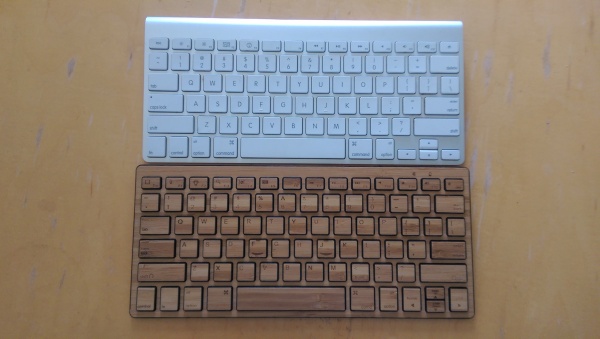
This case popped up recently and looked like it had a chance to be something unique. While it borrows heavily from the Zagg mate, it makes a few improvements and is a heck of a lot cheaper. Let’s take a look at the Aluminum Keyboard Buddy case for it iPad 2.

This keyboard for the iPad 2 is sold as a case, but it’s not truly a case. Rather, it is more of a smart-cover-enabled clam shell with a keyboard included. The iPad sets, face down, into the tray of the keyboard with the edges coming up to enclose the sides of the iPad. And here we see the first issue with this keyboard.

To place the iPad 2 into the case for storage, users need to wedge one wide side of the iPad under two tabs on the edge of the keyboard. Then, users close the iPad by easing it down over the keyboard. To get the iPad wedged under both of these tabs is not a super easy thing. And once the iPad is closed into the keyboard, it is not as secure as the iPad was in the Zagg keyboard. The friction seems a bit lacking – it easily works itself out when stored in a bag or carried in your hand. Perhaps a little forceful adjusting of the aluminum edge of the keyboard would help, but I’m not willing to risk breaking it to do so.

Using the actual keyboard is much better than expected. It’s a similar Bluetooth design to most other non-folio type keyboards. The iPad 2 wedges into a groove on the front of the keyboard and leans back either in portrait or landscape orientation. The keyboard base then becomes the platform to hold the iPad 2 and use as a keyboard. This works quite well and is in my opinion the best method for typing. The solid base allows you to use this on a table or even in your lap, though using it in your lap with the iPad in portrait mode can feel a bit unbalanced. The one issue with this keyboard in particular is that the iPad bounces considerably when touching on the screen. The tabs holding the iPad in place are perhaps a bit soft for this or the overall design is a bit less rigid than it needs to be.

What about the keyboard? Well this is where this device really shines. While it has very small keys, they have great separation from the other keys. This really has given me unparalleled accuracy in typing on an iPad keyboard device. Add to that my preferred double-width backspace, inverted T arrow keys, and the usual compliment of iPad quick access keys, and this could be my favorite small iPad keyboard.

When closed up, the keyboard adds very little bulk in comparison to other keyboard cases. The whole package is just under double the thickness of the iPad alone. This keyboard also includes the special iPad 2 magnet in just the right place to automatically wake up your iPad when you pull it out of the case. Perhaps this could be an issue for battery drain if the iPad is popping out of the case in your bag, however.

Overall, the Buddy iPad 2 case is a good specialized keyboard. While half the price and not nearly as good as the Zagg mate, it is half the price. While for pure typing pleasure you can’t beat the Apple Bluetooth keyboard, in a pinch this one will work and is considerably more portable. Add to that the rather cheap price at under $50, and it might be the perfect keyboard for some.

This iPad 2 keyboard shell is available for $49.90 from MIC Gadget in either white or black. Full specs from the manufacturer are below, or after the jump.


Continue reading Aluminum Keyboard Buddy iPad 2 Keyboard Case Review »

Here at 148apps.com we’re big fans of the iKlip and its ability to hold iPads and iPhone/iPod Touches (courtesy of the iKlip Mini) – now the manufacturer IK Multimedia has come up with another great tool.

Debuting at last week’s Summer 2011 NAMM show, it’s called the iRig MIDI and it provides iOS device users with the ability to connect MIDI keyboards, drum machines, drum pads and pedal boards, amongst others, to their device. There’s even the addition of a micro USB port that can connect to any standard USB power supply source thus ensuring that the iOS device can stay fully powered during sessions. iRIG Midi crucially ensures that users can use their instruments with apps such as the all mighty GarageBand.

As well as that, bundled with the device is IK’s new SampleTank app which is the mobile version of the software of the same name. It offers 20 studio-quality insert effects that can be applied to each individual instrument along with a master reverb-delay effect.

On paper, iRig MIDI looks to be an ideal tool for any musician who enjoys using their iOS device to create music.

iRig MIDI is coming soon and will be priced at $69.99.

148Apps editor, Rob LeFebvre, was quite impressed with his time with the iKlip back in April. It provided him with a great way to attach a first generation iPad to a microphone stand, thus making it easy to consult for everything from speeches to lyrics or music sheets.

Now, IK Multimedia has announced the release of the iKlip for the iPad 2. It’s a similar device but geared towards the iPad 2 by offering a new mounting kit that sets to be just as effective but aimed at the new slimmer build of the iPad 2. It also works around the new back-facing camera on the iPad 2 ensuring that it never gets in the way of using it. As before, users can position the iPad to either portrait or landscape orientation. It’s worth noting that the new iKlip adaptors still allow for users to use it with the iPad 1 ensuring it works well for everyone.

The iKlip is available now for $39.99/€29.99 (excluding tax) from the IK online store as well as select music and electronic retailers across the world.

Any users who have already got an older version of the iKlip and require the iPad 2 adaptors can pick them up for $9.99/€7.99. Users who purchased the iKlip after May 1st 2011 can claim the iPad 2 adaptors for free by providing a proof of purchase to IK Multimedia.

Just in time for this holiday season Discovery Bay Games’ has introduced its newest iPad accessory, Duo ($40). By using physical game pieces in conjunction with the virtual interface of the iPad, Duo takes us one more step towards the Tron world of the tomorrow. To be anything more than a paper weight though Duo must be paired up with one of Discovery Bay Games’ specially made apps which currently only includes Yoomi, but more are promised to be coming soon.

Yoomi is a game where players take turns secretly answering questions like “would you prefer to fly to the moon or dive to the bottom of the ocean?” Once answered the other players attempt to guess which response the first chose. It’s a game very reminiscent of Apples to Apples but with a new and fresh feel that the whole family can enjoy. Explaining in writing how the pair works together would be an nightmare, so I’ve included a much more colorful video below to help keep everyone’s attention…you’re welcome. If you’re interested though Yoomi is currently free on the App Store while Duo is being sold exclusively through Toys “R” Us.

Picture 2Since the iPad announcement a few weeks ago, a number of big giant questions marks have popped up about the device. There are so many fundemental things that just don’t seem to connect. So much that we don’t know.

Apple is, playing this as they do so well, the masterful marketing machine at Apple is running at full steam. Leaving out some of these details could lead up to a last minute One more thing… announcement by Apple, or could be a spin of the fact that Apple was left a little short on development of the next version of the OS for the device.

Either planned slow release of information or covering up for OS release delays, the result is whetting the appetite of the consumers and increasing the buzz and the demand for the device.

Lets take a look at some of the most glaring questions that still surround the iPad.

Continue reading There’s Still a Lot We Don’t Know About the iPad »

Plant-Mate Gives Green Thumb to Everyone

Even the worst gardener in the world now as hope

Read The Full Review »

Magellan’s Premium GPS Car Kit ~ Wish it was Cheaper

Will this help iPhones replace GPS units?

Read The Full Review »

The Sticky Strap ~ A Stand that Loves to Suck

A durable pocket sized stand that sucks...in a good way.

Read The Full Review »

Gorillamobile Tripod Review

A tripod that can go anywhere and do anything!

Read The Full Review »

This last week, Chris, Tony and I made the trip to CES to take a look at some of the best new gadgets and accessories for the iPhone. After walking 743.9 miles, shaking 16,984 hands, and trading business cards with 3.5 gajillion people, here’s are some of the highlights of what we saw.

FloTV Mophie Battery Case – Mophie announced an interesting new version of their great juice pack. This new version will include a FloTV receiver allowing you to watch broadcast TV right on your iPhone. They include the FloTV receiver yet the unit is only 2mm thicker than the usual Juice Pack. So far the only downside we’ve heard is the price of the FloTV service which is expected to be about the same as it is for other devices. Full details are still short, but we’ll let you know more as soon as we find it out.

tunebugTunebug – Tunebug is a tiny little interesting speaker for your iPhone. Not much larger than a couple matchbooks stacked on top of each other, this isn’t a normal speaker. Tunebug uses a patented technology called SurfaceSound that turns anything you set it on into a speaker. The coolest implementation is a Tunebug that straps to you bike helmet and connects to your iPhone using Bluetooth allowing you to listen to music while riding your bike without plugging up your ears and tuning out all of the sounds around you. Obviously a huge breakthrough for biker safety. The other implementation connects to your iPhone (or any device) with a normal speaker wire and sets on your desk, turning your desk into the speaker. The Tunebug will be available soon at $119 for the Bluetooth version, $69 for the wired version.

Zoll PocketCPR – As amazing as the iDevices are, they really don’t do much in the ways of saving lives. Sure, there are some apps that are probably helpful in the medical community, but life saving isn’t quite the iDevice’s forte. The Zoll PocketCPR changes this with an app that shows how to perform CPR with accuracy by using the accelerometer to judge compression depth. At the booth, we heard a story or a doctor who used the app and was complimented by a nurse who hadn’t seen proper CPR done by a doctor in a long time. The app hasn’t been officially approved by the FDA yet, but Zoll expects the approval to come shortly. [More Info]

Blio Reader – we got a chance to get a demo of the iPhone version of the much talked about Blio Reader. A multi-platform ebook reader announced at CES. Blio does a few things that other ebook readers don’t do. For one, there’s text to speech technology. Also included are some pretty good options for different ways to read text on the device including both as printed and text versions. Obviously this will be a much more interesting app if the rumored tablet/slate is released. Blio is still a few weeks off, but it looks to be a great platform. We’ll bring you more as soon as we can.

L5 Universal Remote – The L5 Universal Remote, while not quite as universal as the Logitech Harmony due to its lack of bluetooth connectivity (PS3), but is quite an amazing remote replacement unit. With the included IR attachment, the L5 Universal Remote instantly learns your remotes features without needing to plug in those pesky product codes. To me, there’s really nothing that excites me quite as much as the prospect of controlling my entire house with my iDevice. The L5 will be available soon.

Continue reading The Best and Worst of CES for iPhone Lovers »

I’m an iPhone purist, I’ll admit it, I love my phone just how it is, stable, fast, non-glitchy. Sure from time to time I’ve wished I could customize my text message tone or set a new wallpaper behind my icons, but in the end it’s not worth it. At least that’s what I tell people most days. I confess however that today, for the first time since 1.1.2, I gave serious consideration to jailbreaking my iPhone. What could lead me down this dark path again? How about controlling a game on my iPhone using a Wii Remote!?! The BTstack project has managed to pull it off!

If you’re not familiar with what the BTstack Project is, it’s an open source project focused on expanding bluetooth device support far beyond what Apple is currently allowing. A lot of the above information comes to us from this article via Zodttd.com which also includes a statement from the developer saying his next target is the PS3 controller. Upon reading, I was almost giddy with anticipation and immediately started spreading the word. But one of my colleagues, being the glass is half empty type that he is, quickly pointed out why I shouldn’t get too excited.

“For one,” he said “theres nothing comfortable about hunching over a table, looking straight down, just to keep your hands free for use on a controller…”

I quickly pointed out that an iBend would be a quick, easy, and cheap solution to that. He conceded this point but continued.

“Secondly and much more importantly [BTstack] is hacking their iPhone to use them, no major developer is ever going to spend the time and money making a game that needs a hack to be used fully.”

I hated to admit it but he had a point, however it may not be a relevant one for much longer as I know of at least one legitimate controller being developed for the iPhone, the GameBone Pro.
gamebonepro_500x281
The GameBone Pro has amazing potential as 22Moo states it will be fully compatible via bluetooth or dock connector, fully functional D-pad with 4+ action buttons, and a built in speaker/mic, etc. While there is no official price listing or release date yet, we know they are targeting an early 2010 release. Gratefully they are making their developer’s kit free to anyone who wants it.

The free SDK is an important point I’d like to touch on momentarily. While I’m certain more than one developer has a controller under development, it’s my hope that in some circle somewhere there is a committee working on a set standard of controller code. Without a set basic standard we will end up in a market where a game may work with one joystick but not another. Resulting in another BlueRay vs. HD DVD war, only with more players. A war that would most likely end up with game developers ignoring the idea of external controllers all together simply because of inconvenience.

MarvelVsCapcomWith a set standard though I can already see what the future may hold for iPhone gamers. I can imagine sitting at an airport with a friend waiting for our redeye flight to arrive and needing something to do. Out of my pockets I pull three things, my iPhone, GameBone Pro, and a Pico Pocket projector. Out of his pocket he grabs his controller and within a minute we are playing Marvel vs. Capcom (not currently released for the iPhone) dreamcast style on a 60″ while being totally portable and wireless…I’m getting giddy again.

iBend, An iPhone Stand You Can Take Anywhere

iBend, an iPhone stand you can take anywhere.

Read The Full Review »

WildCharger…Pesky Cables Be Gone!

I can charge my iPhone wirelessly?...Sweet

Read The Full Review »
    Advertisement    


Featured Apps

    Advertisement    


Developers

Would you like your application reviewed on 148Apps? See the About page for information.
    Advertisement    


148Apps Network

148Apps - iPhone app reviews and news. The best gosh darn iPhone app site this side of Mars.
http://148apps.com :: @148Apps

The Portable Gamer - Mobile gaming magazine for the casual gamer.
http://ThePortableGamer.com :: @PortableGamer

The App Hall of Fame - An archive of the very best in apps and games.
http://AppHallofFame.com :: @AppHallofFame

Android Rundown - Android news and reviews. Where you get the rundown on Android apps and hardware.
http://AndroidRundown.com :: @AndroidRundown

148Apps.biz - iPhone development news and information for the community, by the community.
http://148apps.biz :: @148AppsBiz

Best App Ever - Yearly Mobile App Achievement Awards.
http://bestappever.com :: @BestAppEver

GiggleApps - iPhone applications reviews for kids and parents.
http://GiggleApps.com :: @GiggleApps