Posts Tagged keyboard

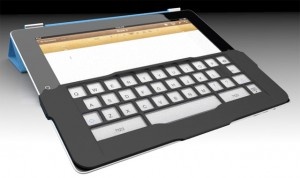
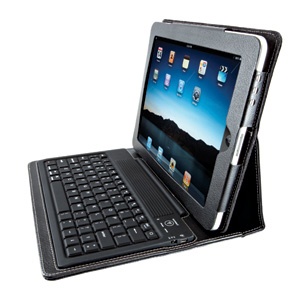
This case popped up recently and looked like it had a chance to be something unique. While it borrows heavily from the Zagg mate, it makes a few improvements and is a heck of a lot cheaper. Let’s take a look at the Aluminum Keyboard Buddy case for it iPad 2.

This keyboard for the iPad 2 is sold as a case, but it’s not truly a case. Rather, it is more of a smart-cover-enabled clam shell with a keyboard included. The iPad sets, face down, into the tray of the keyboard with the edges coming up to enclose the sides of the iPad. And here we see the first issue with this keyboard.

To place the iPad 2 into the case for storage, users need to wedge one wide side of the iPad under two tabs on the edge of the keyboard. Then, users close the iPad by easing it down over the keyboard. To get the iPad wedged under both of these tabs is not a super easy thing. And once the iPad is closed into the keyboard, it is not as secure as the iPad was in the Zagg keyboard. The friction seems a bit lacking – it easily works itself out when stored in a bag or carried in your hand. Perhaps a little forceful adjusting of the aluminum edge of the keyboard would help, but I’m not willing to risk breaking it to do so.

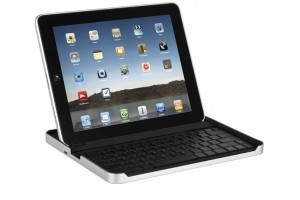
Using the actual keyboard is much better than expected. It’s a similar Bluetooth design to most other non-folio type keyboards. The iPad 2 wedges into a groove on the front of the keyboard and leans back either in portrait or landscape orientation. The keyboard base then becomes the platform to hold the iPad 2 and use as a keyboard. This works quite well and is in my opinion the best method for typing. The solid base allows you to use this on a table or even in your lap, though using it in your lap with the iPad in portrait mode can feel a bit unbalanced. The one issue with this keyboard in particular is that the iPad bounces considerably when touching on the screen. The tabs holding the iPad in place are perhaps a bit soft for this or the overall design is a bit less rigid than it needs to be.

What about the keyboard? Well this is where this device really shines. While it has very small keys, they have great separation from the other keys. This really has given me unparalleled accuracy in typing on an iPad keyboard device. Add to that my preferred double-width backspace, inverted T arrow keys, and the usual compliment of iPad quick access keys, and this could be my favorite small iPad keyboard.

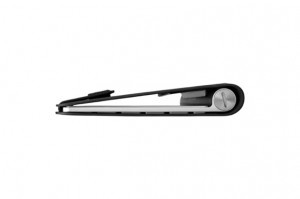
When closed up, the keyboard adds very little bulk in comparison to other keyboard cases. The whole package is just under double the thickness of the iPad alone. This keyboard also includes the special iPad 2 magnet in just the right place to automatically wake up your iPad when you pull it out of the case. Perhaps this could be an issue for battery drain if the iPad is popping out of the case in your bag, however.

Overall, the Buddy iPad 2 case is a good specialized keyboard. While half the price and not nearly as good as the Zagg mate, it is half the price. While for pure typing pleasure you can’t beat the Apple Bluetooth keyboard, in a pinch this one will work and is considerably more portable. Add to that the rather cheap price at under $50, and it might be the perfect keyboard for some.

This iPad 2 keyboard shell is available for $49.90 from MIC Gadget in either white or black. Full specs from the manufacturer are below, or after the jump.


Continue reading Aluminum Keyboard Buddy iPad 2 Keyboard Case Review »

OmmWriter for iPad Review

OmmWriter for iPad Review

iPad Only App - Designed for the iPad
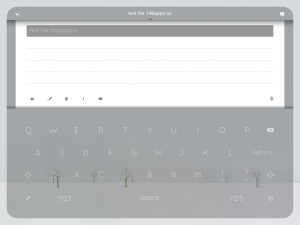
OmmWriter is an interesting text-editor that attempts to simplify the writing experience.

Read The Full Review »

If there was one reason I’ve heard more than any others about why someone bought an Android or Blackberry phone over the iPhone, it’s that the person doesn’t like to type on touchscreens. Regardless of my argument that after a few weeks, I ended up typing MUCH faster on the iPhone’s onscreen than on my old Blackberry, people often opt for a physical keyboard.

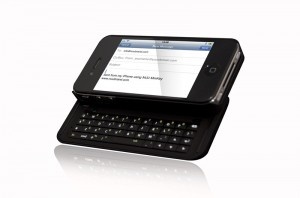
The NUU MiniKey is by no means the only physical keyboard case for the iPhone (there’s a flip-out one available at ThinkGeek and another popular one by BoxWave), but it has a few interesting features and sturdy-looking design (though it looks like it may almost double the thickness of the iPhone).

The MiniKey has navigation keys to allow easier movement between characters than using the magnifying glass on the touchscreen. Like most cellphone keyboards, the MiniKey has function keys to allow quicker typing of symbols and numbers. Something I haven’t seen on other iPhone keyboards is backlighting. While it isn’t helpful to a skilled typist like myself who doesn’t need to look at the keys, other more novice typists may need to see what keys they are pressing. The MiniKey is also compatible with the Mac keyboard shortcuts like Command+C for copy and Command+V for paste. And finally, it has a key to toggle between the physical and onscreen keyboard. I assume this key simply turns the keyboard on and off (which would be great to save battery life).

The NUU MiniKey is selling for $79.99 on Amazon (free shipping). This won’t appeal to those of us that trust that Apple knows best and if we needed a physical keyboard they would have given us one. But to anyone who is on the fence between iPhones and other phones, accessories like this may be the deciding factor.

While the iPad can definitely be used to write (emails, blogging, etc), it isn’t necessarily ideal for writing more than short posts and emails. One solution would be to grab the iPad Keyboard Dock or a bluetooth keyboard. But the obvious problem with buying one of those is (1) the price and (2) it’s just something else to carry around. Inventor Cliff Thier came up with a solution that doesn’t involve carrying around another largish gadget.

The iKeyboard isn’t on the market yet. It’s one of those Kickstarter projects that will be funded and put into production only if a certain amount is pledged ($4000 in this case). The iKeyboard would attach to the iPad and create a sensation of touch-typing by providing tactile feedback similar to that of a real keyboard. The iKeyboard is light-weight – much lighter than carrying around a bluetooth keyboard. It seems that it will be cheaper than a bluetooth keyboard considering people that pledge over $30 will receive a first-generation iKeyboard (hopefully meaning that the product will be around $30).

Thier, along with industrial design firm IDEAZ, seem dedicated to making an experience akin to a real keyboard experience,

The designers at IDEAZ have managed to match the force required to depress a key on the iKeyboard to the force needed to depress a key on an Apple keyboard. They’ve also succeeded in making the iKeyboard’s keys travel a distance equal to that of Apple keys. We now have a fully functional prototype that works pretty well.

At the time I’m writing this, $14,376 has already been pledged to the iKeyboard. Looks like we’ll be seeing an iKeyboard in the near future. But there are still solid reasons to pledge. $30 or more will reward the pledger with the first-generation product and $50 or more will get the first and second-generation (when it comes out). Both increments will be asked to participate in providing feedback to create a better second-generation product. Interesting in supporting iKeyboard?

Source: Mashable

Heart Writer

Heart Writer

iPad Only App - Designed for the iPad
Heart Writer is going to be added to my arsenal and will most likely take over a good portion of my text-editing time.

Read The Full Review »
Developer: Incase

Price: $29.95

iPad Integration Rating: ★★★★½
Hardware Design Rating: ★★★★☆
Long Term Reuse Rating: ★★★½☆

Overall Rating: ★★★★☆

When I bought the Apple Wireless Keyboard for both my iPad and MacBook Pro, I immediately ran into a problem. How do I pack up the keyboard to take with me to class? I didn’t want to damage the keys by just throwing it in my bag. I sorely needed a case for the keyboard. As a side note to those who don’t have a keyboard case and don’t want to damage their keyboards: the box that the keyboard comes in is portable and sturdy enough to use temporarily.

Due to a suggestion on a favorite podcast of mine (Andy Ihnatko on Macbreak Weekly), I bought the Incase Origami Workstation. The Origami Workstation is definitely of a minimalist design. The keyboard simply clips into the case – quite securely, I might add. The case is closed, book-style, and velcroed shut. Just as a keyboard case, the Origami Workstation is not worth its $29.95 price tag. But the real usefulness comes in when it doubles as a stand for the iPad.

The Apple case for the original iPad isn’t the most secure stand. It’s not sturdy at all when using it in portrait mode or in landscape mode when it’s sitting upright. So pre-Origami Workstation, I was constantly worried that my iPad was going to fall screen first onto my desk in class (those slanted desks don’t help the situation). The top half of the Origami Workstation folds back and attaches to itself via velcro to make room to place an iPad.

The viewing angle that the stand creates is perfect (the Apple case makes an angle that’s too steep). It holds in both portrait and landscape mode. Also, it’s possible to leave the Apple case on the iPad and it will still fit into the keyboard stand.

The only problem I had with the Origami Station is that one of the velcro pieces fell off shortly after I received it. A little superglue fixed the problem, but I’d obviously rather not have to repair a new accessory that way.

For anyone who is tempted to buy the iPad Keyboard Dock but still wants to be able to use the keyboard in landscape mode, this is the solution – buy the Apple Wireless Keyboard and the Incase Origami Workstation.

Zagg mate iPad Keyboard Case Review

The actual keyboard on the Zagg mate keyboard is nearly perfect. The keys are real, with a great feel. In addition, the key placements are almost perfect though I would have preferred the standard inverted T for the arrows. They Bluetooth pairing works great as well. But the actual case design is so out of left field. It just doesn’t work well for me.

So let’s start out with the good. This thing has a great keyboard. The keys are small, but that’s fairly easy to get used to. They are very satisfying to use and type on. The keyboard works as you would expect it to. There’s the normal functions that you get with a keyboard connected to the iPad. The standard cut, copy, paste keys are great to have along with the arrow keys with the modifiers for text selection, which is great for power text editors.

When in use the iPad reclines in a recessed ridge in the middle of the device with a little easel in the back to hold it up. The iPad is loose which allows you to use it in any of the four orientations — portrait or landscape mode. This is a nice feature that no other iPad keyboard case I’ve seen has.

The problem I have with this case is that when it’s “closed”, it only covers the glass front of the iPad. The iPad is held in place by a foam gasket inside the unfinished rim of the aluminum base. The problem with this is that the back is left open to damage. I’m not one that obsesses over scratches of my devices. I buy them to use, not to display, so it’s not a huge concern. But it does leave me a little bit uneasy that there’s nothing like a layer of a case to help protect the iPad.

The usage issue is that it’s rather hard to get the iPad out of the device when it’s closed. You need to wedge your finger in the side to pry the two halves apart. It can be a bit difficult if you are in a hurry.

Overall, I really have a love / hate relationship with this keyboard case. The keyboard itself is great, and adds very little weight to the iPad. But, I think the design of the case, and how it sits on the iPad is one that is an interesting and very unique idea that just doesn’t work all that well in practice. The Zagg mate keyboard retails for a cool $99 and is available from a variety of retail locations and from Zagg themselves.

[ Source: Zagg ]

At Macworld this year, we saw a few new iPad cases with something extra, a keyboard. We’re going to take a look at a few of these as we get them in. First up is the Keyfolio from historic peripheral provider Kensington.

The KeyFolio looks like a rather nice faux-leather portfolio for your iPad. The iPad is held in securely by a firm flap at the top yet still gives access to all the needed buttons and ports. On the flap that covers the screen there’s a rubber covered keyboard. While the keys are a bit small, the convenience is really nice to have. Yet I do have a problem with some the of the choices made with this keyboard.

They keyboard uses Bluetooth to connect to the iPad giving you the ability to use this hardware keyboard instead of the soft keyboard on the screen of the iPad. Using an external keyboard does offer you some speed and convenience perks. For one you can use the OSX standard command-C,V,X for cut, copy, paste. In addition for you text warriors, the arrow keys and key modifiers also work for rapid text selection.

This keyboard feels fairly good to type with, though it’s a little odd feeling. The rubber covered keyboard is nice in that it keeps dust, crumbs, hair, etc. from getting below the keys. But it does give it a cheap feel and lacks that satisfying click of a normal keyboard. Actually using the keyboard was convenient and easy. Once the BT is paired, it connected to the iPad quickly when turned on and worked well for typing. No problems in that respect.

The one real issue I have with this device are the decisions made with key placements. For one there’s no right shift key. I don’t miss this that much, but if you use that key it will take you a while to get used to it being missing. My bigger concern is that the quote key, both single and double, has been moved to the lowest row by the space bar. This one I have to go searching for every time I need it.

Overall, if you like the form factor, and can get by the key placements, this is a great case for you. While the case itself is on the heavy side it works really well and I’m enjoying using it. The KeyFolio is available from Kensington directly for $99, and considerably cheaper from other retailers like Amazon.

[ Source: Kensington ]

If you’ve used HippoRemote Pro before you’ll know how effective it is at controlling your computer, either Mac or PC, over Wi-Fi. The app allows users to control their computer as well as a host of popular applications using its multi-touch trackpad and built-in keyboard. HippoRemote also offers a web browser and Twitter client. If all these features weren’t enough, however, the latest update to HippoRemote turns your iPhone into an advanced games controller too.

With many Mac and PC games requiring control via the mouse and keyboard, controllers like those found on consoles aren’t compatible and therefore tie the user to their desk in order to play games. HippoRemote 2.2 offers freedom from this traditional setup by replicating mouse and keyboard control from your iPhone. Whether you’re playing a full on RPG, an intense shoot ‘em up or just a simple Flash game on the web, HippoRemote allows you to customize the control layout and use only the keyboard buttons you need for a particular game. Controls can be set for different games with either a trackpad or a button pad and game-specific profiles can also be downloaded from the HippoRemote website. At present, HippoRemote is compatible with the iPhone and iPod touch but we’re excited by the possibilities introduced by the iPad and look forward to a compatible version in the future. If you love your PC games but want that console feel, you might well have already bought the best controller, you just need HippoRemote to take advantage of it.

$4.99
iPhone App - Designed for the iPhone, compatible with the iPad
Released: 2009-07-16 :: Category: Productivity

Hot Typer

Hot Typer

iPhone App - Designed for the iPhone, compatible with the iPad
Hot Typer tries to introduce a completely new way of typing: a six-key keyboard. It gets points for originality, but not much else, and I found the learning curve to be frustratingly high.

Read The Full Review »
Amazing Piano

Amazing Piano

iPhone App - Designed for the iPhone, compatible with the iPad
Amazing Piano is a music app for iPhone and iPod touch that allows the user to "play piano" via an onscreen QWERTY keyboard. It features both free and practice modes, the latter for playing melodies by pressing keys as the letters for them scroll across the screen.

Read The Full Review »
    Advertisement    


Featured Apps

    Advertisement    


Developers

Would you like your application reviewed on 148Apps? See the About page for information.
    Advertisement    


148Apps Network

148Apps - iPhone app reviews and news. The best gosh darn iPhone app site this side of Mars.
http://148apps.com :: @148Apps

The Portable Gamer - Mobile gaming magazine for the casual gamer.
http://ThePortableGamer.com :: @PortableGamer

The App Hall of Fame - An archive of the very best in apps and games.
http://AppHallofFame.com :: @AppHallofFame

Android Rundown - Android news and reviews. Where you get the rundown on Android apps and hardware.
http://AndroidRundown.com :: @AndroidRundown

148Apps.biz - iPhone development news and information for the community, by the community.
http://148apps.biz :: @148AppsBiz

Best App Ever - Yearly Mobile App Achievement Awards.
http://bestappever.com :: @BestAppEver

GiggleApps - iPhone applications reviews for kids and parents.
http://GiggleApps.com :: @GiggleApps