Singaporean-based Zensorium is introducing a new device designed to let people track their health and wellness on their iOS device, with a new device called the Tinké.
The Tinké plugs directly into an iOS device, and users touch its sensor directly with their finger. By touching this, the device claims that it can measure heart rate, respiratory rate, and the oxygen level in a person’s blood, making it essentially a pulse oximeter for an iOS device. It measures these then rates the person on its “Vita Index”, which is based on the quality of the measured information. Tinké also can track this information over time, so people can see how their health is changing, and preferably for the better! People can share this information with friends and family, with the ability to comment on Vita Indices, to share tips and encouragement. As well, users can share their Vita Scores anonymously, with the ability to compare their scores with other people in their age group.
The Tinké will come in four colors: black, red, white and an aqua blue. Zensorium is currently taking reservations, with a target price of $99, although there is no planned release date for the hardware. As well, there is no indication if this will officially support the iPad. Will the information be cloud-based, or device-based, so users could potentially use the Tinké dongle on their other iOS devices, like iPod touch or iPad, and will the network be available through the web? Plus, will it work? Will all the measurements, especially oxygen measurement, really be accurate based on just using a dongle? Other pulse oximeters are intrusion free, but use a closed design; will the open ended design of Tinké negatively affect measurement? These are important questions to be answered as Tinké reaches its release date in the indefinite future.
Apple likes to boast that their products allow us to connect to each other in fantastic new ways. It’s a tall claim to say the least. However, what stronger connection could there be than the one between parents and their children? The MotherKnows app is trying to help prove Apple right by giving parents a new way to monitor their child’s development and more easily be prepared for medical emergencies.
Working in conjunction with the MotherKnows website, the app stores all sorts of health records like growth charts, medication lists, graphic displays of immunizations and other information collected directly from doctors and regularly updated, all on an iPhone. This is particularly useful for quickly providing places likes schools and camps with anything they may need to know regarding a child health-wise. Parents can use the app for little tasks like scheduling appointments and for more long-term tasks like tracking their child’s progress. Parents can even create milestones like “first steps” and take a picture to go alongside it.
Although the app can sync with one’s MotherKnows account when accessing data one doesn’t need to purchase an account in order to use the app. MotherKnows is currently available for free on the App Store.
Jawbone, known for their award-winning Bluetooth headsets, has announced UP, a wristband and app combo that tracks daily activity such as sleep, motion and eating habits. The goal of it is to help people live a healthier life.
For those who follow Ted Global, they’ll remember that UP was previewed at the event this past July. Tracking sleep, eating habits and motion, the wristband is worn 24/7 and wirelessly communicates with the iPhone app via MotionX technology. The app then calculates daily totals, displays them and works to give users a better understanding of their health, what drives it and ways to improve it. And no, it’s not another weight loss gimmick. It is about visually displaying the hundreds of decisions made every day to be healthy and gives the user the motivation to alter their behavior for an all-around healthier lifestyle.
UP also includes a social aspect with the ability to challenge friends. Within the app friends can send encouragement and challenge each other for most hours slept, who had the healthiest meals and more. The wristband will be available on November 6 for $99.99 while the app is available for free as of today.
Last week we looked at apps that help manage weight by offering simple tools to get nutritional information. In keeping with that healthy theme, this week we look at recipe apps for those seeking to add more veggies to their diets, for vegetarians and even for vegans. These apps are full of healthy and tasty choices for anyone looking to make a change to, or maintain a healthy lifestyle with the help of their iPhone, iPod touch or iPad.
Vegetarian How to Cook Everything
Part of the wildly popular How To Cook Everything series, this cookbook, written by Mark Bittman, offers over 2000 recipes for delicious meat free dishes – by far the most we’ve found in one app. The emphasis is on great taste, but also keeping it simple. The app includes vegan recipes along with tons of how-to’s, illustrations and planning guides. Easy searching and shopping list creation that can be sent by email make this the ideal choice for anyone, whether a person looking for the occasional veggie pasta dinner or a true tofu addict.
iPhone App - Designed for the iPhone, compatible with the iPad
Released: 2011-04-28 :: Category:
Do Eat Raw
There are health conscious meat-avoiders, idealistic vegetarians, hard-core vegans and then there is the raw foods movement. Touted as being not just a way to lose weight and stay fit, but also to increase longevity and health, it may not be for everyone. If raw is on the menu, however, Do Eat Raw is the app to get. The app has over 300 raw vegan recipes along with information on everything from how to dress up a dish to what to drink. The app is divided into sections for easy browsing, and users can rate dishes and see user ratings to see what’s, well, cold?
iPhone App - Designed for the iPhone, compatible with the iPad
Released: 2011-03-17 :: Category:
Whole Living Smoothies
Prefer a nice refreshing drink of fruits and veggies to a full-on vegetarian meal? From the kitchen of none other than Martha Stewart herself comes Whole Living Smoothies. Assembled by dieticians, this recipe app comes with 12 Essential Recipes, 12 Meal-in-a-Glass recipes and 12 Allergen-Free recipes. Additional sets for Weight loss, Immunity Boosting and Detox are available as in-app purchases. The app also contains a comprehensive glossary explaining the specific health benefits of the key ingredients, tips on buying organic produce and even email and Facebook sharing.
+ Universal App - Designed for iPhone and iPad
Released: 2011-07-07 :: Category: Lifestyle
Veggie Love Cookbook from Better Homes and Gardens
While not for vegetarians, this app from Better Homes and Gardens provides 50 family-friendly recipes that teach moms and dads how to sneak veggies into everyday food so their kids will get the required servings without having to give up burgers, tacos, pizza or even bacon. This is not a weight-loss cookbook, but with a good search function, cook-together tips to get families interacting and invested in what they eat, a shopping list creator and built-in timer it’s sure to help kids – and parents – get their daily allotment of veggies. And not just by hiding them, but by showing them how fun and tasty they are to cook and eat.
There is a massive industry related to losing weight, but most doctors agree eating healthy foods in moderation along with exercise is the real key to weight loss success. If being healthy, not just thin, is the objective, quick dieting isn’t the answer. The permanent solution lies in making lifestyle changes that last. So we’ve compiled our favourite four apps to help track calories eaten and burned and find comprehensible nutritional information about foods for iPhone to make the journey to fitness a little easier.
Calorie Counter & Diet Tracker by MyFitnessPal
This app boasts the largest database of foods – over a million – and provides a calorie count along with information on fats, protein, sugars, fiber and other nutritional facts. But the app does a lot more. It allows dieters to enter entire meals, or add favorite foods, even recipes for fast access to comprehensive and useable information. The app also includes a web companion to track your food intake online and it syncs with the app. There is a barcode scanner for packaged foods, and even push notifications if a user forgets to log a meal. On the fitness end there are more than 350 exercises included for both cardio and strength training, and the app keeps track of calories expended. Create goals, generate reports and start shedding those pounds.
iPhone App - Designed for the iPhone, compatible with the iPad
Released: 2009-12-07 :: Category: Healthcare & Fitness
Fooducate Plus
Fooducate is all about helping those on a diet, for weight loss or any health reason, make wise choices at the supermarket. With a database of over 200,000 unique products, this app uses the iPhone camera to scan barcodes and then tells a user about what’s really in that can or box. It will reveal any veiled information from the use of chemical food colorings that may not be safe to excessive trans-fats while also highlighting that item’s health benefits. The app allows for side-by-side product comparisons and even provides healthier alternative suggestions. The free version is ad supported.
iPhone App - Designed for the iPhone, compatible with the iPad
Released: 2010-11-03 :: Category: Healthcare & Fitness
Weightbot – Track your Weight in Style
If regular apps are too lo-tech, how about a weight-tracking robot? Weightbot is weight loss – or gain – for geeks. Users just enter their goal, their current body specs, and the app calculates their BMI and shows progress on a graph. Rotate clockwise to view weight loss progress over time, or turn the iPhone the other way to view the goal and expected arrival date.
iPhone App - Designed for the iPhone, compatible with the iPad
Released: 2008-10-16 :: Category: Healthcare & Fitness
Dotti’s Food Score
We have apps to count calories in raw foods, packaged products, even favorite recipes, but most of us do a lot of our eating out. Getting the nutritional information from a restaurant menu can be difficult and even embarrassing. Dotti’s Food Score uses information from Dotti’s Weight Loss Zone web site to serve up the skinny on almost 600 restaurants. The app has information on the most popular food chains, gets regular updates, and is particularly well integrated with the Weight Watchers program, offering scores based on their program.
The folks behind iMapMyFITNESS seem intent on offering the full package when it comes to fitness based apps. While they’ve got a little work to conquer the behemoth RunKeeper in terms of market share, they’ve got some neat tricks up their sleeves.
One of the latest features is the ability to track the amount of calories burnt off during exercise. It’s a feature that many an exercising app promises but there’s a difference. iMapMyFITNESS tracks the exact workout data rather than sticking to a generic average total that many other similar apps use instead. It means that no corners are cut and users always know exactly what they’ve achieved.
As well as the calorie checking facility, iMapMyFITNESS is also offering live tracking functionality. This means that friends or family can always keep track of where the user is, potentially a very useful security feature for the concerned jogger or runner. Everything is protected also so that the user can define who can and can’t see such information.
While this might sound familiar to RunKeeper users, it’s the interface that makes iMapMyFITNESS stand out more so. The website also offers a fairly different experience which may well appeal to those users looking for a change of exercise tracking app.
With new updates, this is an ideal time to give iMapMyFITNESS a shot.
It’s alarming to think that skin cancer is the most common form of cancer in the US, even more so when considering the relatively simple ways of reducing the chances of suffering from it.
Sunscreen, no matter how inconvenient, is a fantastically useful tool for reducing skin cancer and just regular old nasty sunburn. The important thing is to remember to reapply it at regular intervals. Putting sunscreen on first thing in the morning then going out all day won’t help much, sadly. Forgetting to reapply is easy so it’s handy that there’s now an app to encourage users to reapply their sunblock.
Sun UV Protector is an inexpensive app that will alert its users when to do exactly that. It’s smart too, using GPS to ascertain its location automatically. Once the location is retrieved, it then determines the UV Index and works out how often sunscreen needs to be reapplied. Adjusting according to skin type is also possible which is very useful as problems are more likely for those with very light skin.
$0.99 seems a very low price for an app that could potentially save lives and will almost certainly save the pain of annoying sunburn.
Anyone who wants to lose weight knows that motivation is the main thing that’s needed in order to achieve such goals. How can that motivation be gained, however? While it can all be done internally, sometimes it’s useful to have something visual to look at during regular intervals which is exactly where SlimBooth might be of great use.
It’s an app that allows users to see a full body picture of how they’d look if they were slimmer. It’s quick to implement and can give a great insight into just how they could look if they slimmed down a bit. Once the transformation has taken place, users can then choose to share the results through all the standard social networking options and show off their new potential look.
While SlimBooth makes a point of being primarily an entertainment app rather than anything scientific, it’s still a great idea that’s bound to appeal to many in need of a bit more motivation.
Keeping track of weight loss and gain is frequently very important to many people. WeightMeter enables exactly that in a simple, no frills way. That doesn’t mean it’s lacking features, it’s just that it sticks to the exact options needed rather than throwing in useless gimmicks to bloat the app out.
At its most basic, users simply need to enter what their goal is, whether it be losing or gaining weight, and then start filling in the weight changes on a daily basis. Users can even set a reminder so that they don’t forget to do so.
Morning and evening weight records can be kept to ensure that even the slightest change in weight is noticed. All this information is stored in a chart form so it’s easy to see how progress is going, right down to the ability to check weekly, monthly and yearly fluctuation. Confident users can also take photos to show the difference and check via the photo gallery how they’re doing. Social networking functionality is also available to share how the weight change is going amongst friends. Everything is portrayed through a simple yet attractive interface that incorporates HD graphics for an extra sheen.
WeightMeter isn’t an obvious motivational tool. There’s no motivational pep talk nonsense or anything like that. Instead it taps into the most important thing – the user feeling good about themselves and their weight change. Just looking at that graph going in the right direction is a great confident booster and bound to encourage further efforts.
Whether it’s for someone trying to lose weight to fit back into their favorite clothes, or it’s a bodybuilder or weedy teenager trying to bulk up, WeightMeter is a great way of keeping track of things.
WeightMeter is available now for $0.99. Surely a bargain when it comes to keeping an eye on good health.
GreatCall make a cell phone called the Jitterbug, which is designed to be a basic and easy-to-use phone for people who don’t need all the advanced features that modern smartphones have. However, for people that do have those modern smartphones with all those advanced features, GreatCall have released an app called MedCoach which is designed to help keep track of medications for users in need of an app to keep track of this aspect of their lives on a deice that is always with them.
MedCoach allows users to log the medications they take, set up the times and intervals when they’re supposed to take them, and get notifications for when it is time to take their medication, no matter what type it is, from pills to injections and more. Users will get push notifications, and the badge of the MedCoach icon will update when it is time to take a medication. When the app is launched, users can view their reminders to take medication, log when they took the medication, with the ability to list reasons if they skipped taking it. It’s possible to view a medication’s information with the ability to view a medication’s facts and possible side effects. It’s possible to edit and modify the list of medication and times to take them, as well.
The app offers easy access to the latest notifications from the bottom of the app on most screens. There’s a central MedCoach hub that offers quick access to the app’s features, with the ability to view refill information, doctor & pharmacist information, medication history, as well as MedCoach account info. The app offers the ability to get help on any page by simply shaking the device. The app is available as a free download for iPhone and iPod touch from the App Store. It requires registration at the initial app launch, but this is free and anonymous, only requiring an email and password to be registered.
Walking is a great way of exercising but it’s also a much underrated form of exercise. It’s easy to do requiring no extra equipment and sometimes not even any extra time – get off the bus a stop early, go for a walk with your kids in the evening or at weekends – it’ll all help. Studies show that walking for between 20-40 minutes a day can extend lifespan by up to 5 years and if nothing else, it’s enjoyable and relaxing.
There are numerous apps out there to help walkers keep track of their movements and progress but Arookoo, a new walking app, aims to make walking into a fun game, too.
The app keeps players motivated by giving them motivational walking challenges and GPS based scavenger hunts. There’s even a form of scrabble game that’s a daily team challenge amongst friends. Everyone loves to be rewarded, so a series of achievements and stars also help motivate walkers into trying that bit harder.
Arookoo, the Japanese for ‘to walk’, is available in two forms. The free version is quite capable but for the price of a $2.99 in-app purchase, users can also view how many calories they’ve burned, distance walked and a few other bits and pieces too.
Did you know that May is National Bike Month in the USA? If the weather’s anything like it is here in the UK, it’s perfect biking weather too.
But how do you track your cycling workout? Use iMapMyRIDE of course! The app uses your iPhone’s GPS to track your average pace and speed in order to log and analyze how you’re doing. Plus there’s an interactive map feature so you can keep track of your routes as well as your friends.
It’s easy to set up and use with a couple of simple taps stopping and starting the timer, plus it automatically uploads the data to your iMapMyRIDE account. As is increasingly customary with such apps, you can also set it to automatically let people know via Twitter and Facebook how you’re doing.
The standard iMapMyRIDE is a free download that’s ad supported or you can download the $4.99 version and have the added benefit of iPod integration, geo tagging photo functionality and no more ads.
And don’t forget to cycle plenty in May! Apps like this are sure to motivate you.
Is it just me that thinks it’s utterly amazing that women can have an entire life grow inside of them? While I understand all the science behind it, there’s still that little part of me that thinks wow when I think about it. I’m certainly not at that stage in my life yet to have a child but apps like My Baby’s Beat sound awesome.
It’s an app that aims to help you hear your baby’s heartbeat using only the iPhone microphone and a set of regular headphones. There’s a lot of potential benefits here. Understandably, it’s no doubt easy to get paranoid in the last trimester of a pregnancy and worry when your baby’s a bit quiet. Use My Baby’s Beat and you should be able to hear it, instantly putting you at ease. You can then record the heartbeat and email it to anyone you like as well as share it on Facebook which is a pretty cool touch.
The only real caveats are that you do have to make sure that you switch your iPhone to airplane mode throughout using the app just in case. You can also only use it in the final trimester of pregnancy, presumably for the sake of accuracy.
While there’s no way of me testing this out (unless I start accosting pregnant women in the street – probably a bad idea!), it sounds a fantastic concept and one that is bound to entice expectant mothers.
My Baby’s Beat is currently available on sale for $1.99.
We use our iPhones for games, email, procrastinating, texting, and web browsing (and sometimes making phone calls, I guess). But iHealth wants your iPhone to do more still. Instead of an all-around awesome entertainment and productivity machine, what if your iPhone could help you manage your health, too?
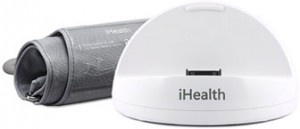
Of course, we’ve seen weight loss apps and blood pressure logs before. But iHealth’s new Blood Pressure Monitoring System is different: it couples a handy app with the actual hardware.
Available soon in the iHealth Blood Pressure Monitoring System is comprised of a blood pressure arm cuff and a portable, battery-powered dock which doubles as a charging station. Fire up the accompanying app, and testing your blood pressure becomes an easy matter. Not only will the app give you a reading, but it also stores the information so that you can later view your daily blood pressure history. This allows you to track your blood pressure over time as well as graph the data. You can also share the data with a family member or doctor.
What’s great about this is that monitoring your blood pressure at home correlates to having it under control, and therefore better health: a recent report found that those who monitored at home were 50 percent more likely to have their blood pressure under control. From iHealth’s press release:
“Regularly monitoring blood pressure in a relaxed consistent setting gives users the most reliable information on the status of their cardiovascular health,” said Dr. Andrew Brandeis, a practicing physician at Care Practice in San Francisco. “More important, iHealth—for the first time—reveals trends and fluctuations in the data and enables the user to easily share the information using their iPhone, iPod touch or iPad, which encourages and reinforces lifestyle changes in real time.”
The iHealth Blood Pressure Monitoring System will be on sale for $99.95 at iHealth99.com soon. The way I see it, iHealth is one of many examples of how the iPhone is far more than just another smartphone—it can do some really amazing stuff, with real results. Who would’ve thought we’d ever be able to conduct a blood pressure test on our cellphone? This is more than another “cool app” like Smule’s long-since-released Ocarina; iHealth actually has the potential to improve lives.
Update: Brian Atz, Founder and CEO of Intelli-Diet, has informed us that the application was successfully submitted and approved by Apple, and is now available to buy. You can download the application through the links below.
Dieting applications and weight planners need something special to make them noticed. It seems that in today’s fast-paced world, the ‘newest diet’ lasts only five minutes until a newer one comes along. But most of these plans all have one thing in common: calorie counting. It’s tried and proven. Or is it?
“After spending $100s on weight loss books, I learned the same thing over and over, eat less and count calories. What I needed was a plan!” writes Brian Atz, the 26 year old Founder and CEO of Intelli-Diet. “To adopt this lifelong, healthy lifestyle, I needed to understand how many calories I burned a day, how many calories I should eat a day, what percent of my calories should come from protein … needless to say, this was way too time consuming, and I quit after 2 weeks.”
Intelli-Diet does things a bit differently. Instead of offering a standard run-of-the-mill calorie-based application for tracking your weight, the application provides three steps to a healthier lifestyle. The first is a personalized eating plan, with no calories mentioned. Next up, an automated grocery list that only has items that you actually like. Thirdly, Intelli-Diet provides weight loss tracking charts and tables for a quick visual reference as to how your diet is going. In addition, the application integrates with Twitter and Facebook so you can keep everyone in the know (if that’s your thing).
“The day I picked up my iPhone, I had an epiphany. This little device, which is always with you at all times, had the power to convert this wealth of data into a format that people can actually use to lose weight.” says Brian. He has since partnered with a Chicago-area registered dietician and developed a database “using the healthiest, most economic and accessible foods” around. The application is now live and priced at $3.99
General Electric have just rolled out a new version of the App Store lifestyle application Morsel, having attracted almost a quarter of a million “morsels” – small steps towards a better, healthier lifestyle. Morsel 2.0 is free to download and provides small, actionable steps to better health. The update brings about a number of new features, including: share via Twitter and Facebook; customizable favourites and to-do lists; personalized plans; and the ability to share with the world your own “morsel” of information.
“The new version of free mobile application ‘Morsel’ provides a manageable and rewarding program to take a daily simple step toward better health” writes GE in their press release, “while also allowing you to promote and share that healthy activity with your friends/family/colleagues.”
Each morsel is described in easy to understand language, and comes with “How It Helps” page. For example: Hold your finger in front of your race. Stare at it for 30 seconds, then look away … If you spend most of the day looking at your computer and objects that are nearby, chances are you’re at greater risk for nearsightedness. This distance-focusing exercise will help you strengthen your eye muscles and maintain your vision.
The application is available to download now, and is coming soon for Blackberry and Android. As a free application, there’s no reason not to check it out!
You probably know that drinking water is good for you, but do you know how much you are taking in each day and how much you should be? Do you know which foods hydrate you and those that dehydrate? Absorb Water is a simple iPhone app that can tell you how much hydration you are getting from anything you eat or drink that has a water content over 65%. Whether you’re eating fruit or drinking beer, you can add your intake to the app and then chart your progress. Cleverly, the app isn’t all about the foods that are giving you water but those that take it away too, with one of the less pleasant but ultimately important parts of the app being the Mellow Yellow chart that lets you calculate your urine color and determine your hydration level. Come on, you know you’ve always wondered!
The ultimate aim of Absorb Water is to help you drink the equivalent of 12 glasses of water every day but doesn’t force you into heading to the faucet every five minutes. By using foods as well as drinks and monitoring them within the app, you have a much better idea of how much you are ingesting and how much more you need. As apps go, this is a healthy and fun tool that will be frequently updated by developer Syndicated Puzzles as more feedback is gained from users.