| |
Hex codes and RGB values might sound like another language to many but they’re vital tools of the trade for designers and developers. Every color has its own hex code and RGB value which in turn can be used to re-use the color elsewhere such as on a webpage or when programming a new app or game.
Finding out the codes is not always as easy as it should be though.
Enter Color Matcher, an app that takes out all the trouble. Simply run an image from the photo library or directly from the camera, and take a look. Colors can then be put into palettes to be easily organized and a recent history section makes it easy to consult earlier color entries.
It’s the kind of tool that will instantly become a firm favorite with designers and developers alike thanks to its simple yet effective layout that works just perfectly.
Color Matcher is freely available for all iOS devices now.
FREE!  iPhone App - Designed for the iPhone, compatible with the iPad
Released: 2011-05-17 :: Category: Utilities

I get a lot of e-mails daily, most of them the usual snore-worthy PR mailshots from the App Store big boys .. and of course (well, at least most of the time), these are about upcoming games and apps for the iPhone itself. So, it was refreshing this morning to receive the heads up on a new completely open-source project from iPhone development studios Edovia and FutureTap.
Originally a Canadian-German co-production between both firms, InAppSettingsKit is an open-source project which allows iPhone developers to place settings in-app, as opposed to hiding them away in the iPhone OS Settings.app.
Edovia and FutureTap admit there has been extensive discussion among the iPhone community about which option is better. Do you oust your app’s settings to Settings.app and hope the user finds them successfully, or do you opt for the in-app route and risk cluttering your once streamline app with a bunch of settings most would only use on the rare occasion? According to Edovia and FutureTap, there are quite a few reasons in-app settings should be considered.
- Settings.app becomes a total mess with longer load times
- If only in Settings.app most users simply don’t understand the mechanism and miss the settings
- A context switch is needed to switch between settings and the app. If on the 16th screen, this involves quite some tapping and flicking.
- In-App settings can instantly change the behavior of the app
Sure, in-app settings are popular. After all, What’s better than to be able to edit the global settings of an app, without having to leave the actual app? We’ve seen a slurry of the big name apps take this approach. Including the likes of Twitterrific, AIM and more recently, Tweetie 2 .. among others.
What’s interesting about this project is, as a developer, instead of having to choose one route and ultimately having to accept the consequences via user feedback, it proposes a new outlook on settings for iPhone OS. Dubbed ‘Hybrid Settings’ the settings are place in Settings.app sure, but they’re also available in-app too, providing the best of both worlds – and don’t worry about visual consistency of your settings either, using the kit your in-app settings will look just like as if they were pulled straight from Settings.app.
“We’re proposing a second approach that we call “hybrid settings”. In this model, the user has the choice: the settings are available in Settings.app. But they’re placed in-app as well. That way, every user can decide where to edit the settings. The in-app settings are a 100% clone of the Settings.app style.”
Developers can find out more about the project at InAppSettingsKit.com – and if you have an app and you’ve recently added the InAppSettingsKit to it, the guys at Edovia and FutureTap want to know. Add yourself to the list at: inappsettingskit.com/apps.
At 148Apps, we pride ourselves at providing the best coverage of the App Store through our reviews, news, and editorial pieces. We’re here to give you the information you need about an app before you make a purchase and to keep you up to date on the latest happenings in the iPhone community. But there are two sides to the iPhone community that we could be assisting instead of just treating it as one single entity.
There are over 11,700 iPhone app publishers in the market right now, all vying for the chance to make their app the next big success. Each publisher could represent one individual making their own app, or a full team working on a string of applications. Beyond development, there’s also the marketing, financing, and customer support aspects that all need to be addressed by the developers. And that’s the beauty of the App Store, anyone can wear those hats as long as they’ve got the drive to do so.
But where do they get their information? Who do they learn from? What resources are made available to those willing to enter into the App Store? For $99 Apple will give you the tools and access to make an app, we want to give you the tools to make a business out of it. After all, everyone benefits from a stronger community.
Enter 148Apps.biz
Where 148Apps.com is more tailored toward consumers looking for apps for their own device, 148Apps.biz is a resource for everyone connected with the creation of iPhone apps. And to truly make 148Apps.biz a community resource, we’ve invited all reaches of the iPhone community to contribute to our site, to make it the strongest and most robust iPhone business resource available. 148Apps.biz is for the community, by the community.
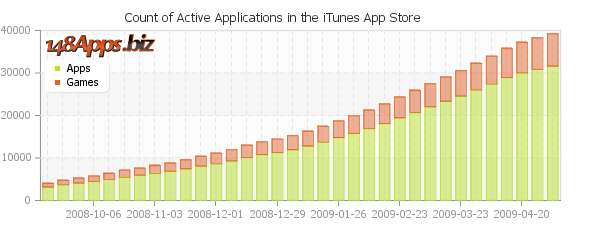
On top of providing that outlet for those well versed in their area of the iPhone app process to speak their mind and provide valuable insight, we’ll also be providing the most accurate App Store Metrics available anywhere on the web. In depth info on what is in the app store, invaluable intelligence for iPhone app development.

If you’re involved in iPhone app development and interested in sharing your knowledge and resources with the rest of the community, we invite you to check out our Submit An Article page over at 148Apps.biz. We’re looking to you to help make the community a stronger, better place, where those new to the scene and those already experienced have access to the tools and knowledge that will help them make the best apps possible.
So take a look at 148Apps.biz and let us know what you think. After all, it is your site!
When thinking of the word flurry, one could imagine a gust of floating snow, but there is nothing cold or wet about Flurry Analytics.
Flurry Analytics is a leading cross-platform mobile application analytics provider for iPhone, Android, Blackberry and Java ME developers. With the intention of helping developers make better applications by providing consumer behavior and application performance analytics, Flurry announced the release of two ground-breaking extensions to its analytic services: User Path Tracking and Dynamic Parameters.
The User Path Tracking will monitor the sequence of actions completed in mobile applications by consumers and the Dynamic Parameters will analyze user-generated content and other user action data within mobile applications.
“Flurry is committed to dramatically raising the standard of iPhone and Android Analytics for its customers,” said Flurry CEO, Simon Khalaf. “Building the ability to track user flows and event parameters was technically challenging but exactly what our customers needed to better understand their consumers, increase retention and grow their active user base.”
The User Path Tracking gives developers the chance to track the sequence of actions that consumers complete in their applications from the time of launch, thus giving the option of using the collected data to increase user satisfaction and retention by improving the design of an application and discovery of key features.
In addition to the ability to track when end-users perform key actions, developers can now “describe” and understand how that action was completed in richer detail with Dynamic Parameters.
Click here to learn more about Flurry Analytics.
The 360|iDev conference has just wrapped up, and it’s been a great one. The three day conference which had ticket prices as low as $200 (a steal!), was attended by roughly 150 developers. Talks were divided roughly into 4 different tracks including business, game development, non-game development, and hands-on. Everyone attending the conference we talked to were very impressed with both the organization of the conference and the quality of the speakers.
360|iDev has a sense of community much more so than most developer conferences. The community feel puts everyone at ease and allows greater participation than a larger conference like WWDC. 360|iDev is put on by a duo of part-time conference organizers, they’ve done a fantastic job, we’re already looking forward to the next one.
“Some of the best and brightest iPhone and Apple development community in one conference. It’s fantastic. I’m looking forward to the next one.” said Keith Shepherd from Imangi Studios, developer of Imangi and Little Red Sled.
The organizers are looking to have another 360iDev conference in about 6 months, this time on the other side of the Mississippi river. I’d suggest following them on Twitter to keep informed of the next one.
March is loaded with conferences related to iPhone development. There are three major conferences going on in the San Francisco bay area alone. Let us know if you are headed to any of these, I’ll be at all three and would love to meet up.
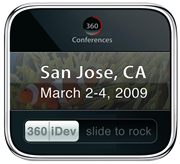
360iDev
March 2 – 4, 2009 – San Jose, CA
More info: http://www.360conferences.com/360iDev/
First up is the 360iDev conference. This conference is a little looser than that most, but it’s 100% iPhone specific. Some great sessions are already scheduled. Topics include everything from development specifics, business aspects, even a session on iTunes Connect. On top of that, it’s an amazingly cheap conference considering the 3+ days length.
The pricing of the tickets is tiered based on when the tickets are sold. The first 100 tickets at $200, then 200 tickets at $350 and the 100 tickets at $499. Some of the $200 tickets are still available, grab them now while you still can.
iGames Summit 2009
March 19, 2009 from 12:00 PM – 5:15 PM (PST) – San Francisco, CA
More info: http://www.igsummit.com/
The iGames Summit promises to be a very interesting, though short conference. This 1/2 conference in San Francisco has some real heavy hitters lined up to speak. Scheduled to speak include Neil Young from ngmoco, Andrew Lacy from Tapulous, Ge Wang from smule, Mike Pagano from EA Mobile, and many more. Check out the site for the full lineup.
Tickets are still available for this conference, earlybird tickets are $299 until February 19th. You can save 15% on General Admission Tickets when they go on sale (after 2/19) if you use the code 148APPS at checkout.
Game Developers Conference / GDC
March 23-27, 2009 – San Francisco, CA
More info: http://gdconf.com
The grand daddy of all game developer conferences. This one is huge. While not iPhone centric, game developer centric, there will undoubtedly be plenty of iPhone discussion going on. This 5 day conference is the place to learn about the latest technologies in game development. It includes multiple courses from Business, Audio, Game Design, Production, Programming, and Visual Arts.
I’m going to be at all of these conferences. If you are going to be there and would like to meet up, maybe to show me what you are working on, send me a message via Twitter @148Apps or an email at review dot monkey (at) 148apps dot com. Looking forward to meeting more of the great iPhone developers.
| |