Having spent a decent portion of my retail career involved in the children’s section of a bookstore, I think I have a solid grasp of what makes for popular literature among parents and their children. There’s always one or two “flavors of the week,” but there are also those that always sell. Where the Wild Things Are. The Velveteen Rabbit. Virtually anything written by Mo Willems or Sandra Boynton. Sitting proudly at the top of this list are the works of the undisputed monarch of children’s literature, Dr. Seuss.
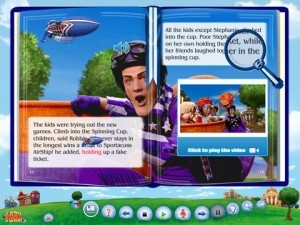
Theodor Seuss Geisel‘s stories have been adapted for all manner of medium, not surprisingly including iOS. Oceanhouse Media has been offering special adaptations, referred to as “omBooks” for portable Apple devices for quite a while now. These special not-quite-ebooks allow users to flip through their virtual pages normally, have the stories read to them at a set pace (not unlike a movie) or a hybrid of the two that narrates while emphasizing key words.
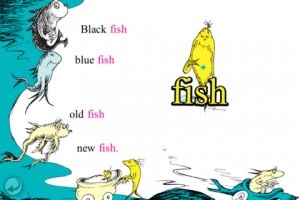
While individual Seuss classics have been available in this form for quite some time, Oceanhouse has released their first-even multi-title collection. The Dr. Seuss Beginner Book Collection #1 features five of (arguably) his most well-known works: The Cat in the Hat, One Fish Two Fish Red Fish Blue Fish, The FOOT Book, Mr. Brown Can MOO! Can You? and Fox in Socks. Five classics, no waiting. Well, depending on one’s WiFi speed, anyway.
This collection is on the App Store right now for $11.99. I know it may seem like a lot, but buying each of these omBooks individually would cost around $15 or so. And that’s after the price drops in celebration of Dr. Seuss’ birthday. Anyone with an appreciation for all things Seuss should certainly check this out.
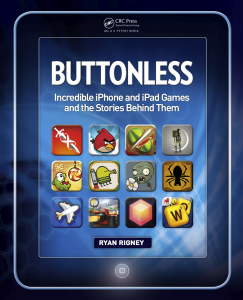
Buttonless: Incredible iPhone and iPad Games and the Stories Behind Them is coming out December 21 (and available for pre-order now) to bookstores and online retailers everywhere. It’s a book about iOS games and their stories by Ryan Rigney, a freelance journalist who has covered the video-game industry from every angle for publications and sites including Gamasutra, PC Gamer and GamePro. We managed to talk with him for a bit about the inspirations for the book, among other things. Click through to the post for the interview AND an exclusive chapter from the upcoming book, all about Fruit Ninja.
Harold and the Purple Crayon is a wondrous and thoughtful adaptation of the classic 1955 children’s book of the same name that had been developed into an interactive storybook, now a universal application.
I remember Harold and the Purple Crayon from my childhood and have shared this story with my son as well. Few children’s books that I can think of beg to be turned into an interactive storybook as much as this one does, and I have been eagerly waiting for this to be developed into a universal app, knowing that at some point this was bound to happen.
I am very eager to introduce this app to readers who may not know of its existence. It is the perfect experience that I expected with every element thoughtfully conceived, making this book a joy to share with my son.
Posted May 18th, 2011 by Gianna LaPin Our Rating: :: IT'S A KEEPER
Book Crawler aims to put a virtual card catalog in your pocket -- whether it’s for books you own, books you’ve read, books you lent out, or all three – and does so with some mighty powerful tagging and sorting features.
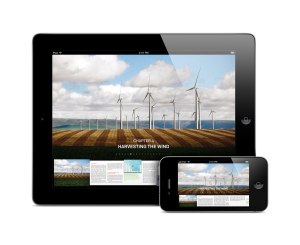
The Our Choice app is Al Gore’s book on global warming converted to an interactive app. The book examines causes of global warming and solutions in the works to stop it. Gore touches on subjects like solar power, nuclear power, wind power, biomass energy, deforestation, and more. The physical book itself is #1 in books on climatology on Amazon.com and #10 in public policy.
The app is packed with features. Al Gore’s commentary, read by Gore himself, is available throughout the app. Pictures and videos pop out and are occasionally accompanied by commentary. Info-graphics are sprinkled throughout the app with various data about global warming and related topics. The app also includes over an hour of documentary footage.
Basically anything in the app can be “picked up” and uses multi-touch in some way: pictures can flip over or fold out, one can zoom out to the visual table of contents, finding the location of a picture can be done by tapping a globe, etc. Push Pop Press, the developers of the app, call it “the next generation of digital books.”
On the Push Pop Press website, names, information, and pictures of each chapter are available. Take a quick scan through what the app consists of before taking the plunge to buy it. The app is selling for $4.99 and is available for both the iPhone and iPad. With the paperback on sale for about $15, it seems a steal to get the book plus all of these extra features for only $5. Al Gore describes the app in the video below.
Loris and the Runaway Ball is a simple and lovely universal storybook app about the dangers of running into the street after a run-away ball.
As a parent, one of my biggest concerns is that my fearless child will run into the street to collect a stray ball or other toy and get hit by an oncoming car. As much as we talk about this in order to reinforce this important lesson, I worry that it is never enough for this utterly crucial message to sink in.
This is a sweet story, told from the point-of-view of a loving older brother Lincoln, about how one day he is playing with his little sister Loris and their ball rolls into the street, and now lincoln needs to save his sister from her horrible decision to go after the ball. Luckily the older brother does get to his sister just in time, something I have not yet had to do, and hope I never have to.
Most people who have seen my new iPad react with the same question, “should I get this or the Kindle?” Apple, obviously, intended its iPad to be perceived as much more than an eBook reader. Yet the much publicized launch of the iBookstore, along with the iPad’s slim form factor, have led many consumers to perceive the iPad as an expensive eBook reader.
The Kindle is the Premier eBook Reader
Amazon's Kindle 2
The Kindle was launched solely as an eBook reader and is marketed as such. Jeff Bezos, on introducing the device, said of the Kindle that “it’s so ambitious to take something as highly evolved as the book and improve on it. And maybe even change the way people read.” Amazon has definitely done much of the legwork in improving the acceptability of the eBook as a new medium for written material. Amazon’s true innovation was bringing E-Ink technology to the consumer market, along with doing the technical legwork to simplify the reading experience. At its core, the Kindle is a delivery device – a user purchases a book as they would online and finds it available for reading seconds later.
The reading experience does everything it can to mimic the experience of paper, all of which is aided by E-Ink. The screen is technology’s response to those who complained that they would never be able to read a book on a traditional LCD screen or a laptop. The Kindle itself is merely the size of a large paperback and is lighter than most printed books. The Kindle is Bezos’ effort to translate the book for the digital age, and he has largely succeeded in providing a popular and widely accepted new platform.
The iPad as an eBook Reader
Apple's iPad with iBooks
The iPad has benefited from terrific interest from both book publishers and book retailers. As a consequence we’ve seen innovative new packages like the Vook and traditional books from retailers like B&N, Amazon, and more. While the Kindle has a terrific – and probably the largest – bookstore, the iPad offers more choices for where you get your ebooks.
There’s Apple’s iBooks, Amazon’s Kindle reading app, B&N’s new iPad reader, and more. The three largest players each offer different solutions to the eBook problem. iBooks tries to mimic the feel of a physical book, utilizing a color UI with beautifully rendered page turns. The Kindle’s UI is black and white and encourages the same type of user interaction as the physical Kindle – a simple tap on the side of the screen changes pages in a fluid transition not as visually distracting as that of iBooks. B&N’s app allows users to choose from dozens of different visual settings but maintains the same fluid page transitions as Amazon’s Kindle app. Only the iBooks app has a store in-app; the others force the reader to go to Safari to purchase books. This is a definite snag in the clear workflow Bezos presented with the original Kindle, but one that I’m sure both B&N and Amazon will surmount in future applications.
The iPad’s reflective LCD screen probably isn’t the best for simply reading a book. It’s a pain in the sun, where it’s nearly impossible to see the text on a page. E-Ink mainly solves this problem with its screen. People who have issues reading for long periods of time on their laptops may wish to reconsider an iPad purchase if it’s intended solely as an eBook reader. While the reading experience is cleaner and more enjoyable, it’s the same experience as the backlit screens most notebooks include. In addition, the iPad’s battery life is rated at 10 hours, enough for most commuters but nowhere near the weeks the Kindle can last for.
The iPad as a Platform: Bigger Than Books
A Vook on the iPad
The key differentiator between the two comes when we move beyond the simple eBook reading features. The Kindle includes a browser, but not one that functions nearly as well as the iPad’s. It’s black and white and renders incredibly slowly due to the E-Ink screen technology. The iPad’s Safari browser is widely regarded as one of the best on a mobile platform.
I’ve always seen the iPad as more than a traditional book reader as well. The Kindle simply translates the book reading experience into the digital age but strives not to completely alter the way we experience books. New features like Amazon’s Popular Highlights add subtle suggestions about the importance of a passage but do not redefine the reading workflow. Cool ideas like the aforementioned Vook change the reading experience by adding videos, multimedia, more information about certain topics (with links) and more. Could the iPad help the form of the written word change? Only time, and developers, will tell.
Decisions, Decisions
Those of you struggling with the decision to purchase an iPad or a Kindle might want to do some soul searching. What do you want from your portable device? Just books and nothing more? Buy a Kindle – that’s what it’s meant for. But if you’re looking for a small computer, with thousands of different and innovative new applications that could redefine reading, the iPad is for you.
Beyond the unusual name, Mongoliad is an exciting new project that could play a part in changing the landscape for modern-day literature and the way it’s published. While everybody is busy talking about how the iPad could revolutionize the magazine market, this new serial novel collaboration is breaking new ground for both writers and consumers of traditional books.
Looking beyond the simple eBook reader mentality, Mongoliad harnesses the writing skills of Neal Stephenson, Greg Bear and others who will all contribute to the developing narrative. While a traditional story exists, Mongoliad’s aim is to create a world of interactivity between writers, readers and other non-literary members who can contribute to and enhance the story.
Mongoliad is due for launch this year and will be available on the iPhone and iPad.
Demoing just a few of Mongoliad’s promised features, Jeremy Bornstein of Subutai told us: “We think that devices like this really change publishing in a pretty fundamental way. Not just moving books into eBooks but really allowing for a lot more creative possibilities for engaging audiences”.
Set in around 1241 with the Mongol hoards threatening to destroy Europe, the novel will pull from a number of sources to ensure authenticity and from what we’ve heard so far, this includes experts in sword fighting to provide a healthy dose of swashbuckling knowledge.
The ins and outs of Mongoliad are still sketchy right now but we’re excited to see how the project progresses and, with such big names on board, how many others attempt to produce their own “novel within an app within an online service”. Most will likely be waiting to see the kind of buzz Mongoliad generates before taking the plunge but, from what we’ve seen so far, it’ll only be a matter of time.
iPhone App - Designed for the iPhone, compatible with the iPad
Posted November 2nd, 2009 by Bonnie Eisenman Our Rating: :: MAGICAL
QuickReader is a speed-reading tool that can produce remarkable results. I was shocked by the rate at which my speed improved. Your mileage may vary, but if you're a frequent reader you owe it to yourself to give this one a go.
iPhone App - Designed for the iPhone, compatible with the iPad
Posted July 21st, 2009 by Bonnie Eisenman Our Rating: :: EXCELLENT
The B&N eReader is a fantastic piece of software that is far superior to Amazon's Kindle for iPhone app. But without a killer piece of e-ink hardware, B&N's app might not be widely adopted...yet. Regardless, I'm ecstatic that there's a new player in the ebook field, especially since this is the best eReader app I've seen so far!
iPhone App - Designed for the iPhone, compatible with the iPad
Posted May 12th, 2009 by Christine Morris Our Rating: :: INTERESTING
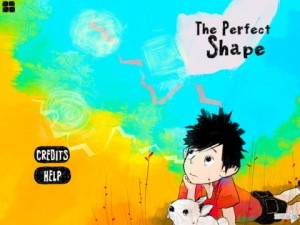
A beautifully drawn Manga comic for your device. The graphics are stunning and a comic could make a nice gift idea for the geek in your life. [me! me!]
iPhone App - Designed for the iPhone, compatible with the iPad
Posted March 27th, 2009 by Bonnie Eisenman Our Rating: :: RECOMMENDED
WordDigest is a dictionary app with a huge database and a number of useful features, including bookmarking, browsing history, a thesaurus, and more. If you're looking for a solid dictionary, this is one to consider.
iPhone App - Designed for the iPhone, compatible with the iPad
Posted March 4th, 2009 by Perrin Stewart Our Rating: :: RECOMMENDED
While not the most robust ebook reader around, Amazon has just laid down the gauntlet in the iPhone / iPod Touch ebook war. Get instant access to over 240,000 books, even ones you've previously purchased for your Kindle!
iPhone App - Designed for the iPhone, compatible with the iPad
Posted February 23rd, 2009 by Bonnie Eisenman Our Rating: :: RECOMMENDED
Next Read helps you to keep track of books that others have suggested for you—suggestions that might otherwise be lost. Literature lovers will find Next Read to be a useful way to organize suggestions; others should probably pass.
iPhone App - Designed for the iPhone, compatible with the iPad
Posted February 18th, 2009 by Christine Morris Our Rating: :: HIGHLY RECOMMENDED
This application is a singing book designed to entertain a young child. However, it is much more than that. It has multiple languages, instruments and recording support, turning it into a great educational tool.
iPhone App - Designed for the iPhone, compatible with the iPad
Posted January 16th, 2009 by Gary Lucero Our Rating: :: RECOMMENDED
iPhone - The Missing Manual is a Stanza ereader based book that thoroughly explains every feature of the iPhone, from its cell phone features to its iPod features, and its vast array of apps, those built-in and available from the iTunes app store. It covers the 3G version of the hardware but also makes references to the first gen version.
iPhone App - Designed for the iPhone, compatible with the iPad
Posted December 24th, 2008 by Perrin Stewart Our Rating: :: HIGHLY RECOMMENDED
Stanza is one of the preeminent ebook readers on the iPhone / iPod Touch, with an intuitive interface, support for a wide variety of ebook formats, and an online store.
iPhone App - Designed for the iPhone, compatible with the iPad
Posted December 23rd, 2008 by Gary Lucero Our Rating: :: RECOMMENDED
eReader is a electronic book reader for the iPhone and iPod Touch. While there are other alternatives, some free and some not, eReader works well, is reliable, and makes reading a joy on the iPhone and iPod Touch.
This week at 148Apps, Tweetbot was on a roll, a new storybook app joined the fold, and - oops - apps broke the Super Bowl. There's more to read, so get to it!