Posts Tagged tv

U-verse has released an app for subscribers to their TV and high-speed internet service that brings both control of their receiver, along with access to on demand video. By downloading AT&T U-verse for iPad and logging in to the user’s AT&T U-verse account, the app’s functions become available.

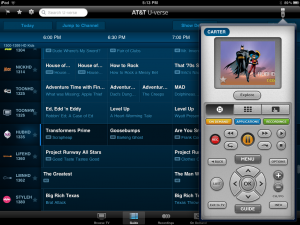
The app’s first function is to serve as a remote for a U-verse receiver. By setting up the U-verse receiver by turning to channel 9301 and enabling remote device access, it can then be discovered by the app. The app offers virtual remote buttons for changing the channel, rewind/fast-forward controls for recordings and live TV, pause/record buttons, and all the other basic commands available on the U-verse remote. As well, the app has an easy-access guide with the ability to quickly jump to the channel, and to record future programs easily. Receivers can be independently named and controlled, so it’s possible for multiple iPads to control different TVs in a house.

For those who have a secondary router on their network to extend their network or because of device incompatibility (AirPlay to an Apple TV has issues with the U-verse router in particular) will need to connect to the U-verse router directly, as even having both devices on the same secondary router will not work.

The app also offers on-demand video from U-verse’s on-demand selection that can actually be watched on the iPad itself. These videos can be watched anywhere, not just on the U-verse network. It ironically also supports AirPlay to a TV, which may explain just why the AirPlay protocol has issues with U-verse routers. The app does have the notable lack of any kind of live TV – especially considering that Comcast launched their own iPad app with live TV just a month ago.

Still, this app should make it much easier for U-verse users to control their TV and watch the content they want, thanks to the touch interface provided by the app. AT&T U-verse for iPad is available now.

FREE!
iPad Only App - Designed for the iPad
Released: 2010-12-18 :: Category: Entertainment

Fanhatten already offered TV and Movie fans tons of entertainment by providing ratings, general information and then linking users to popular streaming services from iTunes, Hulu Plus and Netflix to Crackle and PBS.

Now they have updated to incorporate the hottest trend in in online news – discovery. The app is now a one-stop shop for celeb 411, reviews and streaming, but also personalized news feeds and recommendations based on social networks and predictive algorithms.

Fanhatten now boasts over 60 major entertainment publication sources including Billboard, E!, Entertainment Weekly, TMZ, Rolling Stone, and People.

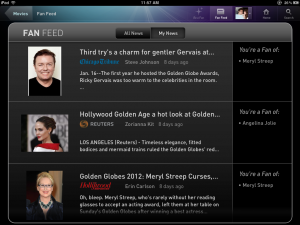
But the new Fan Feed is where to find the action. The app allows users to select favorite shows, actors, even directors and brings up content that is tailored to individual taste. As users spend time with Fanhatten and add more likes, the feed gets progressively “smarter”. If friends use Fanhatten too, the app offers a social component and shared recommendations as well.

Now that the already rich content comes with discovery and social components it should not only please its own existing fans, but create a new market for people who aren’t looking to stream necessarily, but who are looking for what – and whom – to watch no matter how they access the video.

FREE!
iPhone App - Designed for the iPhone, compatible with the iPad
Released: 2011-11-15 :: Category: Entertainment

FREE!
iPad Only App - Designed for the iPad
Released: 2011-06-01 :: Category: Entertainment

Function (X) Inc. launched the first loyalty program for television last week called Viggle. What seems like technology similar to Shazam, the fourth most downloaded app of all time, Viggle automatically identifies the show the user is watching by listening to what the characters are saying. After users launch the app and check in to their show the app awards them with points that can be redeemed later at places such as Best Buy, Burger King, Fandango and Old Navy.

Extra bonus points can be earned by watching featured shows such as “American Idol” and in-app commercials. Currently, the app awards two points per every minute watched. Most $5 gift cards to places such as Starbucks and Burger King cost 7,500 points, but right now the company is running a limited time only special for a $5 gift card to Amazon for only 4,000 points. Users can also set reminders and read detailed information on their favorite shows from within the app as well as share their check-in on Facebook and Twitter.

FREE!
iPhone App - Designed for the iPhone, compatible with the iPad
Released: 2012-01-25 :: Category: Entertainment

Amongst other things, I’m a proud Brit because of services such as the BBC. Producing quality television and radio for many decades, the BBC is an all round fantastic service to be able to access. The company is also not afraid of trying out new technology with the successful launch of its Video-on-Demand service iPlayer coming to the iPad earlier this year.

Not quite as accomplished as something like Netflix, iPlayer has enabled users to catch up on television and radio shows previously aired on a BBC channel in the past seven days. It’s the kind of thing that becomes incredibly useful for those who hardly watch a traditional TV set any more.

That’s a service that hasn’t been open to all around the world though, most notably with the omission of USA and Canada. While there’s still no sign of the USA being added to the countries supported, Canadian iOS users will be pleasantly surprised with the latest announcement. iPlayer will now stretch to 16 countries comprising of Australia, Austria, Belgium, Canada, Denmark, Finland, Germany, Italy, Luxembourg, The Republic of Ireland, The Netherlands, Portugal, Spain, Sweden and Switzerland as of this Thursday. Hopefully for USA fans, it’s just a matter of time until relevant licensing is implemented.

To further add to the excitement for users in those countries, the iPlayer app will be available to iPhone and iPod Touch users from Thursday too. No longer will users be restricted to the website as they can now use the immediately useful and free app instead.

While we’re writing about exciting news, a deal has been arranged with programme distributor DRG to supply the service with many iconic British TV shows in early 2012. These will range from the likes of Peep Show, Black Books, Green Wing, Father Ted and Shameless – all shows that I can confidently say are fantastic examples of what quality television can come out of the British isles.

The new and improved iPlayer app will be released on Thursday but is currently already available for iPad users in the relevant region.

[Source: TheNextWeb]

As anyone with cable TV will tell you, picking what to watch isn’t as easy as it could be. While there’s always a channel guide to browse through, it’s frequently not very intuitive when it comes to finding the right show. Fortunately, Peel – Personal TV Show Guide jumps right in there and tackles that dilemma.

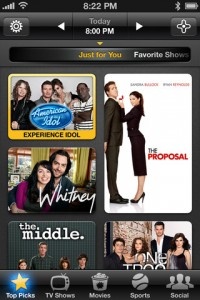
Kind of like an app version of Tivo, Peel – Personal TV Show Guide recommends shows according to what favorites the user adds to the system. The more the app learns about TV tastes and preferences, the better the suggestions become.

An attractive app to look at, it’s simple to flip through the colorful thumbnails of each TV show and these thumbnails can lead onto episode descriptions and other details. Perhaps most useful is that of the ability to search for any show and Peel – Personal TV Show Guide lets the user know exactly when it’s on and what channel to tune into.

Peel – Personal TV Show Guide is bound to save some time for the avid TV watcher, all the more so with Christmas coming up.

It’s out now and it’s free to download.

FREE!
iPhone App - Designed for the iPhone, compatible with the iPad
Released: 2010-10-15 :: Category: Social Networking

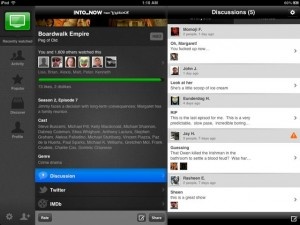
IntoNow from Yahoo! functions on the premise that watching television should be a communal experience. The app, in part, is like having SoundHound for TV. When launched, it listens to the show playing, and seeks out that specific pattern to find the specific episode being watched. Once identified, a panel opens showing how many users watched the episode, a one-line synopsis and a cast list, but only the regular cast, not guest stars.

While watching live or recorded programs, fans can chat with other users and their friends who use the service – spoiler alerts included – or check out the buzz on Twitter. For sports the app even has stats.The app is also a TV discovery tool. IntoNow’s appealing GUI and the “something new” factor could really change how people watch live and recorded TV.


FREE!
+ Universal App - Designed for iPhone and iPad
Released: 2011-01-30 :: Category: Social Networking

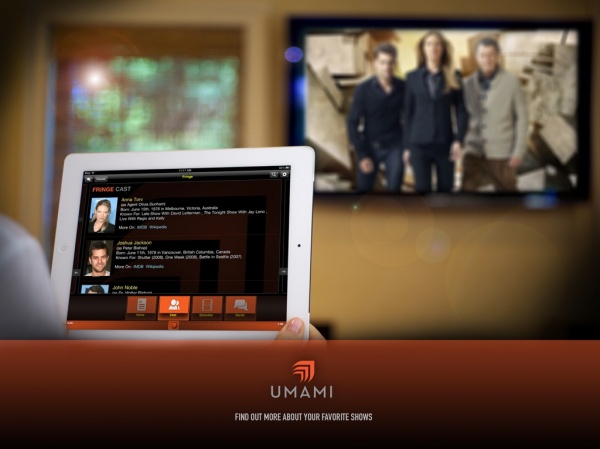
The idea of the “second screen” during TV viewing has arisen recently, as TV watchers increasingly use their phones and now tablets while watching TV. An app called Umami is now available that allows users to interact with their TV shows as they’re on. Users can see social feeds from the general public and show cast members, browse information on recent episodes, and more. Some shows offer interactive elements such as polls for users to share their opinions, along with Twitter and Facebook support. The app uses audio fingerprinting recognition to detect what show is currently being watched, and to automatically pull up the correct show and episode information. This doesn’t just work with live TV; recorded shows that have recently aired can also be matched by the app. Shows can also be manually pulled up by users if they want to look up another show while not watching TV or watching something else. Umami is available now for free from the App Store.

FREE!
iPad Only App - Designed for the iPad
Released: 2011-11-08 :: Category: Entertainment

Last week, NBC announced that their NBC app for the iPad now offers full episodes to, in effect, mirror the functionality of the NBC.com website. In addition, new features such as watching video clips, playing games and scrolling through photos were added to their companion iOS application, NBC Live. The company hopes to bring the social viewing experience to its fans through, obviously, a company branded app.

“We are thrilled to offer our fans full episodes via our NBC.com app. Now the app truly reflects the deep fan experience that we have created online at NBC.com,” said Vivi Zigler, President, NBCUniversal Digital Entertainment. “And our fans are going to love the latest update to the NBC Live app which now offers them more content, better access and a unique social television experience.”

The NBC app and NBC Live app are available for free from the App Store.

FREE!
+ Universal App - Designed for iPhone and iPad
Released: 2011-06-21 :: Category: Entertainment

FREE!
iPad Only App - Designed for the iPad
Released: 2011-04-08 :: Category: Entertainment

Not to be outdone, both TNT and TBS have also added support for full episodes, though they still are tied to app users needing to authenticate as cable subscribers. The apps, for both iPad and iPhone/iPod Touch, offer

- Full Episodes of TBS/TNT Series (after authenticating)
- Series Episode Guides
- Clips and Behind-the-Scenes Video
- Show Schedules with Reminders
- GetGlue, Facebook and Twitter Integration

FREE!
iPad Only App - Designed for the iPad
Released: 2011-09-08 :: Category: Entertainment

FREE!
iPad Only App - Designed for the iPad
Released: 2011-09-08 :: Category: Entertainment

While this may not be as earth shattering as the news from NBC, you can bet that we are witnessing a new paradigm in television viewing. Apparently, being able to create and control their own portal to their own television content has these companies, and no doubt others to soon follow suit, creating the cable-cord-free future we have all wanted from the outset. While the TNT and TBS offerings still require at least a financial link to cable television companies, the NBC announcement leaves no doubt that TV as we know it is changing forever.

[Source: MacRumors]

This Week at 148Apps: September 5-9

This week at 148Apps.com, we took a first look at Garmin’s new StreetPilot onDemand app. Rob LeFebvre writes, “The app itself offers 30 days of premium features for that dollar, including multimodal pedestrian routing, bus/train schedules, spoken turn-by-turn guidance with street names, 3D representations of buildings, traffic rerouting, photoReal Junction View and Google Local Search. Once the free month is up, users can pay $2.99 monthly or $29.99 annually, with a special introductory $19.99 annual price for this first year.”

Read more about StreetPilot onDemand on 148Apps.com.

$0.99
iPhone App - Designed for the iPhone, compatible with the iPad
Our Rating: ★★★★☆ :: AFFORDABLE
Read Our Full Review >>
Released: 2011-08-31 :: Category: Navigation

Meanwhile, at GiggleApps, we got the music playing with our review of Sylvester’s Band. Reviewer Amy Solomon states, “The illustrations are simply gorgeous to look at and I really appreciate how each location Henry visits has a unique landscape all its own, while maintaining the style used throughout this book, such as squared-off trees or cloud formations. I enjoy a great deal how the look of this story changes, becoming dark as the gang makes their way high into the clouds looking for William the Wolf. The details about lassoing the moon in order to bring it to the party create wonderful images that stayed with me after reading this book, my favorite moment of this story. It is also great fun the way each time Henry collects another band member they can all be seen, one by one, running to a new location. These creatures look great as well…”

Read the rest of Amy’s review on GiggleApps.com.

$4.99
+ Universal App - Designed for iPhone and iPad
Released: 2011-07-27 :: Category: Books

148Apps.biz featured an article about tablet owners and TV viewing habits. Kyle Flanigan writes, “According to the report, some 50% of tablet owners – iPad included – watch films and TV shows on their portable device for leisure. In the words of research director Keith Nissen, “tablets, in particular, have become a primary video device, both inside and outside the home.” There are few adjectives that come to mind to describe such a high percentage: unexpected, unanticipated and unprecedented began to scratch the surface.”

Find out more by reading the full story at 148Apps.biz.

And finally, AndroidRundown writer Carter Dotson announced G5 Entertainment’s first simultaneously-launched iOS and Android app, Stand o’ Food 3. “While G5 Entertainment only recently got on to the Android train, they aren’t wasting their time making sure their library of sim games are well-represented on the platform. In the past few weeks, both Supermarket Mania 2 and Virtual City have been released for Android, after their initial mobile releases on iOS.”

Read all about it on AndroidRundown.

That’s it for this week, but don’t forget to check out our ever-changing lists of apps, and make sure you keep up to date on all the latest news and happenings by following us on Twitter and liking us on Facebook. See you next week, true believer.

TV Forecast HD Review

TV Forecast HD Review

iPad Only App - Designed for the iPad
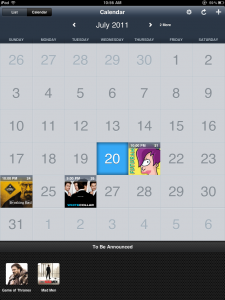
TV Forecast HD is shows a calendar view of new episodes of favorite shows.

Read The Full Review »

Favorite Four: Free Video Content

Most come to 148apps to learn which apps to spend their hard earned dollars on. Today I’ll mix it up, because my favorite four are apps with free video content.

Crackle

Crackle, a division of Sony, adds 20 new movies and TV episodes to its app monthly. It’s 100% free and a must-have app for anyone. It’s always there for me to just whip out and watch whenever I don’t really have a preference. Some of my current favorites available are 21, The Nines, The Karate Kid I and Final Fantasy VII: Advent Children.

FREE!
+ Universal App - Designed for iPhone and iPad
Released: 2011-04-18 :: Category: Entertainment

SnagFilms (iPad only)

SnagFilms is an app dedicated to nothing but documentaries. While documentaries aren’t for all movie-lovers, those of us who like them will jump at the chance to have an app filled with free documentaries. The app is currently boasting over 80 films and I’m hoping for more in the future. To highlight some available, it has “A to Zeppelin” about Led Zeppelin, “Close Encounters” about the existence of aliens, “Hell on Wheels” about a group of women trying to bring back roller derby, and “MacHeads” about us Mac fanatics.

FREE!
iPad Only App - Designed for the iPad
Released: 2011-01-05 :: Category: Entertainment

ABC Player (iPad only)

The ABC Player is a free app dedicated to catching up on various ABC shows. As far as I know, all shows available to watch on their website are accessible on the iPad app. This is an awesome app for anyone who’s a fan of at least one show on ABC. Currently, some popular shows on the app include Dancing with the Stars, Castle, Desperate Housewives, and Grey’s Anatomy.

FREE!
iPad Only App - Designed for the iPad
Released: 2010-04-01 :: Category: Entertainment

TED

While TED talks aren’t movies or TV shows, they’re definitely free video content – arguable the best free video content available online. It’s arguable because to say otherwise would be to argue with me! I love TED talks. Basically, they are talks almost any subject imaginable delivered by field experts. Some of my favorites include one from Adam Savage (Mythbusters guy), Pattie Maes about her SixthSense device, Malcolm Gladwell about spaghetti sauce (but it’s much more general than that!), and Sal Khan about his educational video program, Khan Academy.

FREE!
iPhone App - Designed for the iPhone, compatible with the iPad
Released: 2009-02-11 :: Category: Education

FREE!
+ Universal App - Designed for iPhone and iPad
Released: 2010-10-14 :: Category: Education

And it absolutely has to be noted that, we’re I living in the UK, the BBC iPlayer app would be at the top of my list for favorite free video content.

iPad owners will be excited to discover a new way of forming social connections via the fun that can be had watching TV thanks to BeeTV.

BeeTV allows users to share their favorite TV moments as they happen with their friends and others. Users are able to see what their friends are watching at the time, invite them to ‘join’ them in watching a show and see what hits are currently trending. Users in need of recommendations are also served well here with BeeTV aiding them by offering personalized recommendations based on what they’ve previously enjoyed.

The app encompasses Twitter and Facebook ensuring that it’s easy to see what’s going on at any point. Plus users can swiftly find new friends that like the same shows or films as themselves, extending friendships across the globe. Fact fans can also learn more about the show they’re watching at the tap of a button and they can receive notifications as to when their favorite shows are coming up next too.

BeeTV is a free app for the iPad and it’s available now.

FREE!
+ Universal App - Designed for iPhone and iPad
Released: 2011-05-17 :: Category: Social Networking

BBC iPlayer Review

Developer: BBC
Price: FREE
Version: 1.0
iTunes UK Link: BBC iPlayer

Design Rating: ★★★★☆
Features Rating: ★★★☆☆
Integration Rating: ★★★☆☆

Overall Rating: ★★★½☆

Last year, I reported on the launch of the highly-anticipated (and delayed) BBC News application:

“In less than 24 hours after its release, the BBC News application has shot up to #1 in the News category. It was a story about bureaucracy at its worst whenever the BBC Trust, BBC’s governing body, told their development team to shelve the iPhone application launch in the UK due to ‘uncertainty about the potential significance of whether [the BBC's plans] constitutes a change of service.’”

Over six months have passed since the BBC went live on the App Store, and now it finally has its much needed companion, the BBC iPlayer.

The application is a dramatic improvement over its web-based predecessor, both visually and in terms of features. Three categories – Featured, Most Popular and For You – work to bring you all of the latest TV catch with minimal fuss. iPlayer focuses on Radio too, with the Radio section receiving as much attention as its TV counterpart, including the same categories. Shows can be favourited, permitting quick access to your most important media. To make a show a favourite, either hold its miniature feature from one of the three categories and drag it up to the favourites bar, or tap “Add to Favourites” and it’ll do the rest. The favourites bar is accessible via the menu bar at the bottom of the screen, or by the star at the top.

Video quality is respectable, and the application offers High Quality where available. Unfortunately, it’s all Wi-Fi only, even for Radio, meaning 3G iPad ownerswill need to resort to creative means or join a Wi-Fi hotspot before media can be viewed. Obviously, stream quality will be network dependent, but in personal tests I found the video to be smooth and consistent. Content cannot be downloaded locally, so its online viewing only.

If you’re a parent who’s concerned about adult humour making its way into children’s ears, the BBC have included a Parental Guidance PIN that requires unlocking before adult-rated content can be viewed. A secret question is included in case you forget your PIN. However, be advised, once you enter a PIN there’s no way of reversing the process, meaning you’ll have to enter it in every time you want to watch or listen to a show marked with adult humour.

iPlayer includes a search and categories section also, the latter of which groups all shows into fourteen categories, ranging from Children’s to Films to Religion & Ethics. Conveniently, the search isn’t just by name only. Typing in Jeremy revealed a number of different shows that include Jeremy in its short text synopsis. Finally, the application also features channel listings for BBC One, Two, Three, Four, CBBC, CBeebies, News and Parliament. The entire week’s listings are present, along with a short text synopsis where available.

Overall, as a free tool, iPlayer will always remained installed on my iPad, but there certainly is room for improvement. Its lack of streaming over 3G is by far the biggest disappointment, something that its competitor The Guardian allowed last month in a major overhaul. In addition, you’ll have to manually check when new shows are added (related favourites will automatically be added to your favourites bar); a push notification alert wouldn’t go amiss for specific programs. Nonetheless, iPlayer is free, and that’s something not to be taken for granted. Better some features than none in this case.

Almost everyone is absorbed in some area of pop-culture, but with so many sub genres it can be hard to keep track of what all your friends and colleagues are into. This is why it is so important to leverage your social currency. If you are unfamiliar with the term, it is a communications phrase that represents shared information. Sometimes a little social currency is all you need to create a lasting friendship or even land a business promotion. Social networking is a good way to increase your social currency, and with the new app, IntoNow, you can be part of a new type of social network.

IntoNow is an app and a service that links to your Facebook, Twitter, and Netflix accounts in order to share and track your TV viewing habits. It even has a built in IMDb feature for instant access to the webs best source for movie trivia information. With IntoNow you can add shows to your Netflix Queue, get recommendations based on what your peers are watching, and discuss shows with your friends. The app will even let you know when your pals are watching the same programming as you.

Perhaps the most intruiging aspect of IntoNow is its “magic” feature that enables you to press a green button so the app can instantly find out what you are watching. This feature is supposed to work right down to what episode is on, and it is said to recognize shows that are being aired for the first time.

Even if you aren’t that into TV, IntoNow can give you a social edge during your next business luncheon or office party. The next time your boss references that obscure goat farming show you won’t be left standing with your mouth agape. The app is available for free on the App Store now.

FREE!
+ Universal App - Designed for iPhone and iPad
Released: 2011-01-30 :: Category: Social Networking

Mario Batali Cooks! Review

Mario Batali Cooks! Review

iPhone App - Designed for the iPhone, compatible with the iPad
No other cooking app quite compares to the singular Mario Batali Cooks!

Read The Full Review »
iTV Shows HD Review

iTV Shows HD Review

iPad Only App - Designed for the iPad
iTV Shows HD allows you to keep on top of both ongoing and already ended TV shows, thanks to aggregated data from TVRage and The TV Database.

Read The Full Review »

Apple regularly schedules a September event to unveil new iPods and other odds and ends in time for the holiday buying season. I think we can assume this year will be more of the same. What will we see and what won’t we see? I’m going to try to put some odds to the various rumors and possible announcements. Note that these are all just my opinion as a guy that watches what Apple does with a rather critical and overly obsessive eye.

New iPod Touch – odds: even money
It’s almost guaranteed we’ll see a new iPod Touch introduced. This, like the iPhone announcement in June, has become a regular event. The question is what are the features we’ll see? I’m hoping we will, as in past years, see feature plurality with the current generation iPhone. So we’ll hopefully see the Retina Display (odds: 2-1), front facing camera with Facetime capability (odds: 3-1), rear camera (odds: 5-1). I’m also wondering if we’ll see the storage capacity increased beyond 64GB (odds: 4-1). And will we see other iPod lines retired like the iPod Classic, perhaps (odds: 8-1)?

iOS 4.1 Officially Announced – odds: even
This is also a given. iOS 4.1 has been in beta for 9+ weeks now and it’s been over 3 weeks since the last beta release. Betas usually come out every 2 weeks. So I think we can guess that it’s done and ready to release. We can expect the release either next week on 9/1 or very shortly after. What features will it have? A fix for the proximity sensor (odds: even) and a Game Center release (odds: 3-1) are the best bets. There’s the possibility that the length of time since the last beta was due to Apple adding in a mystery feature or two (odds: 5-1), or maybe it has to do with….

iOS 4.1 on the iPad – odds: 8-1
While I can’t wait to get iOS 4 on the iPad, it won’t be for a couple more months. I’m hoping that we’ll at least get some details on iOS 4 for the iPad (odds: 4-1), but I won’t hold my breath for that. Features I’m hoping for include support for running iPhone 4 resolution apps (odds: 4-1) and dashboard / icon layout update that takes better advantage of the screen size (odds: 30-1).

Updated Apple TV / iTV – odds: 5-1
This is the big new announcement most are expecting and an update to the Apple TV has been a long time coming. But I think Apple still sees it as too small of a market. I could be way off base here, but I think it’s too early for this rumored update. Apple has had so many leak problems that we tend to know just about every detail of a new device before it’s launched. We haven’t seen anything about a new Apple TV other than a few persistent rumors. While this would be the perfect time to launch it, just before the holidays, I just think it’s too early. But, in case it will be announced, the rumored features are a $99 price tag (odds: 10-1), and iOS based system (odds: 3-2), and App Store support of some kind (odds: 3-2).

I really hope I’m wrong about the Apple TV update and it does launch with all of the above. I’m certainly looking forward to this when it does launch and my head is spinning with the possibilities for apps for the device.

Continue reading Apple Oddsmaker: What Does Apple Have Planned For Us Next Week? »

Verizon, the company that is rumored to get the iPhone onto their network in the not so distant future, has an app planned that will bring live TV to FiOS subscribing iPad users (FiOS, for those who don’t know (which included me until about an hour ago), is Verizon’s bundled home communications service which includes internet, TV, and phone). The live TV in the app will be a completely separate experience, letting the iPad work as an independent TV rather than an extension of another, a la Slingbox.

While the news is not quite as epic as a confirmed by Apple Verizon phone, the ability to stream live TV is something that iPad owners have been yearning for.

There is a major limitation though, as the service can only be used in your home due to Verizon’s need to authenticate users to send them the correct content. While it is unfortunate for the end user, it wouldn’t make sense for every user of the app to get every premium channel just for having it. The eventual goal is to provide a TV anywhere model, but there are apparently some kinks that need to be worked out.

Verizon is also planning a video on-demand store to be ready in Q4 2010 (which may or may not be before the release of the iPad app) that will let you stream rented and or paid for movies on the fly. Instead of making you store the content on-device though, the service saves the media onto a 70 GB HD in the clouds that is specifically dedicated to you. This capability allows users to watch the videos on whatever device they choose, from one of the TV’s connected to FiOS to a supported mobile device.

Verizon doesn’t have a set date for the apps arrival as they are waiting for all of the content partners to get on board, something that could be very difficult in today’s world where everyone is trying to make money in the App Store, but the “cloud TV” experience could be right around the corner. If you are one of the lucky 2.5 million FiOS TV customers, your TV on the iPad dreams could soon come true.

[Source: Newteevee.com]
[Image: Gizmodo]

Elgato has announced that the 1.1 update to its EyeTV app now provides iPad compatibility for streaming TV wherever you are.

Now, before you get too excited, the EyeTV app does need Elgato’s EyeTV software and tuner as well as a Mac or PC in order to stream TV but. if you fulfill these requirements, today is a good day for you. An Elgato package isn’t that expensive either, with products starting around the $150 mark and taking advantage of the free digital video signals it catches.

Elgato is renowned for its EyeTV software that turns your computer into a digital TV and allows for recording live shows as well as scheduling using a small tuner that connect via USB. The EyeTV app for iPhone and now iPad allows users to view all of their recorded content as well as watch TV live on their device, taking advantage of the in-built TV guide. The app even allows you to set recordings on your home computer remotely.

At $5.99, the EyeTV app is a worthy investment for existing EyeTV users and will more than likely lure many new customers too.

$4.99
+ Universal App - Designed for iPhone and iPad
Released: 2009-09-29 :: Category: Entertainment

Okay, so David Hasselhoff‘s airtime these days is a mixture of him singing rock songs in German and eating burgers off the floor in a drunken stupor, but we all remember his heyday, don’t we? No, not Baywatch, the cult classic that was Knight Rider. In a nutshell, the show followed the crime fighting escapades of Michael Knight and his kick-ass futuristic car with a voice that sounded like that old guy from Boy Meets World. Sadly, the last we heard from KITT (the car) and Michael Knight was way back in 1986 when the series ended – until now.

For those who loved the quality soundtrack, cheesy dialogue and completely impractical stunts, Knight Rider has returned as an iPhone game, available now on the App Store. In a nice touch, the developer hasn’t tried to bring the game into the same technical field as the iPhone (which is probably more advanced than any gadget found in the show) opting instead for the retro pixel art feel of 80s coin-op titles. Most of the game is spent driving the car in a top down view and there are plenty of powerups available that hark back to the TV series, clips of which can also be unlocked as you play.

If you enjoyed Knight Rider growing up or simply love the glory days of kids TV you’ll likely get the same goose bumps we did as the intro sequence and title music plays when you launch this app.

$6.99
iPhone App - Designed for the iPhone, compatible with the iPad
Released: 2010-05-23 :: Category: Games

MobiTV has been around for years on other mobile platforms. And the technology behind it has powered the NCAA March Madness app the last two years and also the NBA and UFC video apps. But the MobiTV client, at least until now, hasn’t been available on the iPhone.

MobiTV is a streaming video application that let’s you watch both live TV and on-demand programming. For free, you can try out the app and stream the ABC News Now channel to test the speed and the picture quality.

With a monthly subscription to the MobiTV service, there’s a greater selection of channels you can watch such as MSNBC, Fox News, ESPN, Disney Channel, ABC, CNBC, and Fox Business. You also get access to 30 channels of on-demand such as MTV shows, ABC, CBC, SyFy, NBC, etc. The service costs $9.99 per month with slight discounts for pre-purchasing multiple months either 3 or 6 month packages.

MobiTV is available in the App Store now and it’s free, but to really get anything out of it, you will need the subscription. Oddly, MobiTV hasn’t changed much since I first tried it out on my Palm Treo all those many years ago. The number of channels hasn’t grown, if anything, it’s shrunk a little. This, of course, limits is usefulness and makes the $10/month fee seem a little crazy.

FREE!
iPhone App - Designed for the iPhone, compatible with the iPad
Released: 2010-04-08 :: Category: Entertainment

RedEye Remote ~ Combines Wifi & IR to Control Your TV

RedEye brings us one step closer to controlling everything in our lives with an iPhone

Read The Full Review »
i.TV 2.0 TiVo Remote

i.TV 2.0 TiVo Remote

i.TV announced today that their massive 2.0 update has been submitted to the iTunes App Store. This update includes a striking new feature that turns your iPhone or iPod Touch into a remote control. Initially the app will only support Tivo devices, but the framework is there to allow other remotes to be added. You can now view the TV listings and instantly switch to the channel it’s on, schedule it for recording by your DVR, or download it from iTunes.

This is on top of their already impressive feature list of this all-in-one TV addicts app. Features include TV listings, show information and user ratings, Tivo recording, NetFlix queue management, iTunes and YouTube integration, movie showtimes and ticket buying.

More details on the new release:

Introducing i.TV 2.0
New look, iTunes, alerts, and remote control

Remote Control: i.TV now combines the TV guide and the remote control on an iPhone or iPod touch. Remote controls are powered by the i.TV Remote Control Framework, which allows third parties to develop remote controls for use on the i.TV platform.

TiVo remote: TiVo is the first to introduce a soft remote on i.TV. You can now change the channel, fast forward, record and most importantly play your favorite shows and movies, with just a tap on your iPhone or iPod touch.

New look: i.TV now has a simplified and streamlined user interface.

iTunes: From within i.TV, discover related TV and movie content and then tap to download from iTunes.

Push notifications: Set alerts for when your favorite TV shows air. Never miss a show again.

Here’s the into movie that shows you the new interface of i.TV 2.0.

FREE!
+ Universal App - Designed for iPhone and iPad
Released: 2008-10-06 :: Category: Entertainment

Recently, the fantastic Erica Sadun of Ars Technica uncovered a little undocumented iPhone OS SDK nugget that showed the OS had some hooks to TV output. Turns out this MPTVOutWindow class gives an iPhone OS application the ability to direct it’s output to the TV when connected with the Apple A/V video cables while getting input from the device accelerometer still. Effectively this could turn you iPhone or iPod Touch into an input device and TV game system. But it must be pointed out that this is still totally undocumented and completely unsupported by Apple at the current time.

So what’s the result? Erica contacted Freeverse and asked them to play around with it. They took their killer Moto Chaser (App Store) game and modified it to work with this new output class. Here’s what Moto Chaser looks like played on your TV and controlled and connected to an iPod Touch.

So what does this mean? Why is Apple making this available? Well I doubt we’ll see this officially announced anytime soon. How will Apple use this? A dedicated gaming device? For use on the Apple TV using an iPhone simulator like software application to allow iPhone OS apps to run on your TV screen? Who knows what Apple has planned, they are as always tight lipped.

[ Source: Ars Technica ]

    Advertisement    


Featured Apps

    Advertisement    


Developers

Would you like your application reviewed on 148Apps? See the About page for information.
    Advertisement    


148Apps Network

148Apps - iPhone app reviews and news. The best gosh darn iPhone app site this side of Mars.
http://148apps.com :: @148Apps

The Portable Gamer - Mobile gaming magazine for the casual gamer.
http://ThePortableGamer.com :: @PortableGamer

The App Hall of Fame - An archive of the very best in apps and games.
http://AppHallofFame.com :: @AppHallofFame

Android Rundown - Android news and reviews. Where you get the rundown on Android apps and hardware.
http://AndroidRundown.com :: @AndroidRundown

148Apps.biz - iPhone development news and information for the community, by the community.
http://148apps.biz :: @148AppsBiz

Best App Ever - Yearly Mobile App Achievement Awards.
http://bestappever.com :: @BestAppEver

GiggleApps - iPhone applications reviews for kids and parents.
http://GiggleApps.com :: @GiggleApps