Posts Tagged Mail

Mail Ninja Review

Mail Ninja Review

iPhone App - Designed for the iPhone, compatible with the iPad
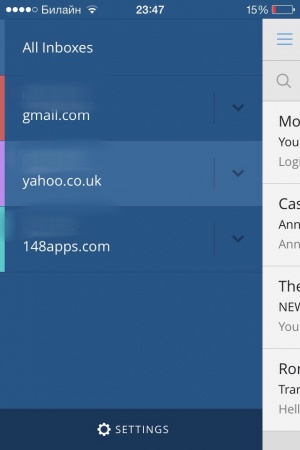
Favoring simplicity over complexity, Mail Ninja won't be the email solution for everyone but it does make sorting through new mail a fairly quick process.

Read The Full Review »

How To: Set Up the VIP Inbox in iOS 6

In iOS 5 with Notification Center, there was finally the ability to get push notifications for all emails that came in through the official Mail app. There was just one problem, not every email is necessarily all that important to make one’s phone go buzzing all willy-nilly.

Thankfully, that’s what the VIP feature in iOS 6 is designed to alleviate. It’s possible to get a push notification when certain people send emails. Setting it up is easy.

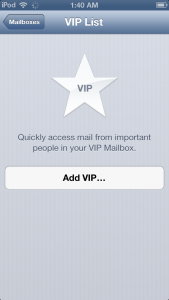
Open up Mail. Go to the Mailboxes screen, by tapping the upper left arrow until it disappears. Then tap on VIP. If a VIP has already been set up, then tap the blue arrow on the right. This will open up the VIP list. Tap Add VIP… to set up a contact as a VIP. Only people with email addresses will be selectable as VIPs. Note that as of iOS 6.0, all of a contact’s email addresses are added as a VIP, so separate contact cards will need to be set up for a person in order to not have certain emails show up in VIP.

The VIP inbox should now be selectable from the Inboxes section of Mail, below All Inboxes. This inbox includes all recent email from VIPs, from all accounts.

The beauty of VIP email is that it exists as a different set of rules in Notification Center, so there’s no need to enable all notifications for Mail, or only certain ones like sounds can be enabled while VIPs will appear as a banner. These can be configured from the VIP List screen by tapping VIP Alerts, or by going to Settings -> Notifications -> Mail -> VIP. VIPs can be configured to appear as alerts, and everyone else as banners. Look at them up and their emails up there in that tiny banner. They’re like ants from up here. VIP emails will show in Notification Center with a star to to differentiate from non-VIP email notifications.

There’s a drawback for Gmail users looking to take advantage of VIP notifications: as built-in Gmail support is still Fetch-only, this means that true Push will only work through Gmail accounts set up as Exchange accounts.

Has the VIP inbox helped tame the email beast? Let us know in the comments?


New App: Cloudmagic is a Quick Search for All Your Online Data

Posted by on October 31st, 2012
+ Universal App - Designed for iPhone and iPad

Cloud + magic = Cloudmagic.

Cloudmagic allows you to search across many of your cloud based services, all in one place. It amazes with how quick it is as well. Connect your Gmail, Twitter, Facebook, Dropbox, Evernote, and other services. Then you can search across all of them in one place.

Remember part of a name but not where you saw it, search in Cloudmagic and it will find where you saw it, quickly, easily. Very impressive. Give it a shot, let us know what you think.

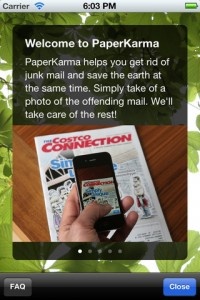
Junk mail. Yuck. Not only is it annoying, it’s also a terrible waste. All those circulars about sales no one cares about involving products nobody wants… At least those unsolicited emails from Nigerian princes don’t waste any paper. Well now there’s this neat little app that will theoretically put a stop to most of these unwanted advertisements.

PaperKarma is so simple in its execution it almost sounds like magic. All a user has to do is snap a photo with their iOS device’s camera and the app will (read: should) find the company responsible and take care of the rest. The rest referring to getting users off of the mailing list. It’s a mind-bogglingly simple concept, really.

Anyone with an iOS device and a thinning patience for junk mail should definitely check out PaperKarma. It’s on the App Store right now, and it’s on sale for free for a “limited time.” What’s the harm in giving it a try, right?


FREE!
iPhone App - Designed for the iPhone, compatible with the iPad
Released: 2012-01-20 :: Category: Lifestyle

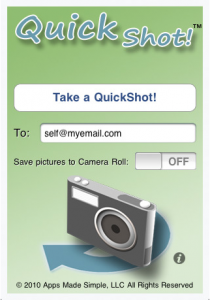
Having an iPhone on you is always handy when you want to snapshot something you need to remember, whether it’s a for sale sign, promotional poster or an advertisement. One of the drawbacks of this process is that once you’ve taken the photo you’ll need to fish it out of your Camera Roll where it’s taking up valuable space among your actual photos and there’s also a good chance that you’ll forget about it altogether.

QuickShot! aims to put an end to these issues by combining your iPhone’s Camera and Mail apps into one slick process. Once the app is setup you can simply launch it, take your photo and push a button to send yourself an email. The process is simple enough that it can take as little as three taps to complete.By default the image isn’t saved to your Camera Roll either so you won’t have to worry about clutter anymore. When sending the email, you can customize it as you wish and also scale the picture before you send. This strikes us as one of those apps you think you wont need until, of course, you actually do and is certainly worth a look. QuickShot! is available on the App Store for $0.99.

$0.99
iPhone App - Designed for the iPhone, compatible with the iPad
Released: 2010-05-06 :: Category: Productivity

Mailroom – Gmail and Google Apps Mail Client Review

Mailroom – Gmail and Google Apps Mail Client Review

iPhone App - Designed for the iPhone, compatible with the iPad
Mailroom is a feature-rich email utility which allows its users to view and utilize all their Gmail accounts at once, within one application, without compromising essential features, such as labeling, threading conversations, etc. found in Google’s online mail service.

Read The Full Review »
    Advertisement    


Featured Apps

    Advertisement    


Developers

Would you like your application reviewed on 148Apps? See the About page for information.
    Advertisement    


Latest Posts

148Apps Goes Deep on XCOM: Enemy Unknown

Ready to save to world, Commander?

Calendars+ by Readdle Goes Free For A Very Limited Time

CultofMac reports that, for the next 48 hours, Calendars+ by Readdle can be downloaded for free. The app works with Google Calendar and the built-in iOS Calendar and lets you manage your work, either online or offline, with an easy to use interface to navigate through. It’s originally priced at $6.99 and will return to [...]


Steel Media Network

148Apps - iPhone app reviews and news. The best gosh darn iPhone app site this side of Mars.
http://148apps.com :: @148Apps

The Portable Gamer - Coming soon.
http://ThePortableGamer.com :: @PortableGamer

Android Rundown - Android news and reviews. Where you get the rundown on Android apps and hardware.
http://AndroidRundown.com :: @AndroidRundown

Best App Ever - Yearly Mobile App Achievement Awards.
http://bestappever.com :: @BestAppEver

GiggleApps - iPhone applications reviews for kids and parents.
http://GiggleApps.com :: @GiggleApps

148Apps.biz - iPhone development news and information for the community, by the community.
http://148apps.biz :: @148AppsBiz

The App Hall of Fame - An archive of the very best in apps and games.
http://AppHallofFame.com :: @AppHallofFame

Pocket Gamer - Mobile game reviews, news, and features.
http://PocketGamer.co.uk :: @PocketGamer

Pocket Gamer.biz - Mobile games industry news, opinion, and analysis.
http://PocketGamer.biz :: @pgbiz

AppSpy - iOS game news and video reviews.
http://appspy.com :: @appspy

Smart TV Radar - For everything you need to know about Smart TV.
http://smarttvradar.com :: @smarttvradar