Permanent — The New Spreadsheet Review
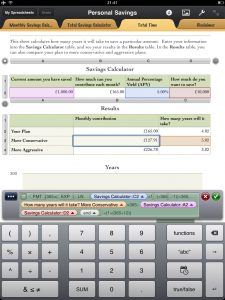
iPad Only App - Designed for the iPadPermanent sets out to change how spreadsheets are created on the iPad thanks to its intuitive interface and powerful features.
Read The Full Review »
Posts Tagged excelPermanent — The New Spreadsheet ReviewiPad Only App - Designed for the iPadPermanent sets out to change how spreadsheets are created on the iPad thanks to its intuitive interface and powerful features. Read The Full Review »
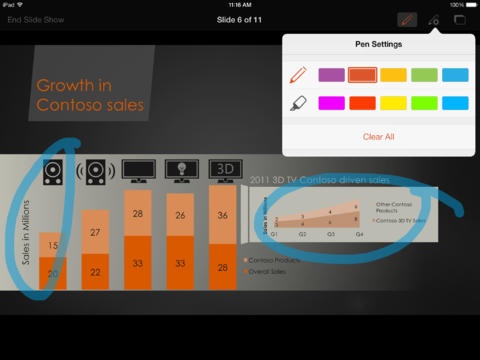
When CloudOn launched, it was so popular that the service was up and down for several days.. This apparently was just based on usage from United States users, as CloudOn has now announced that their app is available in the UK. This means that more users will get to use Microsoft Office applications like Word, PowerPoint, and Excel using CloudOn’s cloud computing technologies. As this is a cloud-based solution, there appears to be mild input lag when operating with the apps. Files still can be saved and loaded from Dropbox, although these require to be saved in Office formats; opening up plaintext or markdown formats in Word isn’t possible at the moment. This is all still available for the low, low cost of free as the service begins to roll out. For users looking for a new way to use their familiar Microsoft Office tools directly on their iPad, this is a very viable option.
The technology behind the service is impressive enough to provide a quality gaming experience, with very little lag time, which makes today’s announcement a relative no-brainer. OnLive is planning to apply this streaming technology to desktop virtualization. All those crazy pipe dreams about being able to have a true desktop experience away from the keyboard may finally be coming to fruition. iPad will be the first iOS device to be able to fully take advantage of this new technology, when they debut their free OnLive Desktop app soon. Among the pieces of software available for virtualization at launch will be Microsoft Word, PowerPoint, and Excel, which are viewed by many as the holy trinity of office productivity. Though the base application will be a free, there will be microtransations that can be used to add in additional storage space, applications and, you guessed it, games. There are also plans of releasing a professional tier application, for $9.99 a month. This second service would bump the storage space from a mere 2GBs to a hulking 50GBs, as well as add in even more applications and features. If the technology works as well as their gaming service has, business folks will undoubtedly be lining up in droves to take part. Better yet, the company’s use of cloud computing could put the need for purchasing a high end workhorse PC on the back burner, in exchange for an iPad. That seems like the kind of trade off that the mobile masses could strongly support. Plus, this sure makes it a whole lot easier to suggest expensing an iPad on the company’s dime. THANK YOU ONLIVE! Source: Gigaom Office HD ReviewiPad Only App - Designed for the iPadOffice HD can edit existing or create new Word, Excel, and Powerpoint Files. Read The Full Review » Numbers ReviewiPad Only App - Designed for the iPadNumbers is the spreadsheet installment of Apple's iWork suite, now available for iPad. Read The Full Review »
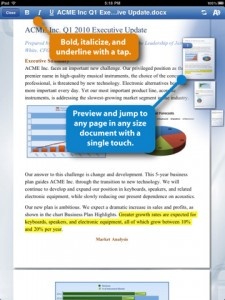
Documents To Go was updated recently to a universal version — meaning it’s optimized for both the iPhone and iPad. So if you had the iPhone version, you would get the iPad version for free. QuickOffice decided to take a different route. But, what they’ve added may make it worthwhile. Released just earlier tonight, QuickOffice Connect Mobile Suite for iPad has all of the features of the iPhone version, but rather than just expand all of the on screen controls to allow the app to fill the screen, QuickOffice have made redesigned it somewhat to take advantage of the iPad with newly redesigned controls. QuickOffice have made it clear that they are not done innovating and adding new features to this app. And I look forward to see where it goes. QuickOffice for the iPad is available now at an introductory price of $9.99. $19.99 ![]() iPad Only App - Designed for the iPad Released: 2010-06-10 :: Category: Business
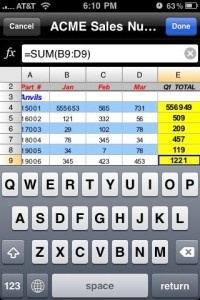
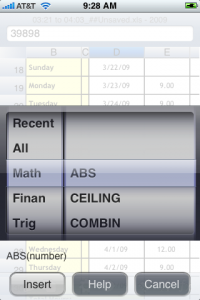
The Excel spreadsheet editor on Documents to Go 2.0 includes the ability to create and edit Microsoft Excel files. This joins the already excellent Word file editor in Documents To Go. The Excel editor works quickly and seems to be fairly full featured. One huge standard feature of Excel files are the functions — the ability to enter a function and have it process other numbers in the spreadsheet in a certain way. Figuring sums, percentages, etc. A huge list of functions are included with the editor and populating the variables in the function is easily done by clicking cells as you would on the desktop. The editor also includes support for multiple pages in each spreadsheet. Dataviz have increased the price for Documents to Go, which they have said all along they would do with the 2.0 update release. The regular version is now $9.99 (up from $6.99). We don’t know yet what the Microsoft Exchange price increase will be as it hasn’t been updated at the time of this article. $9.99 ![]() + Universal App - Designed for iPhone and iPad Released: 2009-06-14 :: Category: Productivity After the jump, take a look at some more screen shots of the new Excel file editor.
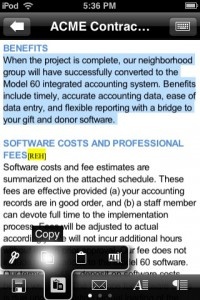
Dataviz has had a long history in the Mac world. They started out doing document conversion software for early Macs — remember when Macintosh software couldn’t read Windows files? Of late they have focused in on providing syncing and editing software for mobile devices. Their Documents To Go application has been available on many other mobile platforms, Palm, Windows, Blackberry. This release on the iPhone brings them back to the Apple world. This initial release comes on two forms, the main Documents To Go and an Exchange Attachments edition. Both versions consist of both a desktop application (Windows or Mac), and an iPhone OS application. The desktop application allows you to choose which files you want to sync to the mobile device — either individual files or folders. If you choose a folder, any new files in that folder will be automatically synced. We should point out that this is true 2-way syncing. Changes either on the desktop or the iPhone are synced automatically when the devices next connect. Much better than many file storage and viewing apps that only do one way transfer and fail to sync any changes. The document types that you can sync and view include all of the usual Microsoft Office and iWork ’08 formats. Also supported are all of the basic text files and image formats that the iPhone can display. Beyond the normal file viewing, this initial release also allows you to edit Microsoft Word documents (.doc and .docx formats). The Word file editor is pretty robust and feature rich and seems to do a really good job maintaining the document formatting. Dataviz have promised a free upgrade to Documents To Go with Microsoft Excel editing as well though that’s not currently available. Documents To Go’s major competitor on the iPhone is QuickOffice which we previously reviewed and found to be pretty solid. QuickOffice does offer one feature that Documents To Go has yet to implement, Microsoft Excel editing. We’ll take a full look at Documents To Go in the coming days. Documents To Go is available now at an introductory price of just $4.99 (for 2 weeks). $9.99 ![]() + Universal App - Designed for iPhone and iPad Released: 2009-06-14 :: Category: Productivity
Appearing as a new folder on your documents list, this support allows you to download, view, and even edit and forward documents attached to your email messages. You are presented with all of your email messages that have attachments and can view the messages and the attachments in a more file focused view, with the attachments at the top of the message. From there you can save the attachments locally, forward them, or edit them. In addition to getting access to your attachments stored on the Exchange server, you can forward any attachment you have stored locally in an email via your Exchange server. This extra support for remote attachments storage should be a great extra feature for those people that use Exchange. The Exchange Attachment edition is available now at an introductory price of $9.99 (for 2 weeks). $16.99 ![]() + Universal App - Designed for iPhone and iPad Released: 2009-06-14 :: Category: Business Mariner CalciPhone App - Designed for the iPhone, compatible with the iPadSpreadsheets on the iPhone are always a bit of a compromise. Still, there are those who would like the option to edit and, yes, even create simple spreadsheets from their phone. Mariner Calc is an ambitious effort to remove the boundaries that have been imposed on spreadsheet users. Read The Full Review » PlusiPhone App - Designed for the iPhone, compatible with the iPadPlus is definitely a worthwhile spreadsheet app. With it you can easily transfer Excel spreadsheets back and forth and edit and open them on both the PC/Mac and the iPhone. While it appears to be well worth its asking price, you still have to ask yourself if its limited support of Excel's XML file format will be enough for you. If you need full MS Office compatibility, this will disappoint. Read The Full Review » Save My Docs 2.0iPhone App - Designed for the iPhone, compatible with the iPadWhile Save My Docs is a one trick pony, all it does is save documents viewed within Safari and then allow you to view them within the app, it does it fairly well. Other viewers offer a variety of ways to get documents onto your iPhone, but Save My Docs is novel and useful. Read The Full Review » Air SharingAir Sharing is a great memory stick replacement and document viewerRead The Full Review » DataCaseDataCase allows you to both store documents on your iPhone and view them on the go.Read The Full Review » |