Posts Tagged bluetooth

Skylanders Bluetooth Portal of Power Hardware Review

The Bluetooth Portal of Power makes the iOS Skylanders games more like the console ones, but is it really worth it?

Read The Full Review »

This Week at 148Apps: November 26-30

This week at 148Apps.com, we got to known iOS developer Lady Shotgun. Jennifer Allen writes, “Doing things a little differently from the rest, Lady Shotgun considers itself as a co-operative of freelance game developers, with the team working remotely from each other rather than through a central office. It might be unorthodox but this team is made up of folks with some extensive experience in the game industry. Uniqueness continues through the fact that Lady Shotgun is made up, predominantly, of female game designers and coders with men forming the minority here.”

Read the full interview at 148Apps.

$0.99
+ Universal App - Designed for iPhone and iPad
Released: 2012-10-28 :: Category: Games

GiggleApps.com headed to work for a review of the unique Grandpa’s Workshop. Amy Solomon says, “Grandpa’s Workshop is a fun interactive app which teaches about the tools found in a workshop as well as learning about simple math concepts.
I really enjoy how this app works, as a fun older gentleman walks children through workshop-related activities such as identifying tools, painting different projects or mending broken objects jigsaw style.

Simple math-related activities are also included such as using a tape measure to measure boards, cutting boards into fractions such as halves or quarters, choosing the correct number of screws or other parts grandpa needs as well as a spot-the-difference section involving tools that may be similar or different.”

Read Amy’s full review at GiggleApps.

$1.99
+ Universal App - Designed for iPhone and iPad
Released: 2012-10-25 :: Category: Education

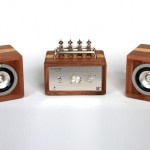
Finally, AndroidRundown.com’s KickStarter spotlight this week was for the BlueTube Amplifier. Joseph Bertolini writes, “Being a sort of audiophile I appreciate the sound of a classic tube amplifier and I recently just started re-downloading my favorite albums as lossless FLAC files to preserve that original sound quality. Looking around the market today, it is really a sad time for those who really care about the quality of their music as cheap parts are appearing from overseas and there is a resulting flood of bargain Bluetooth speakers and docks on the market. These sound terrible, and combined with the super-compressed audio files that the average user has in their music collection music really has taken a technological step backward at a time when there has been nothing but technological advances. Well, audiophiles and smartphone owners rejoice because I have discovered our savior and it does not come from the likes of Sony or any large corporation. Meet the BlueTube Bluetooth Tube Amplifier, and built out of solid cherry and walnut hardwood it promises to look as great as it sounds.”

Read Joseph’s full article at AndroidRundown.

Thus ends November, but that means December fun is just getting started. Join us on Twitter, Facebook and now on Pinterest for the latest news, reviews and more. See you next week, true believers.

Developer: Logitech
Price: $99.99 (retail), around $80 on discount
Hardware Tested On: iPad AKA new iPad AKA iPad 3

Usability Rating: ★★★★☆
Sound Quality Rating: ★★★★☆
Re-use Value Rating: ★★★★½

Overall Rating: ★★★★☆

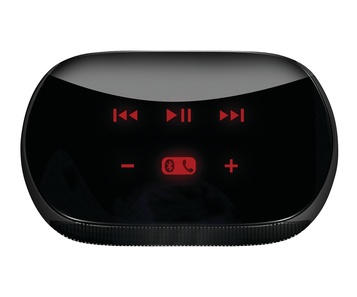
While the Logitech Mini Speakers won’t fill a concert hall with sound, they aren’t meant to. They are meant to be a great option to carry with you and use at the office, in a hotel room, the car, etc. For that, we are very impressed with the Logitech Mini Speakers.

With their compact size comes surprisingly great sound. This makes the Logitech mini speakers a great, convenient, and cheap way to broadcast sound from your iPhone or iPad.

Using Bluetooth to receive sound from your iOS or other compatible device, it’s an easy setup. Once paired, you can select the Mini Speakers for sound output like you would any Bluetooth or AirPlay output device. You can control these speakers either from your device or from the capacitive buttons on the top of the speakers. Volume, next/previous track, play/pause and a speakerphone feature are available. Using this for a Bluetooth speakerphone is a secondary, yet very useful feature.

The size is great and not indicative of the sound these speakers produce. A little bigger than a slightly squished baseball, these red and black or all black speakers are easy to toss in a bag or drawer. They charge via USB and can hold a charge for up to 10 hours of playback. Also impressive for the size.

While there are other options for small Bluetooth speakers, these easily come in on the low end of the price scale at only $99 retail. A great deal when other small portable speakers of this quality are up to twice the price.

If you are looking for a good set of portable, personal, Bluetooth speakers, the Logitech Mini Speakers are a great, and cheap option. Give them a shot.

iCade Core Hardware Review

Developer: Ion Audio
Price: $89.99 MSRP
Hardware Tested On: iPad 2

Usability Rating: ★★★★½
Protection Rating: ★★★½☆
Re-use Value Rating: ★★★★½

Overall Rating: ★★★★☆

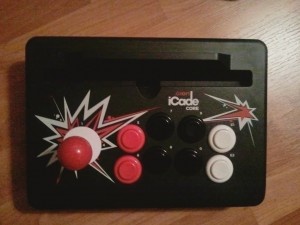
ION Audio has refreshed the original iCade as the iCade Core, acting as a more compact version of the original controller. Functionally, it’s identical; the buttons feel slightly softer compared to the original iCade, but hardware-wise, it is identical and has the same compatibility.

The benefit to the iCade Core is that it I just so much more portable and versatile. Want to play on the couch with the iCade in the lap? Go for it. It’s also much better for playing on a TV via HDMI. Also? There’s no assembly required.

The drawback is of course that it just does not look as cool without the arcade cabinet. The iPad stand does have some room to slide around in the space carved out for it, so having a case might be a good safety mechanism. As well, one of the things I would like to see would be at least a key combination to call up the software keyboard, because until it idles out or Bluetooth is manually turned off, the iCade Core will take over keyboard input.

Bottom line, I must say that while both systems are functionally identical, the iCade Core’s increased portability and practicality makes it a superior option to the classic iCade for iPad owners, unless of course the original arcade-cabinet style is being used as a decoration somewhere.

Until now, most smartwatches that could link up to a smartphone have been created for Android. Pebble is the first smartwatch that works for iOS (it actually works for both iOS and Android).

Engadget broke the story that the Pebble development group created a Kickstarter project for their watch. At the time I’m writing this, the project has made over $1M. They’ve raised over ten times their goal ($1ook) for the next month in the span of a little over 24 hours. This is the same development team that made the inPulse watch for Blackberry.

This watch will receive notifications from the iPhone like incoming calls, emails, and messages. It can also be used as a bike or exercise computer by using GPS information from the phones and presenting average speed, distance, pace data. Users will be able to control the music on their phones with the watch. Pebble has also partner with Freecaddie to make Pebble a rangefinder for over 25,000 golf courses. And the best part is that Pebble is releasing a free SDK for developers to create new watch faces and apps for the Pebble. The possibility for Pebble apps is limitless.

Pebble is currently at the working prototype stage. The money from the Kickstarter will be going to production tooling, large component order, and Global Bluetooth certification. Pledging for the Pebble is now a sure way of getting a discount on the device when it releases (estimated this September). The watch will retail for more than $150, $115 will get pledgers the Jet Black version of the Pebble and $125 will reward pledgers with a color of choice (Cherry Red, Arctic White, Jet Black or the voter’s choice color). Check out the promo video below.

This Week at 148Apps: February 20-24

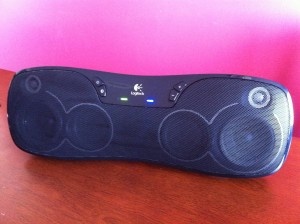
This week at 148Apps.com, site editor Rob LeFebvre took an in-depth look at the new Logitech Wireless Boombox. LeFebvre writes, “Logitech’s newest addition to the device genre is by far the best I’ve played with. The sound is amazing for such a small footprint; the lows are deep and rich, the highs successfully bright without becoming too brittle.

The hardware itself is smooth, sleek and rounded. The dip in the middle, where an old school boombox would have held a tape deck, is just right for a hand to grasp it, obviating the need for an extruded handle. The unit feels solid, like it would hold up to some roughness in handling. The plug and line-in jacks are thoughtfully covered with a rubber flap, protecting from dust or mist. In the back of the unit sits a flip out stand, one that folds flat against the boombox for easy travel.”

Read the full review on 148Apps.com.

GiggleApps.com celebrated what’s left of winter with Amy Solomon’s review of Into the Snow: A Stella and Sam Adventure. Solomon states, “Not only are these puzzles fun and interactive, but I appreciate how Stella creates a motif around each puzzle once created, also showing as a faint gray drawing in the snow, demonstrating what one can do with one’s imagination, as the stick man turns into a soccer player or as the additional details are added to the sailboat which are also made from sticks. They then include an ocean full of waves and a “show shark” that moves with the tap of a finger as well as birds seen in the distance. I really enjoy the basic style of art used in these snow drawings, childlike and reminiscent of the illustrations found in Harold and the Purple Crayon.”

Read more at GiggleApps.com.

$2.99
+ Universal App - Designed for iPhone and iPad
Released: 2011-03-10 :: Category: Games

And last, but certainly not least, 148Apps.biz writer Brad Hilderbrand reported on a recent agreement regarding smartphone customer privacy: “In a potentially landmark move Apple, Google, HP, Microsoft, and Research in Motion (RIM) have come to an agreement with California Attorney General Kamala D. Harris to strengthen and enhance user privacy. The companies have agreed to create and prominently display a privacy policy detailing what information they collect from consumers and how exactly they plan to use it. App Store curators such as Apple and Google will also have to keep a close eye on how the apps sold in their stores handle user privacy, and both the developers and distributors of offending apps could be hauled into court.”

Read more on this developing story at 148Apps.biz.

That’s a wrap on another week that was. Join us next week for another week that has passed….or something like that. In the meantime, keep up to date on the latest app reviews, news and contests by following us on Twitter or liking our page on Facebook. Bye now!

Huntville Review

Huntville Review

iPad Only App - Designed for the iPad
While Huntville may not be the most enjoyable game, it has some awesome features that can't be overlooked.

Read The Full Review »
Piggy Bounce Review

Piggy Bounce Review

iPhone App - Designed for the iPhone, compatible with the iPad
A delightful romp through the sky, this little piggy ascends through cheerful graphics, sound and gameplay.

Read The Full Review »

The foxl V2 Bluetooth from soundmatters is a little device that you may have never heard of. It’s a Bluetooth speaker device with both fantastic high fidelity wireless music playback and great speakerphone options.

I first saw it at Macworld Expo earlier this year and was rather impressed. It had good sound quality even in the crowded and loud conference hall. We got a chance to take one for a drive, and it’s even better than expected.

Why you’d want it: audio speakers. There are two main functions for the foxl. The first is as a wired or wireless speaker system. It puts out an amazing amount of sound for a tiny little device. It’s only about the size of a three pack of golf balls. Using Bluetooth for convenience is a great, wireless way to listen to music. Though note that it does compress the music some and you will lose a bit of dynamic range in the music. The wireless freedom can’t really be beat and the slight loss in fidelity is worth it for the convenience.

Once you’ve paired the foxl, to use it as a set of wireless speakers it’s as simple as turning it on and selecting it in the audio output selector (AirPlay box) in any music app that supports it. You also have the option of doing a direct connection for wired audio playback.

Why you’d want it – wireless speakerphone. The other main feature of the foxl is as a Bluetooth speakerphone. This is where it really shines. The sound of the speaker and quality of the microphone are top notch. In the few times I’ve used it the sound is great and callers report that I sound loud and clear.

How it performs: Overall, the foxl Bluetooth performs quite well. Comparing it to the Jambox from Jawbone, it’s a bit smaller and louder, particularly in the bass end of the audio spectrum. The price is also very similar – in the sub-$200 range. This won’t replace a dock speaker system, but for travel and convenience, the foxl Bluetooth is fantastic.

foxl V2 Bluetooth Features

* Highest-fidelity resolution with pocket-sized portability
* Connect to any music source via standard audio cable
* Up to 8 hours battery life, output wattage increases when wall-powered
* Lithium-ion BassBattery™ re-chargable via USB or wall charger
* Output for optional powered subwoofer 25-30′ Bluetooth range with improved sound quality
* Automatically connects for instant wireless streaming
* Built-in “Business-quality” wireless hands-free microphones for speakerphone/conferencing
* Including speaker one-touch reject/answer/end calls functions

You can pick up the foxl v2 on Amazon and other usual places for around $199 for the Bluetooth model or $169 for the model without Bluetooth.

The Pioneer VSX-1021 is a $549 receiver that works great with an iOS device via AirPlay, Bluetooth, and with a direct connection via the front panel USB port. This really is the iPhone and iPad owners perfect receiver. Not only can you connect via the direct connection and control your music playback via the receiver, you can also stream music from your device via Bluetooth, and AirPlay.

Pioneer have also created a couple interesting apps that interface with this new receiver. First up, iControlAV2, a universal app. This app lets you throw away the remote and completely control the receiver from your iOS device. Every aspect of the receiver can be controlled. From simple things like switching inputs and the volume, to complex tasks like renaming the inputs and configuring the sound for the room. Take a look at the screenshots below for an idea of the polish of this app.


Next up is a party app called Air Jam. This app lets up to four iOS devices create and control a playlist assembled from the music on the devices. The music is then streamed to the VSX-1021 via Bluetooth. A couple shots are below.


Here’s a quick rundown on some of the features that set the VSX-1021 apart from some other receivers and make it a true iOS users dream.

Partial Pioneer VSX-1021 features:

- 7.1 Channel
- Front panel USB port for connection to iPod, iPhone, iPad
- Playback of audio / video from enabled apps
- iOS device charging, including iPad
- AirPlay enabled
- DLNA enabled
- Internet Radio with vTuner
- App Enabled with iControlAV2 and Air Jam apps
- 5 HDMI inputs

The Pioneer VSX-1020 should be available later this month at most major retailers and Amazon.

One of the main compliments typically paid to Apple is that the company does a great job of making sleek, attractive hardware that is generally easy to use. That’s why it’s such a surprise how badly the company has flubbed past attempts at creating first-party Bluetooth headsets for the iOS market. It seems that won’t be an issue much longer though, as a recent acquisition should allow Apple to grow much more competitive in the Bluetooth market.

Update: Upon further review, it seems that Apple hasn’t acquired Wi-Gear after all. Despite earlier reports, company CEO Mark Pundsack stated, “The rumor is false. Wi-Gear and its IP are still available for sale.” What actually transpired is that Wi-Gear co-founder Michael Kim accepted a new position at Apple, but the company he started wasn’t part of the deal.

The company has apparently bought Wi-Gear, a small, San Francisco based Bluetooth headset manufacturer which specialized in iOS devices. Wi-Gear created the iMuffs style of headsets as well as releasing a Bluetooth 2.0 adapter which allowed older model iPhones and iPods to play nice with newer gear. Now it seems that the company will begin creating Apple-branded headsets which will become the “official” Bluetooth devices for iOS machines (and possibly Mac as well). As of yet no firm timetable has been set for Wi-Gear’s first official Apple product.

With an arrangement such as this the sky is the limit for iOS Bluetooth integration. With a new company brought in specifically to handle this aspect of the business, we may finally see Apple fully embrace the technology, which will be a huge boon to business consumers and those who prefer a hands-free setup. While the iPhone has always supported Bluetooth, making it a focus will likely be a net gain by improving functionality and building features with Bluetooth support in mind. Also, could this mean that future iPhones may even come with an official Apple Bluetooth headset? At this point it’s just wishful thinking, but such a pack-in would definitely be welcomed by many consumers.

We’ll keep an eye out for any official product announcements from Wi-Gear. We’ve got our iMuffs plugged into our ears and await their call with more official info.

[via 9to5Mac]

EA Update Big Hits with Multiplayer

EA have released updates for three of their largest games that give them local multiplayer capabilities.

Madden 10, Tiger Woods, and Command and Conquer have gotten updates in the recent days that give them local multiplayer capabilities and EA have done it right.

For example, when playing Tiger Woods, you will actually be watching your opponent live as they play. You see them swing and the travel of their ball live you your screen just as they do on their screen. Tiger Woods supports both Bluetooth and Wifi local multiplayer and all courses are available to play.

For Madden, you each choose your teams and battle it out over a game, each picking their plays and playing in real time. Madden only supports Bluetooth multiplayer.

And for Command and Conquer, each command factions on the game map at the same time. Clashing as each team seeks to expand their territory. C&C works with both Wifi and Bluetooth for local multiplayer.

While we’d love to see large scale global multiplayer in these games, this is a first step and a great step for big fans of these games.

FREE!
+ Universal App - Designed for iPhone and iPad
Released: 2009-09-09 :: Category: Games :: Sports
FREE!
+ Universal App - Designed for iPhone and iPad
Released: 2009-04-30 :: Category:
$0.99
iPhone App - Designed for the iPhone, compatible with the iPad
Released: 2009-11-02 :: Category: Games

Firemint has just released a 1.3 update for their extremely popular Flight Control game that adds the ability to play cooperatively with a friend over bluetooth. Flight Control has sold over 1,000,000 copies on its way to becoming an App Store classic.

picture-1

Flight Control is a deceptively complicated game in which you must guide planes and helicopters to their proper landing places by drawing paths with your finger. The game starts out very simply with very few vehicles on screen at a time, but quickly ramps up in difficulty as more planes and helicopters of varying speeds appear on screen simultaneously. If anything collides, the game is over. When Christine reviewed the game, she gave it a perfect five stars.

In previous updates, Firemint has added new maps and online leader boards via the Cloudcell service. Now, in order to utilize the new 3.0 software for the iPhone and iPod Touch, Firemint has added bluetooth play so you can share air traffic controller duties with a friend. No wifi is required, as you simply need two devices with bluetooth capabilities (note: only the iPhone 3G, iPhone 3GS, and iPod Touch 2G can use bluetooth).

In this new mode, you and your friend share a cumulative score for a game. Each person has a complete map on screen (you can either use the same map or different maps), but can only land planes of a certain color. If a plane appears on screen that you cannot land, you have to direct it to the side of you screen, which will cause it to appear on your partner’s screen. This makes the game even more hectic, as you have to manage planes that both normally appear on your screen and those redirected by your partner all while trying to communicate with your partner.

$0.99
iPhone App - Designed for the iPhone, compatible with the iPad
Released: 2009-03-06 :: Category: Games

    Advertisement    


Featured Apps

    Advertisement    


Developers

Would you like your application reviewed on 148Apps? See the About page for information.
    Advertisement    


Steel Media Network

148Apps - iPhone app reviews and news. The best gosh darn iPhone app site this side of Mars.
http://148apps.com :: @148Apps

The Portable Gamer - Coming soon.
http://ThePortableGamer.com :: @PortableGamer

Android Rundown - Android news and reviews. Where you get the rundown on Android apps and hardware.
http://AndroidRundown.com :: @AndroidRundown

Best App Ever - Yearly Mobile App Achievement Awards.
http://bestappever.com :: @BestAppEver

GiggleApps - iPhone applications reviews for kids and parents.
http://GiggleApps.com :: @GiggleApps

148Apps.biz - iPhone development news and information for the community, by the community.
http://148apps.biz :: @148AppsBiz

The App Hall of Fame - An archive of the very best in apps and games.
http://AppHallofFame.com :: @AppHallofFame

Pocket Gamer - Mobile game reviews, news, and features.
http://PocketGamer.co.uk :: @PocketGamer

Pocket Gamer.biz - Mobile games industry news, opinion, and analysis.
http://PocketGamer.biz :: @pgbiz

AppSpy - iOS game news and video reviews.
http://appspy.com :: @appspy

Smart TV Radar - For everything you need to know about Smart TV.
http://smarttvradar.com :: @smarttvradar