Warm Your Winter With New Apps!
How do you know what apps are worth your time and money? Just look to the review team at 148Apps. We sort through the chaos and find the apps you're looking for. The ones we love become Editor’s Choice, standing out above the many good apps and games with something just a little bit more to offer. Take a look at what we've been up to this week, and find even more in our Reviews Archive.

Playworld Superheroes is one of those games that’s unabashedly aimed at younger iOS users. It starts off slow, almost too mildly, as the player learns the crafting process. It begins with selecting a base character from a batch of different prototypes, and after this the player is guided to a treehouse (which is the home location of this digital tale), and guided through the process of finding simple items that can be crafted to make what look like rudimentary parts of a superhero outfit. --Tre Lawrence

Positioned as a sequel to the original film, no not the sequel they actually made, Mean Girls: The Game has Cady Heron, Regina George, and the rest teaming up to repel a new generation of cliquey Plastics. But turning stuck-up high schools girls into literally identical endless enemy fodder is just one of a few ways the game uses tower defense tropes as a clever metaphor. The towers themselves represent different groups of students. Cheerleaders damage nearby foes with their routines while jocks hurl basketballs at targets. They start as freshmen and players use earned popularity to level them up all the way until graduation. Matches themselves tend to drag, but there are a bunch of new student groups with intriguing properties to unlock, and the environments, ranging from cafeterias to gyms, feature lots of different snaking path. --Jordan Minor
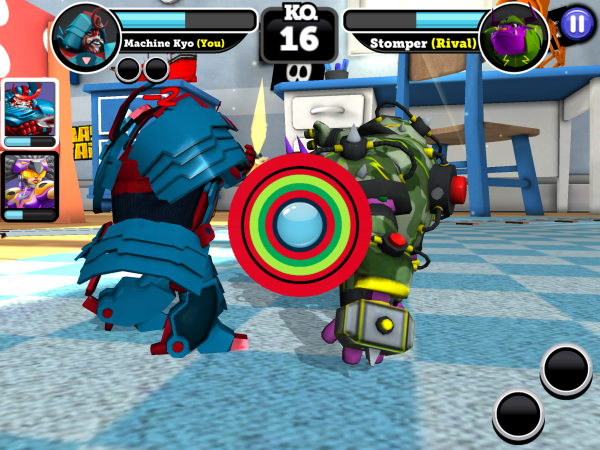
Wouldn’t it be great if toys came to life when we weren’t around like they do in Toy Story? Wouldn’t it be even better if instead of getting up to hijinks and adventure they just beat the stuffing out of each other instead? Battle of Toys seems to think that’s a great idea. From their growing collection, players can choose up to 6 toys to take into battle with them, each with their own special attacks and wide selection of costumes. The controls prioritise reaction time and a set of touch gestures over a standard button layout, requiring players to stop the indicator in one of the green zones to launch one of two combos. One of a handful of reaction mini-games will then pop up to help maximise damage. There is no active defense ability to speak of though, so sometimes an attack won’t land because the opponent has literally beaten the player to the punch. --Lee Hamlet

All Star Quarterback is a free-to-play football game in which players can live out a fantasy of being the quarterback of a pro football team. Unlike most football games, this title tasks players with managing the life of a single football player and their time on and off the field, rather than a whole lineup of eleven players from week to week in a football season. The result of this twist on traditional sports games is surprisingly refreshing, though the game itself isn’t much more than a clicker/management game with some light role playing and action sequences. All Star Quarterback begins with players creating their character by making very simple, but custom choices, like name and skin color. From there, players are drafted to a professional team (though the game is not NFL licensed) and have to train, buy, and play their way to a successful career. --Campbell Bird
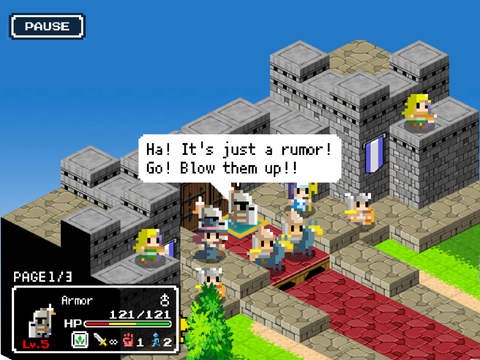
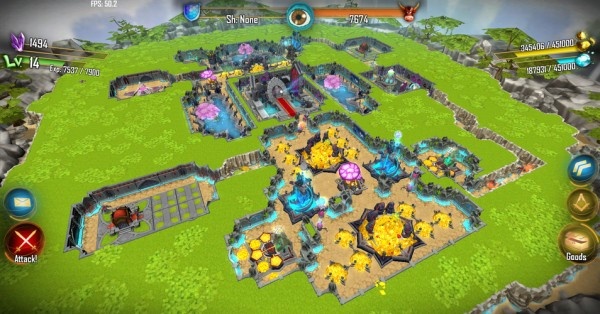
While it may play more like a Fire Emblem or Final Fantasy: Tactics, in a lot of ways Ambition of the Slimes feels like a deconstructed Dragon Quest. First off, there’s the genre-flipping premise of playing as the lowly slime monsters. Being the cool, big bad villain is one thing, but these are worse than henchmen. Also, the game’s Minecraft-esque aesthetic looks like someone ripped the chunky sprites out of a classic 8-bit RPG and dropped them into a trippy retro 3D world. Rotating the screen and watching pixels shift to maintain perspective is always a neat effect, and even the poorly translated dialogue (intentional or not) adds an appropriate charm hinted at by the absurd title. But what really makes Ambition of the Slimes so spectacular is its ingenious strategy hook. Players start each match with a party of slimes they’ve collected. Being slimes, they aren’t great at fighting directly. They’re underpowered and outmatched. However, if players can position them next to a stronger human enemy unit like an archer or a knight, the slime can hop in that poor person’s mouth and possess them. This adds so many awesome new strategy considerations. What units do I go after? How much should I soften up this target before going in for the steal? Possess first and then attack? Use possessed units to shield weaker slimes? --Jordan Minor

There is a new favorite application in our house that I am quite eager to let readers know all about – Winky Think Logic Puzzles from Spinlight Studio. This app, as the name may suggest, consists of logic puzzles that both children as well as adults and all ages in between will enjoy. At 180 levels, this application truly includes hours of activities ranging from those simple and straightforward to complex and difficult tasks even for adults. Winky Think starts out easy enough, with players needing to slide a blue pentagram into a related cutout marked with a smaller gem of the same color and shape. In the next level, things build a bit as now children are asked to slide a red pentagram into a corresponding open spot, now choosing this correct over other colored gems also seen on the board. Soon other shapes are included to color-match as simple maze-like areas of the puzzle are added that one needs to navigate. This app begins slowly for the benefit of young users, but I found these levels utterly engaging as an adult with its dynamic use of jewel colors popping against the grey background, made up with a subtle mix of different shades of warm, bright greys instead of the bleak, stagnant color that a lesser developer may have chosen to use. --Amy Solomon
Other 148Apps Network Sites
If you are looking for the best reviews of Android apps, just head right over to AndroidRundown. Here are just some of the reviews served up this week:
AndroidRundown

As we become more connected in the digital sense, wireless solutions become that much more relevant. Bluetooth is an oldie but goodie, and the trusted protocol is easily incorporated in several ways. Now that it is all but ubiquitous with regards to mobile devices, it makes sense that mobile devices — especially Android — can be the ultimate hub in connected setups. Looking at the IOGEAR TuneTap Audio Receiver, it’s easy to see why it could be compelling; it’s small, easy to set up and comes from IOGEAR. The review unit sent to us exhibits that size, which is 2.88 x 2.88 x 0.97 inches, weighing only 1.6 ounces. It is a sleek little thing, with solid fusing and ports for audio out, optical out and a power jack; on the top, there is a subtle LED light right under the logo. The package also contained 3,55mm to RCA cable, power cable and documentation. --Tre Lawrence
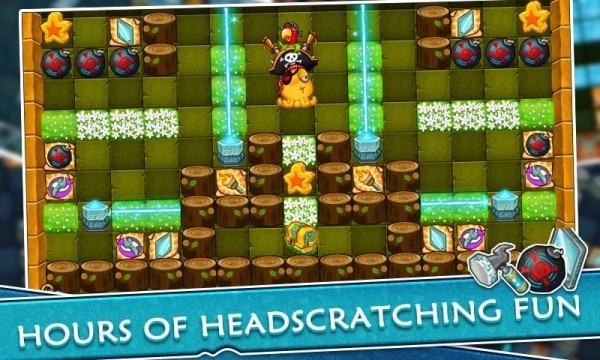
Laser Quest has a flashy name that might fool folks. In a good way. It’s a puzzle game, true, but it’s how the puzzles are framed that make this interesting. Our protagonist, Nio the octopus, is an industrious creature with an eye for treasure, and a willingness to travel to procure it. The playing area is a grid made of smaller squares, and the general premise is to move Nio from the start point to the the location square of the treasure chest. these squares can also be occupied by items that can be collected by contact, or otherwise manipulated to effect a solution. There are also stars that can be collected; each level has three. --Tre Lawrence
This past week, Pocket Gamer previewed The Detail, Forgotten Memories, and The Wild, checked out remastered versions of Fahrenheit and Grim Fandango, and asked, "hey, wanna be a dead body?"
And finally, last week on AppSpy: the very best RPGs on mobile, an early look at The Wild and Forgotten Memories, plus a whole bunch more.






 :: PRODUCTIVITY TO THE MAX :: Read Review »