Band Boss Review
iPhone App - Designed for the iPhone, compatible with the iPadManage real musical artists through fictional tours, promotions, and hopefully stardom.
Read The Full Review »
Posts Tagged moneyBand Boss ReviewiPhone App - Designed for the iPhone, compatible with the iPadManage real musical artists through fictional tours, promotions, and hopefully stardom. Read The Full Review » This week at 148Apps.com we delved into the latest from the developers of Hipstamatic, the “disposable” Hipstamatic D-Series app. 148Apps founder Jeff Scott says, “I got a chance to try out the new app and can report that Hipstamatic D-Series does indeed bring back the nostalgic memories of sharing a disposable camera and swapping double prints into the digital age. It’s a great idea and well executed. There’s even the anxious need to burn the last shot by taking a picture of your foot, just to get the roll developed quicker. It’s indeed very fun. Delve further by reading the full run-down on 148Apps.com. FREE! ![]() iPhone App - Designed for the iPhone, compatible with the iPad Released: 2011-12-15 :: Category: Photography $1.99 ![]() iPhone App - Designed for the iPhone, compatible with the iPad Released: 2009-12-09 :: Category: Photography At GiggleApps.com, reviewer Amy Solomon took a close look at the first interactive book from The Cat in the Hat’s Learning Library, There’s No Place Like Space. Solomon says, “There’s No Place Like Space, although a creative, fun and educational book, is not written by Seuss himself, although it is written in a Seuss-like style. I enjoy this book, as does my son, but my husband and I did comment to ourselves that the text is not as well-written as the classic books by Seuss.” Read the full review at GiggleApps. $5.99 ![]() + Universal App - Designed for iPhone and iPad Released: 2011-11-16 :: Category: Education
Intrigued? Read more on 148Apps.biz. As your advent calendar continues to count towards December 25th, don’t forget to vote for our 2011 Best App Ever, and keep track of the latest news, reviews and contests via our Facebook and Twitter streams.
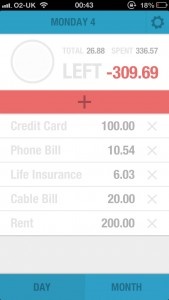
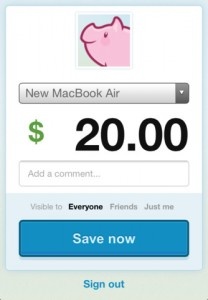
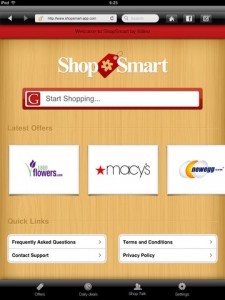
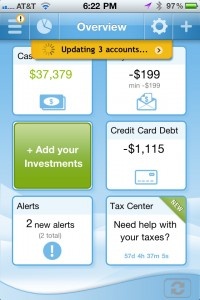
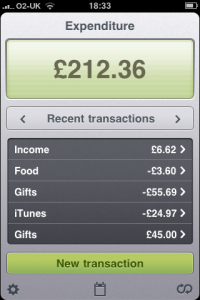
Using information from users’ credit card loyalty programs, services like Groupon, and the retailers themselves, ShopSmart scours the web looking for deals that may interest users. By using so many data sources ShopSmart is able to present the largest possible savings with the average being 10 percent saved per purchase. Facebook support allows friends to offer opinions on items before purchases are made and the eWallet feature fills in payment and shipping information making checkouts quick and easy. Maybe Black Friday won’t be so bad this year. ShopSmart is free and available now on the App Store. FREE! ![]() iPad Only App - Designed for the iPad Released: 2011-11-08 :: Category: Lifestyle Money for iPhone ReviewiPhone App - Designed for the iPhone, compatible with the iPadMoney for iPhone offers up a fairly comprehensive financial management toolset for a pittance. Just understand that it requires a bit of a time commitment for it to be most effective. Read The Full Review » Debt Free Review+ Universal App - Designed for iPhone and iPadJuggling debts is made simpler with Debt Free Read The Full Review » Piggie ReviewiPhone App - Designed for the iPhone, compatible with the iPadA new personal expense tracking app is the definition of simplicity, while offering feature rich options and backup storage. Read The Full Review » Pageonce Pro – Money and Bills+ Universal App - Designed for iPhone and iPadIf you're down with its asking price, Pageonce Pro is an app which organizes and tracks your hard-earned green and belly-aching bills. It allows users to see their bank account information, credit cards, bills and investments, collectively, all on one screen. It further allows you to control your money, bill-paying, etc. and sends you real-time alerts/reminders regarding any/all of your accounts. Read The Full Review » Expenditure ReviewiPhone App - Designed for the iPhone, compatible with the iPadTracking your expenses can make one person cringe and another very satisfied. Expenditure aims to simplify the process without removing any of the features. Let's see how they did it. Read The Full Review »
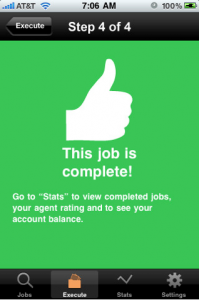
Well the Field Agent app might be able to help you do just that, claiming to be the first app that actually pays you, the user. By signing up to become an “Agent” you fit into a very simple ecosystem: A “Client” creates a job, the “Agent” (you) completes the job, the client and agent are happy. What does this mean in the real word? Well, a client is a company or service that has signed up at FieldAgent.net and needs information on competitors, consumers or wants to check whether its products are being correctly sold. The agent is someone who has download the Field Agent app and receives notification that a client needs a job done, carries it out and is paid a small fee for their troubles. While it sounds very James Bond meets Foursquare, the app and its assignments are for real as far as we can tell and actually do pay. While no explicit information is given as to the purpose or beneficiaries of these “assignments”, it’s a safe bet that most of them are market research for the Fortune 50 clients who back the app. Fortunately, the agent jobs required by the clients don’t involve horses heads in beds or extortion either. Most of the assignments involve checking prices at stores or filling out surveys and pay between $3 and $12 if completed properly and within a set time limit. Jobs often require a verifiable GPS location and a photograph in order to keep the clients happy so an iPhone 3G or 3GS is recommend. Once an agent has made their money it can be transferred to a PayPal account within 48 hours. Agents also develop a Rep Score that shows how good a job you’re doing for your clients. Starting with 85 points, agents gain points up to a maximum of 100 for successful, accurate jobs with higher rep leading to more frequent jobs. Of course, if you fail at your task or submit inaccurate results you lose points and aren’t at the top of the pile when the next assignment comes in. It seems that agent jobs are somewhat scarce at the moment with a number of iTunes reviewers giving some pretty harsh feedback that has prompted a response from the company. Apparently the number of agents has increased by 500% in a week and they are waiting for the client growth to catch up. This does sound like a cleverly worded way of saying “companies aren’t quite as interested in the service as consumers who stand to make money” but apparently more jobs are coming soon. We’re keeping a close eye on this intriguing service that has the potential to be groundbreaking but could also end up wasting a lot of people’s time.
Pretty staggering, no? Of course, the app can calculate things the other way around, too. Here are a few samples for your amusement, with the numbers taken from this site:
Conversely, if you take modern numbers and change them:
Playing with numbers is always fun. Sadly, DimeTravel only goes back to 1948 for us Americans. I don’t know why—Wolfram Alpha can handle prior centuries just fine—but even with the current data, it’s still nifty to look at these numbers! And you can look at them, too, because DimeTravel displays the path of inflation as a nice graph. If you’re a sucker for realizing how transient your money is, go ahead and give DimeTravel a look. And more importantly, invest your remaining money wisely, because if you leave it under your mattress, it’s likely to vanish into grasp of good ol’ inflation. $0.99 ![]() iPhone App - Designed for the iPhone, compatible with the iPad Released: 2010-04-16 :: Category: Finance
PayPal has long had a free app on the App Store, which provided mundane features like managing your PayPal account. (Who needs that?) But recently, they added a new feature: just like Bump, PayPal’s app now allows you to exchange things by simply bumping phones. The difference is that PayPal lets you actually exchange money with the person you’re bumping phones with. It looks like a gimmick on the surface, but the feature is actually pretty useful. If you’re using an iPhone and have a PayPal account, you can download the app from anywhere and quickly complete a transaction. The process is painless, requires no exchange of information, and it’s free. What more could you want? It’s a neat feature, that’s for sure. I can just see it now: instead of paying the normal way, you’ll bump fists with an iPhone clenched in your fingers. Passersby will stare in bafflement, but that’s okay—because you’ll know that you’re at the cutting-edge of technology. Yeah, you could pay for stuff in cash, but this is the twenty-first century! Yeah, it’s silly, but it’s still cool. And there’s nothing wrong with that. If you have a PayPal account, it’s probably worth downloading the free app just to manage your account and check your balance. And, hey, if the opportunity arises…bump-money-transfers are the way to go. Cash CowiPhone App - Designed for the iPhone, compatible with the iPadCash Cow takes money-counting and turns it into a fantastic puzzle that rivals Bejeweled in the addiction category. Absorbing and fun, this puzzle game is simple to learn but requires plenty of strategy to master. Read The Full Review » iBank MobileiPhone App - Designed for the iPhone, compatible with the iPadiBank Mobile has been a long-anticipated release for the fans of IGG's iBank desktop app. This is a great first release with stability emphasized over having every desired feature. Read The Full Review » PocketMoneyiPhone App - Designed for the iPhone, compatible with the iPadI think everyone can use some budgeting help in economic times like these. I used Balance for a long time, but I needed something more complex. PocketMoney was that solution. Read The Full Review » The new year just recently passed, it’s only been a few weeks, but you might find yourself faltering a little on your new years resolutions. Now is the time to re-commit to your resolutions, before it’s too late. And maybe the iPhone can help. Some of the most common resolutions have to do with health, money, and organization. Three things that the iPhone can help you track and organize. We’re going to share some of the best applications for this, hoping to help you stick to those resolutions. MeasuresA well done conversion utility priced right in a very crowded category.Read The Full Review » |