Posts Tagged gmail

Google Updates Gmail With Direct Links To YouTube, Google Maps, and Chrome

Posted by on May 6th, 2013
+ Universal App - Designed for iPhone and iPad

The Next Web reports that Google released an update to its Gmail app, guiding users towards the use of other apps by Google. Now when you receive an email with links to YouTube, Google Maps, and Chrome, the links will open up in the app instead of the mobile web browser. This new feature is optional and can be turned off in the in-app settings. The update also lets users sign out of a single account instead of all accounts at once.

gmail

source: The Next Web

Mailbox Review

iPhone App - Designed for the iPhone, compatible with the iPad
Mailbox has changed the way I use email, and it's for the better.

Read The Full Review »

Google Updates Their Gmail App

Posted by on March 27th, 2013
+ Universal App - Designed for iPhone and iPad

Gmail – email from Google app received an update that adds new features along with performance and bug fixes. Users are now able to swipe left or right to move between messages without the need to return to the inbox. Additionally, the new actions bar lets users perform actions much faster than before by selecting multiple emails and choosing whether to archive or delete them.

Gmail 2.0 Released – Multiple User Support Added

Posted by on December 4th, 2012
+ Universal App - Designed for iPhone and iPad

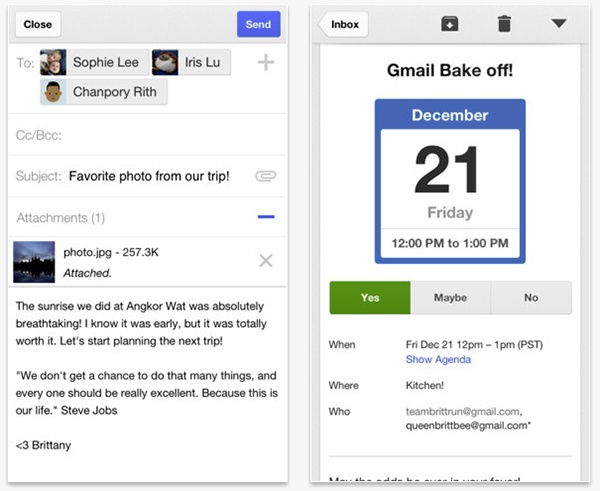
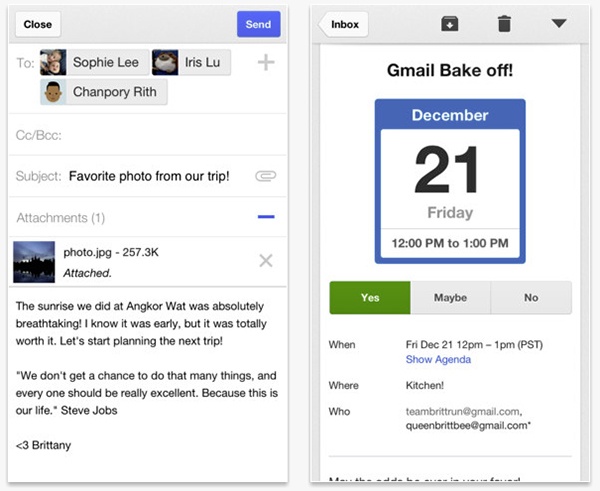
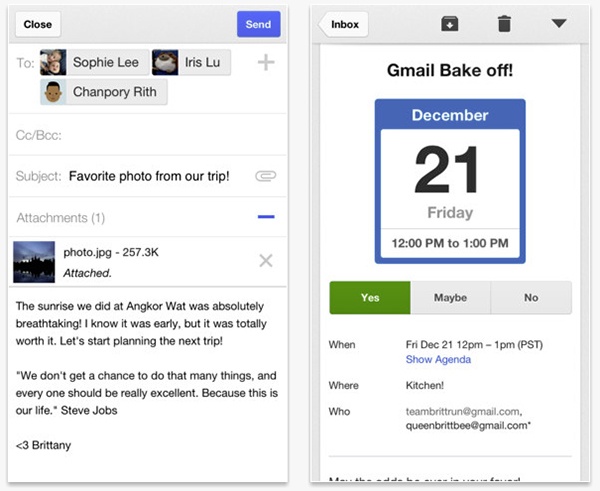
Google today released a big update to the GMail app for iOS. A whole new design that closer mimics GMail on Android and most requested feature, multiple sign-on support has been added.

What’s New
- Multiple account support
- App redesigned with a new, cleaner look
- Search predictions as you type
- Infinite scrolling inbox
- Respond to Google Calendar invites inline
- Interactive Google+ posts support
- New welcome experience

For users of Google accounts, iOS provides a built-in way to access mail, calendars, and notes from Google. However, for users looking to get their email pushed to their device, or to synchronize their contacts, this built-in method doesn’t work. But there is a way to do this, though, via Microsoft Exchange on iOS. This will allow for email to be pushed to the device, and for contacts to be synchronized to the iOS device. With iOS 5, it is also possible for notifications to appear in Notification Center, unlike in the official Gmail app, which only plays a notification sound.

This is a better method of contact synchronization with Google than doing it through iTunes. This means that contacts will be directly synchronized to and from Google when they are updated. This is great for those who have an Android device to go along with their iOS devices. This method also only synchronizes the main contacts; iTunes has been known to add all people that have ever been emailed. This method is safer and smarter.

Here’s how to enable this feature on iOS.

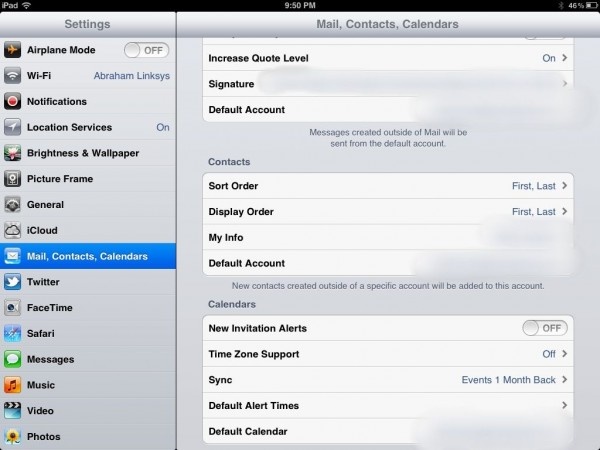
Open up Settings. Tap on Mail, Contacts, and Calendars. Tap Add Account. Select Microsoft Exchange.

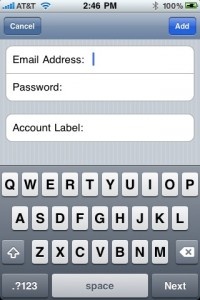
Enter the email address to be synchronized. The username is the same as the email address, and the password is the password to the account. The description can be anything the user wants. After submitting this information, a new Server option pops up. Enter m.google.com for this field.

If all the info has been successfully submitted, then the ability to enable/disable Mail, Contacts, and Calendar is available.

After all the information synchronizes, contacts from this Google account should appear in the Contacts app. Make sure that for new contacts to sync to the Google servers, set the Default Account in Mail, Accounts, and Calendars to the Exchange account. Multiple Exchange accounts can be synchronized, but only one account can have contacts added to it at a time.

Google does note that there are some drawbacks with Exchange sync versus standard account setup, but these drawbacks are well worth the trade-off for the enhanced feature set.

Journalists are prone to hyperbole, but this title is almost euphemistic. SHAPE Services, creator of the popular IM+ client, are continuing to roll out feature after feature for their mass-market social networking application.

IM+ current supports Google Talk, Yahoo! Messenger, MSN / Live, AIM (Mac users think iChat), ICQ, MySpace, Facebook, Jabber, Twitter and Skype chat. Outside of the seemingly endless list of clients, the application also provides an equally long list of push notification options, including e-mail arrival notifications from popular clients such as Hotmail, Yahoo! and Google Mail.

In addition to the application being universally built for iPhone, iPod Touch and iPad, IM+ also features an in-built browser for those who don’t have the ability to multitask – a welcome addition for iPhone 3G and iPod Touch users who are unable to avail of Apple’s much-awaited feature.

The latest update – 4.3 – brings with it a number of new themes and wallpapers, high resolution graphics for iPhone 4 users and VoiceOver support, allowing for speech recognition to be enabled. This last feature will set users back 99c a month.

There’s no doubt that SHAPE Services developers are trying to appeal to everyone. From customizable sounds and animated emoticons to geo-location support and retina display graphics, IM+ is becoming the client of choice for social networking users. It remains one of the top grossing applications for Social Networking – not bad at all for a $9.99 application with almost 4 000 competitors. And to top it all off, there’s a free version too.

$4.99
$9.99
+ Universal App - Designed for iPhone and iPad
Released: 2008-11-14 :: Category: Social Networking

FREE!
+ Universal App - Designed for iPhone and iPad
Released: 2008-08-27 :: Category: Social Networking

Mailroom – Gmail and Google Apps Mail Client Review

Mailroom – Gmail and Google Apps Mail Client Review

iPhone App - Designed for the iPhone, compatible with the iPad
Mailroom is a feature-rich email utility which allows its users to view and utilize all their Gmail accounts at once, within one application, without compromising essential features, such as labeling, threading conversations, etc. found in Google’s online mail service.

Read The Full Review »
Push for Gmail

Push for Gmail

iPhone App - Designed for the iPhone, compatible with the iPad
Push for Gmail is a simple, straightforward application providing its users with reliable, visual Gmail push notifications on their iPhone and iPod Touch.

Read The Full Review »

GpushIcon_128x128The long awaited Gmail Push Notification Service is not coming from the search engine giant and creator of Gmail, Google, but from Tiverias Apps: a non-related company specializing in productivity enhancing applications for the iPhone and iPod Touch. Tiverias Apps have released a statement saying that “GPush is the missing link between GMail and the iPhone. For the first time, receive instant Gmail message notifications”. The application was released on the App Store earlier this month but was taken down just hours after its release due to server complications. Tiverias have subsequently fixed the problem and have used this downtime to address other issues and concerns with the application. The downtime serves as both a fix and an update.

In essence, the application will mimic what it is like to receive a text message, where a user is alerted and a notification is shown on the front screen displaying what the message says. Several applications already take advantage of push notifications, but none have been posted to the App Store that allow push notifications of incoming mail.

Users should see signs of increased battery life as well, as data will be pushed instead of pulled. Under the current system, the Mail application operates under “Fetch”, a feature that pulls data to the iPhone at specified intervals (usually every 15 minutes). With the arrival of push notifications, data can now be pushed to a phone from external servers as opposed to be being pulled by phone:

Fetch (Data Pulling)
iPhone –> Talks to servers –> Pulls any data from servers

Push (Data Pushing)
Servers talk to Apple –> Apple Push Notification Service –> iPhone

As you can see, in the former (fetch) it is the iPhone that does all the work. With push, it’s the third party servers.

We’ll have a review of GPush up within a few days of its release. Check back soon!

6.00AM PST
9.00AM EST
14.00PM GMT

    Advertisement    


Featured Apps

    Advertisement    


Developers

Would you like your application reviewed on 148Apps? See the About page for information.
    Advertisement    


Steel Media Network

148Apps - iPhone app reviews and news. The best gosh darn iPhone app site this side of Mars.
http://148apps.com :: @148Apps

The Portable Gamer - Coming soon.
http://ThePortableGamer.com :: @PortableGamer

Android Rundown - Android news and reviews. Where you get the rundown on Android apps and hardware.
http://AndroidRundown.com :: @AndroidRundown

Best App Ever - Yearly Mobile App Achievement Awards.
http://bestappever.com :: @BestAppEver

GiggleApps - iPhone applications reviews for kids and parents.
http://GiggleApps.com :: @GiggleApps

148Apps.biz - iPhone development news and information for the community, by the community.
http://148apps.biz :: @148AppsBiz

The App Hall of Fame - An archive of the very best in apps and games.
http://AppHallofFame.com :: @AppHallofFame

Pocket Gamer - Mobile game reviews, news, and features.
http://PocketGamer.co.uk :: @PocketGamer

Pocket Gamer.biz - Mobile games industry news, opinion, and analysis.
http://PocketGamer.biz :: @pgbiz

AppSpy - iOS game news and video reviews.
http://appspy.com :: @appspy

Smart TV Radar - For everything you need to know about Smart TV.
http://smarttvradar.com :: @smarttvradar