
What's New
+ Improved integration with Adonit stylus (Jot Touch 4, Jot Touch with Pixelpoint & Jot Script 2) with the latest SDK
+ Upgraded Ink Brush - You can adjust the brush size and blend colors now
+ Bug fixes
App Description
*** While we focus on bringing your experience one notch above, we will no longer be maintaining this version soon. Please search “NoteLedge Cloud” on iTunes and download the all new universal app that gives you more than ever. Try it out for FREE!
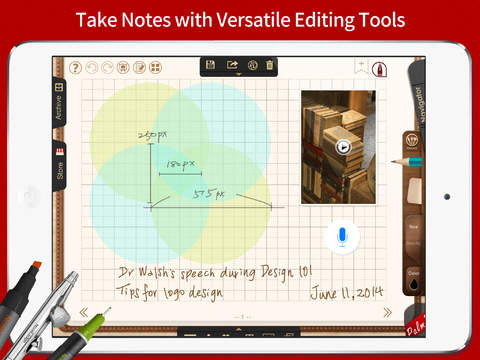
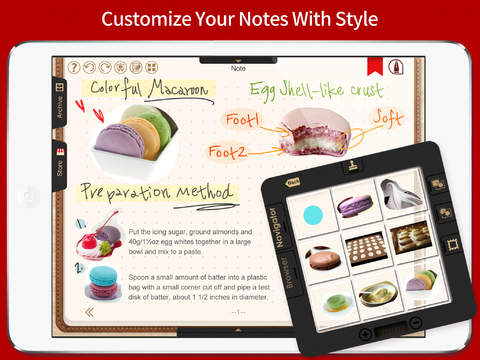
NoteLedge is a robust note-taking application that allows you to take notes with powerful editing functions such as handwriting, typing, photo-editing, audio and video recording. What makes NoteLedge stand out is its cutting-edge patented feature, “Navigator”, a gadget that provides you with the possibility to crop the selected contents in your own way and paste them anywhere within the notes. NoteLedge makes a perfect tool for making a scrapbook, composing a brief memo, keeping a daily diary, writing a travel journal, and recording brainstorming results.
:::::: Top-Ranked in the App Store ::::::
+ Overall: #1 in 6 countries. Top 10 in 22 countries including the US, Japan, Taiwan and Portugal
+ Productivity: #1 in 65 countries across the world
+ Featured as New and Noteworthy in China
+ Reached 1500,000 downloads worldwide
:::::::::::::::::::::: Features ::::::::::::::::::::::
POWERFUL EDITING TOOLS
+ Realistic handwriting and drawing experience
+ A full set of stylus including pencil, crayon, watercolor and more
+ Various fonts/colors/sizes are available for text typing
+ Take notes and record at the same time
+ Audio and video recording supported
+ Palm rest supported
+ Organize your notes with table tools
OUR PATENTED "NAVIGATOR"
+ Crop and copy selected contents and paste them wherever you like within the active area
+ A wide selection of built-in stamps are available
+ Create close-up writing and painting under magnifying mode
BUILT-IN WEB BROWSER
+ Crop and drag screenshots from websites directly to your notes
+ Copy text from the browser and paste on your notes
CUSTOMIZE YOUR NOTES
+ Choose among blank, graph, ruled, loose-leaf, E-card and Halloween themed note papers
+ Customize note papers and covers with your own photos
+ Support various photo filters
KEEP EVERYTHING ORGANIZED
+ Manage your notes under calendar view
+ Back up you notes to major cloud services including Dropbox, Box, Google Drive, FTP and WebDAV
+ Password protection supported
+ Open in Animation Desk (3.0 or later) and animate your work
SHARE YOUR LIFE THE EASY WAY
+ Share your notes on Facebook and Twitter
+ Present your thoughts under the slideshow mode
+ Export notes to PDF and back up to major cloud services (Evernote, Dropbox, Box, Google Drive, FTP and WebDAV supported)
+ Export your notes to Evernote in PDF format
+ Email your notes in either JPG or PDF format
SUPPORT KDAN CREATIVE CLOUD
Registration for Kdan Creative Cloud membership is free. Subscribe to our premium cloud services and enjoy the digital creative tools that make your creating endeavors easier than ever!
Subscription plans:
Kdan cloud: $2.99/month or $9.99/year
Deluxe Creative Pack: $3.99/month or $15.99/year
-Subscriptions will be charged through your iTunes account at the confirmation of purchase
-Your subscriptions will automatically renew unless cancelled at least 24 hours before the end of current subscription period. Your iTunes account will be charged for renewal within 24-hours prior to the end of the current period, for the same duration and at the current subscription price
-You may manage your subscriptions in your iTunes Account Settings after purchase
-No cancellation of the current subscription is allowed during an active subscription period
Terms of service: https://auth.kdanmobile.com/articles/terms_of_service
Privacy Policy: https://auth.kdanmobile.com/articles/privacy_policy
iPad Screenshots
(click to enlarge)



App Changes
- May 09, 2012 Initial release
- June 11, 2012 Price decrease: $1.99 -> $0.99
- June 28, 2012 Price increase: $0.99 -> $1.99
- August 23, 2012 New version 1.3.3
- September 02, 2012 Price decrease: $1.99 -> $0.99
- September 07, 2012 Price increase: $0.99 -> $1.99
- September 10, 2012 New version 1.3.4
- September 14, 2012 Price decrease: $1.99 -> $0.99
- September 26, 2012 Price increase: $0.99 -> $4.99
- October 04, 2012 New version 1.3.5
- November 12, 2012 New version 1.3.6
- December 04, 2012 New version 1.3.7
- December 05, 2012 Price decrease: $4.99 -> $0.99
- December 07, 2012 Price increase: $0.99 -> $4.99
- December 18, 2012 New version 1.3.8
- December 20, 2012 Price decrease: $4.99 -> $0.99
- January 01, 2013 Price increase: $0.99 -> $4.99
- February 06, 2013 New version 1.3.9
- March 22, 2013 New version 1.4
- April 16, 2013 New version 1.4.1
- April 21, 2013 Price decrease: $4.99 -> FREE!
- April 26, 2013 Price increase: FREE! -> $4.99
- May 15, 2013 New version 1.4.2
- July 26, 2013 New version 1.4.3
- October 07, 2013 New version 1.4.4
- October 11, 2013 Price decrease: $4.99 -> $0.99
- October 13, 2013 Price increase: $0.99 -> $4.99
- November 16, 2013 New version 1.4.5
- December 20, 2013 Price decrease: $4.99 -> $0.99
- December 21, 2013 New version 1.4.6
- December 21, 2013 Price increase: $0.99 -> $4.99
- February 09, 2014 New version 1.4.7
- April 28, 2014 New version 1.4.8
- April 30, 2014 Price decrease: $4.99 -> FREE!
- May 06, 2014 Price increase: FREE! -> $4.99
- May 28, 2014 New version 1.4.9
- May 30, 2014 Price decrease: $4.99 -> $0.99
- June 02, 2014 Price increase: $0.99 -> $4.99
- June 25, 2014 New version 1.5
- August 27, 2014 Price decrease: $4.99 -> FREE!
- August 31, 2014 New version 1.5.1
- August 31, 2014 Price increase: FREE! -> $4.99
- October 12, 2014 New version 1.5.2
- November 07, 2014 New version 1.5.3
- January 27, 2015 New version 1.5.4
- March 03, 2015 Price decrease: $4.99 -> FREE!
- March 08, 2015 Price increase: FREE! -> $4.99
- June 03, 2015 New version 1.5.5
- July 15, 2015 Price decrease: $4.99 -> $0.99
- August 21, 2015 Price increase: $0.99 -> $4.99
Other Apps From Kdan Mobile Software LTD