Posts Tagged wireless

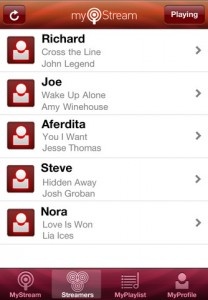
MyStream, the mobile to mobile music sharing app that launched earlier this year, has announced a recent update that adds additional media file type support, fixed a few bugs within the MyPlayist function and improves the loading screen behavior. The app, created by entrepreneur Richard Zelson, acts as a virtual earphone splitter and allows users to share their music via Wi-Fi and Bluetooth.

Now, the app features social networking integration and a new expanded playlist sharing functionality, which allows the full song to be played by turning on “Access MyPlaylist” and selecting a top 10 list of songs to be made available for others to enjoy. This was a major point of feedback from users of the previous version. Previously, the app only allowed full playback of the host’s song in real-time while others could only be played as 30-second samples. MyStream is available as a free download in the App Store for iPhone, iPad and iPod touch.

FREE!
iPhone App - Designed for the iPhone, compatible with the iPad
Released: 2011-03-30 :: Category: Music

Photo Party Upload is an app developed by LA Photo Party, Inc. in order to help facilitate the sharing of photos taken at events in an easier manner, with the ability to share them to the internet directly from an iPad. By using a PC with the Photo Party Upload Helper program and an iPad connected to the same wireless network, photos can be automatically sent from a camera directly to the iPad. While getting photos directly from the camera is naturally the hurdle to going completely wireless, this can be achieved through the use of an SD card with wireless capabilities like the Eye-Fi, by shooting photos from a camera directly hooked up to a PC, or just by transferring from the camera’s memory card at various times. When photos reach the watched folder of the Photo Party Upload Helper, then they are automatically sent to Photo Party Upload for iPad. From there, photos can be easily viewed, and sent by guests via email, Twitter, and Facebook. The app is free to download, but requires a subscription to the Photo Party Upload service; a 2-week trial is included.

FREE!
iPad Only App - Designed for the iPad
Released: 2011-05-04 :: Category: Photography

Wireless music syncing? Wireless playlist syncing? It seems the 21st century is finally starting to live up to its expectations, thanks to an update from Spotify. A new version of the application will provide users with the ability to sync MP3s and playlists wirelessly, in addition to the “offline playlists” mode that finds local tracks in the Spotify and iPod app. That includes Spotify Free users.

A new download service has been unveiled too, making it a simple process to buy every song in a playlist. “Spotify’s new MP3 download service makes it possible to own your playlists in one easy step … we’ve been able to offer you some of the most competitive prices available – from as little as 50p per song.” The download prices are tiered, depending on how many tracks you buy: 10 will cost £7.99 (80p per song); 15 will cost £9.99 (67p p/s); 40 will cost £25 (63p p/s); and 100 will cost £50 (50p p/s).

“From today, Spotify really is the only music player you’ll ever need” writes Daniel Ek, CEO & Founder of Spotify. “Our users don’t want to have to switch between their music players, but they do want to take their playlists with them wherever they go … now we’ve made that possible.” The new features will be packed into a new version “rolling out to users … over the coming days.”

iPod Classic, Nano and Shuffle users haven’t been left behind, with new functionality to manage music from the Spotify desktop application. Simply connect an iPod via USB and watch it appear under ‘Devices’ in Spotify. iPhone and iPod Touch owners – check your updates now, there’s at least one waiting for you.

SugarSync Brings Local Sync

Many people, myself included, have gone almost completely mobile with their data syncing. There’s nothing wrong with syncing your iPhone to your computer to get info, but something about plugging my phone in seems very “last generation.” Through various apps, you can access just about any form of data right off your computer; no wires attached.

Since its launch, SugarSync has been one of the leaders in accessing data remotely. With the app (and the downloadable SugarSync Manager for Mac or PC), you can have complete access of your computer’s files, photos, movies, and music with little to no lag or usability drawbacks. Keeping music on your phone for everyday listening is almost silly with an app like this because you can now have your entire music library with you, whether you are at the office or taking a morning jog.

The only downfall, up until now, is that when you are out of a service location or are forced to turn off data (like in an airplane), you’re left with an empty iPhone, devoid of the media that makes it great. SugarSync version 2.1 remedies this by letting you sync files and folders directly to your device, enabling you to use the selected files for offline viewing. There are obvious space limitations, but having the ability to sync up a movie or two before a long flight is an invaluable resource for some.

Other features of the update include improved performance of photo uploads and file downloads, as well as the ability to lock the app with a PIN code in case your iPhone gets lost or stolen.

SugarSync 2.1 is out now and can be downloaded for free in the App Store. In fact, the entire app is free, so even if you don’t have it yet, it can be had for nothing. Happy streaming!

FREE!
+ Universal App - Designed for iPhone and iPad
Released: 2008-08-27 :: Category: Productivity

If you liked our coverage of Air Display but it left yourself cursing your lack of a Mac, fear not. MaxiVista has arrived for iPad and will transform your device into an external display for your PC.

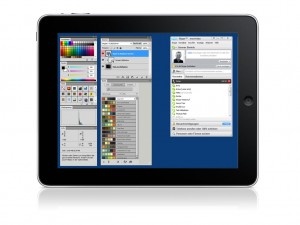
For $9.99, MaxiVista can wirelessly add an additional screen to your setup by connecting to your PC via the app and is compatible with XP, Vista and Windows 7. And this is no fly-by-night developer either. MaxiVista has existed in the Windows world since 2003 and now brings its experience to iPad users, with a Mac version also on the cards for the cross-platform iPad owners out there.

Offering a frame rate that comes close, via wireless, to the same quality found with traditional wired displays, MaxiVista looks to be great solution for Windows users who work with multiple windows, palettes or apps.

$9.99
iPad Only App - Designed for the iPad
Released: 2010-07-12 :: Category: Utilities

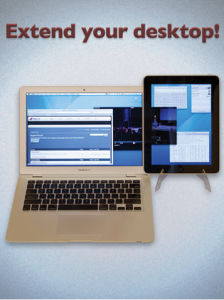
Do you ever wish you could squeeze a little more space out of your desktop screen? Say, ten inches or so? Avatron Software can help you do just that. Avatron has made a name for itself by producing excellent productivity software, namely Air Sharing for iPhone and Air Sharing HD for iPad, and looks set to continue this trend with its new Air Display app for iPad.

Just launched on the App Store, Air Display allows users to connect an iPad to their computer via Wi-Fi and extend its screen real estate by dragging windows onto the iPad screen. This seemingly magical technique frees your main screen from clutter and allows you to keep your Mail client, calendar or any other application in view while you work. Just like attaching an additional monitor, Air Display effectively extends your workspace by the 9.7 inches the iPad provides.

“We’re really thrilled to see how well Air Display is being received. But we’re just getting started!” Says Dave Howell, CEO of Avatron. “The foundation of frameworks we’ve built for Air Sharing and Air Display is a platform for some really exciting new products in our pipeline.”

Air Display has many uses beyond a home for your utilities as well. Musicians can use the extra space as a control surface and Photoshop users can store their palletes on the iPad screen, the possibilities are almost endless. At present Air Display only works with Macs but a Windows version is on the way and interested users can visit the Avatron site to sign up for notification of its launch.

For you lucky Mac users, $9.99 is all that’s standing between you and a bigger desktop area.

$9.99
+ Universal App - Designed for iPhone and iPad
Released: 2010-05-24 :: Category: Utilities

Wired vs. Wireless Charging

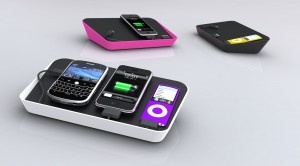
RFH0301Wireless charging stations have been creating a lot of waves over the past few months and were certainly a big focus at CES, but will they ever really take off? Certainly the market is becoming pretty competitive; I can think of 3 companies selling them off the top of my head (Powermat, WildCharge, and CaseMate). While the concept is theoretically very useful and has a cool, futuristic feel to it, they’re all currently hindered by one major factor, they all require a special case. One of the major sell points for these platforms is the idea of reducing the cables needed to charge multiple devices, but is adding a special case any better? First off, each case is an added expense and more than likely all of the devices you own won’t have a case designed for them, i.e. iPod nano, digital camera, extra battery pack, etc. Instead one company, blueLounge, has taken a slightly more practical approach to the cable management situation.

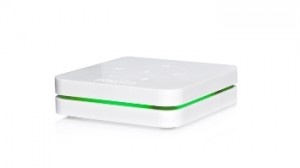
The Refresh ($89.95) charging station was designed to be a catch-all for personal mobile electronics. Constructed with both functionality and style in mind the Refresh comes in 3 different stylish colors (white, pink, and black) with a very modern feel. The rubberized lid prevents devices from sliding around and is large enough to accommodate 3 or more items depending on their size. Concealed below the lid are 6 built in connectors, 2 iPod/iPhone connectors, both a Mini & Micro USB cable, and 2 empty USB sockets to be used as needed. Additional connectors for specific devices can also be bought for $5.95 directly from their site. Each of the cables can reach up around the lower lip of the lid to start charging any of the up to 6 devices. The Refresh is a great addition to any home with numerous mobile devices and cables.

Continue reading Wired vs. Wireless Charging »

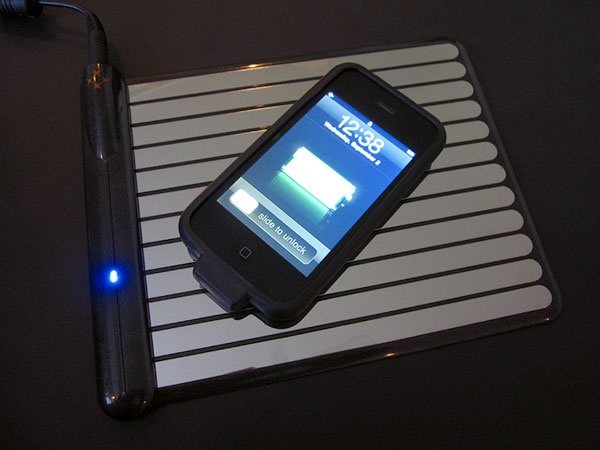
WildCharger…Pesky Cables Be Gone!

I can charge my iPhone wirelessly?...Sweet

Read The Full Review »
Discover

Discover

iPhone App - Designed for the iPhone, compatible with the iPad
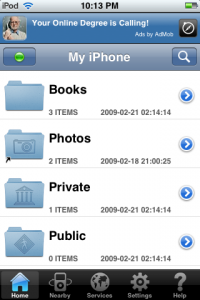
Discover is a free gem that turns your iPhone or iPod Touch into a wireless flash drive combined with a file viewer. With plenty of features, the only real downside to Discover is the ads and some minor lag—but at least you won't hear anyone complaining about the price.

Read The Full Review »
AirPhones

AirPhones

iPhone App - Designed for the iPhone, compatible with the iPad
If you have a super speedy router and need some wireless headphones to watch movies on a computer plugged into a TV that is across the room, this is the app for you. It would be hard to recommend this app otherwise, given the quality of some other apps that do similar things.

Read The Full Review »
    Advertisement    


Featured Apps

    Advertisement    


Developers

Would you like your application reviewed on 148Apps? See the About page for information.
    Advertisement    


148Apps Network

148Apps - iPhone app reviews and news. The best gosh darn iPhone app site this side of Mars.
http://148apps.com :: @148Apps

The Portable Gamer - Mobile gaming magazine for the casual gamer.
http://ThePortableGamer.com :: @PortableGamer

The App Hall of Fame - An archive of the very best in apps and games.
http://AppHallofFame.com :: @AppHallofFame

Android Rundown - Android news and reviews. Where you get the rundown on Android apps and hardware.
http://AndroidRundown.com :: @AndroidRundown

148Apps.biz - iPhone development news and information for the community, by the community.
http://148apps.biz :: @148AppsBiz

Best App Ever - Yearly Mobile App Achievement Awards.
http://bestappever.com :: @BestAppEver

GiggleApps - iPhone applications reviews for kids and parents.
http://GiggleApps.com :: @GiggleApps