| |
Posted by Jeff Scott on August 24th, 2012
iPhone App - Designed for iPhone, compatible with iPad
Wired brings to our attention a new app for Escort radar detectors. From Wired:
The app links up with an Escort radar detector via Bluetooth, and when your detector catches a signal bandwidth that might be a police speed gun or red light camera, it sends the data into the software’s global database.
It’s an interesting use of iPhone technology and one that could save you money if you drive a lot.
source: Wired
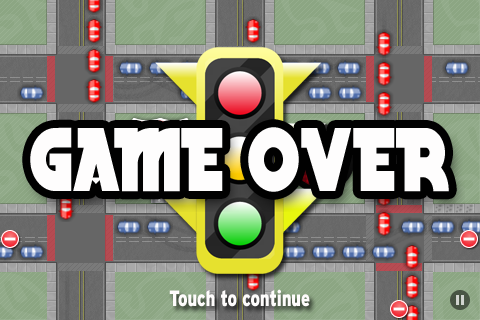
This little ad supported game is a city-wide destruction derby that takes the player through many different situations with lots of different goals and absolutely no sense of traffic laws. In Crash Mayhem the player takes control of their car and uses their finger to point out the direction on screen where they’d like the car to accelerate. Missions are varied and change from level to level. Sometimes players will have to crash as many cars as they can in a single intersection. much like a very watered-down version of Burnout CRASH! at a much lower price. In other levels, players will have to run rampant through the open city in search of items to collect before the time runs out.
The simple finger controls in Crash Mayhem work pretty well and the cars handle well too, depending on which car players are driving. As the game progresses, players gain control of faster and more responsive cars to take around on their destructive missions. The AI on other cars is virtually non-existent and they more or less run on tracks until they are hit or hit something in their path. The claims that this game is an “open world” game are a little misleading. It’s true that each level takes place in a different section of a larger sprawling city, but the action is broken into levels with no way for the player to explore the city by themselves with no pressing mission or goal to worry about.
The design of the cars and city is simplistic, but it really works for what this titles is. With such a large environment and many different things to see in each level it doesn’t matter that the city and cars aren’t rendered in super high quality 3D models. There is a certain charm to the visuals of Crash Mayhem that lets the player enjoy the gameplay.
Crash Mayhem basically boils down to a mini-game collection that brings together many of the gameplay elements and mechanics made popular in other iOS driving games. The game is ad supported which can be very annoying when ads are shown almost constantly and sometimes even cover buttons or gameplay. Still there is an unlock available via in-app purchase to get rid of the ads for players who really end up loving this title.
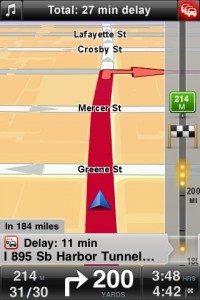
One of the most popular (and expensive!) navigation apps on iOS, TomTom, has just released it’s newest update, 1.8, that includes a new add-on called TomTom Traffic HD. The add-on, available via in-app purchase, helps the driver find solutions to avoid traffic jams and delays. The traffic is advertised to update every two minutes, providing incredibly up-to-date traffic information. The in-app purchase for the TomTom Traffic HD service costs $19.99. The TomTom Traffic HD service is part of TomTom’s recent mission to reduce traffic congestion everywhere. Read more about TomTom’s traffic reduction plans here.
Also available with the 1.8 release of TomTom is multi-stop routes. Users can now add up to five planned stops for their trips. iOS navigation apps are getting closer and closer to rival their dedicated GPS system counterparts. And with the release of TomTom’s 1.8 release, it just got closer. I personally don’t use a dedicated GPS system; I use iPhone GPS apps like TomTom. The 1.8 release also updates the map including recent road changes.
$59.99  + Universal App - Designed for iPhone and iPad
Released: 2010-03-16 :: Category: Navigation
Navigon, the company behind the extremely useful MobileNavigator app, has announced that they will be releasing a series of free, single-purpose apps in 2011. The first up is help2park, which is available right now.
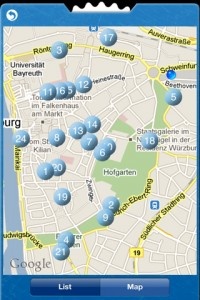
Help2park does exactly what its name implies, specifically it allows users to find all available parking lots and structures within a preset radius. Users first set the radius in which they’d like to search and with a simple tap help2park will track down and display every potential parking place within that radius. Results can be displayed in either list or map form, so you can find your place either by looking for the specific address or checking your current location against the map. Those who also have MobileNavigator installed can set the GPS to take them directly to the parking location of their choice, circumventing any potential navigation issues.
Of course what the app can’t do is tell you if any spots are available in the lot you’ve chosen, so it might be a bit more useful for day-to-day errands and shopping than trying to find a spot at a major sporting event or concert. Yes, the stadium does indeed have several parking lots, but unless you’re there early they’re likely all full, so you’ll have to keep looking. The app might also be helpful for those who are traveling in a new city and don’t really know where to park their car in a strange metropolis. As someone who lives near Washington, DC I can tell you that this app will be a godsend next time I try and drive downtown. The city’s already confusing enough as it is, but when you factor in trying to find a parking space it becomes a downright nightmare.
We’re looking forward to seeing what other apps Navigon comes up with over the next several months to make our travels a bit easier. If help2park is any indication then we’re in for some real treats.
FREE!  iPhone App - Designed for the iPhone, compatible with the iPad
Released: 2010-12-16 :: Category: Navigation
NAVIGON has announced today that its MobileNavigator app is receiving a major update, most important among them the fact that MobileNavigator will feature native iPad support. The update also includes numerous other new features including Zagat ratings and reviews, a map reporter to update new road information and in-app user notifications and newsletters.
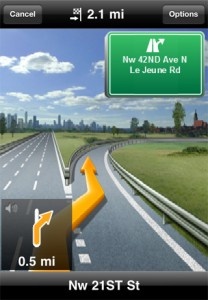
One other new feature deserves special mention because it’s particularly cool. MobileNavigator’s new Active Lane Assist feature will help users more fluidly navigate the roadways by providing optional directions on which lane to merge into at any given time. The feature creates a map of the road ahead and demonstrates when and where users should merge so as to have the safest and easiest trip possible. No more having to dive across five lanes of traffic to make an exit or work through multiple lanes of congestion just to find out that the lane you’re in will die out in a quarter mile and now you have to merge back into the mess you just got yourself out of. For those who prefer to not be told what to do the lane assist is an optional feature which can be turned on or off whenever you please.
We’re also excited about the Zagat integration which offers over reviews 40,000 restaurants, hotels, attractions, golf courses, nightspots and other leisure activities. All users have to do is tap on an applicable location to see its Zagat rating, and we assume more ratings will pop up for new locations in future updates.
The MobileNavigator update is currently available for all US MyRegion apps, and the new version should be hitting the USA and North America editions very soon. What is already one of the best GPS apps out there just got even better, so enjoy all the fancy new features aimed at making your life easier.
$22.99 $29.99
 + Universal App - Designed for iPhone and iPad
Released: 2010-03-16 :: Category: Navigation
 Quick, easy to read Aha Mobile Update 8/20/2009: Aha sent us a note to let us know that in addition to SF, LA, and San Diego, the app also now works in DC, Dallas, Seattle, San Antonio, Miami, Fort Lauderdale, Miami Beach. More cities means more venting!
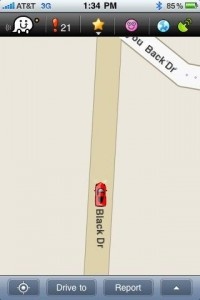
Aha has launched a rather nice traffic monitoring app for the iPhone. Finally an app with a well thought out user interface for distracted drivers. Large, clear buttons, easy to read and understand.
Aha allows you to see at a glance the travel times for your usual routes allowing you to quickly pick the best option. In addition, if you are in need of a quick caffeine hit, you can see nearby coffee shops and gas stations as you travel.
Aha also includes some interesting voice features. You can report on traffic incidents near you and listen to reports from other users and from a robot reading all of the traffic reports. There’s also a room you can listen and publish voice messages bitching about traffic and bad drivers. A welcome vent when stuck in traffic. Bitching about bad drivers, now there’s an app for that.
Aha is available now and it’s free. It currently covers the San Francisco, LA, and San Diego areas.
FREE!  + Universal App - Designed for iPhone and iPad
Released: 2009-08-05 :: Category: Navigation
| |