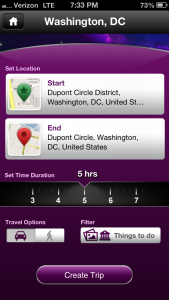
Yahoo! TimeTraveler Review
iPhone App - Designed for the iPhone, compatible with the iPadYahoo! TimeTraveler creates custom itineraries for users that meet all of their criteria.
Read The Full Review »
Posts Tagged TipYahoo! TimeTraveler ReviewiPhone App - Designed for the iPhone, compatible with the iPadYahoo! TimeTraveler creates custom itineraries for users that meet all of their criteria. Read The Full Review » One of the simplest ways to increase the visual appeal of your photos is with different points of view. This is possibly the one area the iPhone excels at when it comes to taking photos. The diminutive size, coupled with a large “view finder”, means you can easily play with varying angles to create spectacular, different, and enjoyable photos. Here is what I mean by changing your angles. We have all seen photos where the subject is straight on, with a relatively generic background. While the scene might be nice, it does not do enough to differentiate itself from the flood of these types of photos online. This is where you, your eye, and a bit of work come into play. Prepare to lie on the ground, climb a tree, and generally look like a goon while you try to catch “the shot.” There is a reason why professionals are willing to lay in the dirt, and that is to create an image that is both pleasing to the eye while providing a different view point to set the photo apart. Let us take an example of how a simple change of angle creates a more dramatic and interesting photo. Here we start with a photo taken straight on. Sure, the Lego Falcon adds a little to the photo, but the overall feel is a bit bland and over done. We get the idea, but the photo is lacking personality. Now, take the same setup and change the angle you are going to take the photo. Get in close, get low, go high, go somewhere other than just the run of the mill head on shot. Here are a few examples of the same setup, but with varying angles. Changing the perspective for a photo works on just about every subject there is for a camera lens. The iPhone camera just lends itself to changing up how you construct your shots. This includes when you are doing portrait photos. Try to change the angle you shoot a portrait and see just how a standard headshot can become so much more.
As it turns out Apple and iTunes is more prepared for this than it appears, they just don’t advertise or explain it very well to anyone. An iPhone isn’t tied to just one machine for syncing, it’s simply tied to one machine for syncing each category. In other words you could have your music sync from one machine, photos from another, movies from a third machine, etc. for each separate tab in the iTunes menu. So if you click the “Sync Movies” check box and it warns you it will erase all Movies on your phone you can proceed without fear of losing all of your music as long as the music check box is not marked as well. Go forth my friends and buy as many computers as you can afford, iPhone syncing can no longer hold you back from your dream of having an AT&T-like command center in your basement. With all of the announcements and new iPods last week, 3.1 really seemed to slip through the cracks. Sure Steve made a special point to show off the new app store genius, which really is a cool feature, and of course the new organization in iTunes is pretty sweet but it also added a cool little security feature for MobilMe users. Spawned from the days of the .Mac service that was really built for a niche market, MobileMe has quickly and quietly developed into a godsend in the iPhone world. With features like the automatic contact syncing, the Find My Phone, and Remote Wipe features, there was already plenty of reason to be looking in this direction. However, until now there was still a small security concern lurking. Find My Phone gave you the ability to locate your phone if you left it somewhere and the Remote wipe would clear it off if it was stolen, but what about if you’re not sure which has happened. Maybe it was stolen but maybe you just left it at the bar. If you wipe it then you can’t locate it any longer, but if you don’t then someone could be looking through all those pictures you took last week in Vegas. BAM, Apple brings you Remote Lock. Via the MobileMe web page you can set a pass code lock that instantly kicks the phone out of any app it’s running and locks it up nice and tight. Someone could still shut the phone off at this point but at the very least you know they aren’t getting to your information. All and all, this is a great little feature that really completes the security circle Apple is trying to build for it’s iPhone users. Here is the list of other features 3.1 add as well.
|