Posted by Rob LeFebvre on November 13th, 2012 iPhone App - Designed for iPhone, compatible with iPad
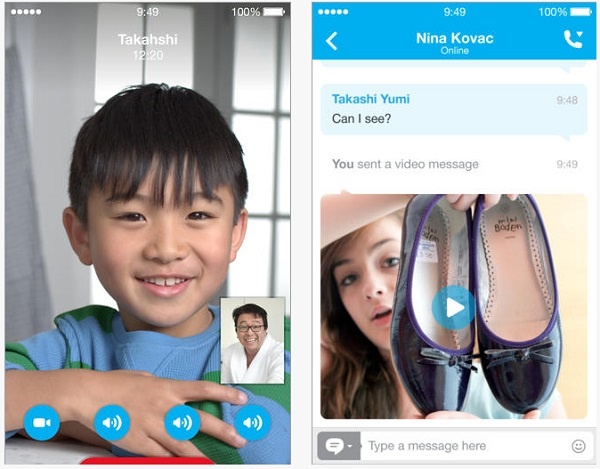
Skype, that venerable internet audio, video and text chat app that began life as a way to dial real phones from your computer, has updated its software to better support the screen size of the iPhone 5. Hooray!
What’s New in Version 4.1.2
-Support for iPhone 5 display.
-Bug fixes.
The iPad has been out for almost 15 months, and has proven to be extremely popular. However, some notable services have yet to release their apps on the iPad, even to this day. Skype has been one of these notable services, with only an iPhone/iPod touch-optimized app. While it works fine on the iPad for calling, and the experience with using multitasking is virtually the same, text chatting suffers in particular with using the app on the iPad. This particular aspect of Skype usage has been possible only through third party instant messaging apps.
However, it appears as if Skype has inadvertently revealed that their absence on the iPad is about to come to an end. Skype posted a video to YouTube of their iPad app, which was then made private, but not before someone made a screen recording of the video. The video demonstration in particular shows off the video calling features of the app between two people, with the ability to switch between front and rear cameras mid-call like FaceTime. As well, there’s the ability to do text chats mid-call via a pop-up display, view a list of recent chats on a sidebar, and view contacts by picture, similar to viewing photos in Photos.app.
As well, TUAW was able to speak with Rick Osterloh, Skype’s Vice President of Consumer and Product Design, who confirmed the authenticity of the video and upcoming release of the app. The reason why an iPad app is finally coming is because of the iPad 2′s cameras and video calling abilities; they were fine with having just the iPhone app running on iPad on the iPad before. With the impending release of this Skype app, this should hopefully motivate other popular services to start releasing iPad apps. Facebook, the world turns its lonely eyes to you!
If there is one thing that the rapid expansion of social networking has left in disarray, it has to be instant messaging services. Using myself as a horrible example of this phenomenon, I have accounts through MSN, AIM, Yahoo, Facebook, Google Talk, and even Skype. To make matters even more confusing, I have have some instances of several different sign-on names per service, as I attempt to segregate work and personal contacts. Simply put, managing my social life has become nothing short of a nightmare.
Now try to wrap your brain around trying to operate a different application for each service that holds your digital identity. Needless to say, something has to give. That is why the new iPad release of IMO Instant Messenger was just what the doctor ordered. Offering the ability to unite all of your messaging accounts and their management under a single application, suddenly makes keeping your life straight a bit more feasible. Take at look at some of the awesome features that they are bragging about:
Use of existing IM account logins, so no need to create a new account
Your IM accounts can be Linked so you can login to all accounts at once
Searchable chat history: search your past conversations on both our website and the app
Flag your buddies as favorites so you can easily find them at the top of your buddy list
Push notifications sent for 72 hours after you close the app
Buddy icons that can optionally be displayed on the buddy list
Links sent by your buddies open in our app instead of Safari
The option to save passwords for quick sign-in without linking accounts
Just to prove that they are not just tooting their own horns, the team over at IMO.im has whipped up a trailer to help fill you in on using the application effectively. Check it out below:
So they have manage to finally create the app that can help keep my life straight, while not breaking the bank in the process. That’s right folks, the software will cost you absolutely nothing! If you have an iPad and an instant messenger account of any variety, this should be an instant download. Don’t worry, we will be in the queue right behind you!
I was up fairly late last night watching an old episode of Law and Order SVU when one of those Apple spoof commercials from T-Mobile came on. In it, the too-cool-for-himself guy with the excessively yellow-orange hair, the Apple guy, was talking to his family via Facetime when he walked out of his Wi-Fi bubble. As you’d expect, he garbles and gadooks into what is assumed is a “lost connection” image while the half pretty, half odd looking Anne Hathaway knockoff explains that the T-Mobile MyTouch 4G can do video chats from anywhere with its mythical 4G network speed.
Skype then (covertly) launched their 3.0 update which allows for video chats over 3G. I was saying “a-ha!” when Mariska Hargitay was busting some young punk for kidnapping a girl after a party. I’m pretty sure she died, Ice T will sort out the mess I’m sure.
So yes, the iPhone now has the almighty capability of making video chats over its regular network, but the feature sucks up a whopping 3.4 MB/sec. It allows you to talk to your other Skype wielding buddies on any sort of device, and even works in portrait and landscape. Best of all, it runs fairly smooth even if both users are stuck on a 3G network, although nothing, not even Santa Clause, can make 3G work smoothly in certain areas.
With a feature as amazing as this, it comes as a shock that Skype didn’t publicize the launch more. The 3.0 launch could’ve been a big deal, like Super Bowl ad big, had they put some thought into marketing the update. Instead, the update released in the middle of the night, to no fanfare, while I was sitting up in bed watching Law and Order. Silly Skype. Maybe they were too upset about China’s ruling to make the service illegal in their closed off country to remember about this massive update.
Happy video chatting! Be sure to watch that data usage though, the gigabytes will fly by if you don’t watch out.
Note: The youtube video below is about as strange as it gets. Something tells me that Skype wants their service to be the next Chatroulette… if you get my drift.
The App Hall of Fame (the original App Hall of Fame, not the Apple knock off) is an independent initiative launched by 148Apps that includes selection committee members from over 40 web and print publications.
Our goal is to archive the very best mobile apps by honoring only 12 applications per month. To be eligible, applications must be available for download from the App Store for at least 6 months. Applications are nominated and voted on monthly by the selection committee with the applications that get the most votes being inducted into the hall of fame.
We want you to join in on the celebration. We’ll be giving away copies of the newly inducted applications to subscribers of our mailing list later this week. Subscribe now for a chance to win.
We are very proud to announce the December inductees into the App Hall of Fame:
As the year winds down and we look ahead to the next decade it’s time for all those wonderful end-of-year lists we all get so excited about. Today we have some exciting news, as Apple has detailed all the top paid and free apps for the iPhone and iPad, as well as the top grossing apps on each platform. Here’s the full rundown, for your edification.
1. Facebook
2. Angry Birds Lite
3. Words With Friends Free
4. Skype
5. Tap Tap Revenge 3
6. The Weather Channel®
7. Paper Toss
8. Bing
9. ROCK BAND FREE
10. Talking Tom Cat
Journalists are prone to hyperbole, but this title is almost euphemistic. SHAPE Services, creator of the popular IM+ client, are continuing to roll out feature after feature for their mass-market social networking application.
IM+ current supports Google Talk, Yahoo! Messenger, MSN / Live, AIM (Mac users think iChat), ICQ, MySpace, Facebook, Jabber, Twitter and Skype chat. Outside of the seemingly endless list of clients, the application also provides an equally long list of push notification options, including e-mail arrival notifications from popular clients such as Hotmail, Yahoo! and Google Mail.
In addition to the application being universally built for iPhone, iPod Touch and iPad, IM+ also features an in-built browser for those who don’t have the ability to multitask – a welcome addition for iPhone 3G and iPod Touch users who are unable to avail of Apple’s much-awaited feature.
The latest update – 4.3 – brings with it a number of new themes and wallpapers, high resolution graphics for iPhone 4 users and VoiceOver support, allowing for speech recognition to be enabled. This last feature will set users back 99c a month.
There’s no doubt that SHAPE Services developers are trying to appeal to everyone. From customizable sounds and animated emoticons to geo-location support and retina display graphics, IM+ is becoming the client of choice for social networking users. It remains one of the top grossing applications for Social Networking – not bad at all for a $9.99 application with almost 4 000 competitors. And to top it all off, there’s a free version too.
Fring, for those not aware, is a free communications hub on the iPhone. In it, you can make and receive free phone calls, send free IM’s, and chat with other social networking groups such as Twitter, AIM, Skype, and Google Talk. Obviously the tech is neat on its own, having everything in one spot, but the “free” part is the kicker.
The latest version of Fring, 3.2.0.5 (couldn’t they just make it 4.0?) adds a few essential touches to make it the communications app for iPhone 4. Now, with the addition of the front facing camera, you can video chat with your buddies for free, as long as they use Fring or Skype, and are on WiFi or 3G. Also, with iOS4 and its multitasking capability, you can leave Fring running in the background so people can actually call you for free, even when you’re not in the app. Instead of using it as a gimmick app, or even just a cheaper way to make calls, you can now completely do away with your extra ATT minutes and just use Fring. Too bad we can’t just drop the call plan altogether…
Last but not least… well maybe it is least… is the new ability to merge all of your social network streams into one. Instead of having to search all over the place, you can check your Twitter, Facebook, call updates, and IM’s in the same spot.
Go now, download the update or pick up Fring for free. Your phone bill will thank you.
iPhone App - Designed for the iPhone, compatible with the iPad
Posted April 1st, 2009 by Trevor Smith Our Rating: :: Highly Recommended
Skype for the iPhone is finally here! Make phone calls and chat with friends and family over WiFi without using a single minute of your iPhone's voice plan.