Posts Tagged Sharing

Hipstamatic Oggl Review

Remember Hipstamatic? It's back with a host of features to challenge the likes of Instagram.

Read The Full Review »
Story Review

Story Review

iPhone App - Designed for the iPhone, compatible with the iPad
Perhaps too simple for the experienced iOS user, Story is ideal for those novices who want to share their memories and photos with others via email or Facebook.

Read The Full Review »

Pictorama is Cash for Photos


People love taking pictures with their iPhones and since the cameras keep getting better so does the quality of the pictures themselves. With a seemingly endless supply of potentially great snapshots out there, Pictorama figured that there was probably some money to be made. The good news is that they are letting the users get in on the action.

The process is simple. Users take a photo, give it tags, and upload it. From there, it is judged by a panel of experts and fellow enthusiasts. If it’s approved, the picture is then put on the marketplace and every time it gets purchased, the photographer gets a cut. Beyond that, everyone from professionals to amateur shutterbugs can get feedback from the community and even share knowledge of their own. Pictorama is also offering 0.25€ per accepted picture upfront.

“Turn passion for pictures into profit.” Pictorama is available now for free on the App Store.


FREE!
iPhone App - Designed for the iPhone, compatible with the iPad
Released: 2012-06-12 :: Category: Photography

Ptch Review

+ Universal App - Designed for iPhone and iPad
Share and remix memories and stories in a fun, creative way using little more than your iPhone/iPad. Grab assets from your device or pull them from your social networks quickly and easily with Ptch.

Read The Full Review »

The beauty of video recording with an iOS device is that it’s almost always at hand. iPhones in particular are likely to be in their user’s pocket or bag most of the time meaning it takes no time at all to whip it out and record some footage.

How convenient would it be to earn money for these recordings? That’s what VideofyMe promises its users.

The app makes it easy to share video content with others but it also offers the ability to earn money through adding advertising to the content. It’s not compulsory. Users can always use the app just for sharing content or to add one of many filters to the video, but the opportunity to earn money is an intriguing one.

Earnings can be anywhere from $2-$9 per thousand views, depending on the audience reach involved so while no one is going to become a millionnaire, it’s still a handy addition.

VideofyMe is out now and it’s free to download.

FREE!
iPhone App - Designed for the iPhone, compatible with the iPad
Released: 2011-09-13 :: Category: Photography

Instagram has done wonders for the photo sharing app world. That doesn’t mean there isn’t time to try out a new photo sharing app, one with some very useful features when it comes to contextualizing the content.

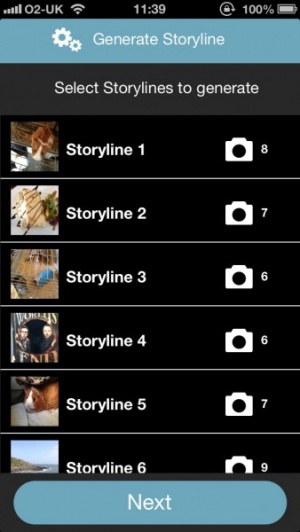
That app is WeHeartPics. The free to use app holds the lofty ambition of helping its users to make sense of their life’s fragmented moments by organizing them into forms of stories. Put a selection of photos together and it tells so much more than just one detached image.

The app offers a few different ideas for what kind of photo stories to create such as everything about the user, their family & friends, their home, place of work, hometown and regular places they visit.

Like other photo sharing apps, it’s easy to add friends or strangers in order to check out what’s going on around the world. Users can also share their WeHeartPics content on Pinterest or their Facebook timeline, thus consolidating their life.

It’s all quite a charming idea amongst a wave of photo sharing apps that don’t seem very personal. WeHeartPics is out now so why not give it a shot?

FREE!
iPhone App - Designed for the iPhone, compatible with the iPad
Released: 2012-03-19 :: Category: Photography

Frametastic Review

Frametastic Review

iPad Only App - Designed for the iPad
An attractive way of creating postcards out of photos and posting them to loved ones.

Read The Full Review »

Passing one iPad around an entire family can be frustrating, as everyone likely logs in to check their email and social networks without logging back out, and many folks will leave tabs open or clutter up the browser history with sites you could care less about. Rather than constantly log in and out and start to secretly resent those you love why not download Skyfire HotSwap instead?

The new service, which integrates directly into the Skyfire browser, allows users to set up to four separate profiles on an iPad, each with its own social and email settings and browser preferences. Not only is it more convenient, it’s also a boon to user privacy, as now brothers and sisters don’t have to worry about the other spying on their email. Of course, by the same token parents may find it harder to keep tabs on their kids, but parents always find a way.

HotSwap has been integrated into the latest update of Skyfire which is available right now. All you have to do is download (or update) the app and you’ll be ready to put those family fights about the iPad behind you!

$4.99
iPad Only App - Designed for the iPad
Released: 2010-12-22 :: Category: Utilities

One of the downsides of a landscape dominated by social media is the fact that the noise level is often through the roof. Thousands of links can fly through your feed in minutes, and it’s tough to know what’s important and what’s just fluff one of your friends posted up when drunk. For those of us who don’t have time for the clutter News.me is here to do the heavy lifting for us.

The app scans your Facebook and Twitter feeds and grabs links to articles that seem to be really resonating with your personal community. If you tend to associate with a more gamer-specific crowd then you’ll see a lot of stories revolving around video games; if you lean toward sports then scores and highlights from yesterday’s games will appear onscreen. News.me strives to deliver all the content you care about and nothing you don’t.

The app also supports offline reading so you don’t have to worry about having a signal, as well as displaying what friends are saying about each story on the feed so you can have your finger on the pulse of the conversation. With so much information out there we have to be smart with how we consume it, and News.me seems poised to be one of the best tools out there for doing just that.

FREE!
iPhone App - Designed for the iPhone, compatible with the iPad
Released: 2012-03-01 :: Category: News

Glmps Review

Glmps Review

+ Universal App - Designed for iPhone and iPad
This new app mixes photography and video in a fresh way.

Read The Full Review »
MusicStatus for Facebook Review

MusicStatus for Facebook Review

iPhone App - Designed for the iPhone, compatible with the iPad
MusicStatus for Facebook has been designed from the ground up to give users a smooth and easy way to keep their friends in the loop.

Read The Full Review »

Everyone does it. They’re sitting there listening to music, doing whatever else while the sweet melodies relax or empower them, and then they get The Urge. Suddenly, it becomes extremely important to let other people know what they’re listening to. I can’t even begin to explain this phenomena but it’s a real thing and it happens all the time. Thanks to James Shaw, the 16 year-old app wiz, the process will be getting even more streamlined.

MusicTweet is an app designed to do just that: tweet music. When a user starts up the app, it will automatically find the song and album information on what they’re currently listening to. When the tracks change, it’ll track down the info for the new one, too. From there it’s simply a matter of tapping the “Tweet” button. The app will automatically add the title, artist and other miscellaneous bits. Tracks can be changed in-app, along with the volume, so there’s little reason for tweet-happy music lovers to not keep it running all the time.

MusicTweet is available on the App Store now for $0.99.


$0.99
iPhone App - Designed for the iPhone, compatible with the iPad
Released: 2011-11-29 :: Category: Social Networking

Photo Movie Creator Review

Photo Movie Creator Review

iPhone App - Designed for the iPhone, compatible with the iPad
Photo Movie Creator is a simple but effective way of creating short slideshows out of photo collections.

Read The Full Review »
Diptic Review

Diptic Review

+ Universal App - Designed for iPhone and iPad
This superb app allows users to frame several photos into one stunning photo.

Read The Full Review »
Zapd Review

Zapd Review

iPhone App - Designed for the iPhone, compatible with the iPad
Zapd offers a simple way of creating your own website in a matter of seconds.

Read The Full Review »

Users of the popular database application FileMaker now have a new way to access important information while away from the office. The freshly launched FileMaker Go app for iPhone and iPad allows businesses and individuals to connect to, view and update a database using a local wireless network or via a Wi-Fi or 3G internet connection.

Databases shown in FileMaker Go are largely identical to their desktop equivalents, with any changes made via the app instantly written to the server. Available on PCs and Macs, a FileMaker database still needs to be created on the desktop but this new application will offer a greater degree of flexibility to users, especially those with remote sales teams. FileMaker databases can also be accessed via email, file sharing services like Dropbox and Box.net and can also be downloaded from the web and launched in FileMaker Go. Databases can also be added via iTunes file sharing on both iPhone and iPad.

As an extension to the existing FileMaker product you would perhaps expect FileMaker Go to be a free application, but the company has other ideas and is likely recouping development costs with a $19.99 price tag for the iPhone version and a hefty $39.99 for the iPad. Of course, the product is primarily aimed at business users who will likely foot the bill for the improved functionality offered. For the consumer, FileMaker also offers Bento for Mac, iPhone and iPad which is probably the best bet for non-business users.

$19.99
iPhone App - Designed for the iPhone, compatible with the iPad
Released: 2010-07-20 :: Category: Business

$39.99
iPad Only App - Designed for the iPad
Released: 2010-07-20 :: Category: Business

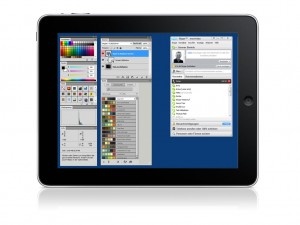
If you liked our coverage of Air Display but it left yourself cursing your lack of a Mac, fear not. MaxiVista has arrived for iPad and will transform your device into an external display for your PC.

For $9.99, MaxiVista can wirelessly add an additional screen to your setup by connecting to your PC via the app and is compatible with XP, Vista and Windows 7. And this is no fly-by-night developer either. MaxiVista has existed in the Windows world since 2003 and now brings its experience to iPad users, with a Mac version also on the cards for the cross-platform iPad owners out there.

Offering a frame rate that comes close, via wireless, to the same quality found with traditional wired displays, MaxiVista looks to be great solution for Windows users who work with multiple windows, palettes or apps.

$9.99
iPad Only App - Designed for the iPad
Released: 2010-07-12 :: Category: Utilities

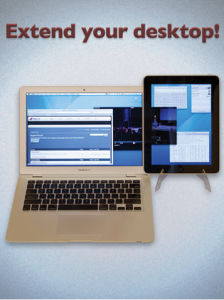
Do you ever wish you could squeeze a little more space out of your desktop screen? Say, ten inches or so? Avatron Software can help you do just that. Avatron has made a name for itself by producing excellent productivity software, namely Air Sharing for iPhone and Air Sharing HD for iPad, and looks set to continue this trend with its new Air Display app for iPad.

Just launched on the App Store, Air Display allows users to connect an iPad to their computer via Wi-Fi and extend its screen real estate by dragging windows onto the iPad screen. This seemingly magical technique frees your main screen from clutter and allows you to keep your Mail client, calendar or any other application in view while you work. Just like attaching an additional monitor, Air Display effectively extends your workspace by the 9.7 inches the iPad provides.

“We’re really thrilled to see how well Air Display is being received. But we’re just getting started!” Says Dave Howell, CEO of Avatron. “The foundation of frameworks we’ve built for Air Sharing and Air Display is a platform for some really exciting new products in our pipeline.”

Air Display has many uses beyond a home for your utilities as well. Musicians can use the extra space as a control surface and Photoshop users can store their palletes on the iPad screen, the possibilities are almost endless. At present Air Display only works with Macs but a Windows version is on the way and interested users can visit the Avatron site to sign up for notification of its launch.

For you lucky Mac users, $9.99 is all that’s standing between you and a bigger desktop area.

$9.99
+ Universal App - Designed for iPhone and iPad
Released: 2010-05-24 :: Category: Utilities

Tony’s Tips ~ Photo Sharing

Accordion Wallet InsertRemember the good old days when your dad would want to show off how cute you were. Whenever he could get the chance he’d whip out his wallet and that accordion style photo holder would flop out with a dozen embarrassing photos…well today’s kids have it even worse. Think about it, with an iPhone the parents of today can walk around with over a decade of snap shots in their pocket just waiting to embarrass their 25 year old son with…no, I’m not bitter!

To make matters worse, not only can they whip them out at a moments notice but now they can share a copy of them with anyone on the spot simply via MMS or e-mail. If you’re not familiar with this, it can be easily done from the Photos application. Clicking on the arrow in the lower left corner of the Album View will bring up 3 options. “Share,” “Copy,” and “Delete.” Next you’re able to select up to 5 photos and by tapping on the Share icon you’re can choose either “MMS” or “Email.” Quick, simple and to the point, right? But what if you have 12 or more photos you’d like to share, is your only answer going back and forth creating 3 separate e-mails? Nope, here’s your trick: Copy. Share Photos ChecksBy selecting the Copy option instead of the Share your iPhone will allow you to select as many as you like and paste them in a new blank e-mail all at once. This can be a handy little time saver but there are some restrictions. For starters it won’t work for MMS and also the number of photos you can send in a single e-mail is limited by how large of a message your provider will allow you to send. Oh and BTW, this trick does not work with videos either.

Now if you’re a parent, go forth and embarrass away with all of those priceless photos. If you’re the victim…I mean child in this disastrous scenario well then I’m sorry. But do take some comfort in the knowledge that someday you’ll probably be sharing your kid’s holograms via text.

    Advertisement    


Featured Apps

    Advertisement    


Developers

Would you like your application reviewed on 148Apps? See the About page for information.
    Advertisement    


Steel Media Network

148Apps - iPhone app reviews and news. The best gosh darn iPhone app site this side of Mars.
http://148apps.com :: @148Apps

The Portable Gamer - Coming soon.
http://ThePortableGamer.com :: @PortableGamer

Android Rundown - Android news and reviews. Where you get the rundown on Android apps and hardware.
http://AndroidRundown.com :: @AndroidRundown

Best App Ever - Yearly Mobile App Achievement Awards.
http://bestappever.com :: @BestAppEver

GiggleApps - iPhone applications reviews for kids and parents.
http://GiggleApps.com :: @GiggleApps

148Apps.biz - iPhone development news and information for the community, by the community.
http://148apps.biz :: @148AppsBiz

The App Hall of Fame - An archive of the very best in apps and games.
http://AppHallofFame.com :: @AppHallofFame

Pocket Gamer - Mobile game reviews, news, and features.
http://PocketGamer.co.uk :: @PocketGamer

Pocket Gamer.biz - Mobile games industry news, opinion, and analysis.
http://PocketGamer.biz :: @pgbiz

AppSpy - iOS game news and video reviews.
http://appspy.com :: @appspy

Smart TV Radar - For everything you need to know about Smart TV.
http://smarttvradar.com :: @smarttvradar