Swann, a global leader in security monitoring systems, and also a producer of many remote controlled (RC) helicopter models, has just announced the addition of a new RC helicopter to its fleet that can be controlled via an iOS device. The i-Fly Micro Lightning is an RC helicopter that can be controlled by iOS devices through Swann’s free iFly app and an adapter that fits into the device’s audio jack. The user can control the i-Fly Micro Lighting with on-screen touch controls or by tilting their device in tilt mode. There is also a 3-way infrared control included to control without an iOS device. The little helicopter charges via USB and will fly for up to 8 minutes on a full charge.
The i-Fly Micro Lightning will retail for $69.99, and will be available from Fry’s Electronics, BrandSmart, and other major retailers. The free iFly app is available for download form the Apple App Store and is compatible with iPhone, iPod, and iPad devices running iOS 3.0 or later.
It’s refreshing to see increasing numbers of radio stations offer their own official apps so that iOS users can easily listen to music stations wherever they are. The latest to implement such an app is that of Radio Volum, a Norwegian based radio station that focuses on EDM (Electronic Dance Music). Broadcasting live 24/7, it offers the best in Trance, House, Dance and Progressive music.
The freely available universal app allows users to tune in live, read the latest news from the official website, track the station’s Twitter feeds and Facebook page, listen to exclusive Mixtapes and watch the latest YouTube videos too.
Multitasking support is available so that users can carry on with other tasks on their iOS devices while listening to the latest dance music.
Radio Volum should provide exactly what dance fans could want from a music app. It’s available now and it’s free.
Southern Californians and music fans alike should instantly recognise the name KCRW. It’s a public radio station that’s become increasingly popular thanks to its use of modern methods like podcasts and streaming Internet radio broadcasts in its efforts to educate music fans in the latest and greatest new acts. In the past, KCRW hosts have helped showcase the likes of Beck, Adele, Florence & the Machine, Coldplay, Dido and Massive Attack.
Now there’s an app from KCRW that aims to take ‘listeners on an audio adventure of artists especially selected by DJs’ from the station. Pretty exciting, huh?
KCRW Music Mine – an iPad only app – is dedicated entirely to music exploration using The Echo Nest’s music intelligence platform to track down the best new artists. The app offers up to 100 artists at a time with lists updated daily in tandem with the on air playlists for KCRW. Listeners who want to learn more can then find videos, photos, blog posts and more behind each artist as well as discover the musical talent.
The format of KCRW Music Mine lends itself to users who don’t have a lot of time on their hands for messing around with configurations. Intead it’s an app that’s simple to browse and quickly find something of interest.
For fans who just want to kick back and relax, they can jut tap the KCRW’s 24 hour, all music stream Eclectic24 and enjoy the music, or they can listen in to full shows by many KCRW DJs.
KCRW Music Mine sounds like the ideal companion for KCRW fans and a fantastic app for music enthusiasts keen to find something new to love. I can certainly see some lazy Sunday afternoons being lost to checking out new music.
It’s free to download so why not give it a try today?
Rdio Unlimited Family, announced today, is a new discounted way to have more than one account for your family and friends. Calling it “the industry’s first digital music family plan,” Rdio hopes to allow folks who know each other group their accounts in bundles of up to three at a time. Each account acts as it’s own individual account, with the ability to listen to an individual mix of the over 10 million songs on the Rdio service. Users can also follow other Rdio listeners, and share songs and playlists with other users, Facebook, and Twitter. The accounts are fully functional Rdio accounts, able to access their unique settings on a variety of devices and platforms, including the iPad, iPhone, Android, BlackBerry and Windows Mobile 7, as well as home devices like Sonos and Roku.
“When we first introduced Rdio, everyone in the industry offered the same rates and service plans for on-demand music: five dollars per month for Web-only access and ten dollars per month for Web and mobile,” said Drew Larner, CEO of Rdio. “Now with whole families using Rdio, we’ve had a tremendous number of requests from our users for a family plan. We’re really proud to be the first digital music service to bring this type of plan to market.”
The new Rdio Unlimited Family Plan, users can save 10% with a two-account plan, at $17.99/month. If there are three accounts purchased in the bundle, there is a 23% savings, coming in at $22.99/month, while additional accounts above and beyond the three are charged at the standard $.9.99 per month. So, while a family of six will save some on the first three accounts, it might behoove them to purchase two family accounts, with up to three accounts each.
We hope to see more services adopt this “buy more, save more” approach with time, and Rdio is leading the way. I look forward to the time when the discounted savings includes more than three at a time, but this is definitely a step in the right direction.
With the enormous amount of music discovery, internet radio, and music subscription services available, the ones that have a unique idea deserve a little extra attention. The Hype Machine is a hybrid between a music blog aggregator and a music radio service.
While the Hype Machine just released their iPhone app, the service has been available online for a while. Hype Machine handpicks a variety of music blogs (and from the looks of it they use a large amount of them) and uses links to MP3s on those blogs to cook up radio stations in the app. It’s possible to actually read the source blog post within the app while the song it came from is playing. And since the very nature of most music blogs is to talk about relatively unknown, new and upcoming bands, the radio station turns out to be a powerful discovery tool.
The Hype Machine crew is selective on what types of blogs make the cut. On the Hype Machine blog they explain, “We look for genuine voices; people excited about music, thinking, drawing, experimenting, creating. We want people who would blog whether or not they were listed on the Hype Machine.”
The Hype Machine app allows users to listen by genre, popular music on the Hype Machine, recent posts, by blog, by friends, and also has a radio show highlighting the months’ best music. Also, by picking favorite blogs and songs, Hype Machine can create a Pandora-esque mix station.
Hype Machine already boasts over one million monthly visitors and has some interesting demographics. Users tend to be musically inclined with 20% of them being bloggers, 20% DJs, and 24% musicians. Before buying the app for $2.99, check out the type of music available and sign up at hypem.com.
Every now and then, an app comes along that makes you scratch your head in wonder at just how it works. One such app is What’s On Air. It kind of reminds me of the traffic alert system on my car radio but while I understand that, I’m intrigued as to how What’s On Air figures things out.
You see, this app keeps track of your favorite music then detects what songs and bands are playing currently on all manners of internet radio stations. Once it’s tracked the song or band name down, it can then switch to that station with the shake of your iOS device. Plus you can always browse through what’s currently being played on air.
There’s more too with multitasking meaning you can listen from outside of the app and you can browse through information about your favorite band courtesy of Wikipedia, YouTube and a full discography.
Priced at $1.99, What’s On Air looks set to be an ideal way of ensuring you get the best out of the radio airwaves.
8tracks is a site that lets you create and share digital mix tapes. Self-described as “handcrafted internet radio,” 8tracks allows users to upload the music files of their virtual playlists so that others can then legally stream their handiwork. This capability has now been expanded to the iPhone, as 8tracks Radio has been launched to the app store.
Some features of the 8tracks Radio app include:
Listen to user-curated mixes
Follow your favorite DJs and play their mixes through the Mix feed
Search for mixes containing your favorite artists
Browse hundreds of popular tags like alternative rock, sleep, sad, chill or dubstep
Listen to mixes everywhere – on your commute, at the gym or at home via AirPlay
The core philosophy behind 8tracks is that user-created playlists will trump those that are algorithmically generated. The online mixes that you submit to the open community via the website, along with accompanying cover art, must contain at least 8 tracks, with no more than 2 belonging to a specific artist. Listeners can then search by a variety of methods, and 8track offers select mixes curated by various notable sources such as SPIN, Pitchfork, Metric, Threadless, etc.
So, remember those days when you were mad at your parents, and you just broke up with your girlfriend, and you expressed yourself in the ultimate angst-ridden mixed tape? Uhm, yeah. Me neither. That was a friend of mine. Have any personal mixes that you’d like to share? Let us know in the comments…
Developer: BBC
Price: FREE
Version: 1.0
iTunes UK Link: BBC iPlayer
Design Rating:
Features Rating:
Integration Rating:
Overall Rating:
Last year, I reported on the launch of the highly-anticipated (and delayed) BBC News application:
“In less than 24 hours after its release, the BBC News application has shot up to #1 in the News category. It was a story about bureaucracy at its worst whenever the BBC Trust, BBC’s governing body, told their development team to shelve the iPhone application launch in the UK due to ‘uncertainty about the potential significance of whether [the BBC's plans] constitutes a change of service.’”
Over six months have passed since the BBC went live on the App Store, and now it finally has its much needed companion, the BBC iPlayer.
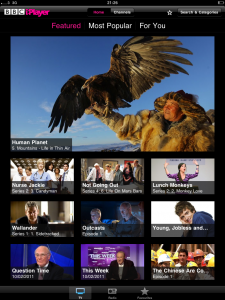
The application is a dramatic improvement over its web-based predecessor, both visually and in terms of features. Three categories – Featured, Most Popular and For You – work to bring you all of the latest TV catch with minimal fuss. iPlayer focuses on Radio too, with the Radio section receiving as much attention as its TV counterpart, including the same categories. Shows can be favourited, permitting quick access to your most important media. To make a show a favourite, either hold its miniature feature from one of the three categories and drag it up to the favourites bar, or tap “Add to Favourites” and it’ll do the rest. The favourites bar is accessible via the menu bar at the bottom of the screen, or by the star at the top.
Video quality is respectable, and the application offers High Quality where available. Unfortunately, it’s all Wi-Fi only, even for Radio, meaning 3G iPad ownerswill need to resort to creative means or join a Wi-Fi hotspot before media can be viewed. Obviously, stream quality will be network dependent, but in personal tests I found the video to be smooth and consistent. Content cannot be downloaded locally, so its online viewing only.
If you’re a parent who’s concerned about adult humour making its way into children’s ears, the BBC have included a Parental Guidance PIN that requires unlocking before adult-rated content can be viewed. A secret question is included in case you forget your PIN. However, be advised, once you enter a PIN there’s no way of reversing the process, meaning you’ll have to enter it in every time you want to watch or listen to a show marked with adult humour.
iPlayer includes a search and categories section also, the latter of which groups all shows into fourteen categories, ranging from Children’s to Films to Religion & Ethics. Conveniently, the search isn’t just by name only. Typing in Jeremy revealed a number of different shows that include Jeremy in its short text synopsis. Finally, the application also features channel listings for BBC One, Two, Three, Four, CBBC, CBeebies, News and Parliament. The entire week’s listings are present, along with a short text synopsis where available.
Overall, as a free tool, iPlayer will always remained installed on my iPad, but there certainly is room for improvement. Its lack of streaming over 3G is by far the biggest disappointment, something that its competitor The Guardian allowed last month in a major overhaul. In addition, you’ll have to manually check when new shows are added (related favourites will automatically be added to your favourites bar); a push notification alert wouldn’t go amiss for specific programs. Nonetheless, iPlayer is free, and that’s something not to be taken for granted. Better some features than none in this case.
“Jelli is the future of radio.” – Jaime Chaux – Austereo
I see a ton of music radio type apps come through my inbox every week, but none are nearly as ambitious as Jelli. Jelli is a crowdsourcing music platform that enables the listeners to really listen to what they want. Unlike most online-only platforms, Jelli is integrated into many radio stations across the country, from KITS-FM in San Francisco to WPST-FM in Philadelphia to provide an on air experience like no other. Listeners then can hop online and literally vote a song off the air… mid-play. As Jelli says, their product is true radio democracy.
Up until now, users of the system could only vote through their computers, leaving many people on the go without much of a say. To fix this, Jelly has launched the Jelli app which not only lets you listen to Jelli based community controlled playlists (consisting of music genre sections and no genre anarchy rooms) or any of the FM stations across the country that use the platform.
The app is a completely interactive app that lets you vote online for what comes next (much like iTunes DJ), and also lets you chime in as to whether the song that is playing “Sucks” or “Rocks.” If the song fills up the suckitude quota, it is instantly yanked off the air and the next song will play. To get a song on the air, or to get a song out of the list to vote on, you use your social gaming type rockets and bombs. When a song that you rocket up gets selected, your “DJ” name gets announced and you earn points for more rockets to use in the future. Use your rockets and bombs wisely though, because you only get a limited amount.
Jelli is free to download and free to listen to, so hop on board this new wave of internet/broadcast radio… and don’t pick any crappy songs.
When it comes to sounds that tickle the eardrums, I would consider myself a mass consumer. Whether it be local talk radio, sports, podcast, numerous music stations or even my 28GB+ of mp3s, it is safe to assume that I have my auditory nerves tingling as often as humanly possible. One way that I have found to mass consume both new and old music that I like is through a little website that many have become familiar with by the name of last.fm. The problem, as you can tell, is that I like to listen to far more than just music.
So what is a podcast, talk radio, news and music fiend to do? Why not download the new app AudioPress and let your entire media world be transformed. Combining feeds of everything that you like from all mediums, along with the latest news that is custom fit to you, might be a recipe for success. But what else does this new game-changing software bring to the table?
“AUDIOPRESS brings you the spoken word in all its forms—old and new—so you can hear all the news, entertainment, and information you want while on-the-go.
And with AUDIOPRESS, discovering content and creating sync-free playlists is easy, and intelligent playback can automatically play current episodes only and skip content you’ve already heard, so listening is ‘start-and-go!’” — VIA AudioPress description in App Store
If there were such a thing as custom designed applications, I believe that this would be the one made for me. I spend hours every week listening to numerous different forms of content that I love. The problem is that finding the type of information and entertainment can take months to line-up. This is where AudioPress could be the personal savior of my free time. Now the trick will be living up to the promises that they make in the trailer below. Give the app a download, because I can assure you that the sticker price of absolutely nothing is not going to break any bank.
Those wishing that the currently Europe-only Spotify music streaming service and iPhone app would hit to the rest of the world now have another option – MOG Mobile Music.
The MOG network has been around for a while but its new iPhone app makes it a serious contender in the audio subscription market offering similar, if not better, features by comparison to its rivals.
Highlights of the service include a library of eight million songs and some 700,000 albums that can be streamed to your iPhone over 3G and Wi-Fi and bundled into playlists. An unlimited number of songs can also be downloaded to the iPhone and stored for periods when you’re outside of Wi-Fi or cell areas.
The above features are all par for the course when it comes to this type of app and service but there are a few gems to be found in MOG Mobile Music too. The first is the true on-demand nature of the listening. Songs can be played at any time and repeated unlike many similar services that prevent repeat play, and you can listen to user playlists and customizable artist radio stations on the go. Artist radio isn’t as strict as the others either, with a simple slider determining how much of the artist you hear and how many similar artists are played.
It’s flexibility that seems to be the key difference between MOG and its rivals and, for a $9.99 per month fee, looks set to take a lead in the cloud-based music subscription game.
If you fancy trying out MOG Mobile Music, a three-day free trial is currently available when you download the app. No credit card is required either so you can sample the service risk free during this period.
While Pandora got the top billing when Apple demoed iOS 4 multitasking, other music services are also updating their apps to support background play.
Multitasking in iOS 4 allows compatible apps to run in the background while another app runs in the foreground. Apps in the background can continue to perform tasks such as play music streams.
Slacker Inc has announced that its personal radio application, Slacker Radio, has been updated to support multitasking and is available now for free on the App Store. The currently Europe-only Spotify is also headed for background-centric adjustment with the company announcing on its blog that an update has been submitted to Apple. The blog post goes on to suggest that a “surprise” will also be included in the update to thank users for their patience.
As well as music streaming, GPS navigation apps and social networking clients are also popular background enabled apps. Expect to see many more updates of this type in the coming days.
*Update Apple Stores are reported to be currently selling them for $69.95, no word yet on if a price fix is in the works or if this is an exclusive deal Only 7 months after the original press release Belkin’s new TuneCast Auto Live iPhone FM transmitter, which was originally tagged as being the first iPhone 3.0 accessory, is finally shipping. Physically the transmitter doesn’t look any different then many of the other transmitters on the market currently. It charges through the car’s 12-volt lighter outlet and connects through the dock adapter with a control module in between. What makes this one special though is the app, ClearSacn Live, that goes along with it. Not only can users manually control all of the frequencies from the iPhone interface but the ClearScan function uses the iPhone’s GPS locater (apparently this only works with a 3GS) to automatically find the strongest frequency for the best audio quality. The transmitter is retailing for $79.99 and the app is now on the App Store for free.
iPhone App - Designed for the iPhone, compatible with the iPad
Posted November 10th, 2009 by Bonnie Eisenman Our Rating: :: AWESOME
Pocket Tunes Radio is a brilliant radio streaming application that spots over 16,000 streams, a slick interface, and tons of features. It even includes support for Sirius and XM Radio.
iPhone App - Designed for the iPhone, compatible with the iPad
Posted June 29th, 2009 by Kyle Flanigan Our Rating: :: A MUST
Wunder Radio is an internet radio application that gives live feeds from thousands of stations across the world. Whatever you're in the mood for - you'll find it in here. From the Bahamas to Poland, United States to United Arab Emirates .. there's no shortage of choice.
Every week, I have to go to a 12 step program designed to wean me off my addiction.* But, you know what? It’s not working. You see, to be cured of an addiction you have to want to be cured. I love my iPhone. It’s a part of my life. It’s never far from my grasp, and I use it many, many times throughout my day. I don’t want to be cured.
Paul Pelosi (look at his hands) is also an iPhone addict.
When I first got my iPhone, I was amazed – due to the superb implementation of the web, that I could actually use it to buy my wife’s Christmas presents… from the sofa… while she sat next to me. I would ask her what she wanted, she’d have a little think, then tell me, then I’d buy it, without her even realising her wishes were coming true within seconds of her uttering the words. She might as well have been saying abracadabra. It was magical, and exciting in a way only another iPhone-phile can understand.
This is how my iPhone and I spend the day.
Wake Up Call
Even before I awake, my iPhone is there for me, dragging me from my slumber with the sound of Marimba. Clock has become my Alarm Clock. I’ve even taught it not to wake me at all at the weekend – at those times my iPhone allows me to dream on (although my daughter does not respect the covenant me and the iPhone have made). Continue reading A Day In The Life »
I don’t know how excited you are about it, but Slacker just updated their mobile app! For those of you who have never used Slacker, it is basically Pandora but with a larger library… which means less repeats and more awesomeness. In their own words, “The Slacker Radio application for iPhone offers listeners millions of songs, high-quality sound and an intuitive interface,” said Jonathan Sasse, senior vice president of marketing at Slacker. “With new features and sleek usability upgrades we are continuing to make the listening experience even more powerful and easy to use.”
To celebrate the update, Slacker has given me a 1 year subscription to Slacker Radio Plus (full description here) to give out however I please. Mwahaha. So here is what I would like you, the reader to do. I am looking for some good music, and I want you, dear reader, to tell me what to listen to.
I am going to take each entry (example entry – CCR) and play it as a Slacker playlist. The best Slacker playlist to come from the artist or song that you give me wins the prize. I’ll listen to any genre, as long as it’s good music, so don’t ask me what my favorite genre is.
Good Luck! Send me some good stuff… and thanks in advance.
All entries should either be posted in the comments section of this page or sent to me via Twitter (@148apps). Contest will close Sunday night with the winner being selected on Monday to much fanfare. One note from Slacker… the winner must have a valid email address already configured for Slacker (i.e. they already use Slacker with it)… so go get one, they are free.
Rule 1. Enter as many times as you want.
Rule 2. Tell all of your friends to send me their music entries
Rule 3. Don’t send me anything from the Baja Men.
iPhone App - Designed for the iPhone, compatible with the iPad
Posted May 1st, 2009 by Bonnie Eisenman Our Rating: :: GREAT EXECUTION
The Public Radio Tuner is a streamlined way to play public radio stations on your iPhone or iPod Touch. Plus, you can choose from a library of dozens upon dozens of stations—so what are you waiting for?
iPhone App - Designed for the iPhone, compatible with the iPad
Posted April 16th, 2009 by Chris Hall Our Rating: :: AMAZING
From the makers of... baseball, comes the best non game app that I have on my iPhone. Not only can I keep track of every game with pitch-by-pitch coverage, but I can also listen to my favorite radio broadcast, streaming from any teams broadcasting team that I want it from. Stomaching the Astros losing night after night has never been sweeter.
iPhone App - Designed for the iPhone, compatible with the iPad
Posted April 1st, 2009 by Bonnie Eisenman Our Rating: :: AVERAGE
Radio Flare is a musical side-scrolling shooter with a soundtrack that dynamically morphs as you play, responding to your actions. While I love the audio and believe that its spot as an IGF finalist in Audio Achievement is definitely deserved, the core gameplay ultimately failed to hook me.
This week at 148Apps, Tweetbot was on a roll, a new storybook app joined the fold, and - oops - apps broke the Super Bowl. There's more to read, so get to it!