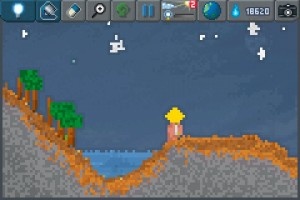
Holy crap. No, seriously, holy crap. Pixowl Inc, in collaboration with Bulkypix, are poised to unleash something major on the App Store. It might look like a simple toy at first, but make no mistake: The SandBox is packing some seriously intense concepts behind that cute facade.
When The SandBox first caught my attention, I thought it looked like a nifty little pixelated world-building game. In a way, it kind of is. However, I was thoroughly unprepared for just how many different aspects of this created world could be manipulated. Water will flow down hills, erode stone into sand, turn dirt into fertile soil, evaporate in extreme heat and freeze in extreme cold. Flowers and trees can grow. Weather will develop based largely on the environment. Players can even make rudimentary circuits to do anything from heating to creating light.
The SandBox is still very much in beta at the moment, but that’s no reason not to get excited. What’s already implemented is pretty amazing, actually. A lot of specifics are still up in the air, such as the final number of “story” levels (currently around 20), price and release date. It’s kind of a shame because this is all so cool, but then again it’s probably best not to rush things. Although the super-curious or anxious can try to get in to the beta. No guarantees, though. Regardless, be sure to keep an eye out for The SandBox whenever it does hit the App Store.
Lacking in musical talent? I know the feeling well. I’m what many people would call musically challenged despite desperately wishing I was able to create musical splendours. I’m going to have to settle for just writing words but at least Tones will give me a way of pretending I can create such works of art.
Tones is easy enough to use that even children should be able to figure it out. The user is presented with a grid of sound pads that can be activated by tapping on them. Each provides a way of producing sound through a selection of different musical instruments. Tempo can be adjusted to further change things up and a series of waves, cycles of sound, can be produced, too.
Placed together, Tones creates an unique form of music in a fun and fascinating way. There’s no way of recording just yet but it makes for an ideal, disposable form of creative expression. Just the kind of fun to have with young members of the family who love to see instant results.
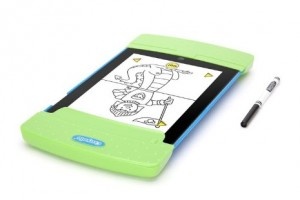
Crayola, the most familiar name in children’s craft projects, has teamed with accessory maker Griffin to release Trace and Draw. This accessory turns an iPad 2 into an interactive drawing studio for young aspiring artists with the help of the free Trace and Draw app.
The casing is kid-proof, allowing parents to relax if the child applies too much pressure to the screen or drops the device. This creative toy, just in time for holiday shopping, is recommended for children ages three and up and includes a black Crayola fine line marker and 50 sheets of specially sized tracing paper. A special screen shield protects it from damages and smudges, and the case becomes a storage unit when not in use.
Trace and Draw for iPad 2 can be found in Apple Stores for $39.99 and the app is currently available on the App Store. Let us know how you like it if you pick it up for a small one in your own life.
There are so many ways to express ourselves creatively with iOS apps. There are apps to paint with, apps to help animators, video editors, apps for playwrights and musicians, and iPhononography has become an art form unto itself.
But, what’s equally wonderful about apps is that there are amazing ones out there that allow people with not all that much talent to get creative, and end up with impressive results too. In this week’s Favorite Four, we look at our favorites apps to help bring out anyone’s inner artist.
TypeDrawing
This is a simple app that produces spectacular typography and word art. Users simply input text, choose a style and professional art that’s fit to be shared follows. Educators report this is a terrific tool for making “word splashes” – creative usage of words and art to help kids express themselves. All that’s required is typing in a sentence and drawing with a finger: ta-da! – typographical art. There are 15 fonts and as many ways to get creative as there are words in a multi-lingual dictionary, emojis included.
iPad Only App - Designed for the iPad
Released: 2010-05-18 :: Category: Entertainment
Instant Poetry HD
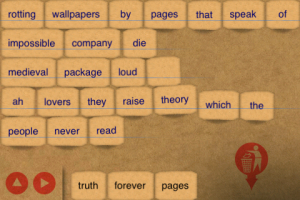
Remember that fridge magnet game with a bunch of words, largely poetic or descriptive, cut into little strips that could be arranged to create a short insta-poems? Well, Instant Poetry HD ports the concept exactly to iOS except instead of a fridge, would-be poets need an iDevice. This is a lot of fun to play with, and the results can be anything from “mad-libs” hysterical, to some decent, if lexically limited, descriptive imagery. Don’t be put off by the HD, the app is universal and for those who write real poetry, but are shy on inspiration, it can double as a brainstorming device.
+ Universal App - Designed for iPhone and iPad
Released: 2010-02-08 :: Category: Lifestyle
Songify
We’ve all heard of apps that can help the tone-deaf make music without any training, but what about an app that turns spoken words into autotune-like songs that, while even less original that a Rebecca Black hit, are in tune, and often yield hilarious audio clips that can be shared with social media. Songify can really do that, quickly and seamlessly, and best of all, the app is completely free, although additional songs and song packs are available as in-app purchases. This app is so funny, we went with saying the strangest things we could think of and having them, well, songified. That said, you can find what seem to be serious attempts at songifying, but we don’t think this app is going to make you the next YouTube sensation. Try it on an unsuspecting friend instead – just ask about about their date last night and let the musical hilarity begin.
iPhone App - Designed for the iPhone, compatible with the iPad
Released: 2011-07-06 :: Category: Music
Flowpaper
Oh how wonderful it would be to buy a high-end painting app, a world-class stylus and use all the complex features to create original masterpieces. There are a bunch of apps for that, but what about the rest of us who can’t draw our way out of a paper bag, but want to make pretty pictures nonetheless? Flowpaper allows a user to draw with a finger and physics instead of virtual paint. Just pick a “brush,” place a finger on the screen and drag. Behind the appendage will be a trail of stunning results that can look like anything from a computer-generated trail of intricately entwined light to a detailed black and white sketch with absolutely no talent required.
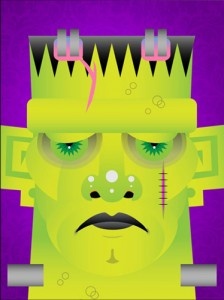
Create A Monster HD is a very creative app for iPad allowing players to create the monster of their dreams with some unique and very helpful features not typically included in apps such as this.
The app offers many different choices including head shape as well the basic eyes, nose, mouth and ears choices, with these choices typically including a monster slant to them, such as bloodshot eyes, single eyeball, and varied fang choices included with the mouths. There are many odd selections available for great interesting details like horns, scars, and antennae, as well as some quirky choices like hair pieces and eyeglasses, plus much more.
iPhone App - Designed for the iPhone, compatible with the iPad
Posted May 5th, 2009 by Christine Morris Our Rating: :: INTERESTING
You will need to build catapults, vehicles and other interesting devices in order to succeed in this game. If you are after a mental workout, in an interesting and creative way (like contraption fantastic) then this is your game.
iPhone App - Designed for the iPhone, compatible with the iPad
Posted February 25th, 2009 by Christine Morris Our Rating: :: HIGHLY RECOMMENDED
A unique application to create fantastic poems. It gives you words taken from the works of Shakespeare, Ancient Mariner, Kipling and E. A. Poe. It then adds to the mix a feed from news and Digg. This allows you to create interesting poems which uses the words of past masters mixed with current trends. Poems can then be published to Twitter or using e-mail.