Recently, I saw someone tweet that they had forgotten their anniversary. Now, with some people, I could understand this, but this person, who shall remain nameless so as to not immortalize their indiscretion, is very tech-savvy. Really, there should be no excuse! But sometimes you just don’t know how to use technology to your benefit in certain ways. So as a public service for everyone who needs to remember an anniversary, or anything recurring, like a reminder to pay one’s bills monthly, here’s how to set up recurring events.
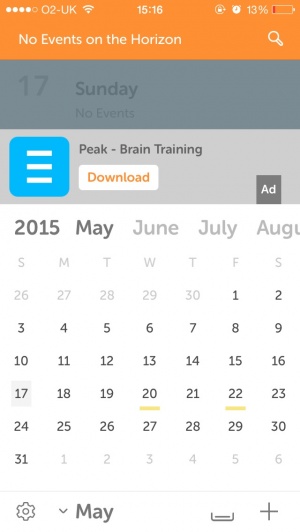
Boot up Calendar. Go to the date that you want to set up the recurring notification for. Tap the + icon in the upper-right corner to add a new date. Set up the event as normal.
Now, check the Repeat setting. You can set up an event to repeat daily, weekly, bi-weekly, monthly, or yearly.
The End Repeat section will allow you to choose when this reminder ends, like when a bill is due to be paid off. Save the event, and now every month, an event with the same parameters will appear, including the same reminder settings.
If you want an additional level of notification, sync up your reminder with a Google Calendar account. Then go to your Google Calendar, go to one of the event’s dates (preferably the most recent future occurrence) and you can add email reminders. As well, you can configure alert times to come in at different or additional intervals.
Now, let’s say that you want to cancel this event’s future recurring dates. Like if your beloved turns out to be an alien reptile or something, and that’s just a dealbreaker that you don’t want to be reminded of. Just go to the event on your calendar, and tap Edit in the upper right corner. Now scroll to the bottom and tap Delete Event. Next, a prompt will come up asking if you want to Delete This Event Only or if you want to Delete All Future Events. This same prompt will appear if you make any changes to a recurring event.
With these tips, the only excuse you have for messing up an important date is yourself! Pressure’s on!
Posted by Rob LeFebvre on November 29th, 2012 iPhone App - Designed for iPhone, compatible with iPad
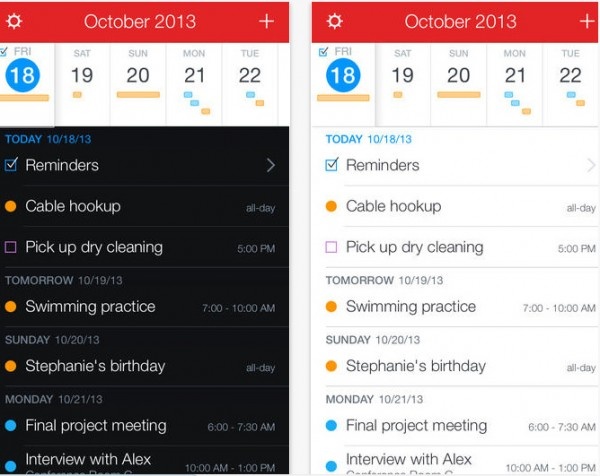
Popular Mac calendar software, Fantastical, is now on the iPhone, and it’s half off its regular price to celebrate the launch.
Using an advanced natural language engine, Fantastical is extremely expressive, allowing users enter event details in their own style. For example, enter a sentence such as “Lunch with John at 123 Main Street on Tuesday” and Fantastical will translate the sentence into an event and add it to their calendar.
With its powerful natural language event creation, DayTicker, calendar, and event list, Fantastical is the fastest and friendliest calendar you’ll ever use!
It is funny how once someone cracks midlife, suddenly their calendar becomes a constant companion. Thankfully the age of smartphone has made keeping track of life’s goings-on so much easier. But what if you were a person that wanted to share meetings, events and plans with others? Thankfully the tool UpTo can help bring the worlds of scheduling and social interaction together.
Integrating into your existing calendar software of choice, UpTo allows users to share events, view friends’ schedules, even seamlessly tie into Twitter and Facebook. All users need to do is fill their contact list with co-workers and friends to communicate, and suddenly the app becomes a social Swiss Army Knife that you can’t afford to go without. As an icing on the cake, the software is a completely free download in the App Store, so what are you waiting for? Be sure to share your hands-on impressions in the comments.
Scheduling meetings should be simple and easy to do. All too frequently, it’s not that simple with the problem of having to juggle the best times for everyone. eMeetMe Schedule Meetings will hopefully solve that problem.
It’s an app that enables users to identify the best time and date for everyone invited meaning a much better chance of a full house when it comes to attendees. Synchronising with the iPhone calendar, the app makes meetings of all sorts, whether they be business or pleasure, much easier. Users simply choose some potential dates then choose from their contacts who they want to invite. An email wings its way to them and they simply tick the relevant boxes to state when they’re able to make it and a reply is sent back to the meeting planner.
eMeetMe Schedule Meetings works out the best time for the meeting then a couple of taps and confirmation messages can be sent out to everyone who is attending. As simple as that and hopefully removing all the stress of planning!
Two versions of eMeetMe Schedule Meetings are available. The free/Lite version and a more comprehensive service that costs $0.99 and offers group creation options to make things even faster.
Posted September 21st, 2011 by Kevin Stout Our Rating: :: SIMPLE, ELEGANT DESIGN
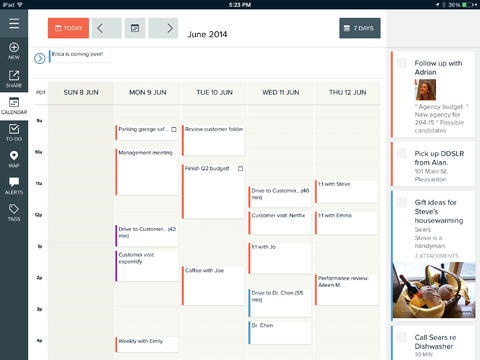
Wikly is elegantly designed for that specific someone that enjoys a simple, aesthetically pleasing interface and a weekly, time table view of their schedule.
Right about now it can be incredibly difficult to keep track of all the various gifts which must be purchased for loved ones for the holidays. Which version of Pokemon did little Timmy want? Is Sally a size 3 or a size 4? Did Frank say that drill he wanted is on sale at Sears or Lowes? It can all be a bit overwhelming but, thanks to the new Gift Plan app, you might just manage to keep your sanity after all.
Gift Plan allows you to easily create and organize shopping lists which you can use as handy references while you’re running about town. Users can put together exhaustive lists sorted in various manners such as individuals or occasions. The app also tracks spending so you can easily keep track of where you are within your shopping budget and make changes as necessary.
Beyond the holidays Gift Plan will also prove itself useful in the future, as you can easily save upcoming birthdays, anniversaries or other special gift-giving events. The app even supports importing birthdays from your contact list or Facebook, taking pretty much all the onus off of you to remember all those pesky dates. On top of all that, Gift Plan also lets you set alerts for upcoming events so you can be sure and get all your shopping done on time.
This seems to be quite an ingenious little app as it manages to merge both calendars and time management with budgeting and shopping. This is the perfect little helper for all those with long shopping lists, short memories or both. Also, it’s just a great organization app in general as it lets you put all the important details about anyone on your holiday list all in one place. It’s one of those apps which just seems too good to be true, but it’s totally real and it’s fabulous.
Fans of the Scott Adams Dilbert comic might see this app as too good to be true. An app which syncs to your calendar and offers a free Dilbert cartoon every day? This can’t be real, can it? It turns out that it isn’t, and the app which markets itself as free actually requires a subscription, which may turn a lot of folks off.
Those who do pick up the app and spring for the subscription will likely be pleased with what they find. The Dilbert Calendar syncs flawlessly with your iPhone’s regular calendar, and every day features a new 15-20 second clip from the animated series. These quick jabs of workplace humor are a nice pick-me-up when you’ve got a case of the Mondays, and those who enjoyed the cartoon will likely welcome some classic moments from the series.
The rub comes in the fact that the app costs $0.99 a month, $4.99 for six months or $9.99 for a year. Is a series of video clips worth $10 a year when you can find them for free on YouTube? For most people the answer will likely be no. If this app were truly free as advertised then it would be an easy recommendation for anyone that enjoys office humor, but the substantial price tag ultimately regresses it to a fun novelty for truly hardcore Dilbert fans.