
What's New
- Bug fixes.
- As always, we suggest backing up your data frequently.
App Description
* "Incredibly intuitive recording interface" - Leanna Lofte, iMore.com
* "CaptureAudio is a fantastic and powerful app for recording voice memos and other audio" - Christine Chan, AppAdvice.com
* "CaptureAudio Will Make You Shout Its Praises" - Chris Maxcer, MacNewsWorld.com
CaptureAudio was the ultimate upgrade to your voice memos and recordings… We now introduce CaptureAudio & Notes!
Universal support for Audio Recordings with precise time marking using our heralded Flags system, and you are now able to enter typed text notes independent of audio recording. Delivering much greater levels of efficiency and productivity when you record important lectures, meetings and other events, CaptureAudio & Notes incorporates the sophisticated marking system and text notes to audio recordings. Simple to use, yet very powerful. If you use your iPad, iPhone or iPod Touch for recording, you need CaptureAudio & Notes!
While recording, a simple tap allows you to quickly and easily mark significant points with audio markers called "Flags". There are two standard flag sets for business and education users, with Flags such as "Urgent", “Listen”, “Research”, and "Test Item". If the standard Flags don’t suit your needs, you can create your own custom flag sets with names and icons that make sense to you. During playback, you’ll see the Flag markers and can immediately start playing from those moments of the recording. Jump to the most important information quickly and easily!
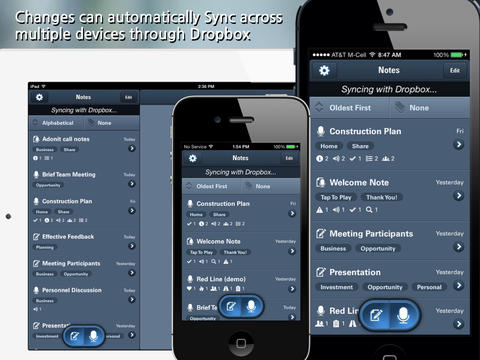
CaptureAudio users can now sync across multiple devices using Dropbox Sync. Once the Dropbox Sync has been established, CaptureAudio keeps track of the changes, and updates the devices both ways to keep everything up to date; Audio Recordings, Text Notes, Recording Tags, Custom Flags Sets... all aspects of the sessions are synced between devices.
Gone are the days of disorganized recordings and voice memos with your key points buried in the mix. With CaptureAudio, you can Tag your recordings with keywords. Tag with a client name, particular class or activity... And to added to the great CaptureAudio features, we've added Folders & Nested Folders to keep your recordings organized the way you think.
Students, Journalists, Project Managers, Home Owners, Physicians, Recruiters…the list goes on! Thousands of users have successfully added CaptureAudio to their productivity suite. With CaptureAudio & Notes, you can stop forgetting and start capturing. It's the voice memo app in a way you've never experienced it before.
========FEATURES=========
+ Incredibly intuitive recording interface
+ Use "Flags" to quickly mark important moments during Recording, and Playback!
+ Add Typed Notes during Recording & Playback
+ Sync between multiple devices with Dropbox Sync
+ Easily Share Notes using Dropbox
+ Independent Text Notes are now supported
+ Organize your recordings in Folders and even Nested Folders
+ Add Tags to completed Recordings, based on your keywords
+ View your Recording list, filtered by Tags
+ Amazing Playback screen shows all Flags and time they were placed
+ Quickly begin Playback from the Flag points of your Recordings
+ Backup all your data to Dropbox or iTunes
+ Rename Flags on the fly
+ Create Custom Flags Sets (settings)
+ Share Recordings with CaptureNotes for iPad, includes Flags & Notes
========SUPPORT=========
Feedback, suggestions or love notes… please contact us from within the app. We highly value our users and continue to improve the app based upon your feedback!
iPhone Screenshots
(click to enlarge)


iPad Screenshots
(click to enlarge)



App Changes
- March 13, 2013 Initial release
- March 19, 2013 Price decrease: $1.99 -> $0.99
- April 05, 2013 Price increase: $0.99 -> $1.99
- April 10, 2013 New version 1.1
- April 28, 2013 New version 1.2
- April 28, 2013 Price decrease: $1.99 -> $0.99
- May 10, 2013 New version 1.3
- June 09, 2013 Price increase: $0.99 -> $2.99
- August 24, 2013 New version 1.4
- August 29, 2013 Price decrease: $2.99 -> $0.99
- September 17, 2013 New version 1.4.1
- October 10, 2013 Price increase: $0.99 -> $2.99
- October 18, 2013 New version 1.5
- September 25, 2015 New version 1.6
- July 07, 2016 New version 1.6.1
- November 07, 2016 New version 1.7
- June 15, 2019 New version 1.8.3
Other Apps From G8R Software LLC