
What's New
INSTAGRAM FEATURE
* IMPORTANT : Instagram.com restricted our integration and removed a lot of our access rights. Nothing we can do around it. It was a great 4 years providing you with full Instagram integration. We are now only support browsing your own photos and stacks.
Yes we know, very limited....
App Description
FlickStackr brings Flickr photo sharing on the iPad. Designed from the ground up for the large screen, it allows you to BROWSE photos in the Flickr universe. UPLOAD photos, and EDIT your photos' metadata.
Most COMPLETE and FUNCTIONAL Flickr app on the AppStore.
follow us on Twitter @ipontCA and also at facebook.com/FlickStackr
Key Features :
==== BROWSING ====
- Single app compatible with iPhone, iPod and iPad.
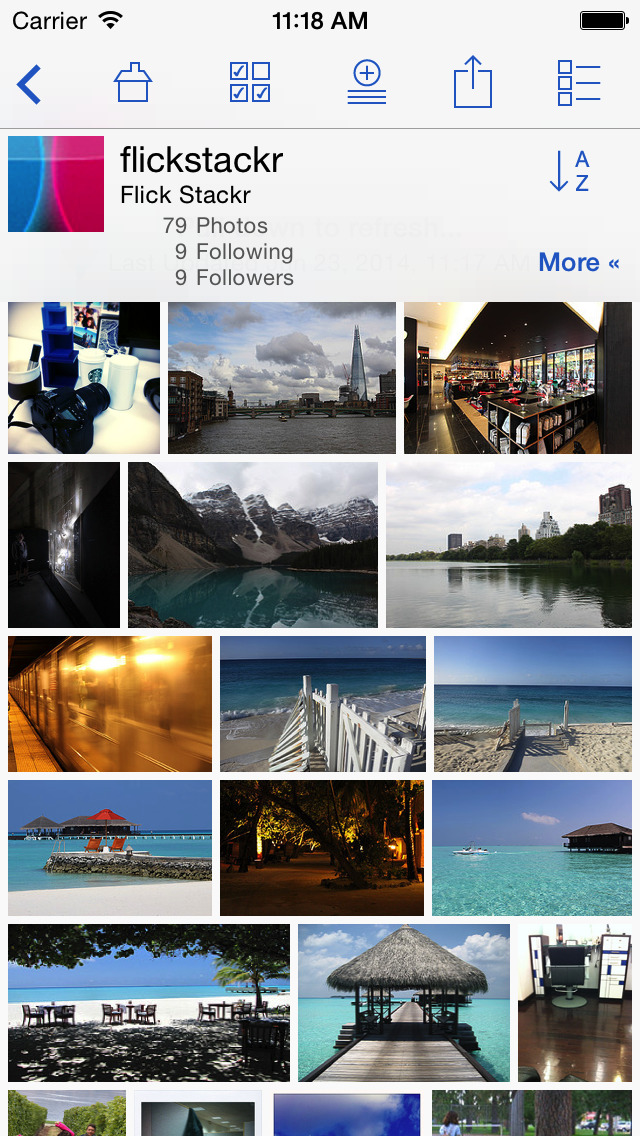
- You can look at your own photos, your sets, your favorites and your contacts and their photos.
- Browse flickr content whether you have a flickr account or not.
- Support for viewing Flickr groups photos and discussions
- Support for viewing Flickr videos
- Full screen photo browser that lets you swipe through photos and zoom by pinching. (Landscape and Portrait).
- Slideshow mode, including support for external displays (TV, HDMI, VGA)
- Browse via user's Streams, Sets, Collections, Groups, Tags and Galleries.
- No need for paging while looking at large photosets. FlickStackr does it automatically in the background.
Photos are cached locally for fast access.
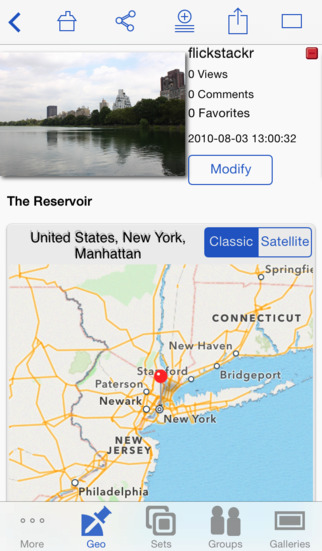
- Tags, exif and photo location viewing
- Search photos in Flickr : via keyword + geographic location + owned by you or a contact
- Offline mode for looking at photos while disconnected.
- A unique feature is the 'STACK'. The Stack lets you mark photos and photosets from you or any other people. This stack is saved on your iPad, so that you can keep this list without having to publish it to flickr. Useful when you want to review photos later, or share them all via email
==== UPLOAD/EDITING ====
- Upload photos directly from your iPhone/iPad. Use the device's photo library as source, the camera, the Camera Connection Kit, or using iTunes drag and drop, to get photos from your computer
- At upload time you can specify : title, caption, tags, sets, groups, geo location, privacy
- Exif and GPS information is maintained when uploading
- Upload in the background while you continue to browse photos
- Edit your flickr photo's metadata and geo location from your device
- Edit photo metadata in batches
-Edit images: crop, rotate, adjust or add efects to your photos when uploading them.
==== SHARING ====
- Share photos with friends via email, Facebook,Twitter and Tumblr.
- Share your photos by playing a slideshow with music on your iPad or iPhone. Or if you have a lager audience stream it via AirPlay or with external display cable (TV, HDMI, VGA)
- AirPlay support for Flickr Videos on any device
- AirPlay mirroring and presentation mode support for all the app on iPad2, iPad3, iPhone 4S and iPhone 5.
==== ACCOUNT FLEXIBILITY ====
- Support for having multiple Flickr accounts active. This is ideal for households sharing an iPad or for people with multiple identities online.
- A flickr account is NOT required. FlickStackr can be used by people who just want to explore flickr. Stacks and searches work without an account.
- Supports all iPad screen orientations.
- As a universal application, FlickStackr can be enjoyed on your iPad, iPhone and iPod Touch
==== 500px, Box, Dropbox. GoogleDrive, OneDrive Support ====
- Access 500px.com photos and uploads via a one-time in-app purchase. ($0.99/ €0.79)
- Access Box and Dropbox, GoogleDrive, and SkyDrive photos, upload, and share via a one-time in-app purchase.
== Check out our free version : FlickStackr Explore ==
iPhone Screenshots
(click to enlarge)



iPad Screenshots
(click to enlarge)


App Changes
- September 01, 2011 New version 1.9
- September 10, 2011 Price decrease: $1.99 -> $0.99
- September 10, 2011 New version 1.9.1
- October 12, 2011 New version 1.9.5
- October 18, 2011 New version 1.9.6
- November 25, 2011 Price decrease: $1.99 -> $0.99
- November 26, 2011 Price increase: $0.99 -> $1.99
- December 22, 2011 New version 2.0
- January 07, 2012 New version 2.0.1
- January 12, 2012 New version 2.0.2
- February 15, 2012 New version 2.1
- February 15, 2012 Price decrease: $1.99 -> $0.99
- February 16, 2012 New version 2.1.1
- February 16, 2012 Price increase: $0.99 -> $1.99
- March 09, 2012 New version 2.2
- March 12, 2012 New version 2.3
- March 17, 2012 New version 2.3.1
- March 27, 2012 New version 2.3.2
- April 14, 2012 New version 2.4
- April 24, 2012 New version 2.4.1
- May 03, 2012 New version 2.4.2
- May 05, 2012 Price decrease: $1.99 -> $0.99
- May 06, 2012 Price increase: $0.99 -> $1.99
- May 11, 2012 New version 2.4.3
- May 31, 2012 New version 2.5
- June 09, 2012 New version 2.5.1
- June 20, 2012 New version 2.5.2
- August 07, 2012 New version 2.6
- August 17, 2012 New version 2.6.1
- September 02, 2012 New version 2.6.2
- September 14, 2012 New version 2.6.3
- September 20, 2012 New version 2.7
- September 21, 2012 Price decrease: $1.99 -> $0.99
- September 22, 2012 Price increase: $0.99 -> $1.99
- October 03, 2012 New version 2.7.1
- October 19, 2012 New version 2.8
- November 08, 2012 New version 2.9
- November 09, 2012 New version 2.9.1
- November 10, 2012 New version 2.9.2
- November 13, 2012 New version 2.9.3
- November 21, 2012 New version 2.9.4
- November 23, 2012 Price decrease: $1.99 -> $0.99
- November 24, 2012 Price increase: $0.99 -> $1.99
- November 30, 2012 New version 2.9.5
- December 19, 2012 New version 3.0
- March 08, 2013 New version 3.1
- March 22, 2013 New version 3.2
- April 12, 2013 New version 3.2.1
- May 23, 2013 Price decrease: $1.99 -> FREE!
- May 24, 2013 Price increase: FREE! -> $0.99
- May 25, 2013 Price increase: $0.99 -> $1.99
- June 30, 2013 New version 3.3
- July 28, 2013 New version 3.3.1
- September 10, 2013 New version 3.4
- October 04, 2013 New version 3.5
- October 17, 2013 New version 3.5.1
- November 05, 2013 New version 3.5.2
- November 07, 2013 New version 3.5.3
- November 19, 2013 New version 3.5.4
- November 29, 2013 Price decrease: $1.99 -> $0.99
- December 02, 2013 Price increase: $0.99 -> $1.99
- December 20, 2013 New version 3.6
- December 31, 2013 New version 3.6.1
- January 10, 2014 New version 3.6.2
- February 09, 2014 New version 3.7
- March 13, 2014 New version 3.7.1
- April 07, 2014 New version 3.8
- April 18, 2014 Price decrease: $1.99 -> $0.99
- April 20, 2014 Price increase: $0.99 -> $1.99
- May 02, 2014 New version 3.8.5
- May 09, 2014 New version 3.8.6
- May 14, 2014 New version 3.8.7
- June 22, 2014 New version 3.9.1
- June 27, 2014 New version 3.9.2
- July 06, 2014 Price decrease: $1.99 -> $0.99
- July 08, 2014 Price increase: $0.99 -> $1.99
- October 21, 2014 New version 3.10
- November 03, 2014 New version 3.10.1
- December 01, 2014 Price decrease: $1.99 -> $0.99
- December 03, 2014 Price increase: $0.99 -> $1.99
- December 05, 2014 New version 3.10.2
- January 27, 2015 New version 3.11
- February 12, 2015 New version 3.11.1
- February 16, 2015 New version 3.11.2
- April 27, 2015 New version 3.12
- May 08, 2015 New version 3.12.1
- June 22, 2015 New version 3.13
- July 09, 2015 New version 3.13.1
- July 17, 2015 New version 3.13.2
- September 17, 2015 New version 3.14
- September 26, 2015 New version 3.14.1
- January 25, 2016 New version 3.15
- February 21, 2016 New version 3.15.1
- July 11, 2016 New version 3.15.4
Other Apps From iPont Software