So the news of an update for Clear might make a few fans nervous. Fortunately, it’s simply been improved upon without getting too complicated for minimalist fans.
The best new feature is the ability to shake to undo, allowing users to quickly retrieve anything they may have accidentally removed. There’s also no more character limit so users can type as much as they want for each entry.
More intriguingly comes news that there are secret themes to discover and more inspirational quotes to be displayed once the user has cleared everything from their list.
It’s the ideal time to give Clear a shot, all the more so as it’s currently on sale for $0.99 instead of $1.99.
Realmac Software updated its website this week with a page devoted to its newest app, Clear. The company’s page on the app doesn’t contain a lot of information yet. All we know is that the app is “coming soon,” and thanks to a teaser trailer on the site, the developer has produced one slick-looking app.
Clear is a to-do list app, and it looks to fill a much-needed hole on the App Store, in my opinion. Indeed, despite there being tremendous innovation in app development, I feel this is one area that app developers haven’t really nailed. For whatever reason, I’ve yet to fall in love with any tasking app I’ve tried. But it looks like Clear has a fair shot at being the very thing I’m looking for.
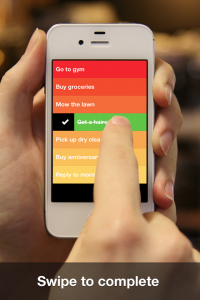
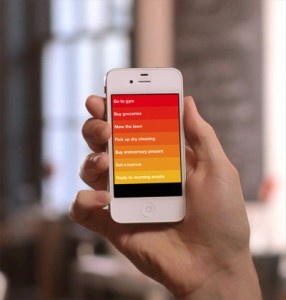
As said before, there’s little information on the app yet. Just a teaser trailer to go by. But I like what I see. First off, Clear has a very clean, color-themed interface. The minimalist approach appears to make entering and sorting through tasks effortless. The teaser shows a guy in a coffee shop, browsing through tasks like “buy groceries” and “pick up dry cleaning.” Each task is represented by different shades of orange. Users can create a new task by expanding space in between tasks, allowing quick organization. Simply tapping on a task allows users to edit it, while swiping one turns it the color green, marking it as completed and thereby deleting it.
Most of the video shows the guy entering new tasks and deleting old ones, but it also offers a quick glimpse of what appears to be a category system. The actor in the video has a setup including a “Things to Do,” “Shopping List” and “Movies to Watch.” So, even though the app appears to be minimalist in its design, Realmac Software hasn’t left out important functionality like this.
No word yet on a price point – or an exact release date yet – but I can’t wait to download this one.
It’s a problem that many parents face: how to encourage their kids to complete useful chores and tasks. The carrot and stick idea is a good one, encouraging kids to do things in exchange for eventual rewards. This is exactly why parents for years have organized sticker charts to give the youngsters a goal to attain. Once upon a time, my parents would give me a gold star every time I completed a chore with the promise of a toy He-Man: Masters of the Universe sword once I completed the chart.
Technology has moved on and so has the way that sticker charts are completed. So we come to Sticker Quest, a new app that parents and children can play together, creating daily chores and giving kids an everyday list of quests to complete such as brushing their teeth, tidying their room or simply drawing a picture of a dinosaur. Kids can then collect stickers for every task/quest they complete as well as level up to unlock new characters.
It’s a pretty fun sounding concept to me and one that kind of sounds like a child’s version of EpicWin which certainly did wonders to my motivation!
Weave is a To Do list app. We’ve all seen those before but Weave offers some fundamental differences. Instead of solely tracking what needs doing, it also keeps notes on income, expenses, projects and time spent making it an ideal way of keeping track of mostly everything any user could need.
The appearance resembles a leather tome of sorts and it’s just as simple to use. Adding To Do list items is easy enough with the option to add notes, due dates as well as project tags. Further information can be added in the form of time spent, money made, money spent and any connections between projects.
Dividing up items into projects is particularly inspired as it makes it easy for any user devising a new project to see what needs time spent on and how much money is involved. Being able to look at it on a day by day basis is also convenient with the ability to set daily alerts useful for the absent minded. Weave looks set to be a great way of boosting productivity.
Weave is out now. It’s a free app and it’s compatible with all iOS devices.
The iPad has the perfect appearance for a noteboard. Even more so for users brave enough to use the iPad Smart Cover to stick their device to the fridge (I’m not yet courageous enough). So how about using Noteboard as an ideal and simple to-do notes app to collate information quickly?
It’s an app that stylises each note as a sticky note just like the paper tools you can buy. Each note is then placed on a board space that looks a lot like a regular corkboard.
It’s a nice idea, facilitating a way of collecting anything from quick reminders to cookery recipes, while still keeping a traditional and easy to consult feel. There are 6 colored notes to choose from in all, allowing users to color co-ordinate certain tasks for instance. Plus an unlimited amount of board spaces can be set up ensuring maximum flexibility.
Noteboard is available now for the iPad priced at $0.99, however one lucky person can win a promo code for the app.
All readers need to do is simply comment on this post and one lucky soul will be picked out at random. Get entering now!
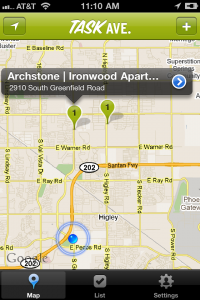
Neer has been referred to as Foursquare for adults and it’s understandable why. It’s even more obvious with its latest update offering To Do functionality.
Neer is more about the potential uses of knowing where people are than simply checking in and competing for badges.
The To Do list is location aware meaning that it’ll keep track of what you should be doing depending on where you are. Everything is done automatically right down to Neer updating when you enter or leave a building. You can just leave the app to go about its business and give you a buzz as and when it needs to.
Sharing features are there but you can choose what places you share and with who so that you can still have some much needed privacy.
It’s an interesting move for location based technology and one that’s got a lot of potential. Being reminded by your phone at the appropriate time to pick up your dry cleaning or buy some milk could be a real timesaver.
Neer is a free app but currently only available in USA and Canada.
iPhone App - Designed for the iPhone, compatible with the iPad
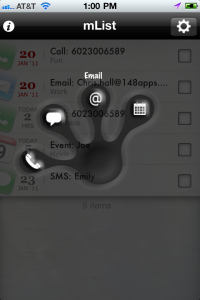
Posted January 26th, 2011 by Chris Hall Our Rating: :: MINIMALIST
mList doesn't overdo it with bells and whistles, but that's part of what makes it great. Pick it up for its great iOS integration and the slick interface.
iPhone App - Designed for the iPhone, compatible with the iPad
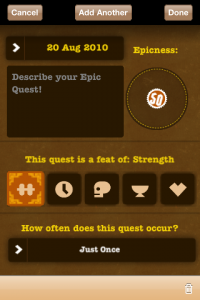
Posted August 20th, 2010 by Chris Hall Our Rating: :: DISHES +50
EpicWin makes mundane tasks feel like... slightly less mundane tasks. Just don't get burned out from adding minute tasks to level up. The goal is to actually live your life.
iPhone App - Designed for the iPhone, compatible with the iPad
Posted July 21st, 2010 by Jason Fanguy Our Rating: :: POWERFUL PROJECT MANAGEMENT
Despite it's name, Honey Do is a surprisingly powerful and useful project-management tool which allows its users to create, collaborate, coordinate and communicate on projects in real time. For those looking for a solid project-management app, look no further: Honey Do practically has it all.
I hate to say it, but most of real life is boring. Sure, sometimes people go to concerts, or go to great dinners, or some kind of vacation, but the majority of life is spent doing dishes, remembering tasks and walking the dog. Most people have great intentions when they wake up, and may even make it to work with them, but then get sucked into leveling up a character on their favorite RPG or Facebook game.
Instead of furthering yourself into this self-dug hole of despair, you will soon be able to download EpicWin. “EpicWin is an iPhone app that puts the adventure back into your life. It’s a streamlined to-do list, to note down all your everday tasks, but with a role-playing spin. Rather than just mentally ticking off your chores, completing each one improves and develops your character in an ongoing quest to level-up, gain riches, and develop skills.”
“Doing the laundry is an epic feat of stamina so why not get stamina points for it?!”
Hopefully if you find joy in leveling up your own life, you’ll actually start getting things done again. Hell, maybe now we’ll finally be able to get someone back to the moon (it’s not like we don’t know how). According to their website, Epic Win will be “coming soon”. Hopefully real soon.
Enjoy the promo video below… it’s the best one I’ve seen in a long long time.
Posted May 10th, 2010 by Chris Kirby Our Rating: :: A BETTER BOX
Like its namesake, FileMaker's Bento for iPad attempts to fill in all of the information manager holes in Apple's iPhone OS. Can one app really handle that many tasks effectively?
iPhone App - Designed for the iPhone, compatible with the iPad
Posted June 5th, 2009 by Kevin Stout Our Rating: :: SPEEDY
If you're looking for complexity and options in a To Do app, Put Things Off probably isn't the direction you want to go. But if speed and simplicity interests you, Put Things off has got plenty of both.