Couple Review
Couple makes it possible for two people to stay connected on a more personal level thanks to many of its integrated features.Read The Full Review »
Posts Tagged facetimeCouple ReviewCouple makes it possible for two people to stay connected on a more personal level thanks to many of its integrated features.Read The Full Review » Why should we ever have to look up the number for our favorite contacts ever again? We shouldn’t ever have to, and thanks to the Favorites list and to some clever trickery with home screen shortcuts, it’s possible to never have to memorize a phone number ever again! The way to access Favorites is through the Phone app on iPhone, or FaceTime app on iPad or iPod touch.even if trying to FaceTime them. So open up the Phone app or FaceTime app and go to the Favorites tab. Tap the + icon in the upper right corner. Your contact list should now be displayed. Tap on a contact to access their page. Now tap on the phone number or email address you want to add to Favorites. Phone numbers will add a shortcut to call the person; email addresses will go to FaceTime. Note that each phone number and email address will appear separately in the list, along with the description for the phone or email address, so you can easily call the different numbers for a person. You can rearrange and delete by tapping Edit in the upper-left corner. Note that this brings easy access to people for phone calls and FaceTime, it may make access too easy! Tapping on the person’s name will start a phone or FaceTime phone call, so if you tap the button accidentally, be prepared to hit the “End Call” button immediately! It isn’t possible to add a person to the list as an SMS/iMessage contact, but tapping the blue arrow to the right of their name (carefully, lest it start a call!) will call up their full contact card, where you can send them a message or email from that page. Now, an even quicker way to call people or to send them a message is through home screen shortcuts. See, it’s possible through URL shortcuts to call up different built-in apps: tel://1-800-692-7753 when pasted in to Safari would call up Apple’s support hotline, and there’s shortcuts for sms:// and facetime:// as well. The easy way to set up a home screen shortcut for yourself is to do it through an App Store app – there are several, but OneTap does the job, with the ability to create shortcuts for calls, messages, FaceTime, and even Twitter. It can even set up custom user icons. The shortcut, once on your home screen, briefly opens up Safari before completing the action you want. Now, there are ways to do this yourself, but they’re more complicated and they require the iPhone Configuration Utility, or other methods with HTML pages and URL redirection that just aren’t worth your time. Hopefully this guide helps you on your way to getting to contact the people you want to contact faster!
This is why the creation of the the Tango Video Calls application is so incredible, because not only do you get to chat for free, but you can also exchange pleasantries with your buddies on Android as well! Due to the constantly evolving ecosystem of the parallel platforms, the software is constantly being upgraded. This most recent release includes the following:
It is good to know that not only is this app frequently getting updated for functionality, but there are also new and welcome features being added all the time. Even better yet is the fact that there is a free alternative available to Facetime. This is not to say that Apple’s software suite isn’t stellar as it is, but personally, I am all for having options. We have heard through the grapevine that Tango only takes thirty seconds to configure and then you are online, free and clear. So what is your excuse for waiting? FREE! ![]() + Universal App - Designed for iPhone and iPad Released: 2010-09-29 :: Category: Social Networking
Really, when you do everything that Apple’s signature app doesn’t why wouldn’t you be successful. It certainly won’t hurt matters much when you realize that it will cost you nothing to download this little marvel. So what are you waiting for? The future of communication is just a download away. FREE! ![]() + Universal App - Designed for iPhone and iPad Released: 2010-09-29 :: Category: Social Networking
Ok, here’s what we know: 1) Apple is hosting an event on Wednesday and at the very least they’re probably going to announce a new iPod touch with a front facing camera. 2) iOS 4.1 beta has been out for several weeks and contains an option to make FaceTime calls via e-mail address. 3) Apple from the start has said it plans to make FaceTime an open industry standard, potentially allowing communication with other devices. 4) Google just announced last week the ability to use their Gchat feature for video chats. Gchat, if you’re not familiar with it, runs directly through Gmail and uses other user’s Gmail address to authorize chats. When you combine the first three together along with the timing of Google’s announcement, it seems just too convent to be just a coincidence. I certainly could be wrong but to me the picture is pretty clear, Apple and Google are going to walk us right into the future and by this time next year, iPhone users and Andriod users will be FaceTiming each other everywhere. Finally the world will be at peace and harmony.
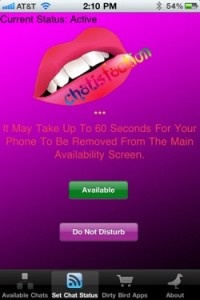
Chatisfication works like a large chat room, pairing you up with different people that have the same “need” for a FaceTime conversation. Unfortunately, due to the artwork for the app, I think the needs will become more and more conspicuous as the app gets popular (if it ever gets popular in the first place, the artwork is particularly bad). “No matter what you are looking for, Chatisfaction has it. If you are looking for a chat with someone in your local area, someone with similar interests, or just testing out your new video enabled iPhone, Chatisfaction provides the gateway for you.” Now go. Have fun talking to strangers… just don’t be too surprised if someone shows you something you don’t want to see. [Source: Recombu] $2.99 ![]() iPhone App - Designed for the iPhone, compatible with the iPad Released: 2010-08-02 :: Category: Social Networking
The latest version of Fring, 3.2.0.5 (couldn’t they just make it 4.0?) adds a few essential touches to make it the communications app for iPhone 4. Now, with the addition of the front facing camera, you can video chat with your buddies for free, as long as they use Fring or Skype, and are on WiFi or 3G. Also, with iOS4 and its multitasking capability, you can leave Fring running in the background so people can actually call you for free, even when you’re not in the app. Instead of using it as a gimmick app, or even just a cheaper way to make calls, you can now completely do away with your extra ATT minutes and just use Fring. Too bad we can’t just drop the call plan altogether… Last but not least… well maybe it is least… is the new ability to merge all of your social network streams into one. Instead of having to search all over the place, you can check your Twitter, Facebook, call updates, and IM’s in the same spot. Go now, download the update or pick up Fring for free. Your phone bill will thank you. |