
What's New
Special Touches for Mother's Day: We're launching new options across the app for our most creative selection of Mother's Day cards ever. Take a look at our new magic templates and features to find unique ways to show your mom how much she means to you.
VIP Please: We've expanded our VIP options to include new filters and overlays.
Spring Refresh: We've updated our content and spruced our editor for a crisp new season!
App Description
PicCollage - the app that lets you create anything to celebrate everything!
With PicCollage, you can turn your photos and videos into memories you want to save and share. Whether you’re looking to flex your creativity with a freestyle collage, stitch together a photo dump of your adventures, or create a quick card for a birthday. PicCollage is the perfect app for the job. Plus, you can even add videos to your collages and create video collages and slideshows that will make your friends and family say, “OMG, where’d you get that?”
It's easy, fun, and completely free. Start right now and create your first collage or card!
PicCollage at a glance
• Create collages, cards and much more
• Edit photos and videos easily - filter, cutout, retouch
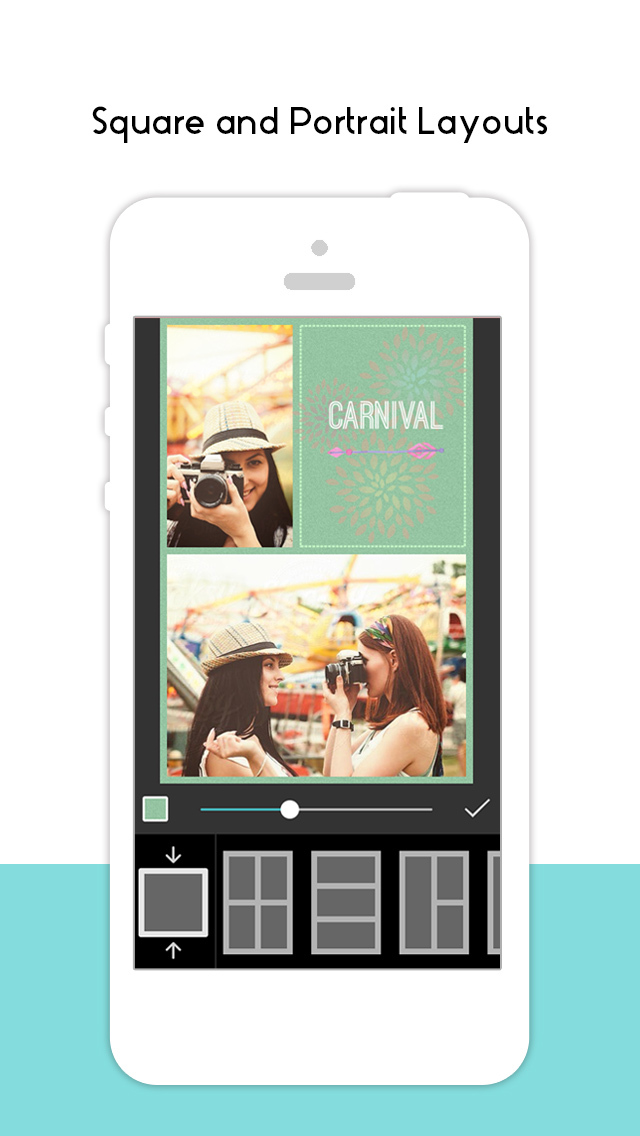
• Use ready-to-use layouts, grids & animated templates
• Personalize with fonts, stickers and doodles
• Get VIP access for unlimited creativity
Try PicCollage now! Our free starter pack is full of new stickers to help you edit photos and videos, create collages and design cards instantly.
CREATE COLLAGES, DESIGN CARDS AND MORE
You can let your creativity run wild! Whether you want to make a freestyle collage, create a picture collection, or design a card for a birthday, PicCollage offers you the perfect solution!
EDIT VIDEOS AND PHOTOS - CUT, FILTER, RETOUCH
You can personalize any creations to make your photo and video fit perfectly into your collages with features like cutouts, doodles and animations, and even add videos to your collages to create stunning video collages and slideshows. Enhance your creations by adding pages and save them as a video or slideshow.
USE TEMPLATES OR CREATE FREESTYLE
You can use a grid, or animated template to create unique cards for any occasion. Add frames around your photos and spice up your collage with fun animations. Our new AI-powered highlight detection keeps the focus of the photo front and center. Of course, you can also design in freestyle mode.
REMOVE BACKGROUNDS WITH AI
With our cutout tool, you can easily remove the background from a photo to isolate people and pets! But our cutout tool isn’t just a background eraser, it also has fun designs that let you cut photos into stars, hearts, squares and more. We’re always updating this feature to give you the sharpest finish possible.
CHOOSE FROM A VARIETY OF FONTS
Add more fun to your collage with text! We offer a variety of fonts for you to choose from, from handwritten to formal. If you want something special, explore our curved text editor to effortlessly display your text in a rounded arc, circle, around your photos, or in other creative ways. AI-powered font pairing in our speedy suggested layouts mode will take your designs to the next level.
ADD BACKGROUNDS AND STICKERS
Thanks to our worldwide collaboration with famous artists and illustrators, PicCollage offers you thousands of exclusive backgrounds and stickers. Add a background to your photos and collages and embellish everything with trendy stickers!
PERSONALIZE WITH DOODLES
To add a personal touch to your collage, card or slideshow, you can create your own drawings and doodles. This is the perfect way to add the finishing touch to your creation.
USE TEMPLATES FOR YOUR INSTAGRAM STORY
Whenever you're on Insta and want to create impressive posts, try our templates. Create an Instagram story or reel and share it directly with your followers!
PICCOLLAGE VIP
PicCollage VIP is a subscription that offers advanced features and removes watermarks and ads. With the 7-day trial version, you can test it for free! As a VIP, you get access to thousands of stickers and backgrounds, as well as exclusive fonts and layouts.
Get the PicCollage photo and video editor and let your memories shine!
PicCollage(TM) and “Pic Collage” are trademarks of Cardinal Blue Software.
Terms of Service: http://cardinalblue.com/tos
Privacy Policy: https://cardinalblue.com/privacy
Terms of Use: https://www.apple.com/legal/internet-services/itunes/dev/stdeula/
iPhone Screenshots
(click to enlarge)




iPad Screenshots
(click to enlarge)





App Changes
- July 28, 2011 New version 1.1
- August 05, 2011 New version 1.2
- August 10, 2011 New version 1.3
- August 17, 2011 New version 1.4
- August 27, 2011 New version 1.7
- September 07, 2011 New version 1.8
- September 16, 2011 New version 1.9
- September 24, 2011 New version 1.10
- October 07, 2011 New version 1.11
- October 17, 2011 New version 1.12
- October 25, 2011 New version 1.13
- November 03, 2011 New version 1.14
- November 11, 2011 New version 1.15
- November 20, 2011 New version 1.16
- November 30, 2011 New version 1.17
- December 09, 2011 New version 2.0
- December 15, 2011 New version 2.2
- December 20, 2011 New version 2.3
- January 07, 2012 New version 2.4
- January 17, 2012 New version 2.5
- January 27, 2012 New version 2.6
- February 11, 2012 New version 2.7
- February 20, 2012 New version 2.8
- March 15, 2012 New version 2.10
- April 04, 2012 New version 2.11
- April 20, 2012 New version 2.12
- May 16, 2012 New version 2.14
- June 05, 2012 New version 2.15
- June 30, 2012 New version 2.16
- July 20, 2012 New version 2.17
- August 27, 2012 New version 2.19
- September 10, 2012 New version 2.20
- October 02, 2012 New version 2.21
- October 28, 2012 New version 2.22
- November 02, 2012 New version 2.23
- November 20, 2012 New version 2.24
- December 03, 2012 New version 2.25
- December 13, 2012 New version 3.0
- December 20, 2012 New version 3.1
- January 11, 2013 New version 3.2
- January 28, 2013 New version 3.3
- February 16, 2013 New version 3.4
- March 20, 2013 New version 3.5
- April 25, 2013 New version 3.7
- May 11, 2013 New version 3.8
- June 04, 2013 New version 3.9
- June 15, 2013 New version 3.10
- August 13, 2013 New version 3.13
- September 07, 2013 New version 3.14
- September 20, 2013 New version 3.15.7
- October 07, 2013 New version 3.16.3
- October 19, 2013 New version 3.17.1
- November 12, 2013 New version 4.0.15
- November 21, 2013 New version 4.1.5
- December 04, 2013 New version 4.2.11
- December 21, 2013 New version 4.3.24
- January 11, 2014 New version 4.4.11
- January 27, 2014 New version 4.5.18
- February 27, 2014 New version 4.6.20
- March 16, 2014 New version 4.7.10
- March 23, 2014 New version 4.8.7
- April 16, 2014 New version 4.9.25
- April 28, 2014 New version 4.10.18
- May 19, 2014 New version 4.11.20
- May 24, 2014 New version 4.11.26
- June 08, 2014 New version 4.12.15
- July 19, 2014 New version 5.1.5
- August 01, 2014 New version 5.2.12
- August 15, 2014 New version 5.3.10
- September 09, 2014 New version 5.4.13
- October 06, 2014 New version 5.5.13
- October 22, 2014 New version 5.6.29
- November 06, 2014 New version 5.7.16
- November 17, 2014 New version 5.7.18
- December 15, 2014 New version 5.8.22
- January 03, 2015 New version 5.9.19
- January 27, 2015 New version 5.10.23
- February 06, 2015 New version 5.11.12
- February 25, 2015 New version 5.12.18
- March 29, 2015 New version 5.13.18
- May 02, 2015 New version 5.14.17
- May 24, 2015 New version 5.15.10
- June 11, 2015 New version 5.16.18
- June 26, 2015 New version 5.16.26
- July 20, 2015 New version 5.17.25
- August 25, 2015 New version 5.19.18
- September 16, 2015 New version 5.20.10
- October 01, 2015 New version 5.21.12
- October 27, 2015 New version 5.22.12
- October 30, 2015 New version 5.23.14
- November 26, 2015 New version 5.24.19
- December 02, 2015 New version 5.25.4
- December 17, 2015 New version 5.26.8
- December 22, 2015 New version 5.26.13
- January 14, 2016 New version 5.27.15
- February 12, 2016 New version 5.28.23
- February 24, 2016 New version 5.29.8
- March 08, 2016 New version 5.30.11
- March 23, 2016 New version 5.31.6
- April 06, 2016 New version 5.32.12
- April 18, 2016 New version 5.33.5
- April 27, 2016 New version 5.34.10
- May 12, 2016 New version 5.35.8
- June 08, 2016 New version 5.36.11
- July 09, 2016 New version 6.0.7
- July 17, 2016 New version 6.1.12
- July 20, 2016 New version 6.1.13
- August 03, 2016 New version 6.2.8
- August 04, 2016 New version 6.2.9
- August 14, 2016 New version 6.3.9
- September 14, 2016 New version 6.5.10
- November 06, 2016 New version 6.7.24
- November 12, 2016 New version 6.8.12
- November 15, 2016 New version 6.8.14
- December 01, 2016 New version 7.1.18
- December 05, 2016 New version 7.1.21
- December 14, 2016 New version 7.2.17
- December 20, 2016 New version 7.3.6
- December 22, 2016 New version 7.4.1
- January 17, 2017 New version 7.5.6
- January 25, 2017 New version 7.6.8
- March 05, 2017 New version 7.7.11
- March 14, 2017 New version 7.8.6
- March 28, 2017 New version 7.9.7
- April 17, 2017 New version 7.10.10
- May 08, 2017 New version 7.11.13
- May 23, 2017 New version 7.12.17
- June 17, 2017 New version 7.13.5
- October 31, 2017 New version 7.22.9
- November 24, 2017 New version 7.24.8
- December 31, 2017 New version 7.27.4
- January 18, 2018 New version 7.28.4
- April 02, 2018 New version 7.33.7
- May 07, 2018 New version 7.34.15
- May 24, 2018 New version 7.35.10
- June 08, 2018 New version 7.36.2
- October 05, 2018 New version 7.40.12
- November 01, 2018 New version 7.41.8
- November 22, 2018 New version 7.42.14
- January 01, 2019 New version 7.45.6
- January 16, 2019 New version 7.46.4
- February 15, 2019 New version 7.47.13
- May 12, 2019 New version 7.50.8
- May 30, 2019 New version 7.50.9
- June 20, 2019 New version 7.51.12
- July 17, 2019 New version 7.52.12
- August 17, 2019 New version 7.53.1
- September 05, 2019 New version 7.54.1
- September 24, 2019 New version 7.55.1
- October 15, 2019 New version 7.56.1
- November 12, 2019 New version 7.57.1
- November 26, 2019 New version 7.58.1
- December 24, 2019 New version 7.59.2
- January 07, 2020 New version 7.59.3
- January 22, 2020 New version 7.60.1
- May 10, 2020 New version 7.64.1
- June 21, 2020 New version 7.64.2
- July 15, 2020 New version 7.66.1
- October 23, 2020 New version 7.68.4
- October 28, 2020 New version 7.69.1
- November 27, 2020 New version 7.70.2
- September 16, 2023 New version 8.28.1
- November 03, 2023 New version 8.29.2
- November 15, 2023 New version 8.30.1
- April 25, 2024 New version 8.35.1
Other Apps From Cardinal Blue Software, Inc