Plasma Pig Review
+ Universal App - Designed for iPhone and iPadThis porky pig needs a light touch.
Read The Full Review »
Posts Tagged drawingPlasma Pig Review+ Universal App - Designed for iPhone and iPadThis porky pig needs a light touch. Read The Full Review » Inkling Review+ Universal App - Designed for iPhone and iPadThis simple yet elegant app is almost perfect for a little on-the-go sketching. Read The Full Review » Draw Something 2 ReviewiPhone App - Designed for the iPhone, compatible with the iPadThe best drawing game on the App Store gets a sequel, and it's even better than ever. Read The Full Review » Sketchworthy Review+ Universal App - Designed for iPhone and iPadCreate a virtual notebook and store plenty of details and sketches in Sketchworthy. Just don't expect to share the content with your other iOS devices. Read The Full Review »
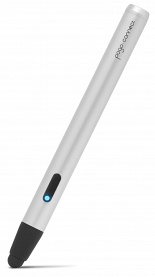
At 5.1″ (130mm) with a price tag of $80, the Pogo Connect sports a stylish silver barrel with a rubber tip at one end and decorative cap at the other. There is a single button on the side and a LED light. It uses one AAA battery and because it’s Bluetooth 4.0 that battery will last a long time. A little wider than a regular stylus, the pen lacks heft, but it fits comfortably in the hand and has good balance. The tip is the same thick dark rubber that one finds on traditional styluses and is magnetic for easy replacement. Ten One promises new tip designs in the future. Pogo Connect doesn’t pair with the iPad in the usual way a Bluetooth device would. To assist in getting everything set up correctly, users can download the free Pogo Connect app to link the stylus and then each of the 19 compatible apps – up from the original 13 – goes its own way. Some apps like Procreate just find the pen, while others like Noteshelf require users to poke around in the settings. It’s easy.
One of the more glaring flaws when I first tested the Connect back in December was that it didn’t prevent palm marks, but recent updates have improved that functionality. How well it works seems to depend more upon the app than the stylus. And what about pressure sensitivity? That’s the key selling point, but it’s very hit or miss. Some apps respond to pressure by varying line thickness, others opacity, and none respond to a light touch despite claims that the proprietary Crescendo Sensor technology requires “0 grams of activation force.” That said, the Connect outperforms captive models. It’s not transformative, but with the right app and practice, sketching feels more holistic. There are a couple of neat features worth mentioning: the Pogo Connect app has a pen locator, the button on the stylus works as an undo command, and the LED light indicates the active ink color. Still, while somewhat more intuitive than capitative models, the Pogo Connect needs a lot of tweaking before it warrants the hefty price tag, much less turns the iPad into a device that can compete with a dedicated graphics tablet. A full list of compatible apps can be found here on the Ten One Design site. FREE! ![]() iPhone App - Designed for the iPhone, compatible with the iPad Released: 2012-09-01 :: Category: Utilities Pickle Weasel ReviewiPad Only App - Designed for the iPadPickle Weasel is better for a quick chuckle than for hours of enjoyment, but it's got personality to spare. Read The Full Review » Portray Review+ Universal App - Designed for iPhone and iPadPortray takes a more hands-on approach to photo filtering, allowing for much more manipulation than conventional filter apps. Read The Full Review » SketchPhrase Review+ Universal App - Designed for iPhone and iPadA whole lot of SketchPhrase's fun depends on who's playing but when it all "clicks" it can be incredibly silly fun. Read The Full Review » Draw a Stickman: Epic ReviewiPhone App - Designed for the iPhone, compatible with the iPadIt's about as taxing as *actually* drawing stick figures in a coloring book, but Draw a Stickman: Epic is full of enough charm and playful interactions to warrant some doodling. Read The Full Review » Concepts ReviewiPad Only App - Designed for the iPadConcepts is a free drawing app designed to make precision drafting and sketching simpler thanks to its intuitive interface and easy-to-use toolbar. Read The Full Review » Brushes 3 Review+ Universal App - Designed for iPhone and iPadIt's not the most technically advanced of drawing apps but Brushes 3 is an ideal place for amateur artists who want to dabble in the fun of drawing. Read The Full Review » SketchBook Ink ReviewiPad Only App - Designed for the iPadSketchBook Ink has a welcoming interface but lacks key features Read The Full Review »
I have to admit that before I saw this app, I had no idea that latte art existed. I took a look at the app and wondered who was creatively strange enough to think of an app where players make art out of coffee. A few YouTube videos later and I’m entranced by how cool some people (latte artists?) can make a latte look. HB Latteland starts a player in “Latte Art School” where the choose a mentor from the Holly Brown team of baristas to lead them through school. When users “graduate” from the art school, they’re faced with challengers from around the world in the Challenge stage. Featured in the challenge modes are World Latte Art Champion Scottie Callaghan and Taiwan Champion Van Lin. In addition, there’s an etching mode where players can basically draw and etch on a cup of latte. Holly Brown is a Hong Kong-based coffee and gelato company with coffee from Italian master roaster Domenic Spadaccini and made-to-order gelato for customers. $0.99 ![]() iPhone App - Designed for the iPhone, compatible with the iPad Released: 2012-04-18 :: Category: Games
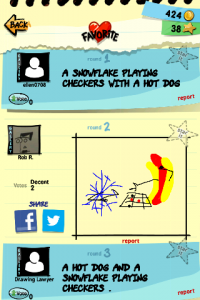
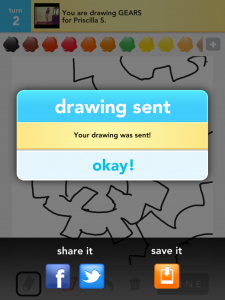
Say Something! allows players to comment on each other drawings. This adds a sort of chat system to the game that lets players tell them what they thought of each others drawings. Share Something! lets players share their favorite drawing to Facebook and Twitter for their friends’ amusement. Right after a drawing is finished, a Facebook and Twitter button becomes readily available for users to press and instantly share with their friends. And Save Something!, probably the most desired feature from people I’ve talked to, gives users the ability to save drawings to the iOS device’s camera roll. In the same screen that displays the social networking sharing buttons, a save to device button is presented. It’s an easy way to save those special drawings players spent their valuable minutes on. Sharing options from the camera roll then become limitless. Other features include Undo Something! and Refresh Something!, adding the ability to undo the last line and refresh game updates by pulling the list down. More updates are sure to come soon. $2.99 ![]() + Universal App - Designed for iPhone and iPad Released: 2012-02-01 :: Category: Games
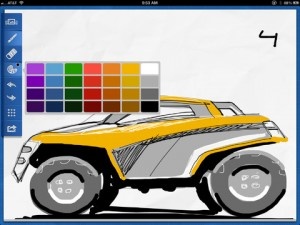
Upgrades include a completely rebuilt gallery, new brush management, pro tools, a shop for more brushes, new painting mode actions, layers, and gestures. As I said, there really are a quite a few new features. Within the brush management system, users can now create custom brush sets (groups of brushes) for easier organization. Within the Pro Tools, the new 48 brushes added to Procreate have been organized into sets of their own. And the additional brushes available as in-app purchases can be previewed before they’re purchased. There are simply too many new additions and upgrades for me to cover in the post. There are equally as many tweaks and fixes to the app to make using the app a better experience. Check out the update notes in the app description. If this was a five star app months ago, what does that make it now? $4.99 ![]() iPad Only App - Designed for the iPad Released: 2011-03-16 :: Category: Entertainment How To Draw! Review+ Universal App - Designed for iPhone and iPadA little heavy on talking rather than doing, How to Draw! does teach some great skills. Read The Full Review »
Tapose’s main feature is the “slide bar” in the middle of the screen. It functions as a control panel for both sides of the screen. It can also be moved to change the sizes of each screen. Users can control two separate functions on each side of the bar (web browsing, note taking, etc). Tapose even offers web storage so that work done through the app doesn’t fill up the iPad’s hard drive. The Kickstarter project raised over $26,000 and was partially funded by the leader of the Courier project at Microsoft, J Allard. Taposé is available in the App Store for $2.99. Check out the video of Tapose in action below. $2.99 ![]() iPad Only App - Designed for the iPad Released: 2012-03-27 :: Category: Productivity Draw Something Review+ Universal App - Designed for iPhone and iPadSo as it turns out, combining turn-based social multiplayer with something akin to Pictionary is utterly amazing. No, really. I'm not exaggerating. Read The Full Review »
Rather than tracing a path to an exit or preventing collisions, players will seemingly have to plan their route through each level in one go. The kicker is that they can use all manner of fruit to acquire special abilities (i.e. bashing through hazards, duplication, etc…). It’s hard to fully picture it with screen shots, but the videos on the developer’s blog should help. Looks pretty nifty, huh? I can only imagine how much planning and practice it takes to blow through levels that fast, and most of the time they’re barely earning “C” ranks! Robot Fish should be hitting the App Store soon. Within the next couple of weeks, assuming it makes it through Apple’s approval process in a timely manner. No word yet on a price, though.
Drawin’ Growin’ Review+ Universal App - Designed for iPhone and iPadHelp Meu bring life (or at least a little more ambiance) back to the kingdom with lots and lots of line-drawing. There's tapping aplenty, too. Read The Full Review » Vectoria Review+ Universal App - Designed for iPhone and iPadVectoria is a vector-based drawing program that creates beautiful geometric patterns, but only if you can figure out how to use the controls. Read The Full Review » Daily Monster Review+ Universal App - Designed for iPhone and iPadDaily Monster lets kids and kids at heart imaginations run wild. Read The Full Review » Pigs in Trees ReviewiPhone App - Designed for the iPhone, compatible with the iPadPath-drawing gets much more intense when a pig's home is on the line. Read The Full Review » Doodle Pixel ReviewiPhone App - Designed for the iPhone, compatible with the iPadDoodle objects to help 'Doodle Dave' get to reach the chequered flag as quickly as possible. Read The Full Review » Spazcon HD ReviewiPad Only App - Designed for the iPadSpazcon is an 8-bit style arcade drawer with some awesome 8-bit music. Read The Full Review » Slewpi Review+ Universal App - Designed for iPhone and iPadCombining majestic simplicity, both musically and visually, Slewpi is an immensely attractive music synthesizer. Read The Full Review » Draw-N-Show ReviewiPhone App - Designed for the iPhone, compatible with the iPadThis fun drawing app automatically saves a time-lapse photo of you drawing your picture to share with friends. Simple but fun. Read The Full Review » Notes Plus ReviewiPad Only App - Designed for the iPadNotes Plus offers much more than what Apple's Notes application offers, such as handwriting, drawing and shape detection, but it's not quite a substitute for the pen. Read The Full Review » Art Studio for iPad ReviewiPad Only App - Designed for the iPadArt Studio for iPad is a nice generalist art program that will probably have the most appeal for younger artists or those just learning the craft. It's got a ton of features, but a couple of performance and interface issues. Read The Full Review » |