 PocketGamer.fun
  U.GG
U.GG  Icy Veins
  Arcade Cloud
  EV.IO
EV.IO Photoshop-Quality Image Retouching For iPhone?
Seamlessly slice objects from your images with a simple swipe
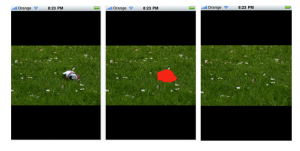
Some apps need to be seen to be believed and CaPix is certainly one of them. This image retouching tool for iPhone has just gone live on the App Store and makes light work of any elements you don’t want included in your pictures. Simply drag your finger over the area you want removed and CaPix will extract it as if it were never there. Whether it’s a random stranger in the background of your family photo, unwanted lens flare or, as in the picture above, a can getting in the way of your lovely shot of… well, grass, CaPix can cut it out. It’s as if the app understands your pictures.
This kind of cloning tool and the algorithms behind it are not far from the powerful features found in Adobe’s Photoshop software, except Photoshop will set you back several hundred dollars. For $1.99, CaPix offers incredible results that could save an image or perfect one of your favorites.
If you don’t believe us, check out the video below.

[itmsapp: 366262211 ]