Our Network
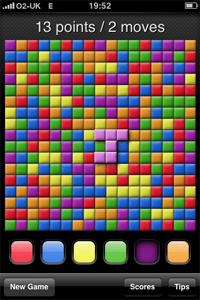
Chromazone is a simple game which focuses on an array of coloured blocks. Starting small, your aim is to fill the whole board with colour in the fewest moves possible. The game works on the principle of trying to link as many blocks together as possible, in a single move.
Beginner Mode Opening Chromazone [App Store], you'll see the game can be played in one of two modes. Beginner, and Challenge. Selecting Beginner will present with an 11 x 11 grid in which multiple multi-coloured blocks are set upon. In the middle of the playing grid you'll see a grey starting block. Along the bottom of the app you have six vibrantly coloured buttons. From left to right they read; Red, Blue, Yellow, Green, Purple and Orange. Using these coloured levers, you can pick you next move logically, according to what is already on the grid.
So how does it work? Well, each time you flick a coloured lever below the grid, all the blocks corresponding to that colour are lifted above the board in 2D fashion. This is shown by the blocks becoming a lighter shade of the chosen colour, and a slight shadowing is added to the coloured selection. Once you've taken your first move, your next move should be planned carefully. Chromazone works on you deciding which coloured blocks you think you should lift up next, in order to gain the highest amount of points possible. Now, there's one deciding factor to this decision. You must aim to lift a set of coloured blocks which are already in contact with your currently lifted selection.
Onto visuals, the game is pretty well presented, and colours used in the game are vibrant and inviting. While Chromazone is not really that graphically intensive (mainly due to the game's concept), the visuals the game does have have been created with the iPhone in mind.
Describing the playing screen now, and at the very top of the screen you'll find an accumulation of points you've already earned, and the number of moves it has taken you to rack up those points. As you earn points throughout the game, the game will add these to your score by majestically floating them the top of your screen.
Your final score is calculated by your current score, divided by the number of moves you have taken to get to that score. In order to gain a high score, you should aim to lift a huge group of these blocks at once.
Challenge Mode Mastered Beginner? Fancy a Challenge? Cue the second mode in Chromazone. Challenge. In this mode your presented with a significantly larger 17 x 17 (289 square) grid. Unlike Beginner mode, the score you rack up in challenge mode will be published to the global online leader board.
Along the bottom of the app you'll find three buttons. New Game, Scores and Tips. These are relatively self-explanatory. The New Game button launches a pop-up with Game mode information, the Scores tab will collate your personal best scores, as well as give you access to the online scoreboard, and finally the Tips tab should be your first stop to learn the fundamentals of Chromazone.
Overall I like Chromazone. While it's not the best game I've reviewed, and putting aside thinking the game could benefit from a more 3D mutli-touch (hands-on) approach, who would of thought such a simple concept like this could be so inviting to play? If your looking to pass half an hour to an hour on the train, or in the car - this may just be the app to do it. Replay value? It's reasonable. The online scoring helps it along, without that it would pretty much have none, but as it is it's a great little find for $0.99!

 PocketGamer.fun
  U.GG
U.GG  Icy Veins
  Arcade Cloud
  EV.IO
EV.IO 

