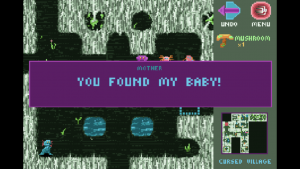
Chuck’s Challenge is a game about a guy (Chuck) who’s been kidnapped by a purple alien monkey-thing (Woop) and forced to create “games” for it to “play” because it’s bored. I think. It’s essentially a follow-up to Chip’s Challenge, with the original game’s creator, Chuck Sommerville, acting as both the designer and main character.
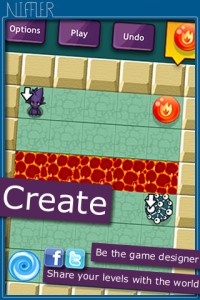
Niffler may have carried over a good deal of concepts from the older title, but the most significant aspect is the community integration. Sure, Chuck’s Challenge features 100 levels, about a quarter of which are free (the rest can be bought through in-app purchases), but the real draw is the ability for users to create and share their own. In a way the concept’s not all that dissimilar from Media Molecule and their community-centric platformer, LittleBigPlanet.
Level editors and sharing aren’t new ideas, even on iOS, but they’re very rarely incorporated as lovingly as they are with Chuck’s Challenge. Heck, the entire game is essentially designed and built around the concept of creating and sharing levels among the community. I kind of wish more games, both on the App Store and just in general, would think about doing things like this more often.
Chuck’s Challenge is available right now for absolutely nothing. Check it out, maybe?
As if it weren’t hard enough to stay off Twitter in the first place, the newly updated Twitter app is about to make it tougher than ever to deny the popular social networking service. The latest Twitter update is now live, and it includes the long-sought option to turn on push notifications for @mentions and direct messages. Depending on how popular you are, you may never get anything (other than Tweeting) accomplished ever again.
We’re unsure why it took Twitter so long to integrate such a highly-desired feature into the service, as this is the sort of thing people have been clamoring for ever since the Twitter app launched. After all, what’s the point in having a mostly narcissistic social media service if you can’t get instant gratification whenever someone mentions you or sends you a message? We may as well be living in the Stone Age!
Furthermore, this feature has been available for Blackberry for quite some time now, but it is just now appearing on the iPhone. That’s a bit strnge since normally iPhone apps are the first to be updated and then Blackberry and others follow along behind. Oh well, at least iOS users can feel superior to Android consumers, who still don’t have the feature available on their device.
Now the question becomes, do we want Twitter to start sending pushes every time someone we follow sends out a Tweet, or is that too much? Computer-based clients such as TweetDeck already offer such a feature, and while it can border on annoying at times, it’s also easy to keep track of when a new Tweet lands so you can stay up to date on the latest happenings. I suppose it depends on how many people you follow, as those with smaller social circles would likely enjoy reading what their friends have to say as they say it, whereas power users would be drowned under the constant tidal wave of pushes. Truly you’d have a hard time getting anything else accomplished. Still, this is a nice first step and one which many users are sure to cheer. If you haven’t updated your iPhone Twitter app then go ahead and do so, then promptly send out a Tweet telling everyone what you just did; because trust me, we all really care.
iPhone App - Designed for the iPhone, compatible with the iPad
Posted March 18th, 2010 by Jason Fanguy Our Rating: :: GOOGLEY GOODNESS
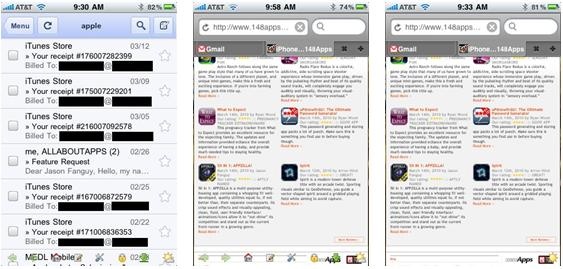
Push for Gmail is a simple, straightforward application providing its users with reliable, visual Gmail push notifications on their iPhone and iPod Touch.
iPhone App - Designed for the iPhone, compatible with the iPad
Posted October 21st, 2009 by Drew LaCroix Our Rating: :: BEST YET
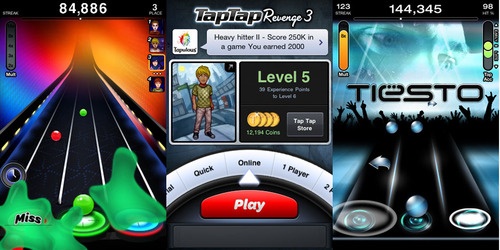
There are many Tap Tap Revenge fanatics out in the real world, along with me. Being such a big fan gave me extremely high expectations, but rest assured, this is the best game to date.
iPhone App - Designed for the iPhone, compatible with the iPad
Posted October 13th, 2009 by Kyle Flanigan Our Rating: :: HIGHLY RECOMMENDED
CNN reaches the App Store with its new flagship application, CNN Mobile. We take a look at its impressive array of features, including push notifications and live video viewing.
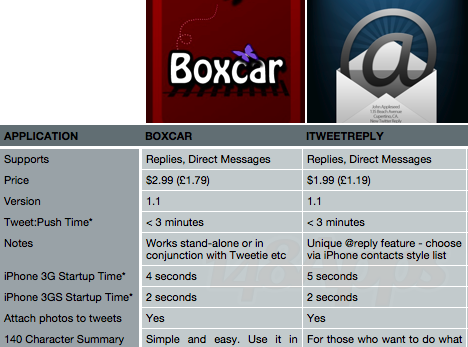
With the much anticipated arrival of push notifications, Twitter clients from across the App Store (and beyond) have been updated and re-polished to support this latest feature. However, times travel fast! Jeff was right when he said to me last week: “[this article] will likely be out of date within a week or so.” No fewer than three extra clients have landed onto the App Store and into our hands this week alone. We’ve dived in at the deep end to check out them all.
Why Push Notifications?
In the olden days, for instance, whenever 148 was the maximum amount of applications that you could install, if you wanted information you had to go to it. Be it the latest news or the latest tweets, the only way that you’d find out about it is if you went to the information source – a Twitter application for tweets; or a news website for breaking news. Push notifications reverses this role and the information is brought to you. You’re updated in real time about what is happening, who is tweeting you, and why the Zune is not as good as the iPod (okay, maybe not the last one). Push is practically limitless, and developers are keen to get ahead of the game.
The Clients
There are two types of clients for Twitter push notifications. Firstly, there is the fully-fledged application that has both a Twitter interface of its own and push notifications. Secondly, there are applications that leave the tweeting to the pros (eg. Tweetie / Twitterific) and a separate application is made solely for push. We’ll look at both.
The long awaited Gmail Push Notification Service is not coming from the search engine giant and creator of Gmail, Google, but from Tiverias Apps: a non-related company specializing in productivity enhancing applications for the iPhone and iPod Touch. Tiverias Apps have released a statement saying that “GPush is the missing link between GMail and the iPhone. For the first time, receive instant Gmail message notifications”. The application was released on the App Store earlier this month but was taken down just hours after its release due to server complications. Tiverias have subsequently fixed the problem and have used this downtime to address other issues and concerns with the application. The downtime serves as both a fix and an update.
In essence, the application will mimic what it is like to receive a text message, where a user is alerted and a notification is shown on the front screen displaying what the message says. Several applications already take advantage of push notifications, but none have been posted to the App Store that allow push notifications of incoming mail.
Users should see signs of increased battery life as well, as data will be pushed instead of pulled. Under the current system, the Mail application operates under “Fetch”, a feature that pulls data to the iPhone at specified intervals (usually every 15 minutes). With the arrival of push notifications, data can now be pushed to a phone from external servers as opposed to be being pulled by phone:
Fetch (Data Pulling)
iPhone –> Talks to servers –> Pulls any data from servers
Push (Data Pushing)
Servers talk to Apple –> Apple Push Notification Service –> iPhone
As you can see, in the former (fetch) it is the iPhone that does all the work. With push, it’s the third party servers.
We’ll have a review of GPush up within a few days of its release. Check back soon!
iPhone App - Designed for the iPhone, compatible with the iPad
Posted July 13th, 2009 by Kyle Flanigan Our Rating: :: MINIMALIST, ALMOST FLAWLESS
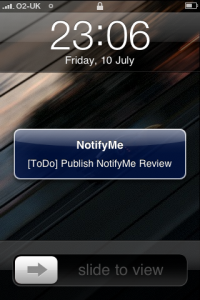
NotifyMe is an event reminder application that utilizes Apple's Push Notification Service. Whether it be TV Shows or To-Do events, the app will push information at a specified time. With a leaf from Apple's minimalist tree, this application is almost flawless.
This week at 148Apps, Tweetbot was on a roll, a new storybook app joined the fold, and - oops - apps broke the Super Bowl. There's more to read, so get to it!