Posts Tagged paypal

PayPal Here for iPad Lets You Charge Credit Cards From Anywhere

Posted by on May 17th, 2013
iPad Only App - Designed for iPad

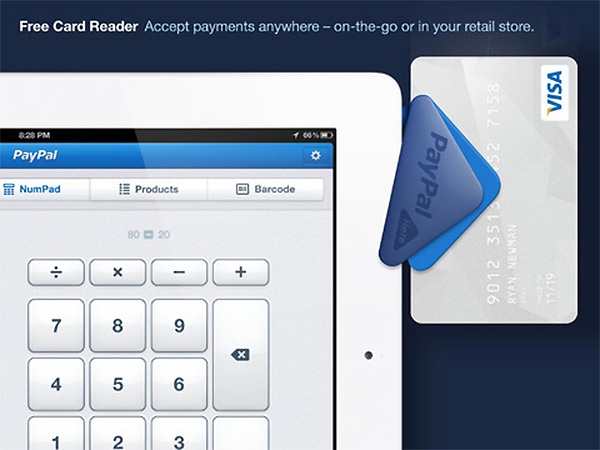
PayPal Here for iPad accepts credit cards from anywhere with the app and free credit card reader, with the intent to simplify a point-of-sale system for small business using an iPad. There are no setup costs or monthly fees and it accepts major debit and credit cards for 2.7% per swipe. The app also enables users to set up a product list, scan an item’s barcode with your camera to add it to a list, connect a cash drawer and receipt printer, email receipts to customers, and more.

paypalhereforipad

PayPal Review

PayPal Review

iPhone App - Designed for the iPhone, compatible with the iPad
PayPal's official app isn't as useful as we'd all like to think.

Read The Full Review »

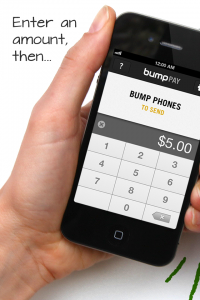
Bump Technologies, developer of popular information sharing app, Bump, has just released Bump Pay, a PayPal-based solution to checks, cash, and IOU’s between friends.

As simple as sharing information like contacts and photos with Bump, Bump Pay allows users to make and receive payments via PayPal by “bumping” their iPhones together. No setup for Bump Pay is necessary. An existing PayPal account is all it takes to sign into Bump Pay. There isn’t even a transaction fee for using Bump Pay. If the PayPal account is linked to a checking account, the transaction is free.

Bump Pay was actually a tool the developers of Bump made for personal use to settle things like going out to lunch when someone didn’t have cash. But everyone loved the app so much that they decided to release the app in the App Store.

Bump Pay is free to download and free to use. PayPal users have no excuse not to check it out.

FREE!
+ Universal App - Designed for iPhone and iPad
Released: 2012-03-29 :: Category: Finance

Just the other day I saw a commercial on TV about Chase offering a new service that would let you deposit a check just by taking pictures of it. I’m not sure why, but I felt like the whole structure of banking was crumbling beneath me. Why do banks even exist when I can deposit checks with my iPhone? It was a fantastic moment.

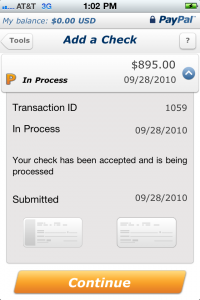
Not to be left out, the online transaction giant Paypal has announced their own check depositing service that works the same way. Just by taking a picture of the check, the recently updated Paypal Mobile app can process the check and add it to your Paypal balance. The service is completely free (no 3% service charge!) and is powered by BankServ, one of the largest electronic money managing companies out there.

“We all agree that the future of money is digital, so it’s hard to believe that there are people and businesses in the U.S. still using an analog technology that’s 400 years old – yes, I’m talking about checks.” wrote Laura Chambers, senior director of PayPal Mobile, “If you’re anything like me, you’ll love this new feature and the fact that you can skip your next trip to the bank when you receive a check.”

Next time you get a check, be sure to download and try out the newly updated Paypal app: it’s free! Be sure sure to hang on to your check for 15 days though, just to be safe.

[Source: Paypal Blog]

FREE!
iPhone App - Designed for the iPhone, compatible with the iPad
Released: 2008-07-11 :: Category: Finance

By now you’ve probably spent a decent amount of money on iPhone apps, so wouldn’t it be nice if you could make some of that money back?

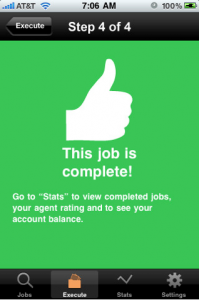
Well the Field Agent app might be able to help you do just that, claiming to be the first app that actually pays you, the user. By signing up to become an “Agent” you fit into a very simple ecosystem: A “Client” creates a job, the “Agent” (you) completes the job, the client and agent are happy.

What does this mean in the real word? Well, a client is a company or service that has signed up at FieldAgent.net and needs information on competitors, consumers or wants to check whether its products are being correctly sold. The agent is someone who has download the Field Agent app and receives notification that a client needs a job done, carries it out and is paid a small fee for their troubles.

While it sounds very James Bond meets Foursquare, the app and its assignments are for real as far as we can tell and actually do pay. While no explicit information is given as to the purpose or beneficiaries of these “assignments”, it’s a safe bet that most of them are market research for the Fortune 50 clients who back the app.

Fortunately, the agent jobs required by the clients don’t involve horses heads in beds or extortion either. Most of the assignments involve checking prices at stores or filling out surveys and pay between $3 and $12 if completed properly and within a set time limit. Jobs often require a verifiable GPS location and a photograph in order to keep the clients happy so an iPhone 3G or 3GS is recommend.

Once an agent has made their money it can be transferred to a PayPal account within 48 hours.

Agents also develop a Rep Score that shows how good a job you’re doing for your clients. Starting with 85 points, agents gain points up to a maximum of 100 for successful, accurate jobs with higher rep leading to more frequent jobs. Of course, if you fail at your task or submit inaccurate results you lose points and aren’t at the top of the pile when the next assignment comes in.

It seems that agent jobs are somewhat scarce at the moment with a number of iTunes reviewers giving some pretty harsh feedback that has prompted a response from the company. Apparently the number of agents has increased by 500% in a week and they are waiting for the client growth to catch up. This does sound like a cleverly worded way of saying “companies aren’t quite as interested in the service as consumers who stand to make money” but apparently more jobs are coming soon.

We’re keeping a close eye on this intriguing service that has the potential to be groundbreaking but could also end up wasting a lot of people’s time.

Mobile Photo Mar 21, 2010 2 23 17 PMDo you remember the billionth app downloaded on the App Store? It was Bump, a free app that lets you swap pictures and contact info by bumping two iPhones together. The concept was simple, the app was cheap, and lo and behold: people like gimmicks. For a while, Bump was a chart-topper.

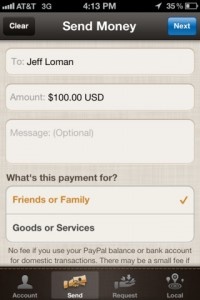
PayPal has long had a free app on the App Store, which provided mundane features like managing your PayPal account. (Who needs that?) But recently, they added a new feature: just like Bump, PayPal’s app now allows you to exchange things by simply bumping phones. The difference is that PayPal lets you actually exchange money with the person you’re bumping phones with.

It looks like a gimmick on the surface, but the feature is actually pretty useful. If you’re using an iPhone and have a PayPal account, you can download the app from anywhere and quickly complete a transaction. The process is painless, requires no exchange of information, and it’s free. What more could you want?

It’s a neat feature, that’s for sure. I can just see it now: instead of paying the normal way, you’ll bump fists with an iPhone clenched in your fingers. Passersby will stare in bafflement, but that’s okay—because you’ll know that you’re at the cutting-edge of technology. Yeah, you could pay for stuff in cash, but this is the twenty-first century!

Yeah, it’s silly, but it’s still cool. And there’s nothing wrong with that. If you have a PayPal account, it’s probably worth downloading the free app just to manage your account and check your balance. And, hey, if the opportunity arises…bump-money-transfers are the way to go.

FREE!
iPhone App - Designed for the iPhone, compatible with the iPad
Released: 2008-07-11 :: Category: Finance

    Advertisement    


Featured Apps

    Advertisement    


Developers

Would you like your application reviewed on 148Apps? See the About page for information.
    Advertisement    


Latest Posts

148Apps Goes Deep on XCOM: Enemy Unknown

Ready to save to world, Commander?

Calendars+ by Readdle Goes Free For A Very Limited Time

CultofMac reports that, for the next 48 hours, Calendars+ by Readdle can be downloaded for free. The app works with Google Calendar and the built-in iOS Calendar and lets you manage your work, either online or offline, with an easy to use interface to navigate through. It’s originally priced at $6.99 and will return to [...]


Steel Media Network

148Apps - iPhone app reviews and news. The best gosh darn iPhone app site this side of Mars.
http://148apps.com :: @148Apps

The Portable Gamer - Coming soon.
http://ThePortableGamer.com :: @PortableGamer

Android Rundown - Android news and reviews. Where you get the rundown on Android apps and hardware.
http://AndroidRundown.com :: @AndroidRundown

Best App Ever - Yearly Mobile App Achievement Awards.
http://bestappever.com :: @BestAppEver

GiggleApps - iPhone applications reviews for kids and parents.
http://GiggleApps.com :: @GiggleApps

148Apps.biz - iPhone development news and information for the community, by the community.
http://148apps.biz :: @148AppsBiz

The App Hall of Fame - An archive of the very best in apps and games.
http://AppHallofFame.com :: @AppHallofFame

Pocket Gamer - Mobile game reviews, news, and features.
http://PocketGamer.co.uk :: @PocketGamer

Pocket Gamer.biz - Mobile games industry news, opinion, and analysis.
http://PocketGamer.biz :: @pgbiz

AppSpy - iOS game news and video reviews.
http://appspy.com :: @appspy

Smart TV Radar - For everything you need to know about Smart TV.
http://smarttvradar.com :: @smarttvradar