Posts Tagged note taking

Sketchworthy Review

Sketchworthy Review

+ Universal App - Designed for iPhone and iPad
Create a virtual notebook and store plenty of details and sketches in Sketchworthy. Just don't expect to share the content with your other iOS devices.

Read The Full Review »

The iPad’s form has been seducing digital artists and those who love to doodle since its launch. It’s also the ideal size for taking hand-written notes. There are dozens of apps that create rich drawing or writing environments, but until recently input devices have been limited. Fingers just won’t do when precision is needed so artists and copious note takers usually rely on capacitive styluses which simulate the feeling of a pen, but are limited by the touchscreen interface. They aren’t sensitive to pressure, they offer no control over line thickness, and holding one comfortably tends to leave palm marks on the virtual page. Ten One Design offers one solution with their Bluetooth 4.0 Pogo Connect stylus. It doesn’t get everything right, but it’s a solid start in a promising direction.

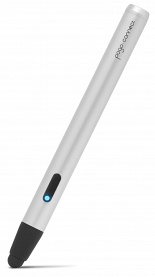
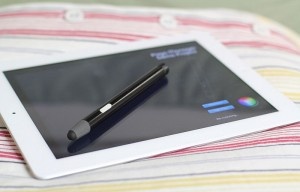
At 5.1″ (130mm) with a price tag of $80, the Pogo Connect sports a stylish silver barrel with a rubber tip at one end and decorative cap at the other. There is a single button on the side and a LED light. It uses one AAA battery and because it’s Bluetooth 4.0 that battery will last a long time. A little wider than a regular stylus, the pen lacks heft, but it fits comfortably in the hand and has good balance. The tip is the same thick dark rubber that one finds on traditional styluses and is magnetic for easy replacement. Ten One promises new tip designs in the future.

Pogo Connect doesn’t pair with the iPad in the usual way a Bluetooth device would. To assist in getting everything set up correctly, users can download the free Pogo Connect app to link the stylus and then each of the 19 compatible apps – up from the original 13 – goes its own way. Some apps like Procreate just find the pen, while others like Noteshelf require users to poke around in the settings. It’s easy.

Because the stylus uses Bluetooth 4.0 it is only compatible with 3rd and 4th gen iPads and the iPad mini. Ten One offers iPad 2 owners a less-than-elegant work-around: there is a Pogo Bridge app that connects to the iPhone 4S or 5 and then sends the signal to the iPad 2, but at present only one app – Procreate – has incorporated the feature.

One of the more glaring flaws when I first tested the Connect back in December was that it didn’t prevent palm marks, but recent updates have improved that functionality. How well it works seems to depend more upon the app than the stylus.

And what about pressure sensitivity? That’s the key selling point, but it’s very hit or miss. Some apps respond to pressure by varying line thickness, others opacity, and none respond to a light touch despite claims that the proprietary Crescendo Sensor technology requires “0 grams of activation force.” That said, the Connect outperforms captive models. It’s not transformative, but with the right app and practice, sketching feels more holistic.

There are a couple of neat features worth mentioning: the Pogo Connect app has a pen locator, the button on the stylus works as an undo command, and the LED light indicates the active ink color. Still, while somewhat more intuitive than capitative models, the Pogo Connect needs a lot of tweaking before it warrants the hefty price tag, much less turns the iPad into a device that can compete with a dedicated graphics tablet.

A full list of compatible apps can be found here on the Ten One Design site.

FREE!
iPad Only App - Designed for the iPad
Released: 2012-10-02 :: Category: Productivity

FREE!
iPhone App - Designed for the iPhone, compatible with the iPad
Released: 2012-09-01 :: Category: Utilities

Simply Write Review

Simply Write Review

iPad Only App - Designed for the iPad
Since Simply Write isn’t packed with a ton of useless features, taking notes and jotting down thoughts is a breeze.

Read The Full Review »

Note.s : Daily Journal Review

iPhone App - Designed for the iPhone, compatible with the iPad
Note.s : Daily Journal’s minimal designed user interface makes it easier for users to focus on writing.

Read The Full Review »
Note Anytime Review

Note Anytime Review

iPad Only App - Designed for the iPad
A free note taking and sketching app for the iPad that’s packed with many features to give users creative flexibility.

Read The Full Review »

CaptureNotes 2 Review

iPad Only App - Designed for the iPad
CaptureNotes 2 is a top notch note-taking app that lets users capture and organize virtually everything in their meetings or lectures with ease.

Read The Full Review »
Drafts Review

Drafts Review

iPhone App - Designed for the iPhone, compatible with the iPad
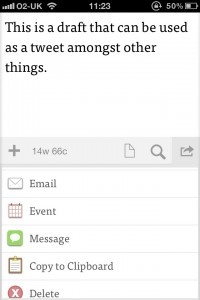
Drafts is a very clean and simple way of keeping notes and having plenty of different sources to transfer them to.

Read The Full Review »
Catch Notes Review

Catch Notes Review

+ Universal App - Designed for iPhone and iPad
Catch Notes aims to be the Swiss Army Knife of productivity apps, with note taking, to do list creation and more available.

Read The Full Review »
iPIM Review

iPIM Review

+ Universal App - Designed for iPhone and iPad
Organizing everything possible in life, all through one app.

Read The Full Review »

Remember the Courier? That dual-screened, book-like tablet that Microsoft might have released. We’ll now there’s an iOS app that attempts to give users the experience they might have had on the Courier. Tapose, a successful Kickstarter project by developers Benjamin Monnig and Ricky Drake, has just been released.

Tapose’s main feature is the “slide bar” in the middle of the screen. It functions as a control panel for both sides of the screen. It can also be moved to change the sizes of each screen. Users can control two separate functions on each side of the bar (web browsing, note taking, etc). Tapose even offers web storage so that work done through the app doesn’t fill up the iPad’s hard drive.

The Kickstarter project raised over $26,000 and was partially funded by the leader of the Courier project at Microsoft, J Allard. Taposé is available in the App Store for $2.99. Check out the video of Tapose in action below.


$2.99
iPad Only App - Designed for the iPad
Released: 2012-03-27 :: Category: Productivity

If ones uses a capacitive stylus on their iOS device – those pseudo-pens that are great for handwriting, sketching, typing, and just tapping – the name Ten One Design may not be familiar but it’s very likely they’ve come across their Pogo stylus line.

This month the iOS accessories company released news that should make iPad artists and note-takers smile. Temporarily dubbed the Blue Tiger Stylus, it’s something completely different. It uses Bluetooth 4.0 to pair with the iPad, particularly the new one. The result is direct input not from the screen, but from another gadget, which allows for much more user control.

The Blue Tiger won’t simulate pressure; it will react to it with genuine sensitivity and be better than traditional styluses (styli?) at distinguishing between intended strokes and palm prints. The killer feature is best described by Ten One founder Peter Skinner: “When using Blue Tiger in a drawing application, the user can control stroke thickness … which is displayed on the multi-colored LED button.” There’s no word on a release date or price, but if it’s durable it will be well worth paying a premium for, as it should outlast traditional styluses with inflated rubbery nibs.

NOTE’d Review

NOTE’d Review

iPhone App - Designed for the iPhone, compatible with the iPad
Glorious to look at but this is a note taking app that's only really ideal for a short term solution.

Read The Full Review »
Remarks Review

Remarks Review

iPad Only App - Designed for the iPad
Remarks has the raw ingredients of a great app, but lacks some basic features.

Read The Full Review »
Noteshelf Review

Noteshelf Review

iPad Only App - Designed for the iPad
Noteshelf makes handwriting and notebook creation beautiful.

Read The Full Review »
Gesture Notes Review

Gesture Notes Review

iPhone App - Designed for the iPhone, compatible with the iPad
Gesture Notes provides a great way of taking notes, either with text, voice or imagery. Plus it offers a neat gesture recognition system.

Read The Full Review »

When the iPad first hit the scene, note takers drooled at the possibilities. A flat slab of digital glass and a little imagination could go a long way with the right app. Well, the iPad has been around for a while now, and it has certainly seen its fair share of note taking apps (check out our fav 4). There has been quite a bit of progress, but note taking on the iPad hasn’t reached perfection just yet. PhatPad is one of the many note apps striving for perfection. It brings some nice features to the digital table with handwriting recognition, map support, and image insertion.

PhatWare aims to bring the note taking experience to the next level with their 1.2 update for PhatPad. Not only does it have a load of great new features, it’s also on sale for $4.99 (was $7.99) in honor of the iPad 2′s release. Document organization has been improved by way of a new filing and sorting system. PhatWare has also put a great emphasis on sharing and syncing with Dropbox support and wifi file exchange. To top it off, there’s a background playback and recording feature for audio clips. Not taking on the iPad just got a little more intuitive.

$4.99
iPad Only App - Designed for the iPad
Released: 2010-12-15 :: Category: Productivity

Notability for iPad Review

Notability for iPad Review

iPad Only App - Designed for the iPad
If you like to make comprehensive notes, complete with web clips, images and even voice, then Notability is the app for you.

Read The Full Review »
Flip Note for iPad Review

Flip Note for iPad Review

iPad Only App - Designed for the iPad
Notepad apps are a burgeoning category on the iPad App Store, but Flip Note needs some more work before you'll flip for it.

Read The Full Review »
    Advertisement    


Featured Apps

    Advertisement    


Developers

Would you like your application reviewed on 148Apps? See the About page for information.
    Advertisement    


Steel Media Network

148Apps - iPhone app reviews and news. The best gosh darn iPhone app site this side of Mars.
http://148apps.com :: @148Apps

The Portable Gamer - Coming soon.
http://ThePortableGamer.com :: @PortableGamer

Android Rundown - Android news and reviews. Where you get the rundown on Android apps and hardware.
http://AndroidRundown.com :: @AndroidRundown

Best App Ever - Yearly Mobile App Achievement Awards.
http://bestappever.com :: @BestAppEver

GiggleApps - iPhone applications reviews for kids and parents.
http://GiggleApps.com :: @GiggleApps

148Apps.biz - iPhone development news and information for the community, by the community.
http://148apps.biz :: @148AppsBiz

The App Hall of Fame - An archive of the very best in apps and games.
http://AppHallofFame.com :: @AppHallofFame

Pocket Gamer - Mobile game reviews, news, and features.
http://PocketGamer.co.uk :: @PocketGamer

Pocket Gamer.biz - Mobile games industry news, opinion, and analysis.
http://PocketGamer.biz :: @pgbiz

AppSpy - iOS game news and video reviews.
http://appspy.com :: @appspy

Smart TV Radar - For everything you need to know about Smart TV.
http://smarttvradar.com :: @smarttvradar