NEW ORBIT Review
+ Universal App - Designed for iPhone and iPadLost in space with only a small shuttle and some spare parts, players rocket around in an attempt to survive and find their home.
Read The Full Review »
Posts Tagged mapsNEW ORBIT Review+ Universal App - Designed for iPhone and iPadLost in space with only a small shuttle and some spare parts, players rocket around in an attempt to survive and find their home. Read The Full Review » Strangeness From Earth HD ReviewiPad Only App - Designed for the iPadFinding quirky Google Earth based sights so you don't have to! Read The Full Review » Parallel Universe Review+ Universal App - Designed for iPhone and iPadParallel Universe is an interesting app on paper, but when in use it's not terribly compelling. Read The Full Review » The arrival of iOS5 has meant that many app developers have had to update their products to work with the new operating system. Fortunately many, like TomTom, have used that opportunity to improve upon an already successful app.
iPad optimization means that TomTom now offers a full-screen display which promises the ability to see the driving view at the same time as the Advanced Lane Guidance images that we’ve all come to appreciate from the product. Ultimately, it’s all down to space and who can resist the saying ‘bigger is better’ in this case? More room to see what’s going on has to be good for drivers as they keep an eye on the road as well as their TomTom app. The interface for both iPhone and iPad users has been updated and improved upon, ensuring that TomTom is quicker than ever to use. Driving view can be checked with just one touch from anywhere with guidance options similarly easy to check out. Even switching between different route types takes mere moments thanks to the improvements made to the app. As we’ve all come to expect from TomTom, maps have also been updated to take into account any road changes in recent times. TomTom users may have also found that they had trouble with their existing subscription to TomTom HD Traffic before this update. Fortunately for them, to make up for the inconvenience TomTom will be extending their subscription by 30 days as way of compensation. Hurrah! One bad piece of news for anyone still using an iPhone 3G however, this is the last update of TomTom that will fully support the device. Future updates can be downloaded for any iPhone 3G users but the new features won’t be available. Maybe this is the ideal time to upgrade to a shiny new 4S? The latest version of TomTom is available now. $39.99 ![]() + Universal App - Designed for iPhone and iPad Released: 2009-12-11 :: Category: Navigation $49.99 ![]() + Universal App - Designed for iPhone and iPad Released: 2009-08-17 :: Category: Navigation Quarrel Deluxe Review+ Universal App - Designed for iPhone and iPadQuarrel takes the humble word game and applies it to a whole new type of strategic gameplay. Read The Full Review » Ever wonder where the heck something is? Sure there’s Google Maps but it’s not always the easiest way of searching for something. As Jeff pointed out a while back in his review, Where To? does exactly that. It was good back then and now it’s had a huge update making it all the better.
There’s even now improved functionality for the visually impaired, courtesy of VoiceOver support, providing directions and distances continuously announced to help any such users. Where To? was already a great app with over 2,400 brands searchable via the app and the Augmented Reality tools superimposing search results onto the live camera video, but this update looks set to have made it even more vital for those in need of some help travelling. Where To? is available now for all iOS devices. It’s priced at $2.99 with an in-app purchase of $0.99 adding Augmented Reality features. $2.99 ![]() iPhone App - Designed for the iPhone, compatible with the iPad Released: 2009-06-23 :: Category: Navigation Maybe I still haven’t fully accepted technology for just how wonderful it really is, but it still impresses me hugely when my iPhone can tell me exactly how to get from one place to another within seconds. Presumably, there’s a future ahead of us where no one can ever get lost, all thanks to wonderful GPS and Google Maps. This future should clearly include Maps+, a new app from IZE Ltd which aims to build upon the uses that the built in app Maps already offers.
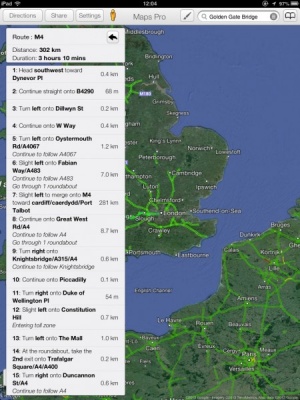
Users can easily search for an address using the search function and even co-ordinates can be searched if the full address isn’t known. Route directions are simple to acquire then with car, bike (in the US) and pedestrian paths being available to consult. There’s also the added benefit of being able to set midway stopping points if the user wishes to stop at certain other locations on the way. If the user is waiting to reach their destination via public transport, they can even set up an alarm that’s dependent on location so they need never miss their stop on the train for example. Particularly useful to fitness addicts, there’s also a feature to record the route taken via GPS so that users can keep track of the path they’ve taken. Simple social networking features are also available whereby users can view their friends’ tweets and the location in which they were tweeted. Maps+ offers a lot in its quest to be more feature rich than the bundled app of a similar name. It’s certainly worth a look for those after a bit more to the free GPS navigation apps currently available. Maps+ is available now and is compatible with all iOS devices. It’s a free app to download but there are some limitations that are bypassed with a $2.99 in-app purchase. London Transport ReviewiPhone App - Designed for the iPhone, compatible with the iPadAn invaluable tool for anyone travelling to London. London Transport really takes the sting out of negotiating the city. Read The Full Review »
With recent news of iPad’s being fitted into car dashboards, this is particularly exciting news for those shopping for a new SatNav device for their vehicle. Street maps are stored on the device and the app can display both 2D and 3D map views with turn instructions for the driver. The app automatically switches between portrait and landscape view and provides iPod controls from within the application, another bonus for those planning to dashboard-mount their new Apple tablet or connect it to their in-car sound system. CoPilot Live HD offers a feature for users to plan trips offline and preview routes to find the most efficient journey before setting out. “CoPilot Live HD provides an absolutely sensational GPS navigation and planning experience on iPad 3G,” said Michael Kornhauser, Managing Director at ALK Technologies. “Developing for iPad was a natural step following the tremendous popularity of our CoPilot Live iPhone app. It’s a really fantastic platform for navigation that allows us to fully exploit the many years of expertise we have gained from supporting tablet computers with our CoPilot Live Laptop products.” CoPilot Live HD is priced at $29.99 for unlimited use with free quarterly map updates through 2010. Find out more here $29.99 ![]() + Universal App - Designed for iPhone and iPad Released: 2010-04-30 :: Category: Navigation
If you’re one of the lucky ones, your iPod’s Location Services will work the instant you connect to a WiFi network, like they’re supposed to. But for the many of us, that nasty “Location cannot be determined” pop-up is a constant reminder of our device’s limits. So why does this work for some people, and not for others? It all depends on where you live and what wireless networks your device finds. For example, my iPod’s Location Services were absolutely useless at home, but when I drove two hours to the Apple Store to have them look at it (hey, I had other shopping to do, too!), suddenly there wasn’t a problem.
To remedy the situation, you can register your router on their website by entering your email address, your physical address, and your router’s MAC address. Instructions for finding your MAC address are available on their website, and after submitting the information it takes 1-3 weeks for Location Services to work. And that’s it! So, if you were wondering why Location Services just won’t work on your iPod…here’s the likely answer. Let us know if you’ve had a similar experience, and/or if this works for you. As for me, I’ll be enjoying my newfound ability to, you know, use Maps. What a relief! Not being from a large urban area with subway lines intermingled with rail lines, I have always trusted the Maps app to get me safely from point A to point B. Typically it finds the fastest route between two locations without a hitch. After spending the week in NY though, I have learned that Google does not have my back. No sir.
I was wrong. Google put me… suitcase, laptop, iPhone carrying Chris… on a city bus driving by the Louis H. Pink Houses on Linden Blvd with people certainly wondering what I was doing. After I made it to JFK, I realized that there is this great light rail hub that I could’ve transferred to, and all that I would have to do is walk a street over from my starting location. The moral of the story is that the Maps app really needs to show alternate routes like its computer based Google Maps counterpart. Lesson 2 is that if you are ever in E. Brooklyn and Maps tells you that you are getting on a bus… it is a city bus. Lesson 3 is that you should never take the route I took from Brooklyn to JFK. Find your way to the Jamaica station, it’s much more pleasant. ![]() Let’s face it. We all love Google Maps on our iPhone’s. The convenience of swiping here, and flicking there to get directions to where we want to go is all too .. convenient. But, it’s been like that for some time now, and it may just be about to change. Remember when Apple and Google used to be such real good pals? Well, I’m afraid to say that sadly those days seem to be over. After the recent Google Voice saga earlier last month, which managed to generate huge media attention and even managed to get the FCC involved, Google and Apple seem to have been slowly drifting apart from each other. Today, Gizmodo reports that another recent rumored purchase of Apple’s may confirm that this is the case. Uncovered via a tweet posted back in July from the founder of Placebase – Fred Lalonde, it’s now rumored Apple have bought Placebase, outright. The acquisition of the company took place in July of this year, but is only coming to light now, due to recent events involving both Google and Apple. So, what exactly separates Placebase from Google Maps? Well, from this post published on Gigaom in early 2008, we can see Placebase has a few things Google Maps doesn’t. For a start, the service allows users to overlay layers upon layers of data on top of each other, to provide an overall richer, fuller experience. On top of this, it’s said that Placebase’s API is smarter and easier than Google’s claiming easier integration into third party products. But, if Apple now has a maps company which is deemed superior to Google Maps, Why do they need Google? Now, that said I can’t see them just dropping Google and the arrangement they currently have for ‘native’ iPhone maps functionality, after all – it’s now one of the iPhone’s most prominent features. But you have to wonder. With a maps company under it’s belt, Apple could be gearing to compete with Google in this area, in a very big way.
There’s something very satisfying about zooming in and out, and scrolling around all without waiting for the images to load. It is completely instant. Fantastic. Other great features include recording your tracks, creating walking tours (combinations of your tracks and photos), mark waypoints and points of interest, save and share your trails, and view a profile of a hike to gauge the elevation changes. Here’s a quick introduction to the app from the developers. OS 3.0 In-App Purchasing Versions of the maps updated for OS 3.0 will also include some great in-app purchasing functionality. You’ll be able to buy small map regions for areas you are visiting for as little as $0.99. Think of a trip to Lake Tahoe and the ability to add the detailed map for that area with just a couple touches. Should be very powerful. The versions that take advantage of OS 3.0 should be hitting the app store soon. Currently there are two free versions available in the app store. These include the Bay Area and Yosemite example applications. FREE! ![]() + Universal App - Designed for iPhone and iPad Released: 2009-06-10 :: Category: Navigation FREE! ![]() + Universal App - Designed for iPhone and iPad Released: 2009-06-10 :: Category: Navigation More screen shots after the jump. G-Map U.S. WestiPhone App - Designed for the iPhone, compatible with the iPadWhile on a trip to South by Southwest, I had the chance to use G-Map extensively for the first time. It was a great overall experience that was tempered by a few shortcomings. Thankfully, XRoad has recently updated their application and alleviated several of my complaints. Read The Full Review » Lux DLXiPhone App - Designed for the iPhone, compatible with the iPadIf Risk is what you are itching for, then Lux DLX will deliver. There are indeed drawbacks, but Lux DLX is the only game on the iPhone that will cure your world domination craving. Enjoy! Read The Full Review » YelpiPhone App - Designed for the iPhone, compatible with the iPadYelp for iPhone is an amazingly feature packed, incredibly useful app for finding services and entertainment in your urban bubble. Need to find a cafe, restaurant, tire changing station, drug store, etc that's approved by the community around it? Yelp is here to help! (I totally didn't intend for that to rhyme and even though it's lame, I'm leaving it in the review) Read The Full Review » Google, strangely quiet on the iPhone thus far, has finally released an application that provides a little interest, Google Earth for the iPhone. Oddly, Google Earth has yet to be released for Google’s own Android platform. Google Earth for the iPhone is a pretty well rounded application including geo-tagged photos and wikipedia article integration, a cool tilt your phone to change the 3D view interface called auto-tilt, and uses the same imagery as the desktop application. In quick testing we found Google Earth to be a little slower than Earthscape but a little more finished feeling. Previously the only application offered by Google for the iPhone was their Google Mobile App. This application was little more than a dedicated search engine front end. This release also marks some competition to one of our favorite apps, Earthscape. It will be interesting to see what happens with this app now that it has competition. Our suggestion is to just try both and use the one you like best. Where To?iPhone App - Designed for the iPhone, compatible with the iPadWhere To? adds a convenient categorized list of search terms to feed into Google Maps. Read The Full Review » |