Ever notice that you’re running out of free space, and apps like Instagram, Spotify, and Vine are taking up a lot more space than they should be? Some apps like these take up over 500 MB of space for cached data, which can be a killer given the limited amount of storage space on most devices. As well, they don’t engage in a best practice of making it possible in the app itself to delete cached space. When trying to install a large app, this can be a real problem.
It’s time to take the power back, and your device’s free space. I’m going to show you two ways to clear up this cached space: the brute force way, and the way that’s a bit more clever.
Method number one: Just delete and reinstall the app
This will delete all the data for the app. It’s easy enough. The downside? You have to redownload and reinstall the app, not to mention needing to login again. Any special preferences will be gone too. This is a solution. It’s just not a very good one.
Method number two: delete the cache files using i-FunBox
The cache files stored by apps can be accessed by users with a little bit of savvy. Download an app like i-FunBox to access your device. Plug it in to your computer. Launch i-FunBox. Go to the “Applications” section of your device, and find the app whose cache data you want to delete.
Find the folder called Caches in the Library folder. Right-click on it and delete it.
This should work for most apps. See the results in the Usage section of Settings -> General:
See, with Spotify, deleting the Caches folder cleared up much of my recent cache usage, with the tracks that I saved for offline listening still in the app. You will notice that after using the app again, the Caches folder will be recreated, so this is non-destructive.
Some apps may use multiple or non-standard folders. The best way to discover where this cached data is hiding is to select all the files, copy them to your computer, and then poke through folders’ file sizes to see where large chunks of data are hiding. Then you can delete those folders safely.
In general, just deleting cached data is safe, because by definition it’s just temporary. As long as you don’t delete anything in the Preferences folder, you shouldn’t lose anything important. Feel free to back it up to be safe.
Not that you may need to do this whenever you need to free up some space as the cached data will add back up as you use the apps. Still, if you’re trying to install a large app, this can free up space without needing to delete apps themselves. So go ahead, install Infinity Blade II and keep it there!
Hipstamatic has been a bit of an odd duck on the App Store. While it was one of the first photo apps to gain a strong following, it has already been used to take over two billion photos. But, it has been somewhat forgotten now that social sharing has taken center stage. Don’t get me wrong, it still has a large and very vocal following, and also a very creatively talented following, but it doesn’t have the mindshare of an app like Instagram. Somewhat forgotten even though it’s still going strong with over four million monthly users. The reason for it losing mindshare could be that Hipstamatic lacks an integrated social stream like Instagram and others. Well, that is until oggl is released later this week.
Instagram was a great idea, and a very wonderful creative stream of photos, for a short while anyway. But now it’s filled with duck faces, selflies, and bad pictures of food. While oggl is open to anyone, it is expected that it will maintain a much higher quality clientele than what is currently seen in Instagram. While Instagram is mean to share, oggl is mean to inspire. Some of the artists on there already are truly astonishing.
Expected to be on the App Store on Thursday, oggl takes the high quality filter system that Hipstamatic pioneered and adds a sharing community on top of it. They do this for free, ad-free, and the artists retain full rights to their photos. How can they do this? Add-ons of course. The Hipstamatic community is pretty crazy for new lenses and films, the add-ons that add new effects to photos in Hipstamatic. So you can buy them in Hipstamatic and access them in oggl, or you can subscribe to oggl for $0.99/month or $9.99/year and get access to all of the lenses and films ever made.
Now the bad news, oggl will be granting access slowly, over time to those that request it at http://oggl.com/. The slowed down access is to ensure that the service quality isn’t degraded as it ramps up. So, head over there now and request access.
This is an interesting move, if not completely unexpected one for Hipstamatic. It should be a great community for photographers and creative types. That is if they can keep the duck faces to a minimum.
Posted by Andrew Stevens on May 3rd, 2013 iPhone App - Designed for iPhone, compatible with iPad
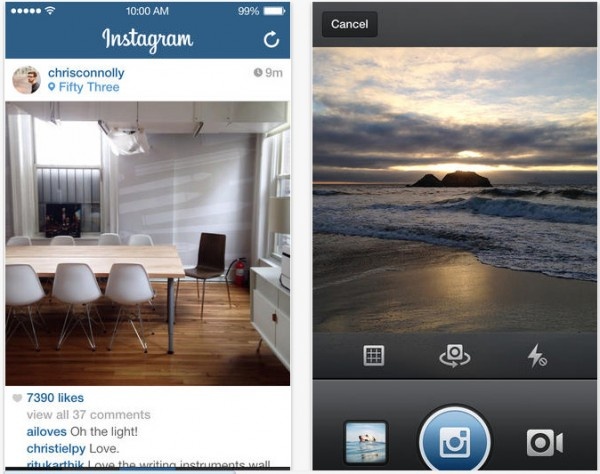
Instagram, the popular app that lets you create and share photos, has been updated and adds photos of you. Now, before sharing your images, you can add people to each photo and share the profile of the person who’s accompanying you on your latest outing. This also includes a new tab on your profile page that allows you to see what images people have tagged you in.
Posted by Rob LeFebvre on January 24th, 2013 iPhone App - Designed for iPhone, compatible with iPad
Recently acquired by Twitter, Vine is a new app that aims to bring short video clips to its own social network, with users, followers, and the like, just like another popular service, Instagram.
• Unlimited uploads and free
• Instantly post videos on Vine, then share to Twitter and Facebook (more coming soon!)
• Find, follow, and interact with people close to you
• Explore trending posts, featured hashtags and editor’s picks
iPhone App - Designed for the iPhone, compatible with the iPad
Posted September 17th, 2012 by Dale Culp Our Rating: :: EASY AND USEFUL
Instatag is a neat little app designed to streamline and take some of the guesswork out of adding tags to photos on Instagram, and it works pretty well.
iPhone App - Designed for the iPhone, compatible with the iPad
Posted September 4th, 2012 by Angela LaFollette Our Rating: :: PHOTO FUN
Mixel lets users turn their photos into impressive collages with ease, but its social networking requirements may turn some away from enjoying this sleek app.
Posted August 31st, 2012 by Angela LaFollette Our Rating: :: PERSONAL GREETINGS
This free app lets users send real postcards worldwide with photos taken from Instagram, Camera Roll or Facebook, but the price to send it may seem a little steep to some users.
This week at 148Apps.com, Carter Dotson asked the question that so many iPad owners have thought to themselves: “Why can’t I work from just my iPad?”
“I’m sick of desktops, laptops, and netbooks. The iPad is lightweight, has great battery life, and I don’t have to take it out of my bag when I’m flying. Most of the work that I do is writing, covering iOS and Android, so it seems appropriate to primarily do this work from mobile devices, right? That’s what I want, but there’s still just so many shortcomings that keep it from being a regular reality.
“What I find is that for basic tasks, the iPad is great. I like the focus that the iPad’s limitation of running a single app on screen at a time provides, especially for writing. I use a portable Bluetooth keyboard, and while it’s not full-size, the benefits I get from being forced to focus on what I’m writing is a huge benefit. As well, with the customer support job I work with that uses Zendesk, I discovered that it’s actually quite easy to do it efficiently through Safari and the Zendesk mobile app. I didn’t feel like I was any less productive in working from the iPad than I do when I work from my Mac in this case. But it’s the exception to the rule.”
Meanwhile, Amy Solomon at GiggleApps.com took a trip to the zoo via ABC ZooBorns: “My son, a fan of these other apps, was excited to hear about ABC ZooBorns, asking me about a list of his favorite animals, all of which are included – much to my son’s excitement. I too enjoy the list of animals included – be it more traditional zoo animals, such as tigers or zebras, but also including some unique choices such as Ural owl, wombat or quokka. We do love to look at these animals as babies, especially those are simply precious to look at such as baby Gorillas or Elephants.”
+ Universal App - Designed for iPhone and iPad
Released: 2012-07-24 :: Category: Education
Finally, AndroidRundown.com featured a story about a fascinating new KickStarter project named InstaCube. Joseph Bertolini writes, “It streams photos directly from any user’s Instagram account and displays them on a large 6.5″ LCD touchscreen. Display those photos from the park yesterday or randomly check in on some friends, because what good are those photos if they are stuck on a tiny phone screen all the time. Probably the greatest element of InstaCube is its ability to stay away from being one dimensional by including full access to Instagram. Doing this allows for photo browsing, ‘liking’ of photos, and InstaCube will even display live photos of sunrises and sunsets from around the world.”
Summer’s heading to a close, but we still have so much more to offer across the 148Apps network. Keep track of all the latest happenings, as well as reviews and contests, by following us on Twitter or liking us on Facebook. You’ll be glad you did.
Cooliris is an app for sharing and discovering photos on social networks, and it just got more social with Facebook and Instagram support. The interface displays photos in an angled grid that can be scrolled through horizontally to view more photos. Photos from the Camera Roll can be shared to Facebook, or shared through private Conversations with other Cooliris users, with the ability to send invites through Facebook and email.
With Instagram, it’s possible to view one’s own photos and popular photos. Support for viewing Instagram feeds is in the app, but wasn’t working when I tested it. Facebook integration brings the latest photos from the News Feed into the app, along with photo’s from one’s own albums. Cooliris even provides a unique way to search for images from Google in its interface. Photos discovered through the app in any of these methods can be saved to the Camera Roll for preservation or sharing in Conversations.
Sneaking candid shots of yourself and sharing them with the world has become a staple of the iOS ownership experience. There was always the issue of security when it came to apps like instagram. Under most circumstances your photos were essentially being broadcast into the ether, for everyone with an internet connection to consume. Who would you expect to come to the aid of users who wanted to share their images in a more discrete manner? If you guessed Warner Bros. you may want to consider getting your head checked, but oddly enough that is actually the correct answer.
Despite coming from a completely unlikely source, outmywindow is a hybrid of social networking and photo storage that allows you full control of who can see your photos. Users can even import images from their iOS libraries and create albums to once again share with only those that are worthy of permission. The app is free and looks to be a solid alternative to other providers on the market. Plus, when they are offering 5GB of free storage, there is always an added incentive.
Instagram has done wonders for the photo sharing app world. That doesn’t mean there isn’t time to try out a new photo sharing app, one with some very useful features when it comes to contextualizing the content.
That app is WeHeartPics. The free to use app holds the lofty ambition of helping its users to make sense of their life’s fragmented moments by organizing them into forms of stories. Put a selection of photos together and it tells so much more than just one detached image.
The app offers a few different ideas for what kind of photo stories to create such as everything about the user, their family & friends, their home, place of work, hometown and regular places they visit.
Like other photo sharing apps, it’s easy to add friends or strangers in order to check out what’s going on around the world. Users can also share their WeHeartPics content on Pinterest or their Facebook timeline, thus consolidating their life.
It’s all quite a charming idea amongst a wave of photo sharing apps that don’t seem very personal. WeHeartPics is out now so why not give it a shot?
While not a replacement for Instagram, Facebook Camera is a good first step in this month+ old union of the two companies. Released today, Facebook camera looks to streamline the viewing of photos and the uploading of them.
The app allows you to apply simple filters to images, tag people, upload multiple images at once, and post a note about the group of photos you are uploading to your timeline.
In quickly testing Facebook camera, it’s a very well made app. Much better and more reliable than the main Facebook app for uploading images. Perhaps that is their plan? The only feature I was left missing was the ability to specify an album to upload images into.
Worth checking out if you upload images to Facebook regularly.
Twitpic has provided many regular Twitter users the means by which they can share images alongside their text-based tweets. Now there’s a whole app devoted to the wonders of Twitpic.
The app, cleverly called Twitpic, is very similar to Instagram but more tightly integrated with Twitter. Users can easily share their photos and videos with other followers, while also applying filters if they so wish. Other editing options such as cropping, orientation and adjusting brightness are also included. Other sharing comes in the form of being able to view photo timelines from people the user follows, as well as checking out the most popular Twitpic users.
It is all very much like Instagram but with the huge amount of Twitter users out there, it should form a great new place to check out the latest images of the world.
CultofMac reports that, for the next 48 hours, Calendars+ by Readdle can be downloaded for free. The app works with Google Calendar and the built-in iOS Calendar and lets you manage your work, either online or offline, with an easy to use interface to navigate through. It’s originally priced at $6.99 and will return to [...]