Posts Tagged gps

App Update: Waze GPS Driving App Gets Even More Social

Posted by on October 31st, 2012
+ Universal App - Designed for iPhone and iPad

Waze is more than a navigation app; its developers promise to help us all outsmart traffic together with a combination of social and database-driven technologies. The new update adds even more social features, including collaborative driving directions, live maps, new interface and design, as well as iOS 6 and iPhone 5 support.

Here’s a list of all the new features:

✓ See friends driving to your destination & everyone’s ETA
✓ Send a pick up request to grab anyone’s location & navigate to them
✓ Share your drive by sending a live map of your route & ETA to anyone
✓ New design and UI throughout
✓ Sign in with Facebook
✓ Nearing destination bar
✓ Toll road usage indication
✓ Private messages
✓ Parking location pin
✓ Support for iOS6 and iPhone 5

source: Waze Homepage
You Are Here Review

You Are Here Review

+ Universal App - Designed for iPhone and iPad
You Are Here uses the iPhone’s GPS to show users where they are on any map that they import into the app.

Read The Full Review »

App Update: Navigon GPS Updated for iOS 6 and iPhone 5

Posted by on September 21st, 2012
+ Universal App - Designed for iPhone and iPad

Navigon has released a great update to their GPS apps for iOS. Updates include integration with iOS 6 Maps for transit info, and great last mile support. From the update:

- iOS 6 and iPhone 5 support

- URBAN GUIDANCE considers public transportation options, such as subways, trams, busses and water taxis, when calculating pedestrian routes. You will be guided to a transit stop by foot and you’re able to look up detailed information on what line to take and where to get off. The feature is available through In App Purchase.

- LAST MILE automatically offers a pedestrian navigation when you park your car near your destination. The parking position will be saved and the app switches into pedestrian mode to provide walking directions.

- We’re celebrating the 3rd birthday of the NAVIGON app and give away a free map update to all users.

New App: Via is Voice Guided Turn By Turn for Runners

Posted by on September 5th, 2012
iPhone App - Designed for iPhone, compatible with iPad

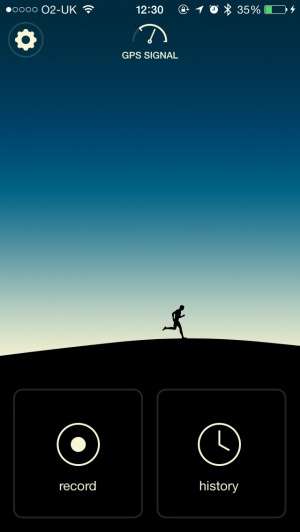
You can think of Via as voice guided turn by turn navigation, for runners. It’s pretty simple — set your start and end points, then go! It’s compatible with the built in Music app so you can listen to music while running — the voice navigation prompts will guide you over the music. Awesome idea.

Good news for those who use CoPilot Live, version eight. The developers, ALK Technologies, are offering a big upgrade free of charge to version nine. The new line of CoPilot Live GPS apps for the US and Canada still have access to live navigation, but now with more perks. The biggest addition is voiced turn-by-turn directions, no doubt a response to Apple’s iOS 6 announcement, but there’s more. The new routing features give you three different ways to find where you are going, each with information not only on distance but on mileage and with the year of free live traffic they are offering to new subscribers on their website it’s even better.

The new design is less distracting, with lane assist arrows and what they call “ClearTurn” display. There is also “Tap and Go” navigation which lets you literally just tap on a location on the map to get directions. It even has “social navigation” allowing you to check into Facebook and Twitter with your locale or to search Wikipedia or Bing’s Local Search from within the app. If you upgrade or try V9 for the first time, let us know what you think in the comments.

$9.99
iPhone App - Designed for the iPhone, compatible with the iPad
Released: 2010-06-08 :: Category: Navigation

Meatspace Invasion Review

Meatspace Invasion Review

iPhone App - Designed for the iPhone, compatible with the iPad
Take the fight to the streets (be safe, look both ways, etc) in this location-based shooter.

Read The Full Review »

Waze has been a fascinating example of the power of crowd sourcing since its inception in 2010. We’ve loved it ever since with its steady stream of updates keeping things fresh. Now comes one of the more ambitious updates.

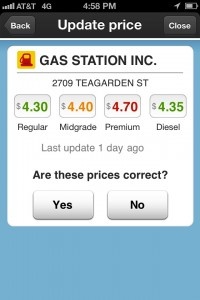
Update 3.2 now provides Waze users with the means in which to keep track of real-time gas prices along their route, along with the ability to update prices themselves, where neccessary.

The new category search makes it simple to check things and at certain participating locations, it’ll even be possible to receive exclusive in-app discounts on gasoline. Partnerships have already been arranged with Kum & Go, Mid-Atlantic Convenience Stores (Exxon and BP stations) and Vintners Distributers (Shell) locations.

One other major new feature is the addition of waypoints to coincide with the new categories, including gas stations, parking lots and car repair shops.

Waze has little competition given its free nature, but now there’s all the more reason to check it out.

Waze is out now for both iPhone and iPad. It remains free.

FREE!
+ Universal App - Designed for iPhone and iPad
Released: 2009-08-01 :: Category: Navigation

Doubtless most people these days carry around one or two club cards. Virtually every single retail and grocery store in existence uses them and they’re a great way to save some money with (typically) no initial cost. The only problem is having to dig out a given card at the register. I myself sometimes get annoyed with flipping through all the little tags on my keyring to find the right one. 1Card exists specifically for this sort of thing.

The app lets users to store and organize a number of different membership cards in one non-physical place. Even better, it can accommodate virtually any card because it allows for barcode scanning/copying with the iPhone’s camera. Assuming the company in question doesn’t already have a listing on the app in the first place. But the handiness doesn’t stop there. 1Card also displays promotions and coupons associated with a selected card with the push of a button, and another push or two can bring up a store’s phone number or even location on a GPS map (via the tracknose website).

1Card is already sitting in the App Store, just waiting to be used by disgruntled card-carriers. And much like the memberships cards most of us have no doubt accumulated, it doesn’t cost a thing.


FREE!
iPhone App - Designed for the iPhone, compatible with the iPad
Released: 2010-12-31 :: Category: Lifestyle

crowdplayce, location-based iOS game developer, has announced the release of its upcoming game Mafia Planet. The game immerses players in a location-based mafia game where they work their way up the ladder to become a mafia Don.

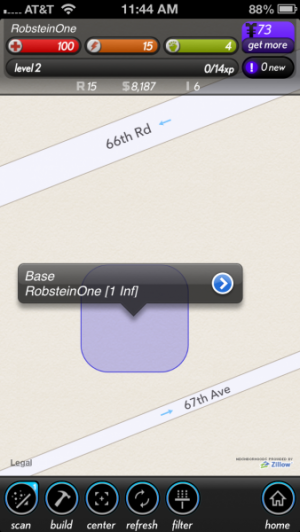
Mafia Planet boasts that it’s going to be the first location-based crime game for iOS. There are other (very) similar games (like Parallel Mafia), but this one might be unique in it’s own way. No matter where players are, there will always be something to do. Players can rob nearby banks, other mobsters, and do quests that can be completed anywhere in the world.

Players have districts that can be attacked by other mobsters or attacked directly. Players gain experience and money as they work their way through the game in their goal to become the next mafia Don. This is one of those games that will be progressively more fun depending on the amount of people locally that decide to use it.

The game is going to be free and ready to play later this month on May 23th.

The iPhone is packed with all sorts of sensors: GPS, gyroscope, facial recognition (camera), and more. It also has a fairly decent camera. Triggertrap combines the features in this powerful piece of equipment to set up automatic triggers for the iPhone camera. Users can set up some interesting automatic triggers with Triggertrap, like “take 50 pictures over 10 minutes” or “take a picture every 200 meters.”

Triggertrap offers 12 different trigger modes including time-lapse, sound sensor, facial recognition, and distance-lapse to name a few. The app also has an automatic HDR mode, HDR time-lapse, and a manual long-exposure mode.

Triggertrap even sells a dongle and connection cables to perform its automatic functions on SLR cameras. Customers can buy the Triggertrap Mobile Dongle for $9.99 and a connection cord that works with their camera that’s also priced at $9.99. There’s also a Twin Head Flash Adapter for using Triggertrap with flashes instead of cameras.

Triggertrap is $9.99 but a free version of the app exists with limited modes (time-lapse, seismic, and cable release modes).

FREE!
iPhone App - Designed for the iPhone, compatible with the iPad
Released: 2012-04-29 :: Category: Photography

FREE!
iPhone App - Designed for the iPhone, compatible with the iPad
Released: 2012-04-29 :: Category: Photography

Augmented reality (AR) apps frequently pop-up on the App Store giving users a visual experience over our everyday reality. LEGO has recently jumped on the AR game with LEGO Lens. LEGO Lens lets users watch and interact with LEGO creations at various locations in the U.S.

The app shows LEGO creations that are close on a Google Map. Once at the location, the LEGO creations can even be captured in a picture to share with friends. A radar shows the LEGO creations when users are close.

We hopped on LEGO Lens to check out the locations of where these LEGO creations are popping up. There were none in my immediate driving distance (but a fair few in my state). Looking at the pins on the Google Map, there are quite a few places boasting The Avengers & Loki in the sky. The locations that these LEGO AR creations are popping up in include movie theaters (lots of Carmike Cinemas), malls, and stadiums. The LEGO creations are swarming in New York, LA, Atlanta, Dallas, Houston, and Chicago.

It’s important that parents supervise with the use of this app given the GPS capabilities and suggestions to visit the LEGO locations.

FREE!
iPhone App - Designed for the iPhone, compatible with the iPad
Released: 2012-04-30 :: Category: Entertainment

Easy Trails GPS, the navigation application made specifically for outdoor enthusiasts, has updated to 6.0 and added new features and interface changes with the release.

The interface for Easy Trails GPS 6.0 has been significantly changed with this update. The interface design was rewritten completely from scratch to keep in mind usability. The new interface displays every feature of the application regardless of the current activity going on, making it easy to switch between Easy Trails GPS’s many features.

Other features added in the release is support for Retina display devices, sharing location via Twitter, the ability to archive up to 1000 tracks and 2500 waypoints, waypoint proximity alerts can be turned on with use of the Notification Center, exporting all track information, and the ability to copy and save waypoint pictures to the clipboard or the iOS camera roll.

Easy Trails GPS is available for $3.99.

$3.99
iPhone App - Designed for the iPhone, compatible with the iPad
Released: 2009-08-13 :: Category: Sports

CodeRunner Review

CodeRunner Review

iPhone App - Designed for the iPhone, compatible with the iPad
A fascinating concept that's unlike all others. It's a great way to make walking exciting.

Read The Full Review »
Placesaver Review

Placesaver Review

iPhone App - Designed for the iPhone, compatible with the iPad
Placesaver makes marking locations significantly easier and more user-friendly.

Read The Full Review »

Some social networking apps are designed to bring people from faraway lands together. Glancee can do that too, but it’s also designed to try and bring people nearby together, slaying that most heinous of demons once and for all: the awkwardness that comes from trying to meet other people.

Users log in with Facebook, then start trying to find people with interests similar to them. Profiles are automatically filled out by Facebook information, including likes, which helps to cull together a list of other users that may be compatible based on shared interests. Matching attempts to base compatible interests on similar subjects, like sports teams, and not just scanning and saying “these two people like these exact same things on Facebook!” This does tend to fall apart at times, though – there are reasons why a fan of football player Michael Crabtree might not be compatible with a fan of the Texas Longhorns and Colt McCoy.

Once a match is found, users can then chat with each other. The app finds people by proximity, and on the iPhone, it can use GPS in the background to help alert when compatible people are nearby, helping to break the ice. Glancee is available now as a free download.

FREE!
iPhone App - Designed for the iPhone, compatible with the iPad
Released: 2011-06-09 :: Category: Social Networking

At this week’s Mobile World Congress in Barcelona, Garmin has announced that it will be adding Google Street View to all Navigon apps later this Spring. This new addition will allow users to get a close-up view of their destinations before they depart, letting them zoom in on target buildings or cross streets so they can more easily spot a previously unvisited locale.A specific launch date for the update was not given, but it should be arriving soon.

This upgrade is a godsend to people like me who really want a street-level view of unvisited locations. It’s just so much easier, in my opinion, to find the place you’re looking for when you’ve seen the building, know what side of the street it is on and can see what other buildings and landmarks are nearby. This addition makes an already impressive GPS app even better, and it’s getting really hard for just about everyone else out there to compete with Garmin’s Navigon offerings.

$59.99
+ Universal App - Designed for iPhone and iPad
Released: 2009-07-22 :: Category: Navigation

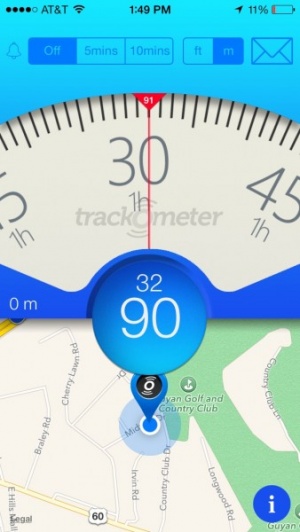
iSpeedMeter turns the iPhone into a speedometer enabling users to time themselves on the eighth and quarter mile as well as track how long it takes to go from 0-60 mph. The main tab sports a simply designed user interface that features a carbon fiber background as well as sleek silver incased speedometer.

To track distance versus time the user only needs to touch the second or third tabs to get to the distances mentioned above. Within these tabs, the app features a stoplight that signals down from red to yellow to green similar to that seen at the dragstrip only single lights and not double found on the light tree. The app then tracks the vehicle via the iPhone’s built-in GPS feature and displays distance, current speed and percentage completed. As the vehicle passes the various distances the app then displays the splits in mph or k/hm. The app is available for iPhone on the App Store for $.99.

$0.99
iPhone App - Designed for the iPhone, compatible with the iPad
Released: 2011-11-02 :: Category: Utilities

App developer, Abvio, has a robust offering of workout apps tailored specifically for the iPhone user. These apps, including Runmeter, Cyclemeter and Walkmeter which respectively track running, cycling, and walking workouts. Each of these apps track and store workout data on the iPhone itself so there is no need for users to connect to any online database to upload or download their data. This can save precious KB for the more data conscious users out there. Users can also post their workout activity to Facebook, Twitter, or dailymile.com and when friends reply to these posts, the apps will report those responses to the user in real time using text-to-speech technology. One voice is included free and other voices are available via in-app purchase for $0.99 each.

As an added bonus, Abvio has recently announced that their apps now support many of the Wahoo Fitness products. Using these monitoring device with their devices, users can track detailed stats on their heart rate and calories burned during their workouts.

$4.99
+ Universal App - Designed for iPhone and iPad
Released: 2009-09-17 :: Category: Healthcare & Fitness

FREE!
+ Universal App - Designed for iPhone and iPad
Released: 2009-09-17 :: Category: Healthcare & Fitness

$4.99
+ Universal App - Designed for iPhone and iPad
Released: 2009-10-09 :: Category: Healthcare & Fitness

At this point it pretty much goes without saying that TomTom is one the most widely used GPS services on the market.  As part of this expansion, they brought their prowess in the navigation world to iOS.  As one might assume, this was a lucrative decision for the company that has paid off for consumers tenfold.

One thing that TomTom has been great about doing is updating their software with different and unique pieces of functionality, features lacking in the competition.  At CES they previewed their upcoming 1.10 update, and the name of the game is social networking.  The core software will now link up with Twitter and Facebook to share destinations and arrival times, all without ever having to leave the application.  Heck, they even made this data available for transfer via text message and email as well!

While this is not exactly in the realm of transportation directions, it certainly makes interesting uses of features already on iOS devices.  We will have more information on the update when it nears release sometime this quarter.  Until then, keep both hands on the wheel.

$59.99
+ Universal App - Designed for iPhone and iPad
Released: 2009-08-17 :: Category: Navigation

Parallel Universe Review

Parallel Universe Review

+ Universal App - Designed for iPhone and iPad
Parallel Universe is an interesting app on paper, but when in use it's not terribly compelling.

Read The Full Review »

What’s the best way of knowing how to travel around an area? A satnav app like TomTom? That would be an easy thing to assume but it’s actually the wrong answer. The best way to explore anywhere is via local knowledge, right down to knowing where the regular traffic hotspots are or a new set of roadworks, recently installed in the area.

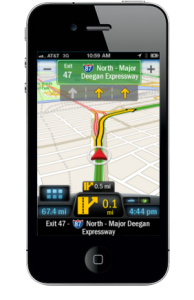
Waze has done a pretty good job in the past of providing social mobile navigation that combines gaming and crowd-sourcing in order to provide real-time, live maps and data. We already covered how useful Waze was last year, but it’s now even better thanks to a significant update in the form of 3.0.

Waze 3.0 has had its entire UI redesigned in order to implement a new and more minimalist interface. Two large buttons form the focus for much of the app, ensuring it’s easy to use. It’s also pretty glorious to look at with cutesy logos making for a much more attractive appearance than what we all know and are used to with navigational apps.

A new search engine means that Waze is fully integrated with Yelp, Foursquare and Bing. This means it’s easy for users to search for, navigate to and check-in at numerous destinations they might not have already known about. Such functionality makes for exciting developments such as real-time POIs (Points of Interest) such as the recent OccupyWallStreet protests and other similar fast moving events.

A wall type communication system has been added to Waze Groups, enabling users to chat with others in the area. A Waze mood feature provides more social networking fun, also.

Full text to speech functionality has been added for US and Canadian users along with other minor but ever useful changes such as the speed boost that Waze has profited from.

All these features put together means that Waze is now a pretty intelligent and worthwhile alternative to other Sat Nav products, even more so given the fact that it costs absolutely nothing to download!


FREE!
+ Universal App - Designed for iPhone and iPad
Released: 2009-08-01 :: Category: Navigation

GPS Navigation 2 – skobbler (US/CAN) Review

GPS Navigation 2 – skobbler (US/CAN) Review

iPhone App - Designed for the iPhone, compatible with the iPad
GPS Navigation 2 offers street level turn-by-turn directions for $.99.

Read The Full Review »
Garmin StreetPilot onDemand Review

Garmin StreetPilot onDemand Review

iPhone App - Designed for the iPhone, compatible with the iPad
Affordable GPS navigation for iPhone.

Read The Full Review »

NAVIGON AG, one of the big navigation companies out there, announced this past THursday not just an update, but a full re-definition of their smartphone navigation software, available for the iPhone and other smartphone platforms, including Android (now) and Windows Phone 7 (later this year).

“Over the last two years, we’ve continuously added new features to our navigation apps, transforming them into the most feature-rich smartphone GPS apps available,” said Gerhard Mayr, NAVIGON vice-president of worldwide mobile phones and new markets. “For our new generation of apps, we went back to the drawing board to see how we could elevate smartphone navigation to the next level. Feedback from our users suggests that a better way to manage and update maps and a more intuitive user interface are top priorities.”

Sounds good, right? What does it boil down to? Here’s what we’re seeing:

New map management and update abilities are in the update, allowing users to download regional maps on the fly. This could allow users to have, say, only the maps of the states they travel in most, rather than an entire United States or pre-defined region sitting on their iPhone taking up space better spent on new ringtones. The maps themselves will be updated from NAVTEQ on a quarterly basis, ensuring the freshest maps available to users for a one-time fee, good for the lifetime of the software. The user interface has also been updated to more easily match the iOS environment in which it is running (or the platform on which it is running, if not iOS). In addition, NAVIGON includes a speed camera warning feature and a cockpit function that displays real-time driving data, allowing those enthusiasts to monitor their driving behaviors right from the app.

NAVIGON AG was founded in 1991, and operates out of Hamburg, Germany. They were recently acquired by Garmin, and current offer smartphone apps for on-board navigation utility. The new update will be available free to current NAVIGON app users sometime this fall.

$59.99
+ Universal App - Designed for iPhone and iPad
Released: 2009-07-22 :: Category: Navigation

Direction Known: A Different Kind of GPS App

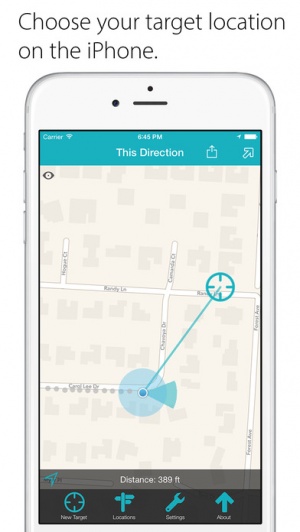
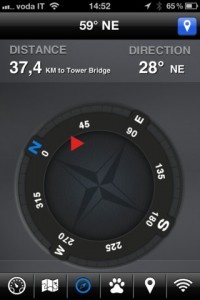
Know those corny signs that are up in just about any tourist-heavy area which show people which direction and how far another tourist-heavy attraction/city/state is? Something like an arrow sticking out of the ground in Maine, pointing West and proudly displaying “Hollywood: ‘X’ miles.” Well Direction Known does something similar, only with customizable lists of things to point at and a readout that updates and syncs in real-time as the user moves around.

As someone living in a major metropolitan center, I can’t exactly walk a straight line to wherever it is I need to go. However, anyone who’s ever tried navigating anywhere on foot ever knows that even having a general idea of where their destination is can be a huge help. Of course, there’s also the option to use the device’s built-in GPS to check the map.

Direction Known does have plenty of practical uses, including finding a friend at the park, trying to figure out which direction to start walking in after getting off the subway or finding one’s way out of the wilderness (if there’s a signal). It also has some non-practical uses, like showing the kids how much farther until they reach grandma and grandpa’s house or letting said grandparents watch their family getting closer. It can also be used for purely nostalgic purposes, such as having an arrow that always points to one’s childhood home. Locations can be saved in separate groups, keeping things from getting too cluttered and giving users more control over what they’re trying to find.

Upon first glance, Direction Known might look like nothing more than a colorful compass, but it can be much more than that. It can be incredibly helpful in the right situation, and it can illicit a nostalgic smile in others. Ultimately it’s up to the individual user to decide. Regardless of how it’s used, it’s available in the App Store right now.


$0.99
+ Universal App - Designed for iPhone and iPad
Released: 2011-01-31 :: Category: Navigation

Garmin Releases StreetPilot onDemand App

Garmin announced this past week that their new StreetPilot onDemand iPhone app was live in the App Store. Coming in at a very sweet initial price point of $0.99, StreetPilot onDemand may well be the new Freemium of GPS apps.

The app itself offers 30 days of premium features for that dollar, including multimodal pedestrian routing, bus/train schedules, spoken turn-by-turn guidance with street names, 3D representations of buildings, traffic rerouting, photoReal Junction View and Google Local Search. Once the free month is up, users can pay $2.99 monthly or $29.99 annually, with a special introductory $19.99 annual price for this first year.

“Our new StreetPilot onDemand app is the perfect solution for anyone who occasionally needs navigation but still is looking for a premium experience and precise directions. There is nothing comparable in the App Store today,” said Dan Bartel, Garmin’s vice president of worldwide sales. “By including multimodal pedestrian routing, our new app is especially helpful for users in urban areas. The app seamlessly provides directions in the car and integrates public transportation when getting directions by foot.”

Multimodal pedestrian routing allows users to integrate walking with public transportation options, giving them the option to navigate to destinations from their current, GPS-located position or from a different starting spot. The pedestrian navigation is also turn-by-turn spoken, with instructions for transit in cities that the service is available in. The 3D building and landmark symbols should make it even easier for pedestrians to get to where they need to go. It’s great to see such attention to detail for folks who don’t use a car as the primary mode of transportation.

For those that do, Garmin has them covered as well, including turn-by-turn spoken navigation instructions and a realistic depiction of road junctions (photoReal Junction view) and real time traffic info. Users can also find local business with integrated Google Local Search, or let the app suggest places to them based on previous local search history. The above mentioned subscription is required for turn-by-turn voice guidance with automatic off-route recalculation, real-time traffic information and multimodal pedestrian routing, however.

StreetPilot onDemand is available now in the App Store.

$0.99
iPhone App - Designed for the iPhone, compatible with the iPad
Released: 2011-08-31 :: Category: Navigation

One of the most popular (and expensive!) navigation apps on iOS, TomTom, has just released it’s newest update, 1.8, that includes a new add-on called TomTom Traffic HD. The add-on, available via in-app purchase, helps the driver find solutions to avoid traffic jams and delays. The traffic is advertised to update every two minutes, providing incredibly up-to-date traffic information. The in-app purchase for the TomTom Traffic HD service costs $19.99. The TomTom Traffic HD service is part of TomTom’s recent mission to reduce traffic congestion everywhere. Read more about TomTom’s traffic reduction plans here.

Also available with the 1.8 release of TomTom is multi-stop routes. Users can now add up to five planned stops for their trips. iOS navigation apps are getting closer and closer to rival their dedicated GPS system counterparts. And with the release of TomTom’s 1.8 release, it just got closer. I personally don’t use a dedicated GPS system; I use iPhone GPS apps like TomTom. The 1.8 release also updates the map including recent road changes.

$59.99
+ Universal App - Designed for iPhone and iPad
Released: 2010-03-16 :: Category: Navigation

Consistently popular instant messaging app IM+ Pro has just had a new feature added in the latest update. It sounds like a great way of bridging the gap between virtual and ‘real life’ social networking too.

The Neighbors feature enables users to find people locally who have similar interests by locating them on the IM+ map. Besides being able to locate your friends on the map at any time (with appropriate privacy settings on offer), you can also get to know new people through the app.

Through the interface, you can post local announcements such as offering goods or services for sale locally as well as see other sellers and their products.

It’s a pretty neat idea so it’ll be interesting to see how it works out on a worldwide scale.

The update is available now for all IM+ Pro owners. For those interested in buying the app for the first time, it’s an universal app and available for $7.99

$4.99
+ Universal App - Designed for iPhone and iPad
Released: 2008-11-14 :: Category: Social Networking

Apple has released a press release addressing some of the issues that have arisen in the past week with the recent controversy over the location tracking controversy. First, Apple claims that the iPhone is not tracking users’ locations – they’re “maintaining a database of Wi-Fi hotspots and cell towers around [users'] current location,” which is designed to “help your iPhone rapidly and accurately calculate its location when requested,” as GPS satellite data can take up to several minutes to triangulate, and using information about nearby wireless networks and cell towers can speed up this process.

One of the big issues is that the iPhone is storing a large cache of data – according to Apple, this is not the actual user location, but a cache of the wifi/cell tower around you. The problem is that the cache isn’t getting cleared out, and this is a bug that Apple is claiming will be fixed in a future software update. This is in line with what John Gruber has said recently, that the length of the history of this cache is a glitch. Apple claims that they cannot track you with this data – that it is sent to them “in an anonymous and encrypted form” and that “Apple cannot identify the source of this data.” As well, this cache will no longer be backed up in iTunes, and that the file will be encrypted in the next major software update. Now, one of the other controversies is that this data was still being sent (approximately every 12 hours, according to research) even if Location Services were turned off. Apple is claiming that this too is a bug, and one that will be fixed in a software update in the near future.

Now, skeptics may claim that this is old information, and Apple are only addressing it now as the controversy has risen up. Alex Levinson and Sean Morrissey published a book about this in December 2010, after all. However, consider that very few people actually knew about this until the recent controversy that flared up, and it seems plausible that Apple could be telling the truth, especially as Apple is now largely adjusted their behavior to similar to what Android does. As well, Apple has mentioned that they’re starting to collect traffic data in order to provide “iPhone users an improved traffic service in the next couple of years.” Along with Apple dumping Skyhook for location services last year, Apple has plenty of reason to be collecting location data. At worst, at least Apple is now fixing these issues since people have been complaining about them.

Source: Engadget

GEO Hunters Review

GEO Hunters Review

iPhone App - Designed for the iPhone, compatible with the iPad
GEO Hunters is an ambitious location based role playing game that's pretty addictive.

Read The Full Review »
    Advertisement    


Featured Apps

    Advertisement    


Developers

Would you like your application reviewed on 148Apps? See the About page for information.
    Advertisement    


Steel Media Network

148Apps - iPhone app reviews and news. The best gosh darn iPhone app site this side of Mars.
http://148apps.com :: @148Apps

The Portable Gamer - Coming soon.
http://ThePortableGamer.com :: @PortableGamer

Android Rundown - Android news and reviews. Where you get the rundown on Android apps and hardware.
http://AndroidRundown.com :: @AndroidRundown

Best App Ever - Yearly Mobile App Achievement Awards.
http://bestappever.com :: @BestAppEver

GiggleApps - iPhone applications reviews for kids and parents.
http://GiggleApps.com :: @GiggleApps

148Apps.biz - iPhone development news and information for the community, by the community.
http://148apps.biz :: @148AppsBiz

The App Hall of Fame - An archive of the very best in apps and games.
http://AppHallofFame.com :: @AppHallofFame

Pocket Gamer - Mobile game reviews, news, and features.
http://PocketGamer.co.uk :: @PocketGamer

Pocket Gamer.biz - Mobile games industry news, opinion, and analysis.
http://PocketGamer.biz :: @pgbiz

AppSpy - iOS game news and video reviews.
http://appspy.com :: @appspy

Smart TV Radar - For everything you need to know about Smart TV.
http://smarttvradar.com :: @smarttvradar