Posts Tagged flashlight

Favorite Four – Apps For The Toolbox

There are those who buy the iPhone for silly games, and then there are those who buy the iPhone for manly purposes like measuring tables and making sure shelves are made level. While you were putzing around playing Doodle Jump and Pocket God, these people were flicking their digital Zippo lighters in peoples faces, just because they could. They chugged beer after beer whenever anyone walked by and whipped everyone who wasn’t working at their Mountain Dew pace.

These toolbox apps for for the tough guys out there, and maybe for a few of the guys like me who have to hang a picture every once in a while. Here’s to you, tough guys.

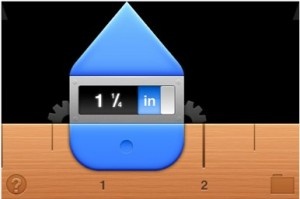
Ruler 2 – Sure, the average guy that needs a measurement probably has a ruler of some sort laying around, but if you don’t, save a tree and buy Ruler 2. With Ruler 2 you can measure an object 2 15/16th of an inch at a time, as long as you make sure to mark where the end of the screen touches. With it, you can measure the smallest of objects, or your whole car if you have a good deal of time.

The app also instantly converts inches to centimeters with a touch, so you’ll never have to try to do the crazy conversion in your head. Nobody wants to have to multiply things my 2.54… it’s just too much work.

$0.99
+ Universal App - Designed for iPhone and iPad
Released: 2010-06-03 :: Category: Utilities

iHandy Carpenter/ iHandy Level – Unlike the ruler, there just aren’t that many people out there that have levels. The master of all tools, the level makes sure that all of your pictures are hung straight on the wall. All you have to do with the app is calibrate it on something that is level, and then just hold it up. The app will then detect any angle at which the phone might be at with a visual level bubble, just like if you were using the real thing.

If you want to get really handy, you can move on from the free level to the iHandy Carpenter. This app has a level, a surface level, a protractor, a ruler, and a plumb bob. Just make sure that you have a big budget for supplies because you may want to go on and build a house.

$1.99
iPhone App - Designed for the iPhone, compatible with the iPad
Released: 2008-10-16 :: Category: Utilities

FREE!
iPhone App - Designed for the iPhone, compatible with the iPad
Released: 2008-12-22 :: Category: Utilities

Flashlight + – Probably the most consistently useful app on the list, Flashlight + uses the LED flash on the iPhone camera to act as a flashlight. It’s just as bright as any flashlight you might own, and it never needs AAA batteries.

The competition in the App Store is steep for flashlight apps, but Flashlight + has a UI that is as slick as any app that is built into your phone. Just for kicks, it also has a strobe light that will work great for Halloween.

$0.99
iPhone App - Designed for the iPhone, compatible with the iPad
Released: 2010-07-07 :: Category: Utilities

DAH-Measure – While most of the objects that you will have to measure will be small enough to use the either of the ruler apps, DAH-Measure is the only one that is handy enough to measure something like a tree. Using the iPhone’s camera as a guide, DAH-Measure can roughly measure the length or height of something with a few fancy equations.

Just a warning, because the app does everything by sight, it’s not always on the money with the exact measurement. You’ll be surprised though how close it actually gets.

$0.99
+ Universal App - Designed for iPhone and iPad
Released: 2010-08-27 :: Category: Utilities

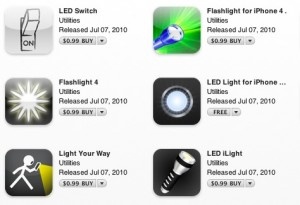
Since the launch of the iPhone 4, we’ve seen lots of developers release details about their submitted but not yet released iPhone 4 flashlight apps. Apps that trigger the LED flash on the back of the iPhone 4 used to provide extra light for the camera. These flashlight apps trigger that LED to give you enough light to navigate in the dark.

Today it looks like Apple finally decided to approve that type of app and we’ve seen a rush of this new sub-genre. So far we’ve seen at least 11 of them appear in the App Store and I’m sure we’ll see dozens more in the next few weeks. Most of these apps are showing up at $0.99 while just one has been released as free. Since they are all basically the same, you might just want to pick up the free one and put that dollar toward an app that’s a little more original for your iPhone 4.

A huge warning on these apps is that the LED will likely burn through your battery pretty quick. You won’t likely notice much of a problem if you are using it for a few second here and there.

So far no one has released the Doodle Jiggle Bikini God LED Flashlight app. That will be the killer one we’ve all been waiting for. [end sarcasm]

Tweetie, in our opinion the king of iPhone Twitter clients, has been updated with some really great features — and some Popularity EnhancemEnts (or PEE) that users have been clamoring for.

In what is a first on any platform and an absolute dream come true to the iPhone community, Tweetie, updated tonight to version 1.2, has added two features that users have been asking to be combined into a single app since the iPhone was first released. Loren Brichter, the developer of Tweetie, has answered user demands and released a single app that has the ability to function as two of the most popular apps in the app store. Oh, and it does some Twitter stuff too.

Tweetie is a multiple account capable Twitter client that just nails the user interface. It’s a rock solid and feature packed application. The new version adds some great features like Instapaper integration, a landscape keyboard, swipe controls, block/unblock of users, and draft saving.

Tweetie is a $2.99 Twitter client that, in our opinion, is the best available on the iPhone. The best new feature has to be the new quick swipe control in the UI. You can swipe over a tweet (a twitter message), and quickly reply to, view the details of the user, or mark as a tweet as a favorite. Much quicker than the previous requirement of going to another screen to do those things.

These new features add to the already fantastic full featured interface of Tweetie. I has everything you could need, Twitter search integration, search favorites, multiple accounts, picture integration, location integration, inline web and image viewer, nearby (location services based) searches, and much more.

Oh yeah, and if you go to settings and click advanced and turn the popularity enhancement on, all of your dreams will come true and Tweetie will become the most perfect app, ever.

FREE!
+ Universal App - Designed for iPhone and iPad
Released: 2008-11-19 :: Category: Social Networking

Rave Light

Rave Light

iPhone App - Designed for the iPhone, compatible with the iPad
Rave Light is a simple but un-interesting application

Read The Full Review »
    Advertisement    


Featured Apps

    Advertisement    


Developers

Would you like your application reviewed on 148Apps? See the About page for information.
    Advertisement    


Steel Media Network

148Apps - iPhone app reviews and news. The best gosh darn iPhone app site this side of Mars.
http://148apps.com :: @148Apps

The Portable Gamer - Coming soon.
http://ThePortableGamer.com :: @PortableGamer

Android Rundown - Android news and reviews. Where you get the rundown on Android apps and hardware.
http://AndroidRundown.com :: @AndroidRundown

Best App Ever - Yearly Mobile App Achievement Awards.
http://bestappever.com :: @BestAppEver

GiggleApps - iPhone applications reviews for kids and parents.
http://GiggleApps.com :: @GiggleApps

148Apps.biz - iPhone development news and information for the community, by the community.
http://148apps.biz :: @148AppsBiz

The App Hall of Fame - An archive of the very best in apps and games.
http://AppHallofFame.com :: @AppHallofFame

Pocket Gamer - Mobile game reviews, news, and features.
http://PocketGamer.co.uk :: @PocketGamer

Pocket Gamer.biz - Mobile games industry news, opinion, and analysis.
http://PocketGamer.biz :: @pgbiz

AppSpy - iOS game news and video reviews.
http://appspy.com :: @appspy

Smart TV Radar - For everything you need to know about Smart TV.
http://smarttvradar.com :: @smarttvradar