Posted by Andrew Stevens on April 19th, 2013 + Universal App - Designed for iPhone and iPad
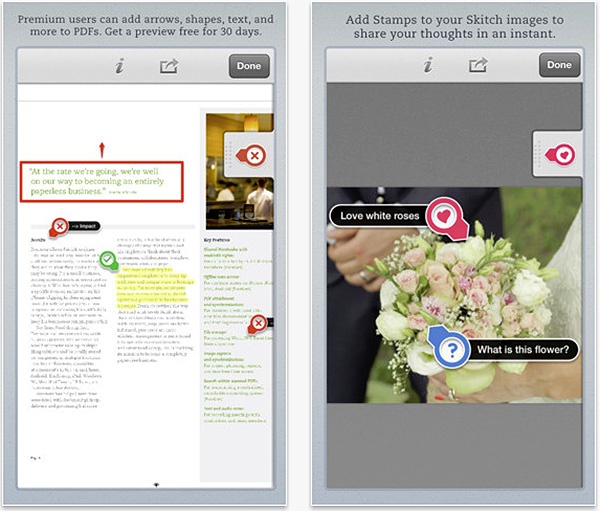
Skitch receives an update adding the ability to view PDF documents by signing in. Users will be able to try a free 30-day preview of PDF support, allowing them to mark and share ideas, while premium users have full access. It also adds Stamps allowing you to give feedback by approving, rejecting or alerting parts of an image.
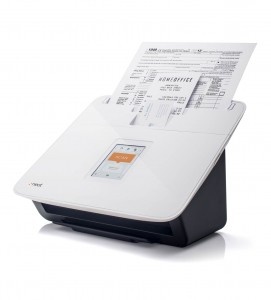
Remember when scanners were big, bulky things that plugged into obtuse parallel ports and almost never worked as well as they should have? Long gone are those days, both in terms of the ports they use and being so restricted to bulky equipment. Now, there’s a whole selection of iOS apps out there, keen to make things easier by turning an iPhone or iPad into a portable scanner. We take a look at our four favorite OCR apps.
Image To Text
It might not be the most feature rich of apps here but, crucially, Image To Text is a free app and thereby, an ideal starting place for anyone keen to scan in content. All the user has to do is take a photo of a document that they want to extract text from, then leave the app to do all the work, thereby converting everything to a text file with editable text. It’s not perfect, and it’s restricted to text only, but it’s a handy and reasonably quick tool to try out.
iPhone App - Designed for the iPhone, compatible with the iPad
Released: 2011-04-20 :: Category: Business
Prizmo
The most expensive entry here, Prizmo offers plenty of different features. The app can be used to scan and recognize many types of documents, including business cards, bills and whiteboards, making it easy to share via various services. With the business card interface, it’s possible to create contacts through the information gleaned, while receipts and bills can be exported to a spreadsheet. Crucially, it’s often very accurate, especially under a bright light. A text-to-speech facility completes the package.
+ Universal App - Designed for iPhone and iPad
Released: 2010-08-18 :: Category: Business
Evernote
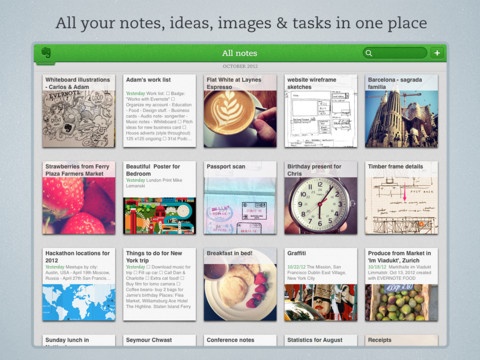
It’s easy to forget that Evernote does everything. Ok, maybe not everything, but it does a whole bunch of useful things, including offering a free way to scan in useful pieces of information. It’s possible to create notes with content that has been scanned in, both of the picture and text variety, all for future reference at a later date. Searching functionality is as powerful as one would expect from the Swiss Army Knife of productivity apps.
+ Universal App - Designed for iPhone and iPad
Released: 2008-07-11 :: Category: Productivity
Scanner Pro
Providing a high level of accuracy, Scanner Pro works well in its efforts to turn someone’s life paperless. Users can scan receipts, notes, book pages and mostly everything else they can think of with this app, with everything converted into a PDF file. With email and print features, the app is particularly useful for those who need to sign contracts before sending them off via email. Online storage capabilities are also there, meaning it’s possible to securely store many different types of document through this app.
Posted by Andrew Stevens on March 20th, 2013 + Universal App - Designed for iPhone and iPad
Evernote Food keeps record of all your food experiences, but now also does much more. In this update, with OpenTable integration, you will no longer need to make phone calls or send texts in order to place reservations at your favorite restaurants, as you will now be able to make your reservations straight from the app. Also, you will be able to see venue ratings from Foursquare so that you know if you want to make that reservation or not. Additionally, you can now share recipes through social media and email along with adding recipes from Evernote to the My Cookbook section using specified notebook or tag options.
Popular note-collecting app Evernote may now have a little competition from newly released Clipbox. Clipbox, currently on a new-release sale of $0.99, collects various clips of text and audio for users and saves those clips in iCloud.
Information synced to Clipbox is also available in a browser; so Clipbox clips are accessible anywhere the internet is available. Like Evernote, clips can be tagged for easy discovery later. Clipboard text and photos can be brought into the app with one easy tap. And boxes can be created to hold clips that use the user’s own search terms for organization. Users can even create a passcode to keep unwanted users out of their information.
The app has a clean and easy-to-use interface with retina display graphics for both the iPhone and iPad retina displays. haha Interactive, the developer, has made it clear that feedback from their customers will influence how they update their app in the future.
Previously, Springpad felt quite a bit like a competitor to popular note-syncing service, Evernote. Now, with Springpad’s 3.0 release, the service has added social networking features that make the app feel similar to Pinterest.
Probably the biggest feature in the new Springpad is the ability to create collaborative notebooks with friends. In the video below, the actors demonstrate making a notebook like “Book Suggestions” where only the friends with opinions users really care about would be invited to the notebook and make suggestions.
Another feature that seems to have potential is the information automatically added to notebooks when a new entry is created. Price comparisons, maps, movie reviews, and more are added depending on what’s added to the notebook.
Users only need to follow the notebooks from their friends that they’re actually interested in, not the friend themselves. Apparently, Springpad understands that I’m not interested in seeing my friends’ rap suggestions but book and movie notebooks will work. And now, Springpad has created an Explore section with content tags that makes it easier to find notebooks from other people that are curating content that users may be interested in.
Springpad has a universal iOS app, so check it out on either the iPad or iPhone.
With the launch of the new iPad and its Retina Display, it may take some time for apps to catch up with the new high-resolution art requirements. Not for these ten apps, which have all been updated to support the new iPad’s high-resolution screen.
ABC Player: Want to catch up on ABC shows, but don’t want to lose out on resolution? Well, the ABC app now supports the new iPad Retina Display, which should make high-resolution video available from the app shine. It would even be possible, if ABC supports it, to stream 1080p, which is even higher resolution than what local ABC stations display at.
+ Universal App - Designed for iPhone and iPad
Released: 2010-04-01 :: Category: Entertainment
Pandora: How would a music app benefit from a higher-resolution display? Well, it might not, but choosing and discovering new artists and songs to play will look better than ever. As well, the LTE in the new iPad means higher-quality audio is easier to stream while on the go.
+ Universal App - Designed for iPhone and iPad
Released: 2008-07-11 :: Category: Music
Pulse: This news aggregator recently added support for local content, but it got a second update this week adding support for the new iPad. Image previews for articles come through clearer than ever, and reading articles is even easier now with sharper text.
iPad Only App - Designed for the iPad
Released: 2010-05-12 :: Category: News
Evernote: The popular service for sharing notes, audio recordings, and pictures to the cloud supports the new iPad with its latest update. Now, all that shared content can be pulled down and viewed more crisply than ever. Well, besides the audio, the Retina Display won’t change the sound. Apple can only do so much.
+ Universal App - Designed for iPhone and iPad
Released: 2008-07-11 :: Category: Productivity
Readability: Don’t lose any viewability when viewing the web through this app’s easier reading experience. The 1.0.3 update introduces Retina Display support, making the title of the app continue to ring true.
+ Universal App - Designed for iPhone and iPad
Released: 2012-03-01 :: Category: News
iA Writer – One of the finer writing apps available for iPad, this crisp and clear writing app loses none of its visual fidelity on the new iPad. As a bonus, it now is universal for the iPhone and iPod touch, and still supports iCloud for syncing between devices as well as the Mac version of the software.
+ Universal App - Designed for iPhone and iPad
Released: 2010-09-21 :: Category: Productivity
Tweetbot: Arguably the best third-party Twitter app available, Tapbots has updated the assets to make the iPad version of their client shine. The new update also brings live streaming of new tweets, but only over wifi, so no need to worry about wasting that LTE data plan.
iPad Only App - Designed for the iPad
Released: 2012-02-08 :: Category: Social Networking
Kindle: Still not giving in to the Apple ecosystem entirely? Well, good news: at least one third-party ebook service is supporting the new iPad, so Kindle books will read clearer than ever. Well, the text will be. The actual content may still be confusing.
+ Universal App - Designed for iPhone and iPad
Released: 2009-03-04 :: Category: Books
BeoClock: Normal alarm clocks are just too low resolution to be any good any more. Wake up to a beautfiul alarm clock displayed by the iPad’s Retina Display, and possibly everything in the world will be more beautiful. Or everything will pale in comparison to this alarm clock’s beauty. Either way, it’ll probably look really nice.
+ Universal App - Designed for iPhone and iPad
Released: 2012-02-24 :: Category: Utilities
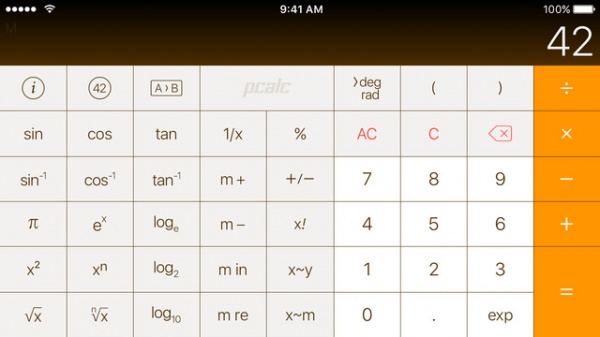
CalcBot: Tapbots’ calculator app may just be the most beautiful calculator on earth, and with its new update, the new iPad can display it in full Retina Display glory. It makes the TI-89 look even more pathetic by comparison. Plus, the iPad doesn’t have a built-in calculator app, so this really comes in handy!
The wait is over. Skitch for iPad is finally here. Evernote purchased Skitch and launched the first app for Android in August and “iUsers” have been jealous ever since. As of Thursday, the popular Mac desktop app is now available for mobiles devices on the App Store. Sure, I could have used an annotated screenshot to tell the audience in fewer words, but then I’d be out of a job.
The goal of the app is to tell more with less. If a picture is worth a thousand words then Skitch is worth that and then a few more as it allows the user to use shapes, arrows, sketches and text annotation to get their point across quickly. They can mark up photos, screenshots, maps, and webpages then share them with anyone they’d like to. Web site developers might find this useful for when showing off their design to clients and instead of asking them what their changes are they could just ask to draw them.
Simplenote – Simplenote, for one reason or another, is always a crowd favorite for simple note taking. Ridding itself of all the bells and whistles, Simplenote does a great job of creating searchable lists very quickly, with an added bonus of having instant syncing between your notes on your device and the internet. Also exciting is that Simplenote syncs with a few different desktop apps, which allows users to pick and choose the desktop interface they like best. Some people will be turned off by the lack of an official desktop app, but the WinAmp generation of PC’s past will appreciate the option to choose something different. There are limitations to Simplenote that users should be aware of, though. Unlike the rest of the feature-packed note apps, Simplenote doesn’t allow drawing or images of any kind. No handwriting recognition, PDF support, JPEG – nothing.
I like it though, and you will too. Think of it as the app version of a Smart Car: tiny but irresistible.
+ Universal App - Designed for iPhone and iPad
Released: 2008-09-08 :: Category: Productivity
Evernote – Evernote is like the BFG of the simple note taking apps. It does everything that Simplenote does, but adds support for just about everything you could ever want. It accepts PDF’s, images, audio, and even has an official app in the Mac App Store. The coolest feature of all, though, according to me at least, is the ability to search through text within a picture. For example, let’s say that you took a picture of an ad in a magazine for a Honda Insight. After importing the picture into Evernote, the company servers turn the words on the page into searchable terms. Six months later, when you finally get around to buying a car, you can hop into Evernote and type in any word that would’ve been in the ad: Honda, MSRP, Insight, anything. It’s all very cool.
The only knock on Evernote, and this tends to come from the Simplenote camp, is that the interface is fairly chunky. There’s a lot going on, and when you just want to type in a simple note, sometimes Evernote just feels like too much. If you are a Swiss Army Knife kind of person, Evernote is definitely the app to download.
+ Universal App - Designed for iPhone and iPad
Released: 2008-07-11 :: Category: Productivity
Notepad Pro for iPad – While Evernote and Simplenote are great for standard note taking, Notepad Pro steps out of the box a little bit by adding a nifty drawing feature that works great for the larger iPad screen. You can go nuts with all sorts of pen sizes and colors, or you can just draw standard pictures in plain ol’ black and white. Don’t forget to speak up either, as Notepad Pro lets you record audio while you are busy with your finger painting (I recommend a stylus). There’s no iPhone app (yet), and no online system to sync with, but people that want to use their iPads like they would a spiral notebook will be very happy with Notepad Pro.
iPad Only App - Designed for the iPad
Released: 2010-07-14 :: Category: Productivity
PhatPad – Really, another note taking app? Well yes, but this one is a bit different. PhatPad, unlike any of the apps above, converts your handwritten text into digital text. The recognition system isn’t perfect and won’t read complete slop, but if you have decent handwriting, the recognition system is a dream. Add in support for images, maps, and syncing via Dropbox and you have yourself a handy dandy little note taking system. I do wish that it had an Evernote style Mac app, but I guess beggars can’t be choosers. If you have legible handwriting, PhatPad may be the one for you.
iPad Only App - Designed for the iPad
Released: 2010-12-15 :: Category: Productivity
At the end of the day though, when I’m falling asleep and need to get one last thought down before bed though, I still find myself opening up the default note taking app. It’s not at all feature filled and doesn’t seem to sync well with anything, but I literally just can’t delete it. It’s like the app equivalent of fast food; I know it’s bad for me, but I keep finding myself in line. Speaking of fast food, In-N-Out is calling my name. Loudly.
iPhone App - Designed for the iPhone, compatible with the iPad
Posted July 10th, 2009 by Dave Spatholt Our Rating: :: MOBILE RESEARCH
What you can accomplish with Evernote will vary depending on your needs. Because the application is so flexible the application can do more than you can initially anticipate. As this is the case you will feel as if you're not getting 100% out of the application until you've used it for a while.