Posts Tagged case

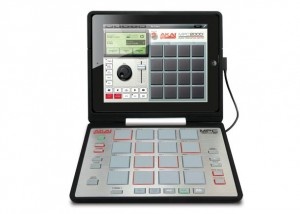
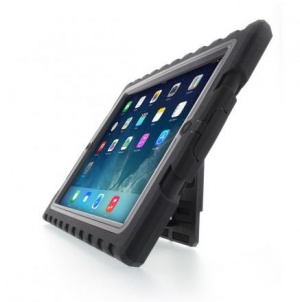
The new Akai Pro MPC Fly turns any iPad 2 into a full featured MPC (music production center). Not only does it turn an iPad into a portable production center, but it also acts as a protective case opening on hinges to sit upright, lay flat, or close shut for transport. The MPC Fly touts 16 pads with note repeat and swing, and works with any Core MIDI apps. It also works in conjunction with the MPC Fly iPad app.

With the MPC Fly iPad app users can sequence four tracks at once, access library of audio samples and drum kits, use various audio effects on their sequences, pull samples from their iTunes library, and share their work on SoundCloud, Facebook, or Twitter.

The MPC Fly houses it’s own rechargeable lithium-ion battery making it a truly portable solution. It also includes a wall charger, and will charge the iPad while it’s plugged in to the wall. No word yet on how much the MPC will retail for.

HandStand Hardware Review

Developer: Hub International
Price: $49.99
Device Reviewed On: iPad 1

iPad Integration Rating: ★★★½☆
Hardware Design Rating: ★★½☆☆
Re-use Value Rating: ★★☆☆☆

Overall Rating: ★★½☆☆

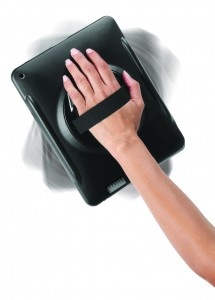
Tablets are awesome. Tablets are also awkward to hold and use because of their size. In order to address this first world problem, there exists the HandStand. This case, available for both of the currently available models of the iPad, features a hand strap on the back to allow for one hand to securely hold the iPad while the other is free to use it. This is great for walking around with the iPad, or for holding it up to display to someone else.

The HandStand works well as a keyboard prop due to its design. This makes it easy to put the iPad on a desk and start typing on it, or to just easily see what is being displayed on the screen, though it isn’t usable as a video stand. The case is very easily usable in any orientation, and can be rotated while holding it. The case provides a good grip while using it; I never felt like I was going to drop the iPad while it was in my hand.

The problem with the HandStand is that by using it, the user is limited to explicitly one-handed usage of the iPad. This can limit what apps are usable while the hand is in the grip portion. This is far better used when with a specific use where having to have the iPad in one hand is best, not for everyday usage. But then, using it is a pain. Literally. See, the iPad is not all that heavy, but combined with the additional weight of the HandStand itself, and with all the weight being put on the hand and wrist, it becomes very quickly uncomfortable to use. When using it to show the iPad to someone else, but it’s more comfortable, but for self usage? It’s just uncomfortable. As well, the case makes pressing the lock and volume buttons difficult to press because of the rubber covering the buttons. This is 2011; why is it so difficult to make a case that doesn’t add unnecessary difficulty to using the buttons on devices? The iPad 2 version of the HandStand appears to offer direct access to the buttons.

I find the limited utility of the HandStand and the discomfort it causes while using it makes this a product I can’t recommend. This seems like a good idea at first, but unless it becomes more comfortable to use, the awkwardness of holding the iPad without this case is still superior.

If there was one reason I’ve heard more than any others about why someone bought an Android or Blackberry phone over the iPhone, it’s that the person doesn’t like to type on touchscreens. Regardless of my argument that after a few weeks, I ended up typing MUCH faster on the iPhone’s onscreen than on my old Blackberry, people often opt for a physical keyboard.

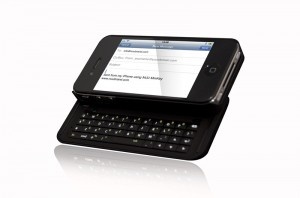
The NUU MiniKey is by no means the only physical keyboard case for the iPhone (there’s a flip-out one available at ThinkGeek and another popular one by BoxWave), but it has a few interesting features and sturdy-looking design (though it looks like it may almost double the thickness of the iPhone).

The MiniKey has navigation keys to allow easier movement between characters than using the magnifying glass on the touchscreen. Like most cellphone keyboards, the MiniKey has function keys to allow quicker typing of symbols and numbers. Something I haven’t seen on other iPhone keyboards is backlighting. While it isn’t helpful to a skilled typist like myself who doesn’t need to look at the keys, other more novice typists may need to see what keys they are pressing. The MiniKey is also compatible with the Mac keyboard shortcuts like Command+C for copy and Command+V for paste. And finally, it has a key to toggle between the physical and onscreen keyboard. I assume this key simply turns the keyboard on and off (which would be great to save battery life).

The NUU MiniKey is selling for $79.99 on Amazon (free shipping). This won’t appeal to those of us that trust that Apple knows best and if we needed a physical keyboard they would have given us one. But to anyone who is on the fence between iPhones and other phones, accessories like this may be the deciding factor.

Developer: Incase

Price: $29.95

iPad Integration Rating: ★★★★½
Hardware Design Rating: ★★★★☆
Long Term Reuse Rating: ★★★½☆

Overall Rating: ★★★★☆

When I bought the Apple Wireless Keyboard for both my iPad and MacBook Pro, I immediately ran into a problem. How do I pack up the keyboard to take with me to class? I didn’t want to damage the keys by just throwing it in my bag. I sorely needed a case for the keyboard. As a side note to those who don’t have a keyboard case and don’t want to damage their keyboards: the box that the keyboard comes in is portable and sturdy enough to use temporarily.

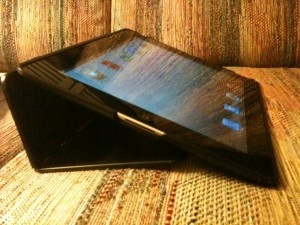
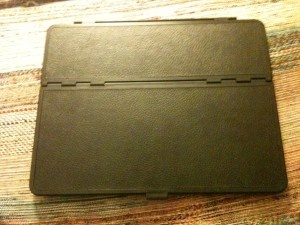
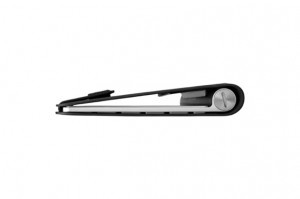
Due to a suggestion on a favorite podcast of mine (Andy Ihnatko on Macbreak Weekly), I bought the Incase Origami Workstation. The Origami Workstation is definitely of a minimalist design. The keyboard simply clips into the case – quite securely, I might add. The case is closed, book-style, and velcroed shut. Just as a keyboard case, the Origami Workstation is not worth its $29.95 price tag. But the real usefulness comes in when it doubles as a stand for the iPad.

The Apple case for the original iPad isn’t the most secure stand. It’s not sturdy at all when using it in portrait mode or in landscape mode when it’s sitting upright. So pre-Origami Workstation, I was constantly worried that my iPad was going to fall screen first onto my desk in class (those slanted desks don’t help the situation). The top half of the Origami Workstation folds back and attaches to itself via velcro to make room to place an iPad.

The viewing angle that the stand creates is perfect (the Apple case makes an angle that’s too steep). It holds in both portrait and landscape mode. Also, it’s possible to leave the Apple case on the iPad and it will still fit into the keyboard stand.

The only problem I had with the Origami Station is that one of the velcro pieces fell off shortly after I received it. A little superglue fixed the problem, but I’d obviously rather not have to repair a new accessory that way.

For anyone who is tempted to buy the iPad Keyboard Dock but still wants to be able to use the keyboard in landscape mode, this is the solution – buy the Apple Wireless Keyboard and the Incase Origami Workstation.

At Macworld this year, we saw a few new iPad cases with something extra, a keyboard. We’re going to take a look at a few of these as we get them in. First up is the Keyfolio from historic peripheral provider Kensington.

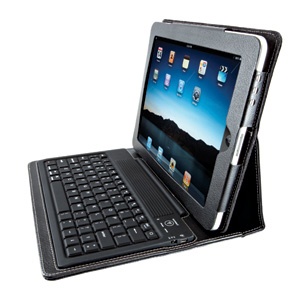
The KeyFolio looks like a rather nice faux-leather portfolio for your iPad. The iPad is held in securely by a firm flap at the top yet still gives access to all the needed buttons and ports. On the flap that covers the screen there’s a rubber covered keyboard. While the keys are a bit small, the convenience is really nice to have. Yet I do have a problem with some the of the choices made with this keyboard.

They keyboard uses Bluetooth to connect to the iPad giving you the ability to use this hardware keyboard instead of the soft keyboard on the screen of the iPad. Using an external keyboard does offer you some speed and convenience perks. For one you can use the OSX standard command-C,V,X for cut, copy, paste. In addition for you text warriors, the arrow keys and key modifiers also work for rapid text selection.

This keyboard feels fairly good to type with, though it’s a little odd feeling. The rubber covered keyboard is nice in that it keeps dust, crumbs, hair, etc. from getting below the keys. But it does give it a cheap feel and lacks that satisfying click of a normal keyboard. Actually using the keyboard was convenient and easy. Once the BT is paired, it connected to the iPad quickly when turned on and worked well for typing. No problems in that respect.

The one real issue I have with this device are the decisions made with key placements. For one there’s no right shift key. I don’t miss this that much, but if you use that key it will take you a while to get used to it being missing. My bigger concern is that the quote key, both single and double, has been moved to the lowest row by the space bar. This one I have to go searching for every time I need it.

Overall, if you like the form factor, and can get by the key placements, this is a great case for you. While the case itself is on the heavy side it works really well and I’m enjoying using it. The KeyFolio is available from Kensington directly for $99, and considerably cheaper from other retailers like Amazon.

[ Source: Kensington ]

At 148Apps, we made a decision years ago to not review iPhone cases. There are just too many different cases with too many subtle variations to even try to take an authoritative stab at it. When an exceptionally different case like this comes along, however, we have to take a look. And not, of course, an authoritative review.

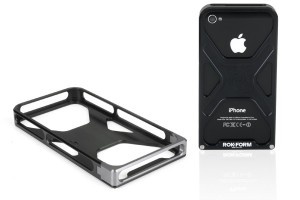
The Rokbed from Rokform was sent to us to take a look at and I must say I’m impressed. It’s a pretty formidable looking two piece all aluminum device, you really can’t call it a case, that slides with a very close fit around your iPhone 4. It’s precision milled by a company that’s been making aftermarket racing parts for years. And the precision is impressive but that precision doesn’t come cheap.

I’ve been using this on my iPhone 4 for a little over a week now and I must say I’m really impressed. I originally thought it would add too much weight or bulk to the phone at over an ounce, but I got used to it almost instantly. It’s easy to grab with ridges and valleys in all the right places. None of the ports or buttons are covered, and it still fits perfectly in my iPhone dock (once I removed the tray). And most importantly the aluminum frame doesn’t touch any of the antennas so it shouldn’t interfere with the reception.

One concern might be the headphone jack. While the three sets of headphones that I tried all worked fine, headphones with a large jack might not fit past the ridges.

Overall, I love this “case,” though I think of it more as an exoskeleton. Sounds tougher and more manly that way. It works well and feels very satisfying in the hand. It is very much on the expensive side at $79, but it is also extremely unique and it certainly does catch the eye.

Full specs after the jump.


Continue reading An Exoskeleton for Your iPhone 4 from Rokform »

Instead of making people go into Apple Stores, or even worse, submit mail-in rebates, for their free iPhone 4 bumpers or cases (if you don’t know why you’re getting a case, click here), Apple has created an app for the process.

The app tracks your phone by its IMEA, so you can’t get a duplicate case or a second case with someones 3G.

Also, be sure to read the policy on the iTunes page so you get the process done in the correct time frame. Don’t expect to hold off til October and get a case, Apple won’t have it.

It’s a shame that every company isn’t so crafty with its rebates.


FREE!
iPhone App - Designed for the iPhone, compatible with the iPad
Released: 2010-07-23 :: Category: Lifestyle

Now Apple has announced that it will be providing free Bumper cases to iPhone 4 users and refunds to existing Bumper owners, there’s never been a better time to get hold of some low cost protection for your device. UK-based case manufacturer Proporta is offering a novel spin on Apple’s generous deal by offering a 20% discount on all of its iPhone 4 cases and screen protectors – if you send them your (now free) iPhone 4 Bumper case that is.

Guy Monson co-founder of Proporta says “We at Proporta think it’s very generous of Apple and admire their commitment to solving the problem. We believe that it’s good for Proporta as it’ll help open people’s eyes to the need to protect their mobile devices – something we’ve been saying for the past 14 years… we realise that a free case is a free case and that a lot of customers will still want fully surrounded protection.”

Whether you see the deal as a handy way to upgrade your iPhone 4 case to fully surrounded protection or a sneaky marketing ploy, Proporta does offer a wide range of cases and the discount will certainly help out those in the market for a more sturdy cover.

Those interested can simply enter the promotional code “CASEFREE” at proporta.com to take advantage of the discount.

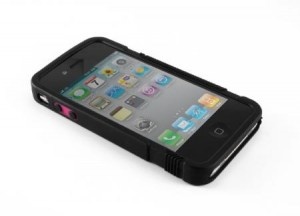
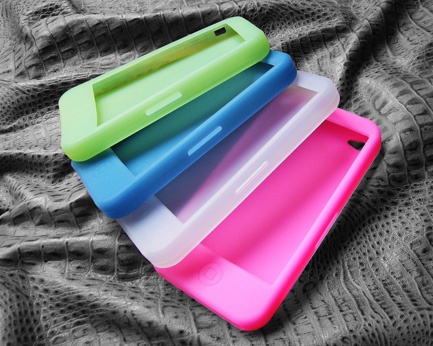
We got an email this afternoon from Soonleader, a Chinese accessory maker that they’ve already started producing some cases for the next generation iPhone. You know, the one that hasn’t even been officially announced yet. In their note, they mention that they have taken a molding of the next generation iPhone. We can only assume that molding is from the one of many that have seemingly escaped the usual Apple tight security.

Here are a couple pictures of the new cases. They seem to have all of the ports in the right places for the pictures we’ve seen so far. Check the Soonleader site for more pictures.

While we already know a lot about the next iPhone. I’m pretty sure there are some things we do not know yet. Those things will likely be revealed next Monday at the WWDC Keynote. And immediately after I’m sure we will be deluged with case designs and accessories from other manufacturers.

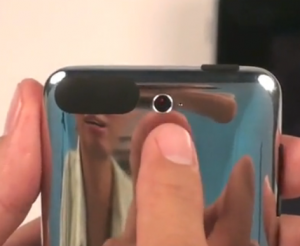
Something is going horribly wrong with Apple’s legendary veil of secrecy. Following the highly documented iPhone prototype leaks already this year, it now appears that a prototype iPod touch has escaped into the wild as well. The same Vietnamese website that, to the best of our knowledge, still has an iPhone 4G prototype is now posting images of a prototype iPod touch with a built-in 2 megapixel camera. As before, Tinhte.vn has also posted a video of the device in action that appears to be running some kind of diagnostic tool with some very un-Apple graphics, but it does show the camera working. Last time we posted about Tinhte.vn we mentioned the dramas Jason Chen of Gizmodo encountered when showing off video of an Apple prototype and urged a little caution. The guys in Vietnam obviously missed that post or simply don’t care, this time they even include footage of them walking into their office!

While this is clearly a prototype model, it may not be that new. Apple is alleged to have scrapped an iPod touch with a camera shortly before its iPod event in September 2009 where it instead launched the iPod nano with video. Images circulating on the web around that time also looked very similar to these. Mac Rumors claims that the codename N18 on the sticker one of the images makes this model a third-generation iPod touch prototype, manufactured in June 2009. Whether or not Apple is planning to return to the iPod touch with camera remains to be seen but these pictures at least prove that they have tried it.

And meanwhile, across the South China Sea, more iPhone prototype information is being spilled. Taiwanese website Apple.pro has posted what appear to be shots of the next generation iPhone’s front fascia. This isn’t exciting in itself, given that we’ve seen what we expect to be the finished product already, but what is interesting is one of these front panels is white. Apple already sells the iPhone with a black or a white back panel and, if these images are true, now plans to sell a completely white version as well. We’re not sure we like the idea of an all-white iPhone, especially if the aluminum seen on the black prototype is included on this white version. We may well think differently when we see the final product, however, with Apple being a company synonymous with beautiful products. Then again, Apple used to be a company synonymous with pre-launch security…

[ via Tinhte.vn ]

[ via Apple.pro ]

The Glide ~ Combines your Wallet and iPhone Case

Fit up to 2 cards right in your iPhone case, great for a night on the town.

Read The Full Review »

1942-20.5.9As a rule, I try not to review iPhone cases, mainly because they are a dime a dozen and really all depend on your own personal taste. Every once in a while though I come across one that offers a little something extra, a flavor thats been missing, one thats just…special. Today that case is the OtterBox Defender. Unlike most other case makers out there OtterBox is known for designing with quality in mind opposed to flooding the market with cheap pieces of junk. The Defender series for the iPhone 3G/3GS is no different and built with one specific quality in mind, to protect.

In a very DEFCON like mentality, this class of cases come with three lines of defense.
1. A hard polycarbonate skeleton that fully encases the phone.
2. An airtight screen protector that protects all of the glass as well as the sensors on the front of the phone.
3. A soft but rugged silicone skin that surrounds the entire phone.

The hard skeleton shell which surrounds the phone contains three windows, two on the back one on the front. The two on the back are there to provide viewing accesses to the Apple logo and more importantly the camera. To date, this is the only case I’ve come across with a protective window for the camera itself. The window on the front is in fact the actual screen protector which is fully attached and sealed on the skeleton. The skeleton itself is designed to recess the screen by about a 1/4 inch, which is important to reduce the risk of cracking the screen if dropped on its face. The recessed screen and protector raise two of my only concerns with the case.IMG_0314 The first being that the gap between your face and the screen makes it slightly uncomfortable to talk on, specifically in a noisy place that you need to press the phone harder to your ear in order to hear. The other being that screen protectors get scratched (that’s what they are supposed to do), but having one that is attached to my case means one of two things. Either I have to buy a screen protector for my screen protector, or I have to buy a new case every time the scratches get too bad. Not the end of the world but depending on how long it takes to get marred up it could quickly turn into an expensive proposition at $50 a case.

Continue reading The Defender, a Case Built to Protect »

feature-3gs1Delayed but not forgotten! Ok, so this is the most people I’ve ever had to apologize to at once, well except for that night in Vegas…on stage with Cirque Du Soleil…I’ve said too much. Regardless I must apologize for the delay of our Design A GelaSkin contest, as it turns out even we are not immune to the technical difficulties of the interwebs. Alas it’s all done, our galley is set up and awaiting submissions, our voting plan is setup, and I’m just itching to see what kind of creativity you, our readers, are really made of.

If you haven’t a clue as to what I’m talking about here’s a brief recap of my blog post a few days ago. Today we are beginning a new contest called Design A GelaSkin, if you’re not familiar with them, check out their site, each case is truly amazing and we need you to design one for us. If yours is chosen not only will you get a free skin for yourself and your very own 148Apps T-Shirt but also your design will be on a limitless amount of skins that we will be sending out for promotions and giveaways around the world!

Even if your not an artist we still need your help on picking out the best design so please come vote!

More contest details after the break…
Continue reading Design A GelaSkin: It’s Begun »

GelaSkins Gallery

Welcom to the Design A GelaSkins Gallery Page. All submissions are added the night of submission so if you don’t see yours right away don’t fret, it will be there in the morning. To keep things honest voting will not take place until all the submissions have been made. In the mean time feel free to make comments about them at the bottom. Click here for more contest details. Spread the word!

    Advertisement    


Featured Apps

    Advertisement    


Developers

Would you like your application reviewed on 148Apps? See the About page for information.
    Advertisement    


148Apps Network

148Apps - iPhone app reviews and news. The best gosh darn iPhone app site this side of Mars.
http://148apps.com :: @148Apps

The Portable Gamer - Mobile gaming magazine for the casual gamer.
http://ThePortableGamer.com :: @PortableGamer

The App Hall of Fame - An archive of the very best in apps and games.
http://AppHallofFame.com :: @AppHallofFame

Android Rundown - Android news and reviews. Where you get the rundown on Android apps and hardware.
http://AndroidRundown.com :: @AndroidRundown

148Apps.biz - iPhone development news and information for the community, by the community.
http://148apps.biz :: @148AppsBiz

Best App Ever - Yearly Mobile App Achievement Awards.
http://bestappever.com :: @BestAppEver

GiggleApps - iPhone applications reviews for kids and parents.
http://GiggleApps.com :: @GiggleApps