Posts Tagged appigo

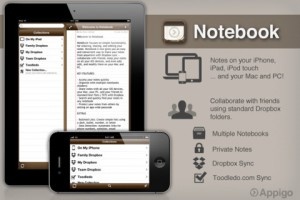
Originally designed for the iPhone, Appigo’s Notebook app has gone through a major update and is now a universal app designed to play nicely with the iPad as well. The productivity app is well known for offering a simple user interface and solid feature set to create, share and edit notes. The new 2.0 version is now optimized for Dropbox syncing, which allows the user to share notes on all iOS devices as well as Mac and PC platforms. In addition to sharing between the user’s devices, this new support makes sharing with friends, family or colleagues even easier.

The update plays off the company’s thought that adding a powerful collaboration tool was necessary for its users. The new version adds a familiar notebook interface with full-screen editing capabilities and overall the update seems to be a cost effective productivity tool for users with multiple iOS devices. The notes are saved in standard text format and is compatible with PC and Mac text editing applications. Notebook is available on the iTunes App Store for $4.99.

$4.99
+ Universal App - Designed for iPhone and iPad
Our Rating: ★★★★½ :: HIGHLY RECOMMENDED
Read Our Full Review >>
Released: 2008-09-12 :: Category: Productivity

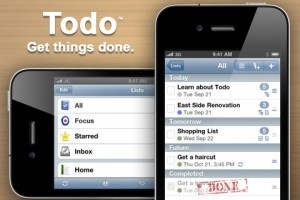
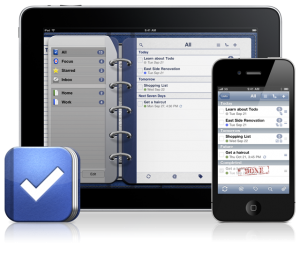
Appigo is developing a version of their task management app Todo for the Mac App Store. The app will come with a variety of features for Mac to improve the desktop platform experience, including Multi-Adaptive Windows, and Task Zooming. These are designed to help users view more tasks and more details on those tasks while on their Mac. As Calvin Gaisford, Appigo’s CEO, describes it, “Todo for Mac breaks the rigid one-window app style and allows users to open multiple windows and customize them to match their workflows. However, what users of the current iOS versions will be excited about are the options for synchronization between the upcoming Mac version and the iOS versions.

Todo will be getting Cloud Sync options between Todo for Mac and the iOS versions. Synchronization will come in multiple flavors: Todo Online, a subscription service for $19.99 per year that allows you to sync up your versions of Todo between all of your platforms. The free, online-only version comes with a 14-day trial of synchronization between versions. As well, users can sync versions of Todo for free over local wifi networks. As well, the free third-party service Toodledo will be supported by Todo for Mac for synchronization, so Appigo isn’t just limiting their apps to their own services – they’re also supporting other services that users might want to use, including synchronization with the desktop iCal. No matter what service you choose for synchronization, you’ll know that your tasks are being synced up between devices, however you choose.

Todo for Mac is currently in beta, with plan for release later this summer. Users looking to get their life figured out and synchronized up across all their platforms will have new options available in the near future, and more options available if they use Appigo’s Todo software. While the synchronization won’t be up to full swing for Mac users quite yet, Todo for iPhone/iPod touch and iPad are available now.

$4.99
iPhone App - Designed for the iPhone, compatible with the iPad
Our Rating: ★★★★½ :: HIGHLY RECOMMENDED
Read Our Full Review >>
Released: 2008-07-11 :: Category: Productivity

$4.99
iPad Only App - Designed for the iPad
Released: 2010-05-11 :: Category: Productivity

Corkulous Learns To Share

I’m not sure what it is, but something about the iPad just screams “cork board.” Maybe it’s because the iPad is the perfect size for a little note/ picture collection center. Whatever the reason, cork board apps have been fairly popular on the iPad, and Corkulous seems to stand out from the crowd.

Not resting on their laurels though, the team at Appigo has updated Corkulous to add sharing and cork board templates, two additions that are definitely appreciated.

Board sharing in Corkulous can be done by either using the entire board, a specific view of the board, or just a collection of selected items. These items can be shared via email, placed in a website for download via mobile Safari, or sent via iTunes File Sharing.

The new template feature makes it possible for users to make Corkulous templates for common uses. Appigo uses a college student as an example, as they could make a note taking template for daily lectures.

“Corkulous works extremely well on the iPad and weʼve been getting great reviews from customers,” said Calvin Gaisford, Appigoʼs CEO. “Weʼre excited to see what kinds of new uses Corkulous board sharing brings to the iPad.”

Be sure to download the 1.6 update (out now), and if you don’t have the app yet, pick it up and save a cork tree.

$4.99
+ Universal App - Designed for iPhone and iPad
Released: 2010-04-15 :: Category: Productivity

Todo 4 Makes Task Management Even Easier

Todo, from Appigo, has long been one of the best task management apps on the iPhone, and now the iPad. Back in Jan, 2009, when we did the original review, we touted its streamlined interface and its free online syncing as the features that put the app above the rest, but the new Todo 4 adds even more to the already impressive app.

The major update for Todo 4 is its implementation of iOS4 features. With the new update, users can take calls or switch to other apps during synchronization, and can use local notifications to continuously update the icons badge so you know exactly how much you have to get done. The iPhone 4 version (and soon the iPad version) also uses local notifications to remind you of tasks, so you’ll get what you need to know regardless of network connectivity.

Other features include:

  • Passcode locking throughout the app.
  • Synching with the brand new Todo Online system ($19.99/yr.), which syncs your iPhone, iPod Touch, iPad, and computers together via wifi or 3G.
  • Updates to Appigio Sync (free), allowing for syncing with iCal and Outlook.
  • “Appigo has taken Todo 4 to a new level that is far beyond other to-do list apps available on the iPhone or iPad,” said Calvin Gaisford, Appigo’s CEO. “With the amazing features of iOS 4, monitoring and completing tasks during the day is now possible even when Todo isn’t running.”

    Be sure to download the new update today, and if you don’t have Todo yet, now would be a great time to hop on board. It’ll cost you less than your venti mocha and it’ll be far more useful.

    $4.99
    iPhone App - Designed for the iPhone, compatible with the iPad
    Our Rating: ★★★★½ :: HIGHLY RECOMMENDED
    Read Our Full Review >>
    Released: 2008-07-11 :: Category: Productivity

    Todo for the iPad Review

    Todo for the iPad Review

    iPad Only App - Designed for the iPad
    Todo for iPad provides all the great functionality that it's smaller counterpart did, fully utilizing the additional size of the iPad to provide enhanced features. This mixed with the great sync features continue to set Todo ahead of the task management crowd.

    Read The Full Review »

    Appigo Todo Released for the iPad

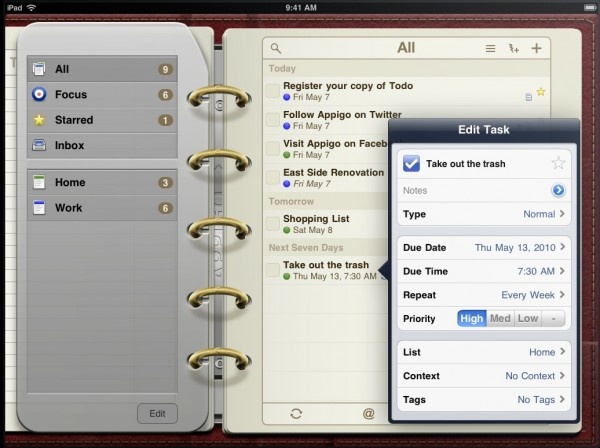
    Appigo Todo, one of our favorite iPhone todo applications has been released for the iPad. This version supports all of the great functionality of the iPhone version with an enhanced display to take advantage of the extra screen area.

    Appigo Todo for the iPad includes the great syncing functionality of the iPhone version. Meaning that you can keep your iPad, iPhone, and desktop all in sync. Fantastic feature. Looks like Appigo have decided to go with the familiar datebook design for the app. While it’s something that is familiar to many, and certainly something that matches with Apple’s own Calendar app, I hope to see more advanced view options in the future. Possibly a power users view.

    As it is now, Appigo Todo is a fantastically functional todo / GTD app and the best one available for the iPad by a mile. The added benefit of being able to keep iPhone, iPad, and desktop in sync is icing on the cake.

    Appigo Todo for the iPad is available on the App Store now at an introductory price of $4.99.

    Contest: We also have 2 copies to give away. Check our Twitter stream @148Apps for details later today.

    $4.99
    iPad Only App - Designed for the iPad
    Released: 2010-05-11 :: Category: Productivity

    media.0Seems like one of the standard apps that developers came up with for the iPad has been that of a cork board. A simple place to put notes / reminders / etc. But most of the ones I’ve seen have been very barebones and simple. And quite honestly, rather uninspired. That is, until Corkulous from Appigo.

    Corkulous shows what seasoned application developers can do with a simple idea. Taking the idea of a cork board and thinking about how people would use it and what extra features they would need.

    You can attach not only post-it like notes to the board but also short text clips, images, even contacts. All great ways to attach bits and pieces that make up a board to keep track of things you need to get done or remember. New items can easily be added by grabbing the item you want to add from the drawer at the bottom of the screen. Items can easily be aligned by watching for the on screen guides that automatically pop up when you are lined up with other items — a thoughtful touch.

    Not only can you attach these information bits, but you can also embed other cork boards. So that on one cork board you can have a little icon that allows you to go to a whole new cork board. A great idea — and infinitely expandable. Though be careful, you could easily get lost in a sea of cork boards!

    You can also email screenshots of parts of your cork board to anyone from inside the app. And you can export PDFs of your whole cork board too.

    There are a few things we’d love to see with this app. For one, I’d love to see an iPhone version too. And have the ability to keep all of my cork boards in sync. Would also love to see synchronized sharing done with other users on a single cork board. That would be fantastic.

    Corkulous is a great app with great potential. Appigo aren’t going to stop here, they have a great foundation, I can’t wait to see where they go this this fantastic app. But even as it stands now, it’s a great app and a great way to organize thoughts quickly.

    $4.99
    + Universal App - Designed for iPhone and iPad
    Released: 2010-04-15 :: Category: Productivity

    Notespark

    Notespark

    iPhone App - Designed for the iPhone, compatible with the iPad
    If you aren't satisfied with the iPhone's built-in note pad, and you are connected to the Internet most of the time, you can really benefit from Notespark's constant syncing. There are a myriad of apps to consider though, and many are far better than this one. This app doesn't do that much wrong, but it has a slim feature set and though what it offers works well, it's best for iPhone users who want something simple.

    Read The Full Review »
    Appigo Todo

    Appigo Todo

    iPhone App - Designed for the iPhone, compatible with the iPad
    Appigo Todo is a task management app with a streamlined user interface. It includes ways to tag and otherwise set todo items apart, robust search and filtering, and is augmented by several synchronization options as well as tight integration with Appigo Notebook, a note taking app available from the same author.

    Read The Full Review »
        Advertisement    


    Featured Apps

        Advertisement    


    Developers

    Would you like your application reviewed on 148Apps? See the About page for information.
        Advertisement    


    148Apps Network

    148Apps - iPhone app reviews and news. The best gosh darn iPhone app site this side of Mars.
    http://148apps.com :: @148Apps

    The Portable Gamer - Mobile gaming magazine for the casual gamer.
    http://ThePortableGamer.com :: @PortableGamer

    The App Hall of Fame - An archive of the very best in apps and games.
    http://AppHallofFame.com :: @AppHallofFame

    Android Rundown - Android news and reviews. Where you get the rundown on Android apps and hardware.
    http://AndroidRundown.com :: @AndroidRundown

    148Apps.biz - iPhone development news and information for the community, by the community.
    http://148apps.biz :: @148AppsBiz

    Best App Ever - Yearly Mobile App Achievement Awards.
    http://bestappever.com :: @BestAppEver

    GiggleApps - iPhone applications reviews for kids and parents.
    http://GiggleApps.com :: @GiggleApps