Posts Tagged accessory

Just as the death of arcades hasn’t stopped Ion Audio from putting out cool, new iCade accessories, they aren’t letting the decline of games like Guitar Hero keep them from getting into the plastic instrument race. However, like their previous Piano Apprentice iPhone accessory, the upcoming Guitar Apprentice isn’t a game. Instead, it’s a musical teaching tool.

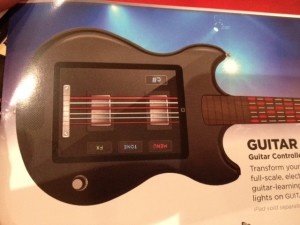
The device is a full-sized guitar shell that the iPad docks into. The onscreen frets light up to show players where they need to place their fingers and whether or not they are strumming the right chords. From there, players can learn and record songs with compatible apps like GarageBand and Ion Audio’s own upcoming Guitar Apprentice app.

The Guitar Apprentice accessory will soon hit retail for $99 in America before arriving in the rest of the world. If this works, imagine what other instruments Ion Audio could plug an iPad into. The second image shows that a drum accessory is in the works. What else could be coming? Saxophone Apprentice anyone?

If there was one reason I’ve heard more than any others about why someone bought an Android or Blackberry phone over the iPhone, it’s that the person doesn’t like to type on touchscreens. Regardless of my argument that after a few weeks, I ended up typing MUCH faster on the iPhone’s onscreen than on my old Blackberry, people often opt for a physical keyboard.

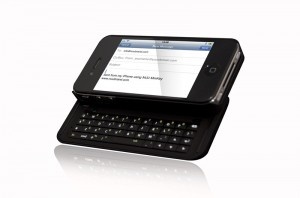
The NUU MiniKey is by no means the only physical keyboard case for the iPhone (there’s a flip-out one available at ThinkGeek and another popular one by BoxWave), but it has a few interesting features and sturdy-looking design (though it looks like it may almost double the thickness of the iPhone).

The MiniKey has navigation keys to allow easier movement between characters than using the magnifying glass on the touchscreen. Like most cellphone keyboards, the MiniKey has function keys to allow quicker typing of symbols and numbers. Something I haven’t seen on other iPhone keyboards is backlighting. While it isn’t helpful to a skilled typist like myself who doesn’t need to look at the keys, other more novice typists may need to see what keys they are pressing. The MiniKey is also compatible with the Mac keyboard shortcuts like Command+C for copy and Command+V for paste. And finally, it has a key to toggle between the physical and onscreen keyboard. I assume this key simply turns the keyboard on and off (which would be great to save battery life).

The NUU MiniKey is selling for $79.99 on Amazon (free shipping). This won’t appeal to those of us that trust that Apple knows best and if we needed a physical keyboard they would have given us one. But to anyone who is on the fence between iPhones and other phones, accessories like this may be the deciding factor.

While the iPad can definitely be used to write (emails, blogging, etc), it isn’t necessarily ideal for writing more than short posts and emails. One solution would be to grab the iPad Keyboard Dock or a bluetooth keyboard. But the obvious problem with buying one of those is (1) the price and (2) it’s just something else to carry around. Inventor Cliff Thier came up with a solution that doesn’t involve carrying around another largish gadget.

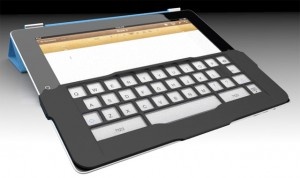
The iKeyboard isn’t on the market yet. It’s one of those Kickstarter projects that will be funded and put into production only if a certain amount is pledged ($4000 in this case). The iKeyboard would attach to the iPad and create a sensation of touch-typing by providing tactile feedback similar to that of a real keyboard. The iKeyboard is light-weight – much lighter than carrying around a bluetooth keyboard. It seems that it will be cheaper than a bluetooth keyboard considering people that pledge over $30 will receive a first-generation iKeyboard (hopefully meaning that the product will be around $30).

Thier, along with industrial design firm IDEAZ, seem dedicated to making an experience akin to a real keyboard experience,

The designers at IDEAZ have managed to match the force required to depress a key on the iKeyboard to the force needed to depress a key on an Apple keyboard. They’ve also succeeded in making the iKeyboard’s keys travel a distance equal to that of Apple keys. We now have a fully functional prototype that works pretty well.

At the time I’m writing this, $14,376 has already been pledged to the iKeyboard. Looks like we’ll be seeing an iKeyboard in the near future. But there are still solid reasons to pledge. $30 or more will reward the pledger with the first-generation product and $50 or more will get the first and second-generation (when it comes out). Both increments will be asked to participate in providing feedback to create a better second-generation product. Interesting in supporting iKeyboard?

Source: Mashable

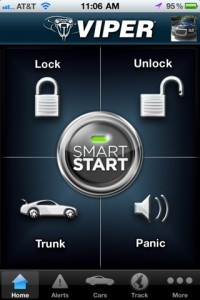
Directed Electronics, manufacturers of Viper vehicle security products and developers of the Viper SmartStart app, have released a new accessory called the Viper SmartStart GPS. This vehicle accessory, available for $299.99, can be used either as a standalone device, or interfaced with Directed Electronics security and remote start systems to provide expanded access to users’ vehicles through the Viper SmartStart app.

Some of the new features included through the Viper SmartStart app include a vehicle locator, which shows you where your car is located, as well as its speed and directed. You can also share your car’s location via text, email, or even through social networks. Now, this may seem like a tremendously dangerous use of geolocation in social media, but you can get notifications if your vehicle is moved without your approval. As well, you can check to find out if your vehicle exceeds a certain speed, so if little Johnny has a distaste for speed limits, you can get notified when he’s going too quickly for your tastes, and have your belt ready when he comes home to deliver some corporal punishment. These features are available as part of the Secure Service Plan for $5/month.

For just under $6/month, you can add a variety of additional features to the Viper SmartStart app. You can create a virtual ‘smart fence’ so that if you vehicle leaves the specified zone, you’ll be alerted. As well, you can create zones that will alert you if your car enters there. You can also set up schedules for when you’ll be notified of all these features. As well, if your Viper SmartStart GPS is integrated with a Viper system, you can access all the standard Viper features, like starting your engine remotely, locking and unlocking doors, popping the trunk, and honking the horn. The 2.2 update that supports these features is available right now for free from the App Store.

FREE!
iPhone App - Designed for the iPhone, compatible with the iPad
Released: 2009-10-13 :: Category: Lifestyle

Gorillamobile Tripod Review

A tripod that can go anywhere and do anything!

Read The Full Review »

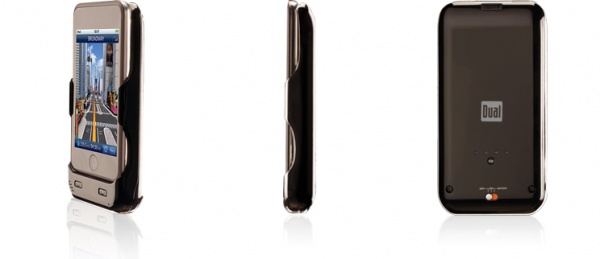
cradle_mainpageDual Electronics has updated their site promising that the XGPS300 Navigation Cradle for the iPod Touch, originally expected in November ’09, will be shipping later this February. The cradle offers GPS support for all models of the iPod Touch and comes bundled with a Windshield Mount kit and the NavAtlas App all for the price of $179.99. While some critics have taken aim at the price point claiming it to be too steep for a consumer who might as well buy a dedicated standalone GPS unit, there are some features of this that might make the expense a little easier to swallow.

Adding significant value to the deal is the battery pack portion of the cradle which can be switched on and off as necessary. Whether it be to keep the GPS from draining all of the touch’s power or simply as a power boost to keep the it kicking, the XGPS300 is capable of doubling its battery life. Battery pack cases alone usually cost between $60-$100, not to mention that this also means you’re not tethered to your car. Unlike many other standalone GPS units, which get all of their power from the cigarette lighter, this one can be taken hiking, biking, swimming…well maybe not swimming, but you get the idea.

Continue reading GPS for an iPod Touch, Coming in February »

*Update Apple Stores are reported to be currently selling them for $69.95, no word yet on if a price fix is in the works or if this is an exclusive deal
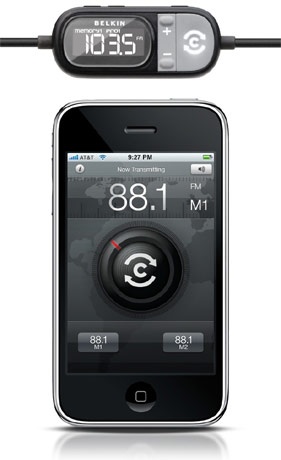
belkin-tunecast-auto-liveOnly 7 months after the original press release Belkin’s new TuneCast Auto Live iPhone FM transmitter, which was originally tagged as being the first iPhone 3.0 accessory, is finally shipping. Physically the transmitter doesn’t look any different then many of the other transmitters on the market currently. It charges through the car’s 12-volt lighter outlet and connects through the dock adapter with a control module in between. What makes this one special though is the app, ClearSacn Live, that goes along with it. Not only can users manually control all of the frequencies from the iPhone interface but the ClearScan function uses the iPhone’s GPS locater (apparently this only works with a 3GS) to automatically find the strongest frequency for the best audio quality. The transmitter is retailing for $79.99 and the app is now on the App Store for free.

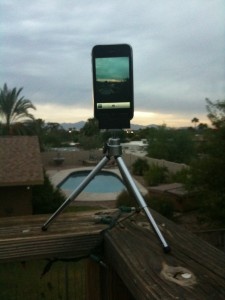
Blur TripodI’ve personally never really believed it when someone would tell me that the iPhone’s camera isn’t bad for a phone. After all, I would take picture after picture and the majority would come out, usually with a string of words which I won’t repeat, blurry and unrecognizable. As I hustled around CES last week taking pictures and spilling coffee all over myself, it was actually Chris Hall who so graciously pointed out, in between laughs of course, that it was probably my pitifully shaky hands that was the problem and not the camera itself. As it turns out, he was right, for once, and for the past few days I’ve been using the Blur Tripod and have formed a new opinion regarding my camera phone.

Priced at $14.95, the Blur Tripod is exactly what you think it is, a tripod for an iPhone. A mini tripod to be precise, which stands about 5.5 inches off the ground or up to 8 inches if you extend the legs all the way. The unit itself comes in two separate parts, the legs and the adapter mount. The legs are made of ultra light weight aluminum wich keeps them portable while still remaining fairly durable. The mount is a simple plastic clip which uses a standard 1/4″ 20 thread camera screw size which makes it usable on most any tripod on the market. An extremely nice feature of this tripod is it’s adjustably, it can truly be manipulated to be able to take photos from nearly any angle you would ever need, however it does become a little unstable when shifted too far to one side. A helpful tip I found though is that while unstable for taking photos shifting the mount all of the way to one side can help in another way by doubling as a steady hand grip for shooting video.

Blur GripMobile Mechatronics didn’t stop there though, they also put together a $0.99 Blur Tripod app to accompany the tripod.
Continue reading Eliminate the Blur with a Tripod »

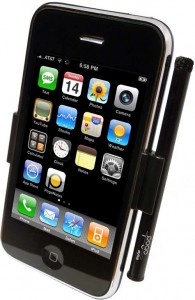
Pogo Stylus

Pogo Stylus Review

Read The Full Review »

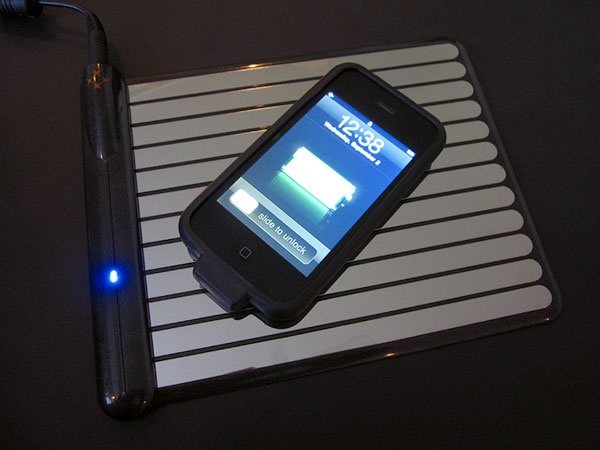
WildCharger…Pesky Cables Be Gone!

I can charge my iPhone wirelessly?...Sweet

Read The Full Review »
    Advertisement    


Featured Apps

    Advertisement    


Developers

Would you like your application reviewed on 148Apps? See the About page for information.
    Advertisement    


148Apps Network

148Apps - iPhone app reviews and news. The best gosh darn iPhone app site this side of Mars.
http://148apps.com :: @148Apps

The Portable Gamer - Mobile gaming magazine for the casual gamer.
http://ThePortableGamer.com :: @PortableGamer

The App Hall of Fame - An archive of the very best in apps and games.
http://AppHallofFame.com :: @AppHallofFame

Android Rundown - Android news and reviews. Where you get the rundown on Android apps and hardware.
http://AndroidRundown.com :: @AndroidRundown

148Apps.biz - iPhone development news and information for the community, by the community.
http://148apps.biz :: @148AppsBiz

Best App Ever - Yearly Mobile App Achievement Awards.
http://bestappever.com :: @BestAppEver

GiggleApps - iPhone applications reviews for kids and parents.
http://GiggleApps.com :: @GiggleApps