
What's New
NEW FEATURES
• Use Touch ID to secure accounts and stacks
- In addition to allowing securing accounts and Stacks with a PIN code, you can also use Touch ID
- If you already have PIN codes enabled, you will now be presented with an option to use Touch ID
- If you have not configured PIN codes :
* Go to the Accounts screen, tap on Edit. Tap on (i) next to the account you want to secure
* Go to the Stacks screen, tap on the select icon, select the stack you want to secure, and then Modify
• Share Stacks to other users via email or iMessage
- We now support sending complete or partial stacks to other Stackr users.
- Go to the stacks screen, tap on Select, and choose the Stacks you want to share. Tap on the action menu, and select More (Stack) to share.
- Or, go inside a particular stack, tap the action menu, and select More (Stack) to share
- Or, in a particular Stack, tap on Select and choose the photos / lists you want to share
• Receive Stacks from other users
- If you receive a Stack file from another user, you can open it from email (or other file management apps)
- The contents of the Stack file will be added to your Stacks. A confirmation is presented.
- Both of these new Stack features allow you to backup stacks !
FLICKR
• View Public Photos only
- In the user profile views, in addition to viewing albums, followers, etc, you can now view Public photos only
BUG FIXES
• Flickr : problems when changing comment/tag security of photos in batches. In some cases this was causing photos to become private
• Picasa : Users reported errors while browsing albums. This has been fixed
• GoogleDrive : Unable to add GoogleDrive accounts
App Description
From the creators of FlickStackr, PhotoStackr for Cloud brings to the iPad and iPhone a beautiful and intuitive way to browse, upload and share your photos from Dropbox, Box, OneDrive and Googledrive
Key Features:
==== BROWSE ====
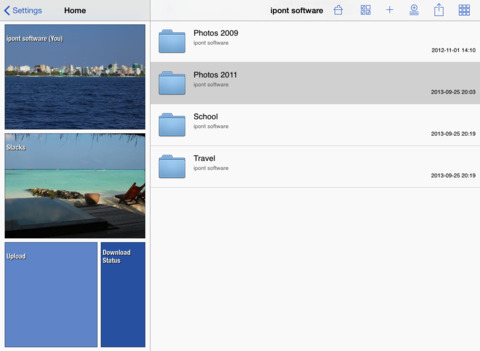
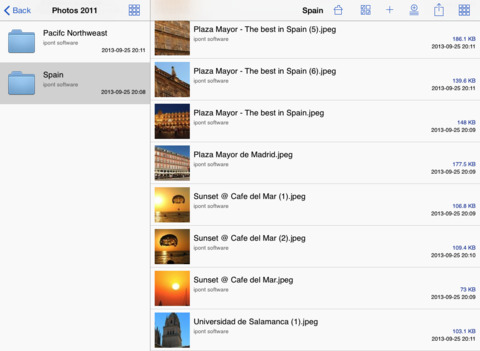
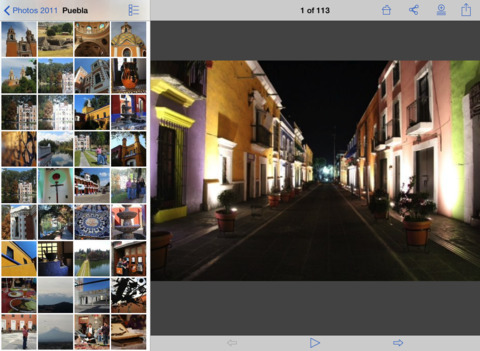
- Choose how you want to view your photos: in a list, gallery style, full screen or slideshow mode.
- When viewing your photos in gallery style you can pinch-in and out to view 3 sizes of thumbnails
- The full screen photo browser lets you swipe through photos and zoom by pinching. (Landscape and Portrait).
- Browse via your folders or your friend’s shared folders.
- No need for paging while looking at folders with large amount of photos. PhotoStackr does it automatically in the background.
- Photos are cached locally for fast access.
- Offline mode for looking at photos while disconnected.
- A unique feature is the 'STACK'. The Stack lets you mark photos for later viewing. The Stack is available whether you are online or not.
==== UPLOAD/EDIT ====
- Upload photos directly from your iPhone/iPad. Use the device's photo library as source, the camera, the Camera Connection Kit, or using iTunes drag and drop, to get photos from your computer.
- Upload in the background while you continue to browse photos
- At upload time you can specify title and folder
- Edit images: crop, rotate, adjust or add effects to your photos when uploading them.
==== SHARE====
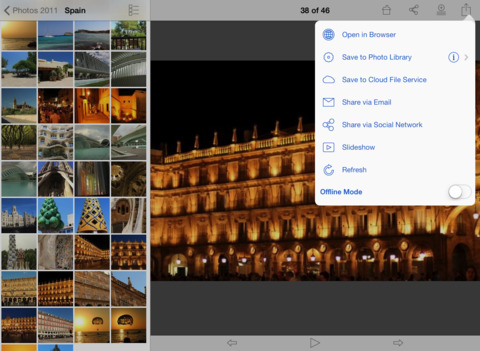
- Share photos with friends via email, Facebook, Twitter and Tumblr
- Share your photos by playing a slideshow with music on your iPad or iPhone. Or if you have a larger audience stream it via AirPlay or with external display cable (TV, HDMI, VGA)
- AirPlay mirroring and presentation mode support for all the app on iPad2, iPad3, iPhone 4S, and iPhone 5.
==== DOWNLOAD ====
- At any time you can choose to download one or several photos to your Photo Library or a Stack.
- Download in the background while you continue to browse photos.
==== ACCOUNT FLEXIBILITY ====
- If you share your iPad at home, PhotoStackr for Cloud supports multiple Dropbox and Box accounts.
==== UNIVERSAL====
- As an universal application PhotoStackr for Box can run on your iPad, iPhone and iPod Touch
==== Add-ons=====
If you also want to also access Flickr, Picasa or Instagram photos, add-ons are available as in-app purchases.
iPhone Screenshots
(click to enlarge)




iPad Screenshots
(click to enlarge)

App Changes
- November 15, 2012 Initial release
- November 22, 2012 Price decrease: $0.99 -> FREE!
- November 24, 2012 Price increase: FREE! -> $0.99
- November 30, 2012 New version 2.9.4
- December 19, 2012 New version 3.0
- February 23, 2013 New version 3.0.5
- March 08, 2013 New version 3.1
- March 25, 2013 New version 3.2
- April 12, 2013 New version 3.2.1
- June 28, 2013 New version 3.3
- July 19, 2013 New version 3.3.1
- July 28, 2013 New version 3.3.2
- September 11, 2013 New version 3.4
- October 09, 2013 New version 3.5
- October 19, 2013 New version 3.5.1
- November 04, 2013 New version 3.5.2
- November 07, 2013 New version 3.5.3
- November 19, 2013 New version 3.5.4
- November 29, 2013 Price decrease: $0.99 -> FREE!
- November 30, 2013 Price increase: FREE! -> $0.99
- December 20, 2013 New version 3.6
- December 31, 2013 New version 3.6.1
- February 09, 2014 New version 3.7
- March 14, 2014 New version 3.7.1
- April 08, 2014 New version 3.8
- May 28, 2014 New version 3.9
- June 26, 2014 New version 3.9.2
- October 21, 2014 New version 3.10
- November 03, 2014 New version 3.10.1
- January 27, 2015 New version 3.11
- May 01, 2015 New version 3.12
- July 09, 2015 New version 3.13
- July 11, 2015 New version 3.13.1
- September 25, 2015 New version 3.14
- November 22, 2015 New version 3.15
Other Apps From iPont Software