

What's New
- iOS 9 support
- small bug fixes
App Description
***** 50% OFF *****
Digital Notebook, Mind Mapping, Outliner, Visual Notes, Visual Task Manager. All in one page in one App. Visually manage your notes, ideas, mind maps, outlines, checklist and tasks for school, personal and business needs.
BRAINSTORM. PLAN. CREATE. ORGANIZE. GET THINGS DONE.
All kinds of information within one page - pictures, web links, documents, attachments, lists, tasks, notes, emails, phones and more.
- AWARDS ------------------------
PC Magazine - "25 Best Small Business Apps" | CNet - "Intuitive no matter your pursuit" | 148apps.com - "Essential iPad app" | Featured on the App Store's Get Productive short list.
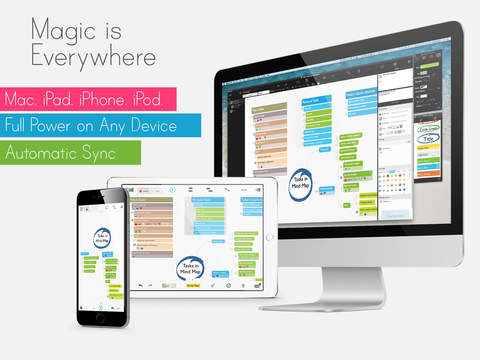
***** GET MAGICALPAD FOR MAC TODAY, seamlessly sync your content and work on the big screen with tons of shortcuts and mouse tricks. *****
Five key functions that make MagicalPad unique notes productivity app.
1. VISUAL NOTES. FULL-FEATURED NOTE-TAKING & AUTHORING
Freeform notes - Place textboxes, outlines mind maps, photos, and drawings anywhere on the page. Brainstorm for an essay, write class or meeting notes, or make lists. Merge and split outlines and easily drag/drop ideas anywhere. Double-tap to create textboxes anywhere then drag them to outlines and mindmaps to structure, connect and prioritize your ideas. Intuitive themes and styles with full style and theme management tools.
2. ADVANCED MIND-MAPPING
Advanced mindmapping tools that allow you more freedom in brainstorming and creative note taking. Place unlimited mind-maps and outlines anywhere on the same page and convert freely from mindmap to outline and vice versa, or have a hybrid mindmap of topics and outlines on the same map. Simply drag any information from anywhere to anywhere.
3. POWERFUL OUTLINER
Powerful outliner capabilities that allow you to structure your ideas and move them around the page. You can merge and split outlines, lists, mind map branches, attach images, drawings, files and more. You can easily drag/drop to prioritize and vote for your best idea. Full control over level-based themes, item styles and formatting to better visualize y our content the way you want.
4. VISUAL TASK MANAGEMENT
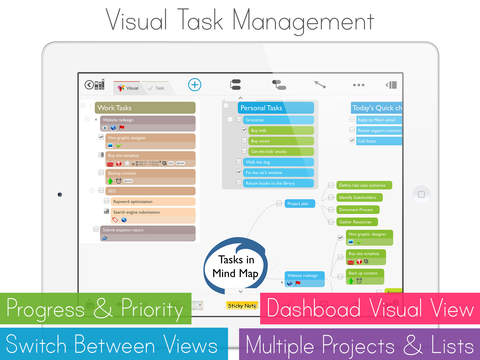
Visual task manager is a powerful task management engine that sits within outlines and mind maps enabling you to visually manage your tasks like a dashboard. You can quickly add icons, tags, set due dates, reminders, priority and add attachments to topics, tasks and notes. Drag and drop tasks between buckets, check them off and set dates and reminders.
5. DEDICATED TASK-VIEW
Yes, just like your favorite task management app. You can track your tasks in a very focused manner. Focus on a specific date, context, tag, notebook or page. Freely edit and manage tasks and switch between page view to task view at any time.
THIS IS WHERE MAGIC COMES FROM...
While these functions are powerful on their own, the real magic comes from having them all connected in front of you on the same app on the same page. No need for different apps.
* Tons of gestures and shortcuts * Content transfer is via dropbox import and export. Automatic sync using dropbox.
- HIGHLIGHTED FEATURES ------------------------
Go to http://www.magicalpad.com/features for full features list.
- TYPICAL USES ------------------------
•Note taking
•Meetings
•Brainstorming
•Class and project notes
•Mind mapping
•Outlining
•GTD
•Tasks & to dos
•Project planning
•Goal setting
•Research
•Dashboarding
- SUPPORT & FEEDBACK ------------------------
[email protected] or visit www.magicalpad.com/support
iPad Screenshots
(click to enlarge)


App Changes
- October 22, 2011 New version 1.1
- October 25, 2011 Price increase: $0.99 -> $3.99
- November 04, 2011 New version 1.2
- November 11, 2011 Price decrease: $3.99 -> $1.99
- November 12, 2011 Price increase: $1.99 -> $3.99
- November 16, 2011 Price decrease: $3.99 -> $1.99
- November 23, 2011 Price increase: $1.99 -> $2.99
- December 07, 2011 Price decrease: $2.99 -> $0.99
- December 07, 2011 New version 1.3
- December 22, 2011 New version 1.4
- January 20, 2012 Price increase: $0.99 -> $4.99
- February 11, 2012 New version 1.5
- February 26, 2012 New version 2.0
- March 16, 2012 New version 2.1
- March 16, 2012 Price decrease: $4.99 -> $0.99
- March 20, 2012 Price increase: $0.99 -> $4.99
- March 21, 2012 Price decrease: $4.99 -> $0.99
- March 31, 2012 Price increase: $0.99 -> $4.99
- April 10, 2012 New version 2.2
- April 10, 2012 Price decrease: $4.99 -> $0.99
- April 22, 2012 Price increase: $0.99 -> $2.99
- May 06, 2012 Price increase: $2.99 -> $4.99
- May 17, 2012 Price decrease: $4.99 -> $1.99
- May 22, 2012 Price increase: $1.99 -> $4.99
- June 26, 2012 Price decrease: $4.99 -> $0.99
- July 07, 2012 Price increase: $0.99 -> $4.99
- July 17, 2012 Price decrease: $4.99 -> $0.99
- July 24, 2012 Price increase: $0.99 -> $2.99
- July 27, 2012 Price increase: $2.99 -> $4.99
- August 07, 2012 Price decrease: $4.99 -> $0.99
- August 15, 2012 Price increase: $0.99 -> $4.99
- September 15, 2012 Price decrease: $4.99 -> $0.99
- September 21, 2012 Price increase: $0.99 -> $4.99
- October 15, 2012 New version 2.3
- October 15, 2012 Price decrease: $4.99 -> $0.99
- November 09, 2012 Price increase: $0.99 -> $4.99
- November 22, 2012 New version 2.4
- November 22, 2012 Price decrease: $4.99 -> $1.99
- November 23, 2012 Price decrease: $1.99 -> FREE!
- November 24, 2012 Price increase: FREE! -> $0.99
- December 06, 2012 Price increase: $0.99 -> $4.99
- December 20, 2012 New version 2.5
- December 20, 2012 Price increase: $4.99 -> $9.99
- January 21, 2013 New version 2.6
- January 21, 2013 Price decrease: $9.99 -> $4.99
- January 23, 2013 Price increase: $4.99 -> $9.99
- February 04, 2013 Price decrease: $9.99 -> $4.99
- February 13, 2013 New version 2.7
- February 13, 2013 Price decrease: $4.99 -> $0.99
- March 01, 2013 Price increase: $0.99 -> $7.99
- March 08, 2013 Price increase: $7.99 -> $9.99
- April 05, 2013 New version 2.8
- April 05, 2013 Price decrease: $9.99 -> $0.99
- April 17, 2013 Price increase: $0.99 -> $2.99
- April 20, 2013 Price decrease: $2.99 -> $0.99
- April 29, 2013 Price increase: $0.99 -> $7.99
- June 25, 2013 New version 3.0
- June 25, 2013 Price decrease: $7.99 -> FREE!
- July 03, 2013 New version 3.01
- July 30, 2013 New version 3.02
- August 04, 2013 Price increase: FREE! -> $4.99
- August 10, 2013 Price increase: $4.99 -> $9.99
- August 12, 2013 Price increase: $9.99 -> $19.99
- August 16, 2013 Price decrease: $19.99 -> $7.99
- August 20, 2013 Price increase: $7.99 -> $9.99
- September 12, 2013 Price increase: $9.99 -> $14.99
- October 06, 2013 New version 3.3
- October 06, 2013 Price decrease: $14.99 -> $4.99
- October 07, 2013 Price increase: $4.99 -> $9.99
- October 09, 2013 Price increase: $9.99 -> $29.99
- October 11, 2013 New version 3.3.1
- October 11, 2013 Price decrease: $29.99 -> $19.99
- October 22, 2013 Price increase: $19.99 -> $29.99
- October 23, 2013 Price decrease: $29.99 -> $19.99
- November 13, 2013 Price decrease: $19.99 -> $9.99
- November 25, 2013 Price increase: $9.99 -> $19.99
- December 13, 2013 Price decrease: $19.99 -> $9.99
- December 18, 2013 Price decrease: $9.99 -> $4.99
- December 19, 2013 Price increase: $4.99 -> $19.99
- December 21, 2013 New version 3.3.2
- December 21, 2013 Price decrease: $19.99 -> $0.99
- December 31, 2013 Price increase: $0.99 -> $9.99
- January 02, 2014 Price increase: $9.99 -> $19.99
- January 08, 2014 Price decrease: $19.99 -> $9.99
- January 15, 2014 Price increase: $9.99 -> $19.99
- February 22, 2014 Price decrease: $19.99 -> $14.99
- February 24, 2014 Price increase: $14.99 -> $19.99
- March 11, 2014 Price decrease: $19.99 -> $9.99
- April 11, 2014 Price decrease: $9.99 -> $4.99
- April 17, 2014 Price increase: $4.99 -> $9.99
- May 11, 2014 New version 3.4
- May 11, 2014 Price decrease: $9.99 -> $0.99
- May 13, 2014 Price increase: $0.99 -> $19.99
- May 20, 2014 Price decrease: $19.99 -> $9.99
- May 22, 2014 New version 3.4.1
- May 22, 2014 Price decrease: $9.99 -> $4.99
- May 23, 2014 Price decrease: $4.99 -> $0.99
- May 28, 2014 Price decrease: $0.99 -> FREE!
- June 02, 2014 Price increase: FREE! -> $0.99
- June 03, 2014 Price decrease: $0.99 -> FREE!
- June 25, 2014 New version 3.4.2
- June 25, 2014 Price increase: FREE! -> $0.99
- June 25, 2014 Price increase: $0.99 -> $4.99
- July 10, 2014 Price decrease: $4.99 -> $0.99
- July 16, 2014 Price increase: $0.99 -> $9.99
- July 24, 2014 Price decrease: $9.99 -> $3.99
- July 27, 2014 Price decrease: $3.99 -> FREE!
- August 05, 2014 Price increase: FREE! -> $3.99
- August 07, 2014 Price decrease: $3.99 -> $0.99
- August 20, 2014 Price increase: $0.99 -> $4.99
- August 28, 2014 Price increase: $4.99 -> $9.99
- October 03, 2014 New version 3.4.3
- October 03, 2014 Price decrease: $9.99 -> $0.99
- October 19, 2014 New version 3.4.4
- October 23, 2014 Price increase: $0.99 -> $9.99
- November 06, 2014 Price decrease: $9.99 -> $4.99
- November 07, 2014 New version 3.4.5
- November 20, 2014 New version 3.4.5.1
- November 21, 2014 Price decrease: $4.99 -> $0.99
- November 23, 2014 Price increase: $0.99 -> $5.99
- December 01, 2014 Price increase: $5.99 -> $9.99
- January 29, 2015 New version 3.4.6
- January 29, 2015 Price decrease: $9.99 -> $4.99
- February 17, 2015 Price increase: $4.99 -> $9.99
- February 25, 2015 Price decrease: $9.99 -> $5.99
- March 05, 2015 Price decrease: $5.99 -> $0.99
- March 07, 2015 New version 3.4.6.2
- March 13, 2015 Price increase: $0.99 -> $9.99
- March 28, 2015 Price decrease: $9.99 -> $4.99
- May 21, 2015 New version 3.4.6.3
- May 21, 2015 Price decrease: $4.99 -> $0.99
- May 25, 2015 Price increase: $0.99 -> $4.99
- June 15, 2015 Price increase: $4.99 -> $9.99
- August 20, 2015 Price decrease: $9.99 -> $3.99
- September 05, 2015 Price decrease: $3.99 -> $1.99
- September 17, 2015 Price increase: $1.99 -> $4.99
- October 15, 2015 New version 3.4.7
- November 28, 2015 Price decrease: $4.99 -> $0.99
- December 02, 2015 Price increase: $0.99 -> $5.99
Other Apps From MagicalPad, LLC