
What's New
- Subspace communication with Starbase Facebook has been reestablished
- Access to internal databanks has been increased by 16 gigaquads
- Now fully warp 9 compatible, including on starships with plasma-linked nacelles
- Betazoid-enhanced search capability finds articles just by thinking about what you want (then typing a few letters)
- Numerous enhancements to support Starfleet’s latest P.A.D.D. and Communicators
App Description
The Official Star Trek™ PADD (Personal Access Display Device) immerses fans in a rich interactive database of Star Trek™ information and images with an authentic reproduction of the LCARS style interface introduced in the Star Trek: The Next Generation™ series.
The PADD provides access to the official Star Trek™ database from StarTrek.com of aliens, ships, places, technologies, and episodes. The app includes a true reproduction of LCARS, the computer interface commonly used in Starfleet and the United Federation of Planets during the 24th century, and includes familiar computer sound effects and voice.
Features of the Star Trek™ PADD app include:
-Browse or search through the official database of Star Trek™ television series information, including aliens, ships, places, technologies, and episodes
-Rich, immersive LCARS graphical interface, introduced in Star Trek: The Next Generation™ television series
-Authentic computer sound effects and voice
-Jump to related information through cross-links to other content
-Read the latest news from the Star Trek™ Facebook page and Star Trek™ Twitter feed
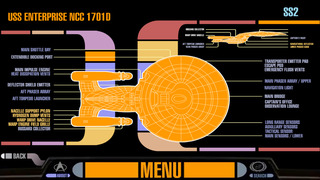
-Enjoy two self-running diagnostic modes with an overview schematic of the U.S.S. Enterprise™ NCC-1701-D
-Voice recognition for searching (Only available on applicable devices)
-Live updates of databank content -- new entries and updated entries appear automatically
Some users have asked why sounds won't always play. This is because the app pays attention to your "mute" switch and the volume on your device. Also, if you have configured the "mute" switch to lock the rotation of your screen, you may "mute" the device in the following manner: Double-press the home button and swipe to the right until you see the visual "mute" button on the screen.
This is the official Star Trek™ app produced for CBS by ArcTouch.
iPhone Screenshots
(click to enlarge)



App Changes
- December 06, 2012 Initial release
- January 25, 2013 New version 2.0.1
- October 31, 2013 New version 2.0.2
- November 19, 2013 New version 2.3
- November 05, 2014 New version 2.4.912
- July 08, 2016 New version 2.5
Other Apps From CBS Mobile