
What's New
Minor compatibility fixes.
App Description
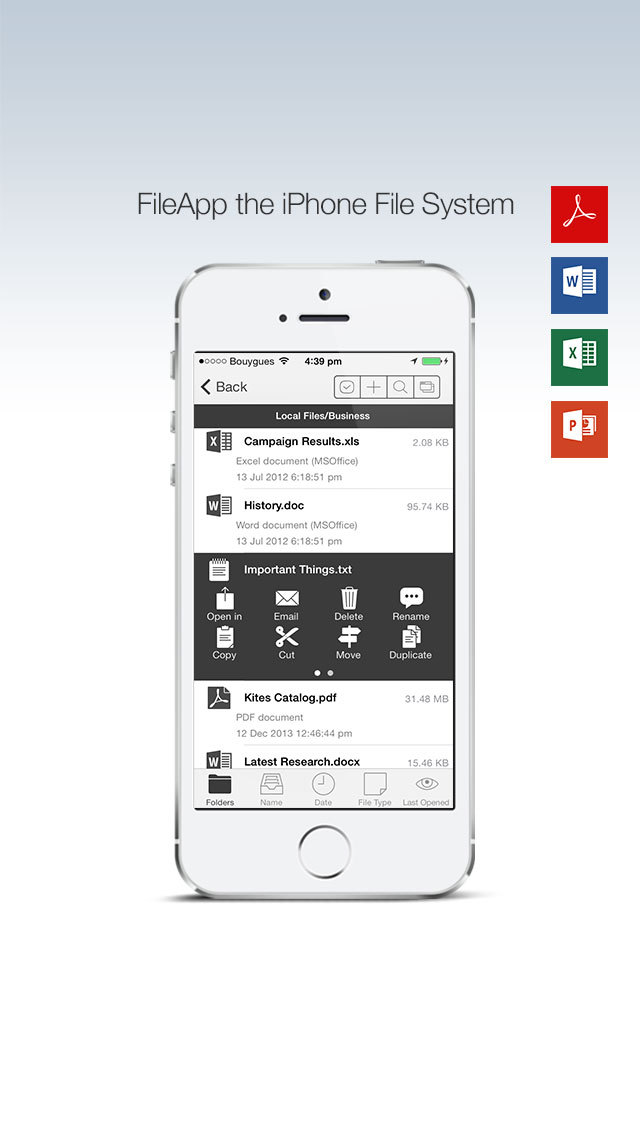
FileApp is a file and documents manager for iPhone, iPad and iPod touch.
FileApp reads many files types such as PDF, Microsoft Office documents and plays multimedia contents.
FileApp will let you store files and folders on your iOS device just like Windows Explorer or the Finder on the Mac.
FILE STORAGE & TRANSFER
- USB file transfer to Mac and PC using DiskAid or iTunes File Sharing
- Robust wireless file transfer to computer via Wi-Fi (HTTP, FTP)
- Stores any file sent from any third party app (Mail, Safari...)
- Allows to "Open In..." any compatible app (Pages, Numbers, iBooks...)
- Secure folder protects files when the device is locked with a passcode
DOCUMENTS & FILES
- System-wide Pasteboard - copy text and images, paste them to FileApp to create a file automatically!
- Powerful PDF Editor with annotation, edition, comments and bookmarks support
- Create and edit text files (.txt, .html, .xml … )
- Microsoft Office documents (Word, Excel, Powerpoint), all formats supported
- RTF and Plain Text
- iWork documents (Pages, Numbers and Keynote)
- HTML files
- Safari Web Archives
- ZIP (Uncompress zip archives)
- Send documents via email attachments
- Open attachments from "Mail" app
IMAGES
- Built-in image editor with many filters and enhancements
- Instant image sharing to Twitter & Facebook
- Slideshow
- Send multiple images via email attachments
- Import pictures and movies both from Camera Roll and Photo Library
- Take pictures within FileApp
MUSIC & VIDEOS
- Audio (MP3 VBR, AAC, Apple Lossless, AIFF, WAV)
- Video (standard iPhone format : H.264, MPEG-4)
- Background, Continuous, Shuffle and Repeat play modes available
- Full AirPlay support
SECURITY
- File encryption with iOS Data Protection
- Passcode to protect FileApp at startup
- Wireless transfer Password if needed
iPhone Screenshots
(click to enlarge)


iPad Screenshots
(click to enlarge)




App Changes
- May 25, 2011 New version 2.5.2
- May 24, 2011 New version 2.5.1
- May 16, 2011 New version 2.5
- February 15, 2011 New version 2.12.1
- February 02, 2011 New version 2.12
- January 13, 2011 New version 2.11
- October 31, 2010 New version 2.1
- October 02, 2010 New version 2.0
- June 21, 2010 New version 1.9
- March 22, 2010 New version 1.8
- January 01, 2010 New version 1.7
- December 17, 2009 New version 1.6
- November 20, 2009 New version 1.5
- September 11, 2009 New version 1.4
- July 05, 2009 New version 1.3.1
- June 16, 2009 Price decrease: $4.99 -> FREE!
- June 08, 2009 New version 1.3
- June 04, 2009 New version 1.3
- March 18, 2009 Price increase: FREE! -> $4.99
- March 03, 2009 Price decrease: $6.99 -> FREE!
- February 13, 2009 New version 1.2
- December 28, 2008 Price increase: $3.99 -> $6.99
- December 16, 2008 Price decrease: $6.99 -> $3.99
- December 12, 2008 New version 1.1
- June 25, 2011 New version 2.5.2
- June 29, 2011 New version 2.5.3
- December 06, 2011 New version 2.5.4
- March 23, 2012 New version 3.0
- March 30, 2012 New version 3.0.1
- April 07, 2012 New version 3.0.2
- May 21, 2012 New version 3.0.3
- June 21, 2012 New version 3.0.4
- August 23, 2012 New version 3.0.5
- October 03, 2012 New version 3.1
- October 10, 2012 New version 3.1.1
- June 01, 2013 New version 3.2
- June 08, 2013 New version 3.2.1
- June 19, 2013 Price increase: FREE! -> $0.99
- June 28, 2013 Price decrease: $0.99 -> FREE!
- September 20, 2013 New version 3.2.2
- January 01, 2014 New version 4.0
- January 10, 2014 New version 4.0.1
- January 24, 2014 New version 4.0.2
- January 29, 2014 New version 4.0.3
- February 19, 2014 New version 4.0.4
- May 19, 2014 New version 4.0.5
- June 19, 2014 New version 4.0.6
- July 05, 2014 New version 4.1
- July 05, 2014 Price increase: FREE! -> $0.99
- July 19, 2014 New version 4.1.1
- September 15, 2014 New version 4.2.0
- September 21, 2014 New version 4.2.1
- October 24, 2014 New version 4.2.2
- November 03, 2014 New version 4.2.4
- January 29, 2015 New version 4.2.5
- June 23, 2015 Price decrease: $0.99 -> FREE!
- November 06, 2015 New version 4.3.0
- November 08, 2016 New version 4.3.1
- June 14, 2019 New version 4.3.4
Other Apps From DigiDNA SARL