What's New
- Add background color to code block in dark mode preview
- Add large note widget
App Description
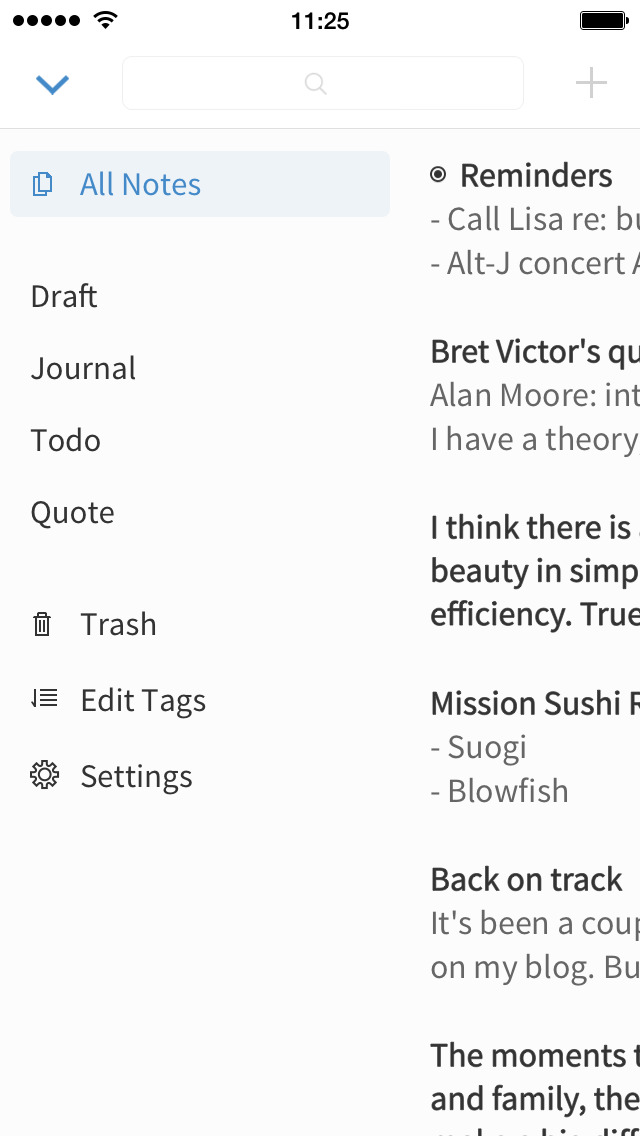
Simplenote is an easy way to take notes, create to-do lists, capture ideas, and more. Open it, jot down some thoughts, and you're done. As your collection grows, stay organized with tags and pins, and find what you need with instant search. Since Simplenote will sync across your devices for free, your notes are with you at all times.
- A simple, note taking experience
- Sync everything across all your devices
- Collaborate and share
- Stay organized with tags
- Log in with your email or WordPress.com account
SYNC WITH CONFIDENCE
- Automatically sync seamlessly across any computer, phone or tablet.
- Back up and sync everything as you take notes, so you never lose your content.
COLLABORATE AND SHARE
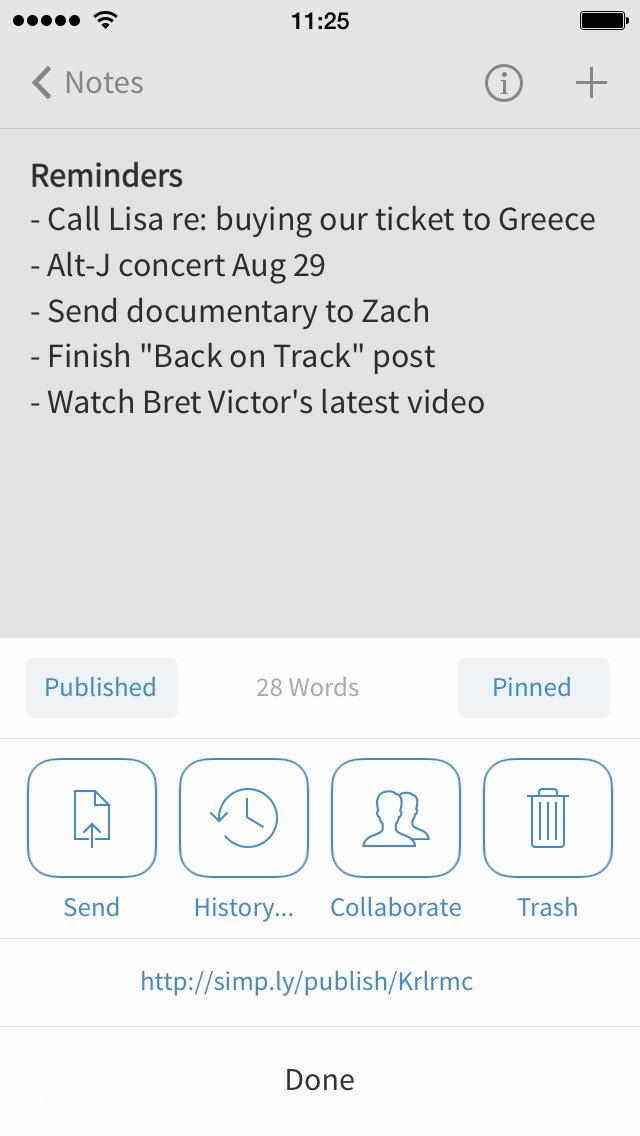
- Collaborate and work together -- share ideas with a colleague, or write a grocery list with your roommate.
- Choose whether to publish your content to the web, and share a link with whoever you want.
- Publish directly to a WordPress site by connecting your WordPress.com account.
- Quickly and easily share with third-party apps.
ORGANIZE AND SEARCH
- Stay organized with tags, and use them for quick searching and sorting.
- Instantly find what you’re looking for with keyword highlighting.
- Use markdown to add formatting.
- Create to-do lists.
- Choose the sorting order of your notes and tags.
- Pin the notes that you use the most.
- Edit tags directly by renaming and reordering.
- Protect your content with a passcode lock.
--
Privacy Policy: https://automattic.com/privacy/
Terms of Service: https://simplenote.com/terms/
California Users Privacy Notice: https://wp.me/Pe4R-d/#california-consumer-privacy-act-ccpa
--
Visit simplenote.com to download Simplenote for your other devices.
iPhone Screenshots
(click to enlarge)



iPad Screenshots
(click to enlarge)



App Changes
- June 11, 2011 New version 3.1.7
- June 06, 2011 New version 3.1.6
- May 28, 2011 New version 3.1.5
- March 12, 2011 New version 3.1.4
- March 08, 2011 New version 3.1.3
- March 02, 2011 New version 3.1.2
- February 14, 2011 New version 3.1.1
- February 03, 2011 New version 3.1.0
- December 20, 2010 New version 3.0.6
- October 13, 2010 New version 3.0.5
- September 25, 2010 New version 3.0.4
- September 08, 2010 New version 3.0.3
- August 24, 2010 New version 3.0.2
- June 03, 2010 New version 2.62
- May 08, 2010 New version 2.61
- April 27, 2010 New version 2.60
- February 04, 2010 New version 2.52
- January 15, 2010 Price decrease: $1.99 -> FREE!
- January 13, 2010 New version 2.51
- January 09, 2010 New version 2.50
- December 05, 2009 New version 2.14
- September 28, 2009 New version 2.13
- September 18, 2009 New version 2.12
- August 31, 2009 New version 2.11
- July 29, 2009 New version 2.10
- July 15, 2009 New version 2.09
- July 01, 2009 New version 2.08
- June 17, 2009 New version 2.07
- April 06, 2009 Price decrease: $3.99 -> $1.99
- March 27, 2009 Price increase: $0.99 -> $3.99
- March 23, 2009 Price decrease: $1.99 -> $0.99
- March 23, 2009 New version 2.06
- March 04, 2009 Price decrease: $3.99 -> $1.99
- March 04, 2009 New version 2.05
- February 20, 2009 New version 2.04
- February 16, 2009 Price increase: $1.99 -> $3.99
- January 08, 2009 Price increase: $0.99 -> $1.99
- January 07, 2009 New version 2.03
- January 04, 2009 Price decrease: $2.99 -> $0.99
- December 23, 2008 New version 2.02
- December 19, 2008 New version 2.01
- December 08, 2008 Price increase: $1.99 -> $2.99
- December 08, 2008 New version 2.0
- October 16, 2008 New version 1.01
- October 21, 2011 New version 3.1.8
- November 12, 2011 New version 3.1.10
- December 15, 2011 New version 3.1.11
- January 07, 2012 New version 3.1.12
- April 01, 2012 New version 3.2.0
- April 12, 2012 New version 3.2.1
- April 26, 2012 New version 3.2.2
- June 16, 2012 New version 3.2.3
- June 28, 2012 New version 3.2.4
- July 16, 2012 New version 3.2.5
- August 02, 2012 New version 3.2.6
- September 29, 2012 New version 3.3.0
- October 10, 2012 New version 3.3.1
- January 17, 2013 New version 3.3.2
- April 07, 2013 New version 3.3.3
- May 04, 2013 New version 3.3.4
- May 17, 2013 New version 3.3.5
- September 20, 2013 New version 4.0.0
- September 28, 2013 New version 4.0.1
- October 15, 2013 New version 4.0.2
- October 31, 2013 New version 4.0.3
- December 12, 2013 New version 4.0.4
- February 07, 2014 New version 4.0.5
- April 26, 2014 New version 4.0.6
- July 08, 2014 New version 4.0.7
- August 05, 2014 New version 4.0.8
- August 13, 2014 New version 4.0.9
- August 27, 2014 New version 4.0.10
- October 14, 2014 New version 4.0.12
- January 27, 2015 New version 4.0.14
- February 13, 2015 New version 4.0.15
- April 13, 2015 New version 4.1.0
- May 31, 2015 New version 4.1.1
- October 03, 2015 New version 4.2
- November 03, 2015 New version 4.2.1
- November 21, 2015 New version 4.2.2
- December 05, 2015 New version 4.2.3
- January 19, 2016 New version 4.3.1
- June 23, 2016 New version 4.3.2
- June 30, 2016 New version 4.3.3
- November 06, 2016 New version 4.4.1
- June 13, 2019 New version 4.7
- August 16, 2019 New version 4.9
- September 24, 2019 New version 4.10
- September 27, 2019 New version 4.10.1
- October 21, 2019 New version 4.11
- November 04, 2019 New version 4.12
- November 26, 2019 New version 4.13
- December 02, 2019 New version 4.14
- December 10, 2019 New version 4.14.1
- December 24, 2019 New version 4.14.2
- January 28, 2020 New version 4.15
- July 14, 2020 New version 4.20.1
- October 23, 2020 New version 4.26
- December 09, 2020 New version 4.28
- August 05, 2021 New version 4.40
- September 15, 2023 New version 4.49
Other Apps From Automattic, Inc.