



What's New
We continue to update our app to help you find your perfect somewhere.
App Description
Find and book your perfect somewhere with the Hotels.com app.
GET REWARDED THROUGH OUR APP
- Access Member Prices* of 10% or more on over 100,000 hotels worldwide.
- Join One Key™, our travel program that unlocks a world of instant benefits and perks.
- Earn OneKeyCash™** and use this whenever you want and instantly save on your next trip on Hotels.com, Expedia and Vrbo when you book eligible hotel stays, flights, vacation rentals, car rentals, and more.
- One Key Silver, Gold and Platinum members can enjoy extra perks at select VIP Access properties.
FIND THE ONE THAT’S JUST RIGHT FOR YOU
- Choose from over 500,000 properties worldwide.
- Whether you’re planning a short hotel stay, last minute weekend getaway, long vacation, business trip, or anything in between, we have a property for every kind of travel.
- Enjoy the flexibility of free cancellation on most hotels***.
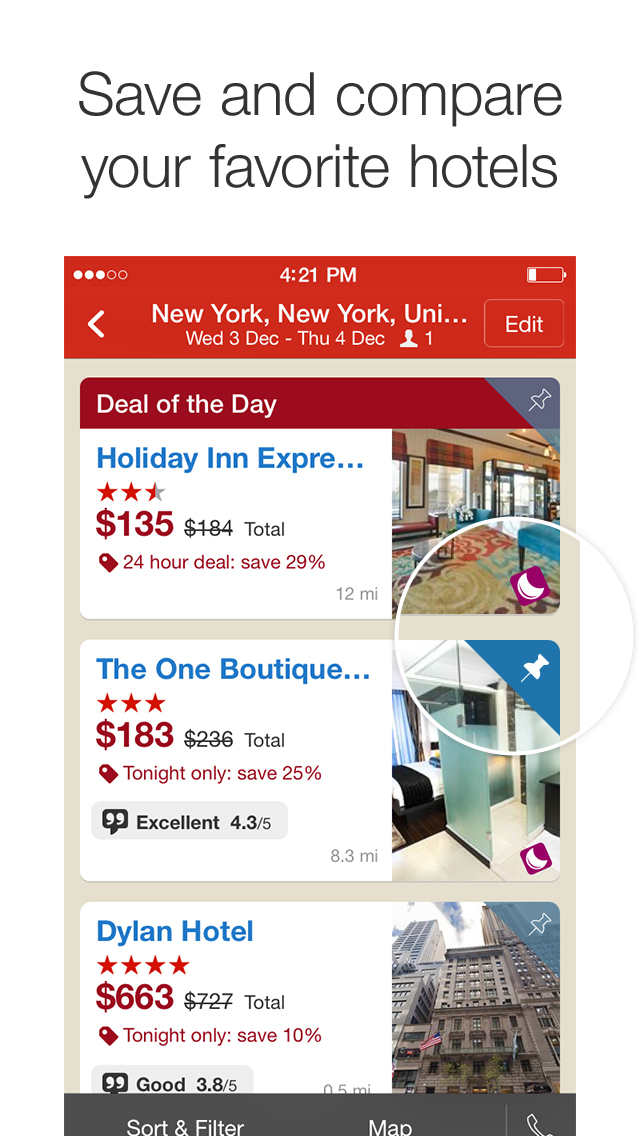
- Compare hotel prices, ratings and amenities side-by-side using our comparison tool.
- Use Trip Planner to organize your travel plans in one place. Save your favorite hotels, vacation rentals, resorts and more, and share these with friends and family.
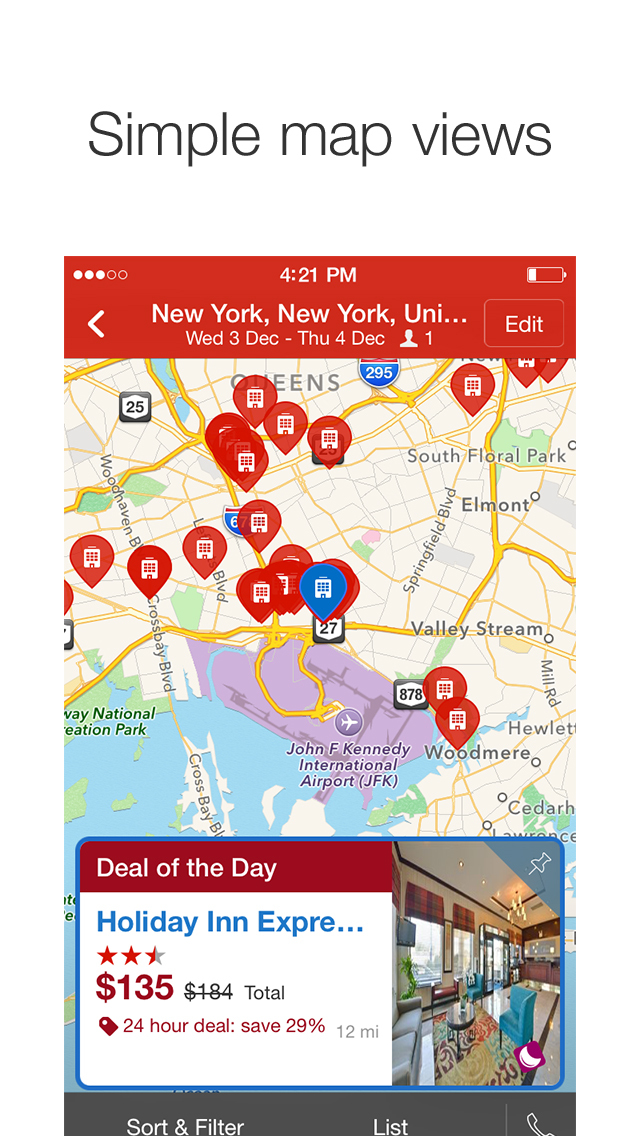
- See the hotel or vacation rental location on a map and read verified guest reviews.
FAST, EASY, & SECURE BOOKING ON OUR APP
- It only takes a few taps to book your hotel.
- Pay now or later on most hotels.
- Save your payment details to book future trips even faster.
- Last minute hotel booking.
OUR APP IS YOUR PERFECT TRAVEL COMPANION
- Save your confirmation and access your hotel or vacation rental booking details anytime – even offline.
- Easily manage your hotel or vacation rental booking on the go.
- Contact us or the hotel or vacation rental owner directly from the app.
- Opt-in for push notifications and we’ll send you updates about your hotel stay.
*Member Prices are available on select hotels to logged in members and app users. The discount will be applied to the price of selected hotels (excluding applicable taxes and other fees). Subject to terms and conditions, see site for details.
**OneKeyCash™ is not redeemable for cash and can only be used on Expedia, Hotels.com and Vrbo.
***Free cancellation on most hotels. Some hotels require you to cancel at least 24-48 hours before check-in. See property pages on our app for details.
The Hotels.com app uses information for analytics, personalization, and advertising. By downloading our hotel app, you agree to our privacy and cookies policies https://hotels.com/customer_care/privacy.html.
iPhone Screenshots
(click to enlarge)



iPad Screenshots
(click to enlarge)


Apple Watch Screenshots
(click to enlarge)


Apple TV Screenshots
(click to enlarge)




App Changes
- June 25, 2011 New version 2.1
- August 02, 2011 New version 2.2
- November 16, 2011 New version 3.0
- November 29, 2011 New version 3.0.1
- January 07, 2012 New version 3.1
- February 18, 2012 New version 3.2
- March 26, 2012 New version 3.3
- April 04, 2012 New version 3.3.1
- April 21, 2012 New version 3.3.2
- May 03, 2012 New version 3.4
- September 09, 2012 New version 3.5
- October 12, 2012 New version 3.6
- October 27, 2012 New version 3.6.1
- January 25, 2013 New version 3.7
- February 15, 2013 New version 3.7.1
- June 16, 2013 New version 3.8
- September 26, 2013 New version 3.8.1
- November 25, 2013 New version 3.8.2
- January 09, 2014 New version 4.0.1
- January 17, 2014 New version 4.0.2
- February 06, 2014 New version 4.0.3
- March 04, 2014 New version 4.0.5
- March 25, 2014 New version 4.0.6
- April 08, 2014 New version 4.0.7
- April 25, 2014 New version 4.1.0
- June 09, 2014 New version 4.1.1
- September 01, 2014 New version 4.2.0
- September 17, 2014 New version 4.2.1
- November 17, 2014 New version 4.2.2
- January 04, 2015 New version 4.3
- March 01, 2015 New version 4.4
- April 13, 2015 New version 4.5.1
- April 27, 2015 New version 4.5.2
- May 06, 2015 New version 4.6
- June 03, 2015 New version 4.7
- June 12, 2015 New version 4.7.1
- June 30, 2015 New version 4.7.2
- September 17, 2015 New version 4.8.1
- October 08, 2015 New version 4.8.2
- November 17, 2015 New version 4.8.3
- January 05, 2016 New version 4.9
- January 25, 2016 New version 4.9.1
- March 08, 2016 New version 4.10
- March 15, 2016 New version 4.10.1
- July 03, 2016 New version 5.2.2
- July 08, 2016 New version 5.2.3
- July 12, 2016 New version 5.2.4
- July 20, 2016 New version 5.2.5
- November 06, 2016 New version 5.4.1
- November 10, 2016 New version 5.4.2
- December 12, 2016 New version 5.4.3
- January 03, 2017 New version 5.5
- June 14, 2019 New version 10.6
- June 26, 2019 New version 10.7
- August 17, 2019 New version 11.0
- August 29, 2019 New version 11.1
- September 05, 2019 New version 11.1.1
- September 11, 2019 New version 11.2
- September 24, 2019 New version 11.2.1
- October 07, 2019 New version 11.3
- October 15, 2019 New version 11.3.1
- October 22, 2019 New version 11.4
- November 05, 2019 New version 11.5
- November 19, 2019 New version 11.6
- December 03, 2019 New version 11.7
- December 17, 2019 New version 11.8.1
- January 14, 2020 New version 11.9
- January 22, 2020 New version 11.9.1
- January 28, 2020 New version 12.0.1
- July 15, 2020 New version 13.2
- October 23, 2020 New version 13.9.1
- December 10, 2020 New version 14.3
- September 16, 2023 New version 2023.36
- October 04, 2023 New version 2023.38
- November 03, 2023 New version 2023.43
- November 15, 2023 New version 2023.45
- March 26, 2024 New version 2024.12
Other Apps From Hotels.com, L.P.